
dirsearch手册
dirsearch介绍
在网络安全和CTF比赛中,目录扫描往往是信息收集阶段的第一步,而dirsearch正是一款高效且轻量级的命令行工具,专为探测网站隐藏目录和文件而设计。它基于字典发起爆破请求,支持多种扫描模式、递归检测、代理配置以及结果过滤。
dirsearch安装
安装地址:maurosoria/dirsearch: Web path scanner
下载成功之后,直接使用pip install -r requirements.txt安装所需依赖库即可
dirsearch使用
master目录之下python运行即可
基本选项
-u URL:指定目标URL扫描(必填)
1 | python dirsearch.py -u https://f8980de5-1154-44ff-9a00-42dcadca075a.challenge.ctf.show/select-no-waf-4.php |
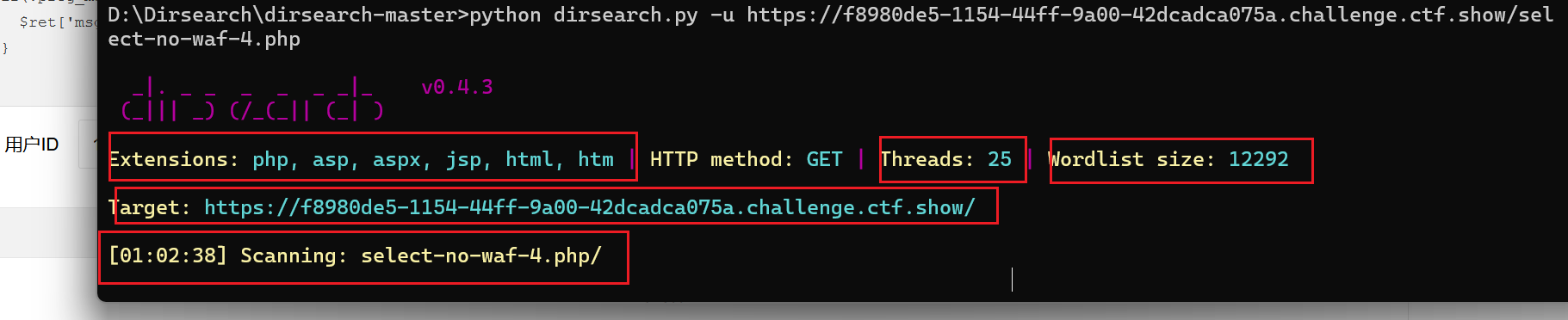
Extensions:代表扫描哪些后缀的文件Threads:扫描的线程大小,在真实的网站扫描中,线程的大小决定你的ip会不会被waf封禁wordlist size:扫描字典的大小Scanning:从哪个路由开始往下扫描
-l <FILE>:从文件中读取多个目录URL进行扫描
1 | python dirsearch.py -l urls.txt |
-e <EXT>:指定文件扩展名,覆盖默认值。
1 | python dirsearch.py -u https://f8980de5-1154-44ff-9a00-42dcadca075a.challenge.ctf.show/ -e php,html,txt |

这里可以使用*代表扫描配置文件中配置的所有后缀名
1
python dirsearch.py -u https://f8980de5-1154-44ff-9a00-42dcadca075a.challenge.ctf.show/ -e *

可以看到比默认的扫描会多出`do、action、cgi、js、tar.gz`可以在配置文件config.ini中配置默认扫描更多的后缀名
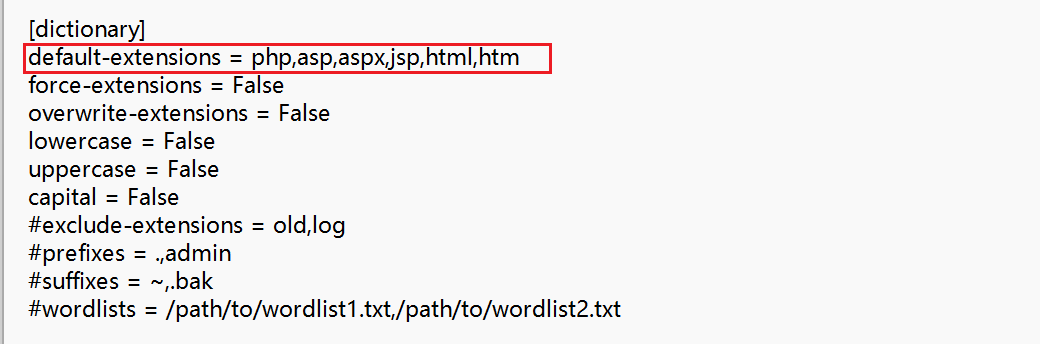
-x <EXT>:排除特定扩展名。
1 | python dirsearch.py -u https://f8980de5-1154-44ff-9a00-42dcadca075a.challenge.ctf.show/ -x html,htm |
字典选项
-w <FILE>:指定字典文件路径。
1 | python dirsearch.py -u https://f8980de5-1154-44ff-9a00-42dcadca075a.challenge.ctf.show/ -w wordlist.txt |
需要什么类型的字典,直接使用deepwiki搜索该项目即可
-f:强行将扫描后缀加到每一个扫描词条的末尾
--prefixes <PREFIX>:为字典项添加前缀
1 | python dirsearch.py --prefixes admin,_ |
- 原始词条:
tools,添加之后词条:admintools、_tools
--suffixes <SUFFIX>:为字典项添加后缀。
1 | python dirsearch.py --suffixes admin,_ |
- 原始词条:
tools,添加之后词条:toolsadmin、tools_
请求选项
-m <METHOD>::指定 HTTP 方法(GET、POST、HEAD 等)。
1 | python dirsearch.py -u https://example.com -m POST |
-H <HEAD>:添加自定义请求头。
1 | python dirsearch.py -u https://example.com -H "Authorization: Bearer token" |
--user-agent <UA>:自定义 User-Agent。
1 | python dirsearch.py -u https://example.com --user-agent "Mozilla/5.0 (Windows NT 10.0; Win64; x64)" |
--cookie <COOKIE>:设置 Cookie。
1 | python dirsearch.py -u https://example.com --cookie "SESSIONID=123" |
连接选项
-t <NUM>:设置线程数。
1 | python dirsearch.py -u https://example.com -t 5 |
--timeout <SEC>:设置请求超时时间。
1 | python dirsearch.py -u https://example.com --timeout 10 |
--proxy <PROXY>:指定代理服务器。
1 | python dirsearch.py -u https://example.com --proxy http://localhost:8080 |
--max-rate <RATE>:限制每秒请求数。
1 | python dirsearch.py -u https://example.com --max-rate 100 |
过滤选项
--include-status <CODES>:仅显示指定状态码的结果。
1 | python dirsearch.py -u https://example.com --include-status 200,301,302 |
--exclude-status <CODES>:排除指定状态码的结果。
1 | python dirsearch.py -u https://example.com --exclude-status 404,500 |
--exclude-sizes <SIZES>:排除特定大小的响应。
1 | python dirsearch.py -u https://example.com --exclude-sizes 0b,1kb |
--exclude-text <TEXT>:排除包含特定文本的响应。
1 | python dirsearch.py -u https://example.com --exclude-text "Not Found" |
输出选项
-o <FILE>:指定输出文件。
1 | python dirsearch.py -u https://example.com -o results.txt |
--format <FORMAT>:指定输出格式(plain、json、xml 等)。
1 | python dirsearch.py -u https://example.com --format json -o results.json |
--quiet:启用安静模式,仅输出结果。
1 | python dirsearch.py -u https://example.com --quiet |
高级选项
默认扫描达到的深度:
1 | https://target.com/ |
-r, --recursive:启用递归扫描。
1 | python dirsearch.py -u https://example.com -r |
扫描范围:仅对以 / 结尾的目录进行递归。递归扫描的深度:
1 | https://target.com/ |
--deep-recursive:启用深度递归。
1 | python dirsearch.py -u https://example.com --deep-recursive |
扫描范围:对 a/b/c 这样的路径会扫描 a/、a/b/、a/b/c/。深度递归扫描的深度:
1 | https://target.com/ |
--crawl:启用爬虫模式,解析页面链接,对页面链接的数据目录再进行扫描,如果开启了深度扫描模式。
1 | python dirsearch.py -u https://example.com --crawl |
--random-agent:随机选择 User-Agent。
1 | python dirsearch.py -u https://example.com --random-agent |
常用命令
ctf一键扫描
1 | python dirsearch.py -u https://example.com -e* --crawl --deep-recursive --exclude-status 404,500 |
真实网站扫描
1 | python3 dirsearch.py -u https://target.com -t 2 --delay 1.0 |
基本目录扫描
扫描目标网站的常见目录和文件,使用内置所有拓展名:
1 | python dirsearch.py -u https://example.com -e* |
- 扫描扩展名为
.php,.jsp,.asp,.aspx,.do,.action,.cgi,.html,.htm,.js,.tar.gz的文件。 - 使用默认字典(
db/dict.txt)和 25 个线程。
自定义字典与代理
扫描特定子目录,使用自定义字典并通过代理:
1 | dirsearch.py -u https://example.com/admin从/admin/ -w /path/to/custom_dict.txt -e php --proxy http://localhost:8080 |
- 扫描
/admin/子目录。 - 使用自定义字典和代理服务器。
递归扫描与结果过滤
启用递归扫描,仅显示特定状态码并输出 JSON 报告:
1 | dirsearch.py -u http://example.com -r -i 200,300-399 -o results.json --format json |
- 显示 200 和 300-399 状态码。
- 输出 JSON 格式报告。
高并发与速率限制
高线程扫描,同时限制请求速率以避免触发防御:
1 | dirsearch.py -u https://example.com -t 100 --max-rate 50 --timeout 10 |
- 使用 100 个线程,每秒最多 50 个请求。
- 设置 10 秒超时。
结合 Burp Suite 进行深入测试
通过 Burp Suite 代理进行扫描并启用爬虫模式:
1 | dirsearch.py -u https://example.com --proxy http://127.0.0.1:8080 -e php,asp --crawl |
- 启用爬虫模式,解析页面链接。
- 流量通过 Burp Suite 代理,便于手动分析。
深度优化与自定义配置
递归扫描,限制深度并排除特定子目录,添加自定义请求头:
1 | dirsearch.py -u http://example.com -r -R 3 --exclude-subdirs logs,static -e* -H "X-API-Key: abc123" -f |
- 递归扫描,最大深度 3。
- 排除
logs和static子目录。 - 添加自定义请求头
X-API-Key: abc123。
帮助手册翻译
1 | **Usage:** dirsearch.py [-u|--url] target [-e|--extensions] extensions [options] |