idea程序多开
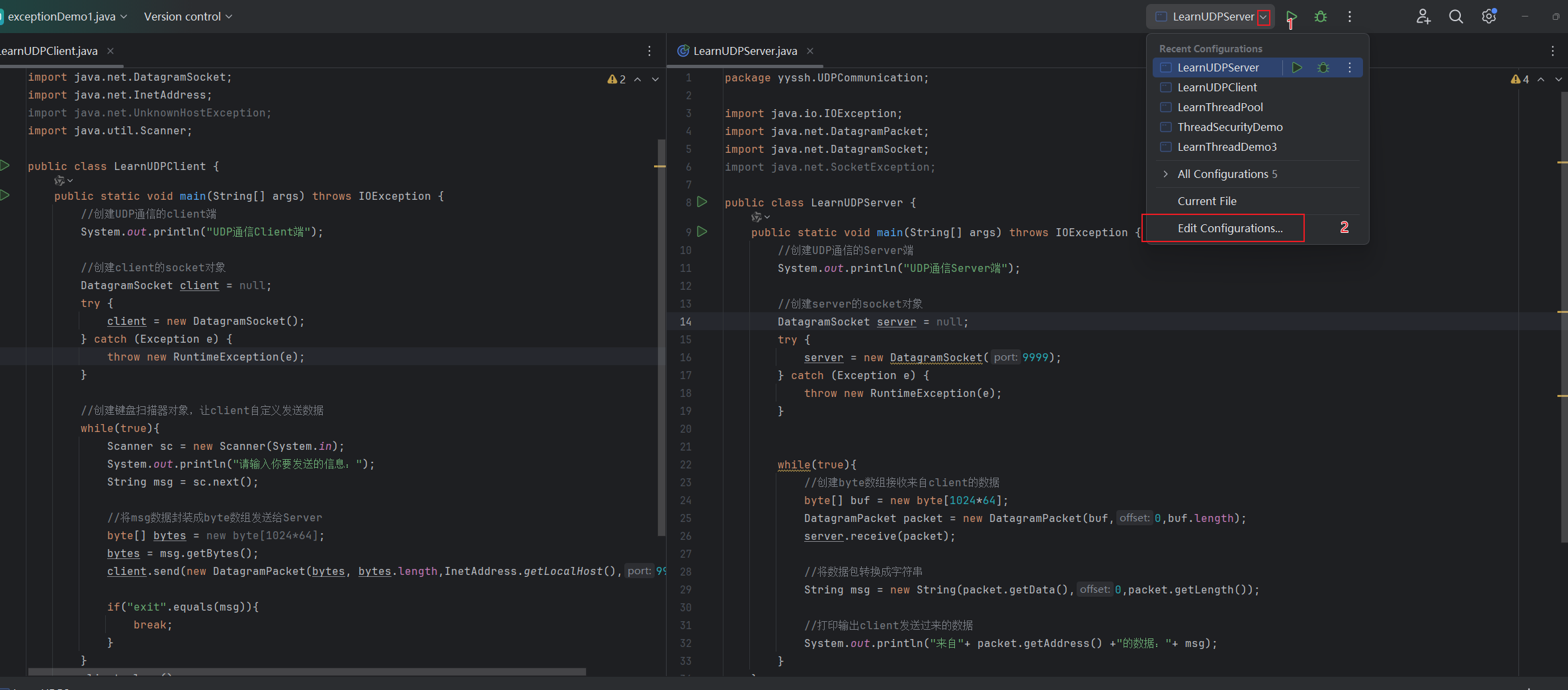
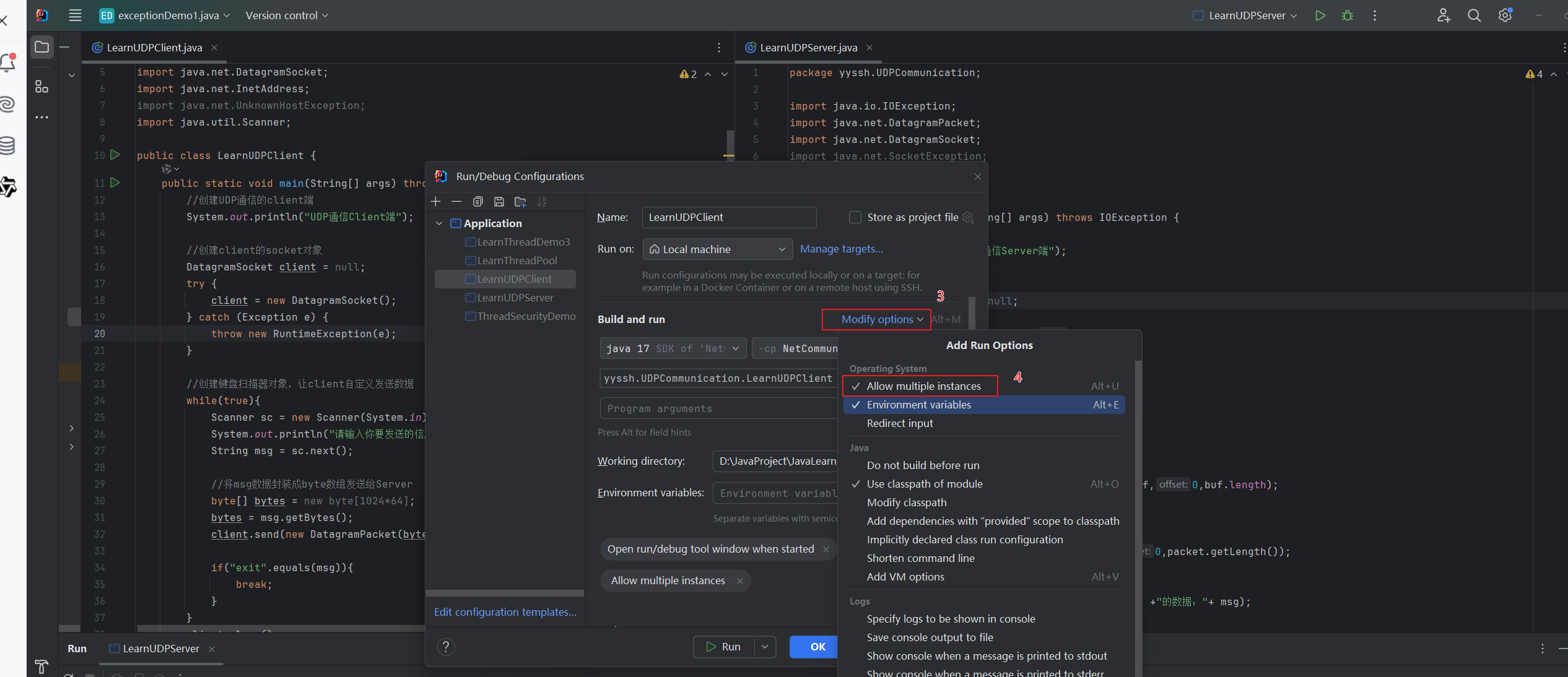
一个java程序的编写
模块->软件包->类
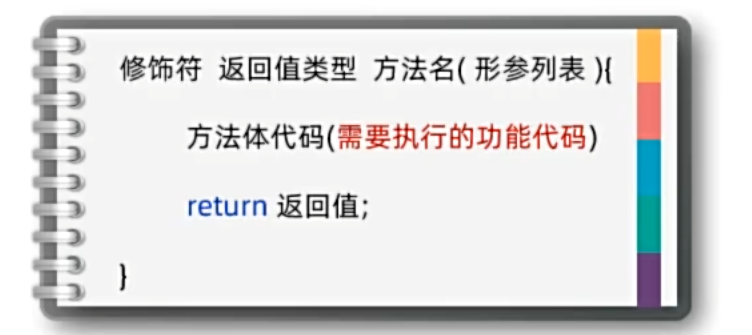
java主要是利用函数调用进行程序执行,主函数调用其他函数(类似于C++)
1
2
3
4
5
6
7
8
9
10
11
| public class functionBasic {
public static void main(String[] args) {
int a = 10;
int b = 20;
int c = sum(a,b);
System.out.println(c);
}
public static int sum(int a, int b){
return a+b;
}
}
|
java类似C++的方法重载
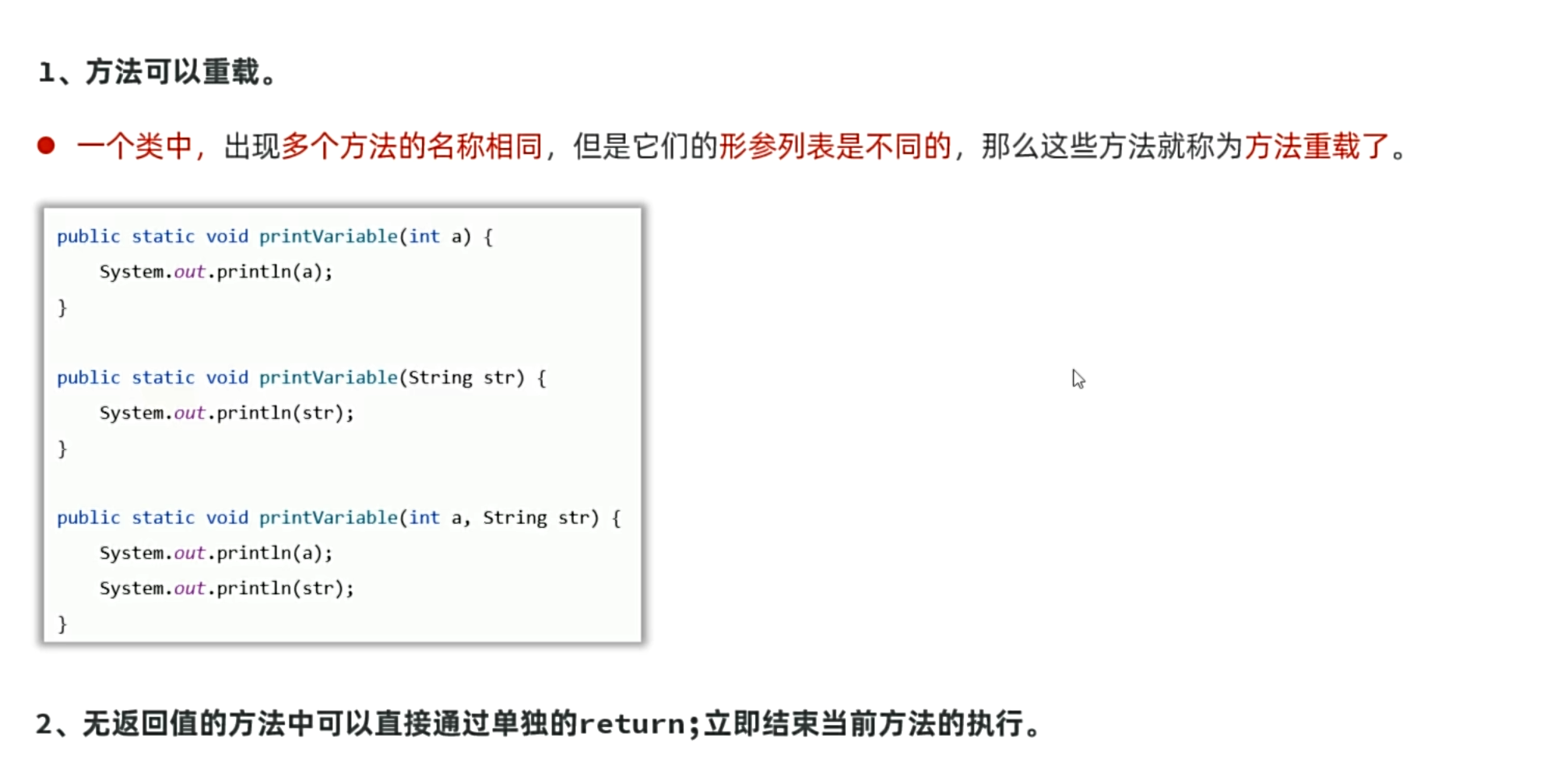
重载的意义在于使一个函数实现多种功能以及方便记忆
1
2
3
4
5
6
7
8
9
10
11
12
13
14
15
16
17
18
19
20
| public class chongzai {
public static void main(String[] args) {
System.out.println("这是重载");
fire();
fire(99);
fire(100,99);
}
public static void fire(){
System.out.println("发射导弹");
}
public static void fire(int a){
System.out.println("发射导弹"+a+"个");
}
public static void fire(int a,int b){
System.out.println("坐标x:"+a+",y:"+b);
}
}
|
Java的类型转换(自动与强制)
自动类型转换
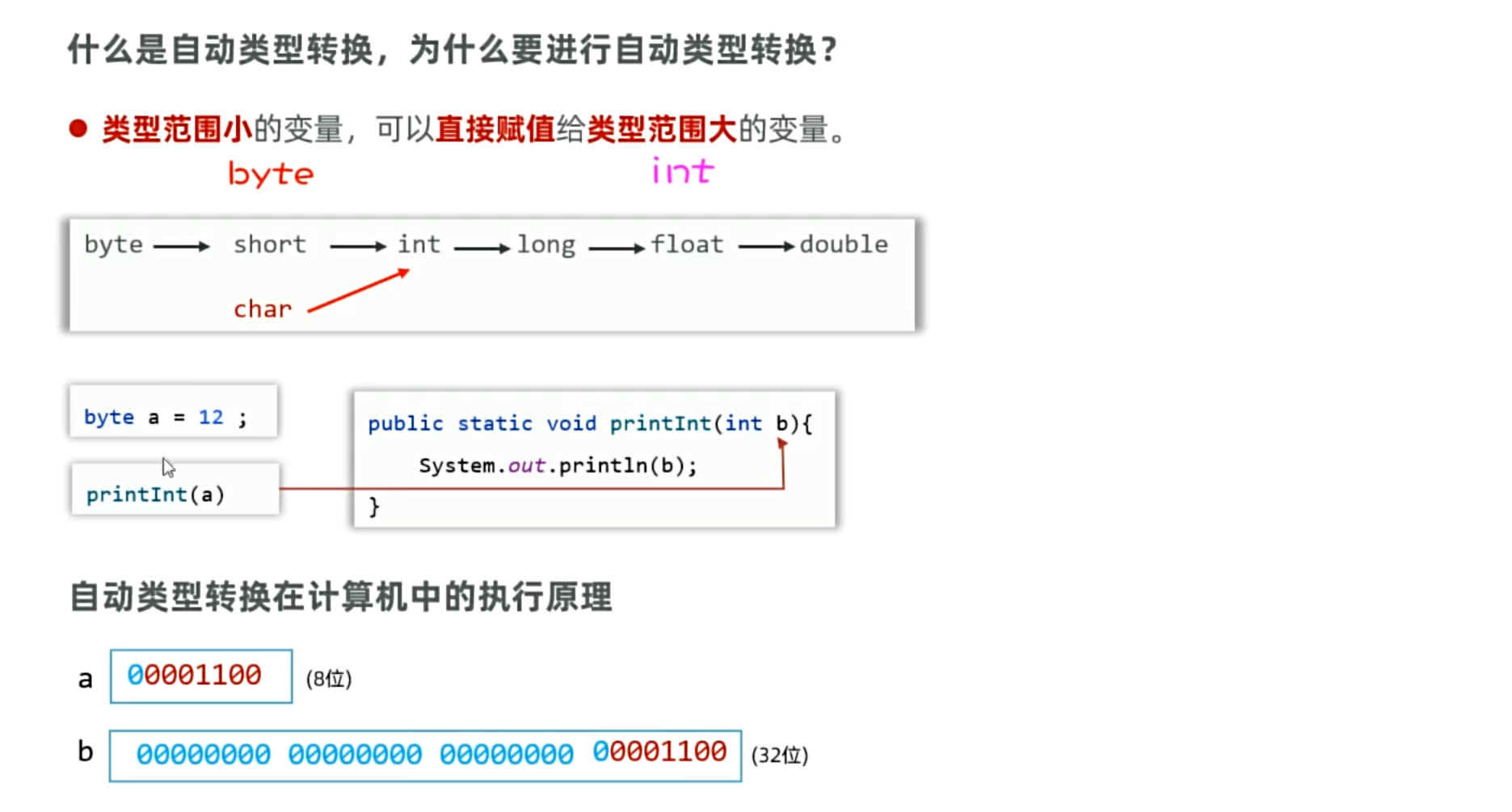
强制类型转换
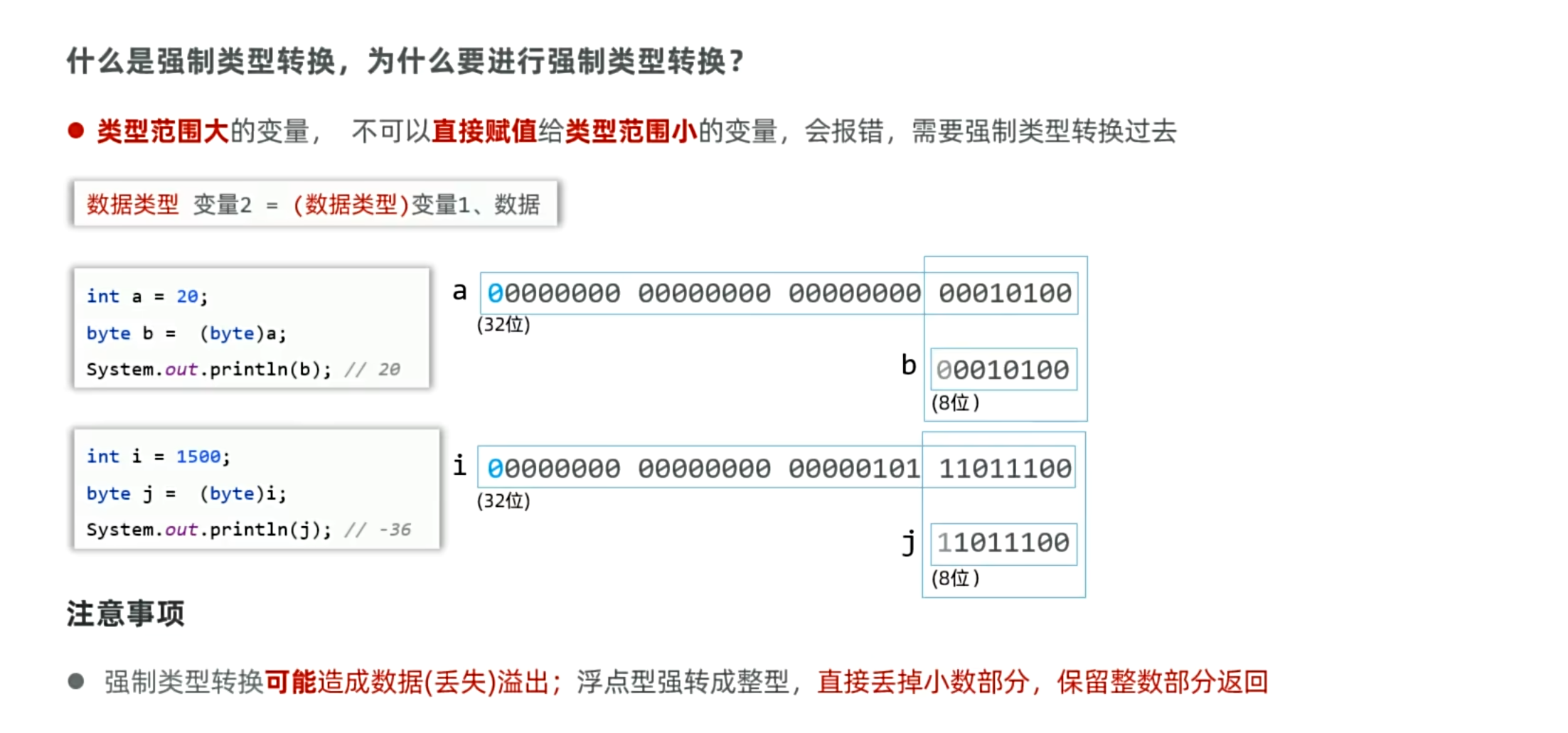
表达式的自动类型提升
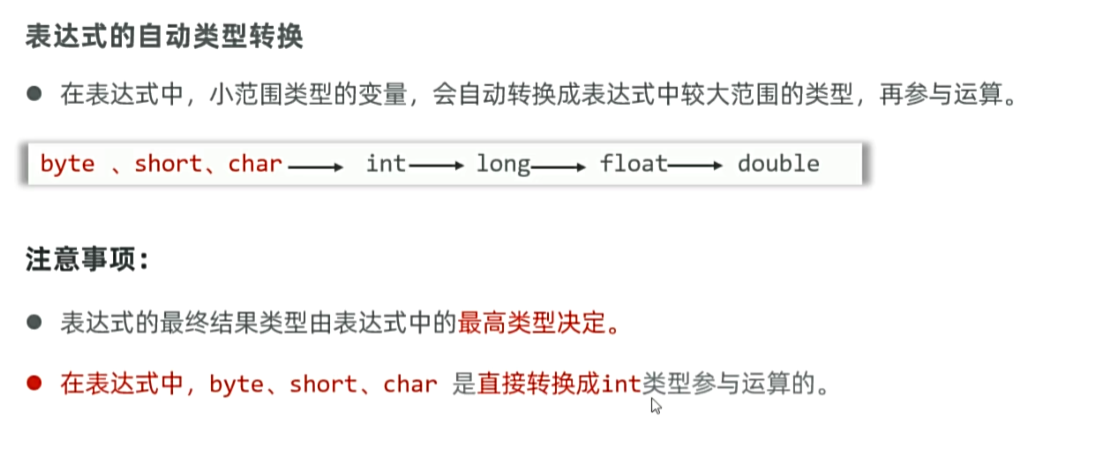
Java的输入和输出
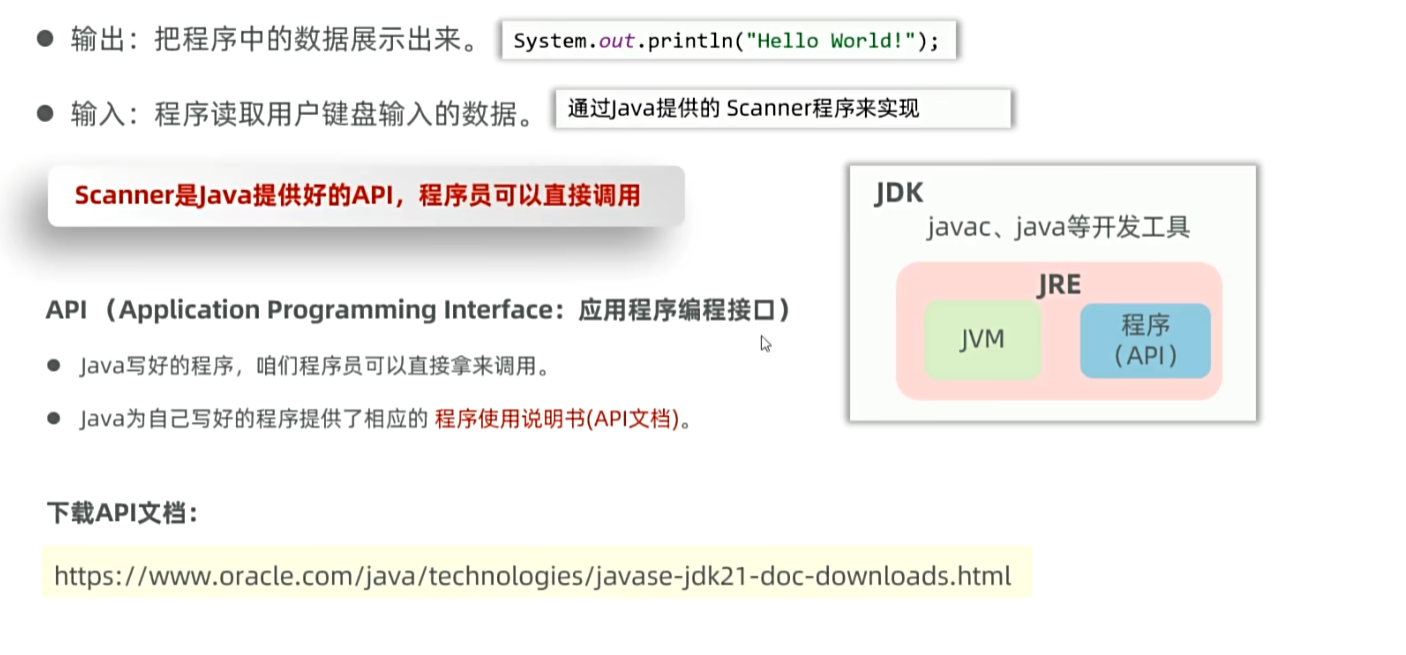
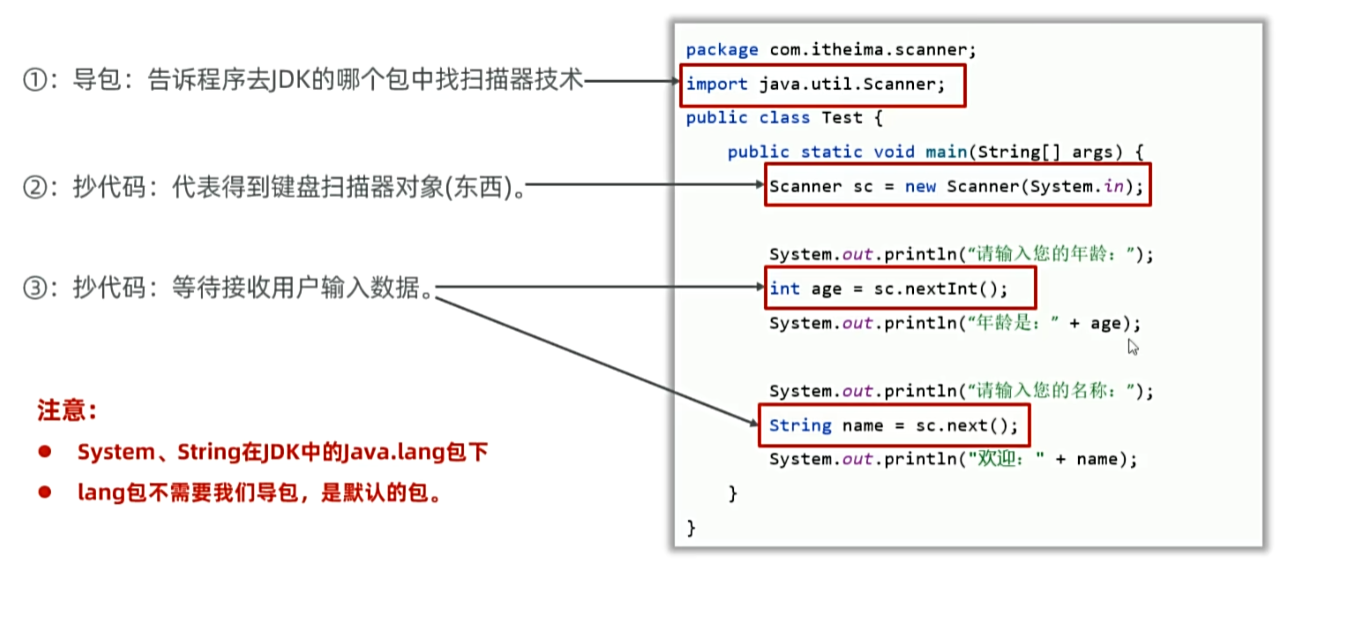
1
2
3
4
5
6
7
8
9
10
11
| public class testScanner {
public static void main(String[] args) {
Scanner sc = new Scanner(System.in);
System.out.println("请输入一个整数:");
int a = sc.nextInt();
System.out.println("您输入的整数是:" + a);
System.out.println("您的名字是:");
String name = sc.next();
System.out.println("您的名字是:" + name);
}
}
|
java运算符和C++的区别
| 运算符类型 |
C++ 特性 |
Java 特性 |
| 赋值运算符 |
支持重载 |
不支持重载,仅基本类型和引用赋值 |
| 三元运算符 |
允许隐式类型转换 |
严格类型兼容 |
| 逻辑运算符 |
接受非布尔类型(隐式转换) |
必须为 boolean 类型 |
java的boolean和C++的bool
boolean 在 Java 中是一个关键字,它定义了一个逻辑值类型,用来表示逻辑状态。与其他原始数据类型不同,boolean 只有两个固定的值:true 和 false,用于逻辑判断、条件判断等。
boolean和C++的bool不同的是boolean不允许与其他类型进行隐式转换,也就是boolean只能等于true或者false,不能等于1或0
Java分支、循环结构和C++的区别
| 特性 |
C++ |
Java |
if 条件类型 |
允许隐式转换为 bool(如 int) |
必须为 boolean 类型 |
switch 类型 |
整型、枚举 |
整型、String、枚举等 |
case 值 |
常量表达式 |
编译时常量 |
for-each 循环 |
基于范围的 for |
需实现 Iterable 接口 |
goto |
支持 |
不支持 |
| 标签跳转 |
支持(少用) |
支持(明确用于多层循环) |
java数组和C++区别
| 特性 |
Java 数组 |
C++ 数组 |
| 内存分配 |
堆内存,GC 管理 |
栈或堆,手动管理堆内存 |
| 类型安全 |
严格类型检查 |
弱类型检查(可通过指针绕过) |
| 多维数组 |
数组的数组(支持不规则) |
连续内存块(固定维度) |
| 长度获取 |
arr.length |
需手动维护或计算(栈数组用 sizeof) |
| 越界检查 |
抛出异常 |
无检查,导致未定义行为 |
| 动态调整大小 |
不可变,需借助集合类 |
堆数组可手动重新分配 |
| 语法初始化 |
支持直接初始化 {1, 2, 3} |
栈数组支持 {} 初始化(C++11+),堆数组需 new |
语法差异:
声明与初始化:
Java:
1
2
| int[] arr1 = new int[3];
int[] arr2 = {1, 2, 3};
|
C++:
1
2
3
| int arr1[3];
int arr2[] = {1, 2, 3};
int* arr3 = new int[3];
|
java的类和对象
创建类和对象的语法和C++一样
1
2
3
4
5
6
7
8
9
10
11
12
13
14
15
16
17
18
19
20
| package CreatClass;
public class LearnCreat {
public static void main(String[] args) {
class CreatClass {
private String name;
private int age;
private String sex;
}
CreatClass creatClass = new CreatClass();
creatClass.name="张三";
creatClass.age=18;
creatClass.sex="男";
System.out.println(creatClass.name);
System.out.println(creatClass.age);
System.out.println(creatClass.sex);
}
}
|
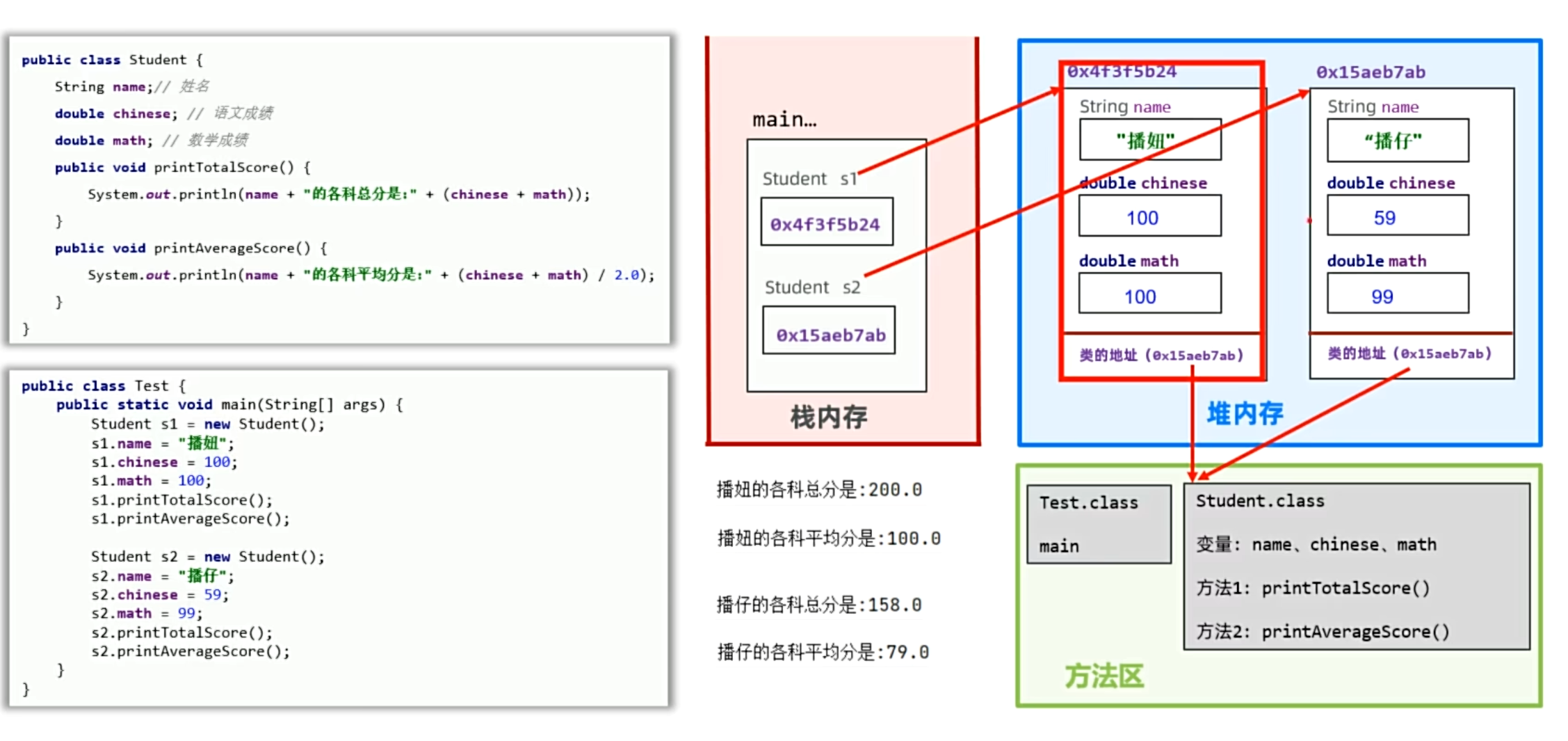
java的构造器就是C++的类函数(方法)
注意:java的有参构造器创建了。默认的无参构造器就没有了,如果想用有参构造器,就必须自己写一个出来
java的this和C++的也是一样
this
回顾this的作用:解决对象属性和类函数的参数名冲突的问题
1
2
3
4
5
6
7
8
9
| package yyssh.LearnClass;
public class testItem {
public static void main(String[] args) {
itemDemo s1 = new itemDemo("yanyuan", 18);
s1.print();
}
}
|
1
2
3
4
5
6
7
8
9
10
11
12
13
14
15
16
17
| package yyssh.LearnClass;
public class itemDemo
{
String name;
int age;
public itemDemo(){
}
public itemDemo(String name,int age){
this.name = name;
this.age = age;
}
public void print(){
System.out.println("姓名:"+name+"年龄:"+age);
}
}
|
java的封装和C++一样,都是先赋值类函数,再取值类函数
static
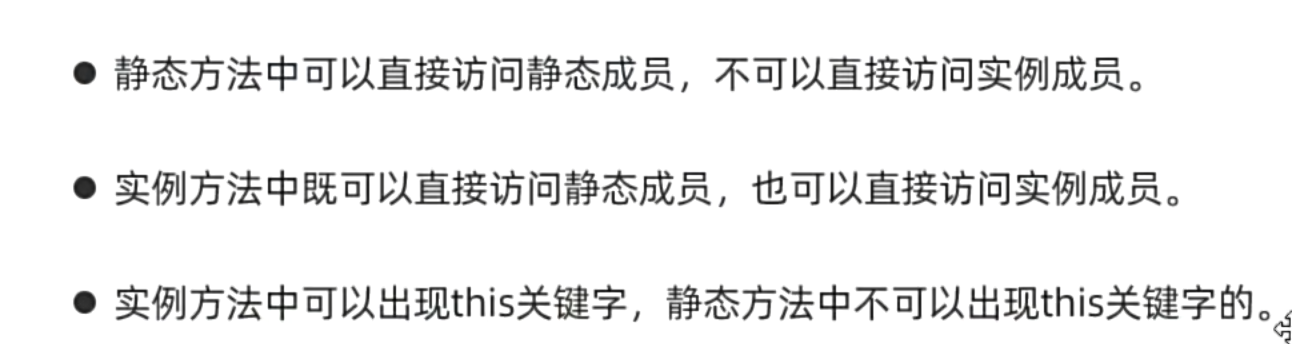
java的static和C++一样,下面回顾一样static,static是属于类的公共成员变量,所有的对象都可以访问,作用是统计公共数据的变化等等
java:工具类私有化构造器,使用静态函数(方法),方便调用
1
2
3
4
5
6
7
8
9
10
11
12
| package yyssh.LearnStatic;
public class staticDemo {
public static void main(String[] args) {
Student s1 = new Student();
s1.SetStudent("yanyuan", 18);
s1.print();
Student s2 = new Student();
s2.SetStudent("chenzhuang", 19);
Student.printStudentCount();
}
}
|
1
2
3
4
5
6
7
8
9
10
11
12
13
14
15
16
17
18
19
20
21
22
23
24
25
26
| package yyssh.LearnStatic;
public class Student {
private String name;
private int age;
private static int StudentCount;
public Student(){
StudentCount++;
}
public void SetStudent(String name,int age){
this.name=name;
this.age=age;
}
public int GetStudent(){
return this.age;
}
public String GetName(){
return this.name;
}
public void print(){
System.out.println("姓名:"+this.name+"年龄:"+this.age);
}
public static void printStudentCount(){
System.out.println("学生人数:"+StudentCount);
}
}
|
继承
大致含义和C++的一样,都是只能继承父类的非私有成员和方法
java语法:
1
| public class A extends B
|
继承权限
private<缺省<protected<public
private 本类
缺省 本类、同一个包中的类
protected 本类、同一个包中的类、子孙类中
public 任意位置
java继承特点:单继承,不支持多继承(不能有多个父类)、支持多层继承(可以有爷类)
子类重写父类函数,名称、形参列表必须一样,访问权限要大于父类权限,私有和静态不能被重写
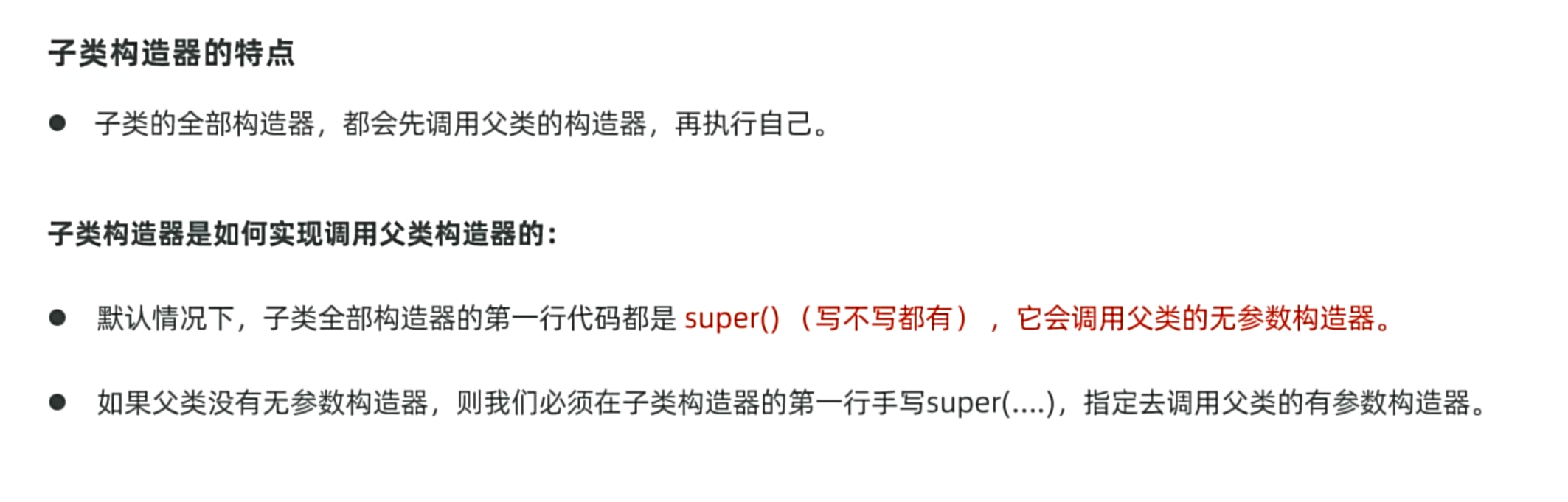
super():调用父类构造器
super和this构造器都只能放在函数第一行,两者不能同时出现
多态
java的多态,要在重写函数的上一行加上@Override
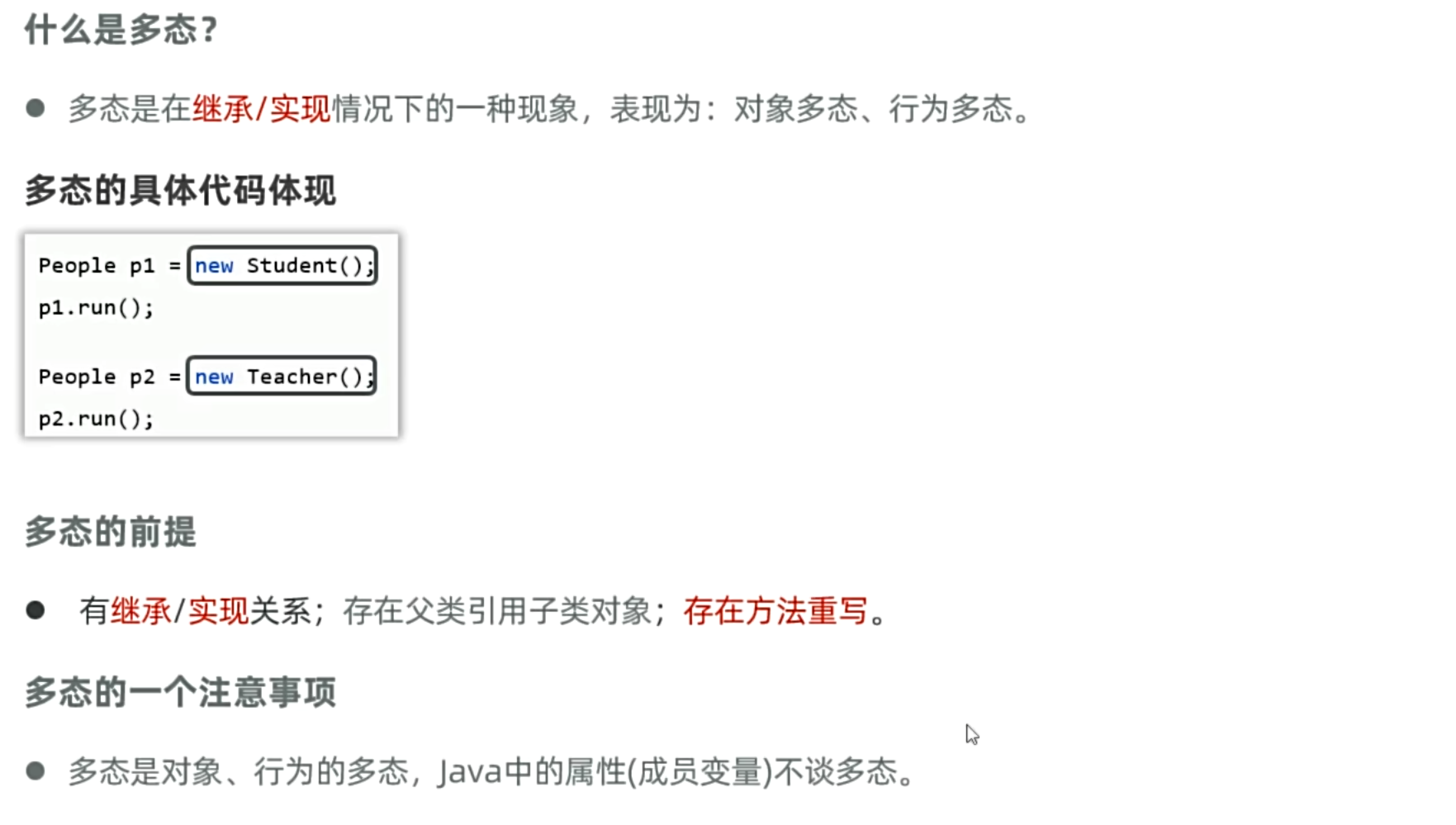
类方法:编译看父类,运行看子类
成员变量:编译、运行都看父类
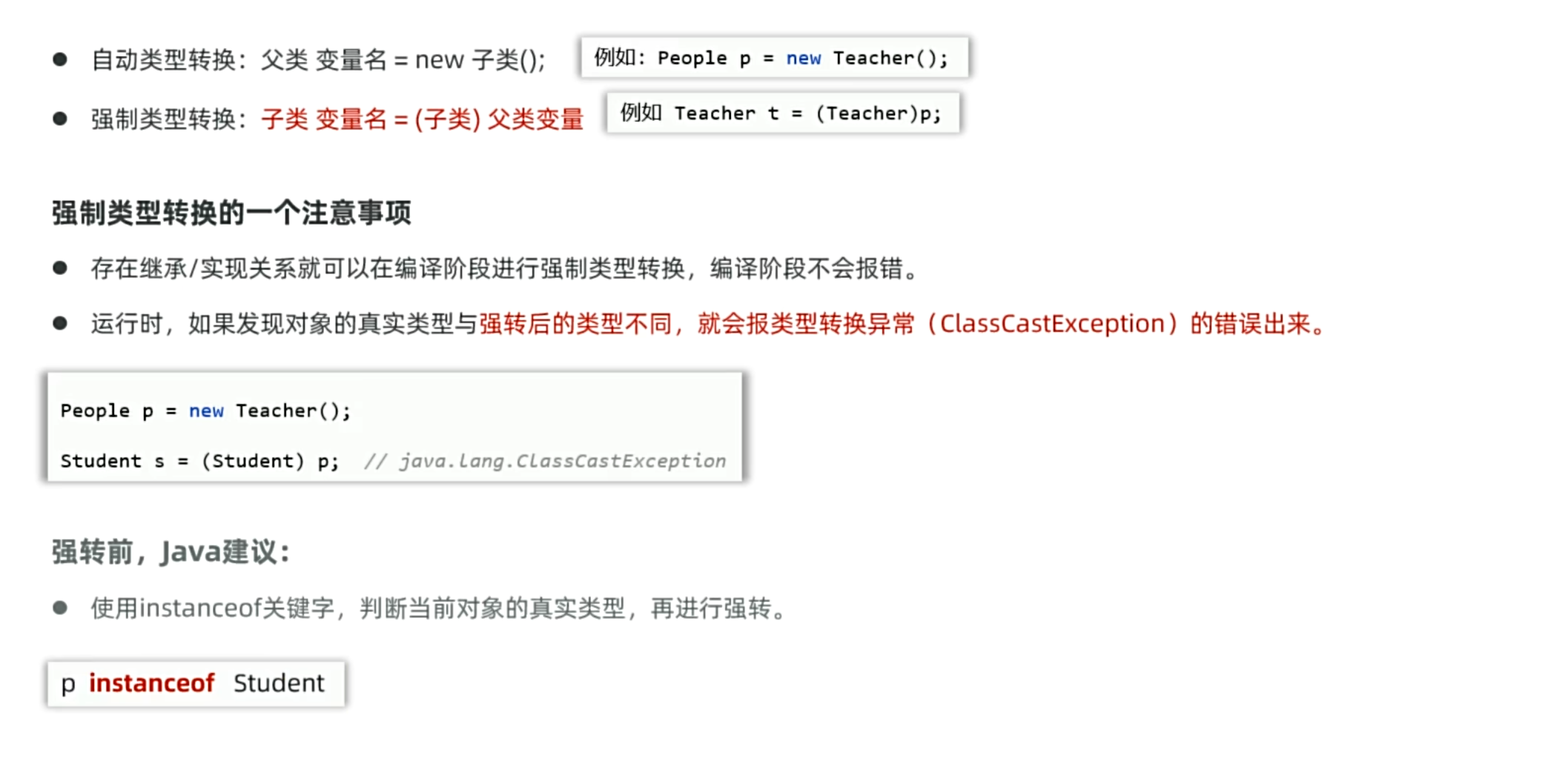
多态下的一个问题,怎么调用子类独有的方法?
这个子类特有方法必须是重写父类的方法,才可以使用自动类型转换调用,如果是子类完全特有的,则只能强制类型转换
1
2
3
4
5
6
7
8
| if (a instanceof wolf){
wolf w = (wolf)a;
w.run();
}
else if {
rabbit r=(rabbit)a;
r.run();
}
|
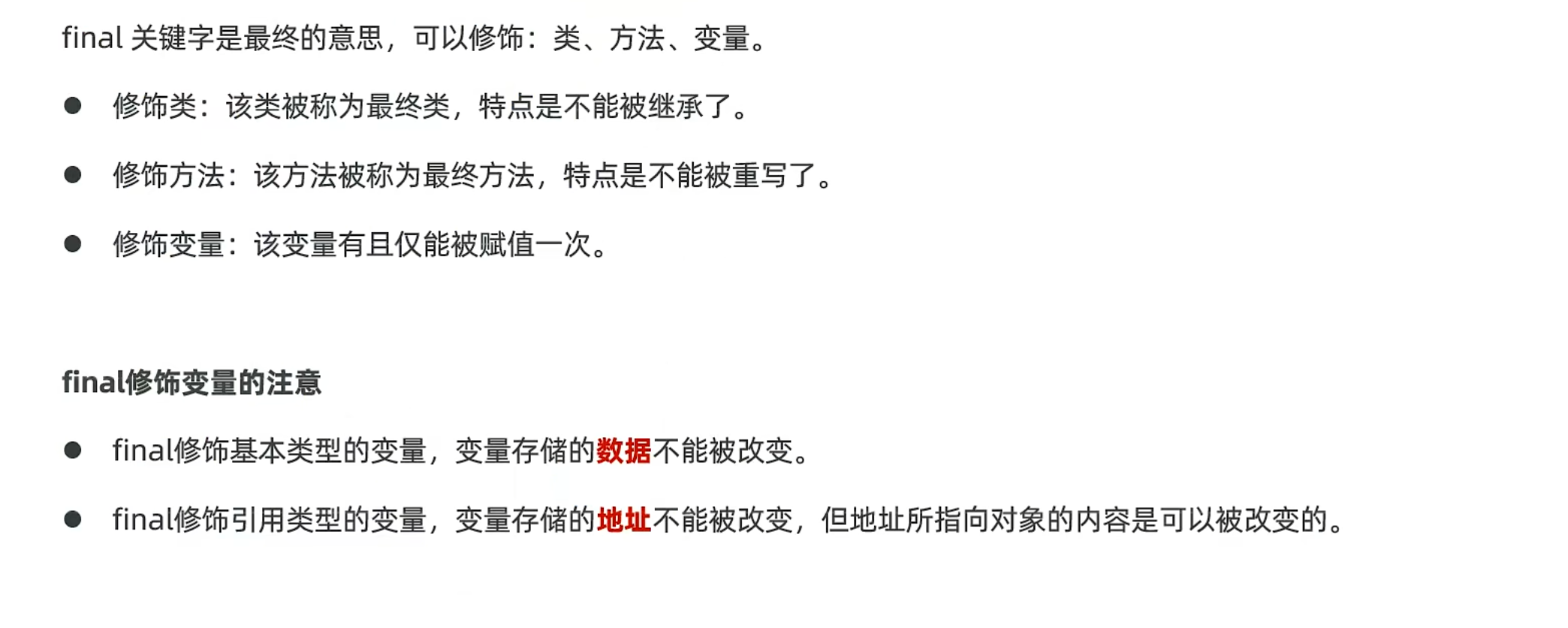
final
1
2
| final int [] arr1={11,22,33};
arr1[1]=99;
|
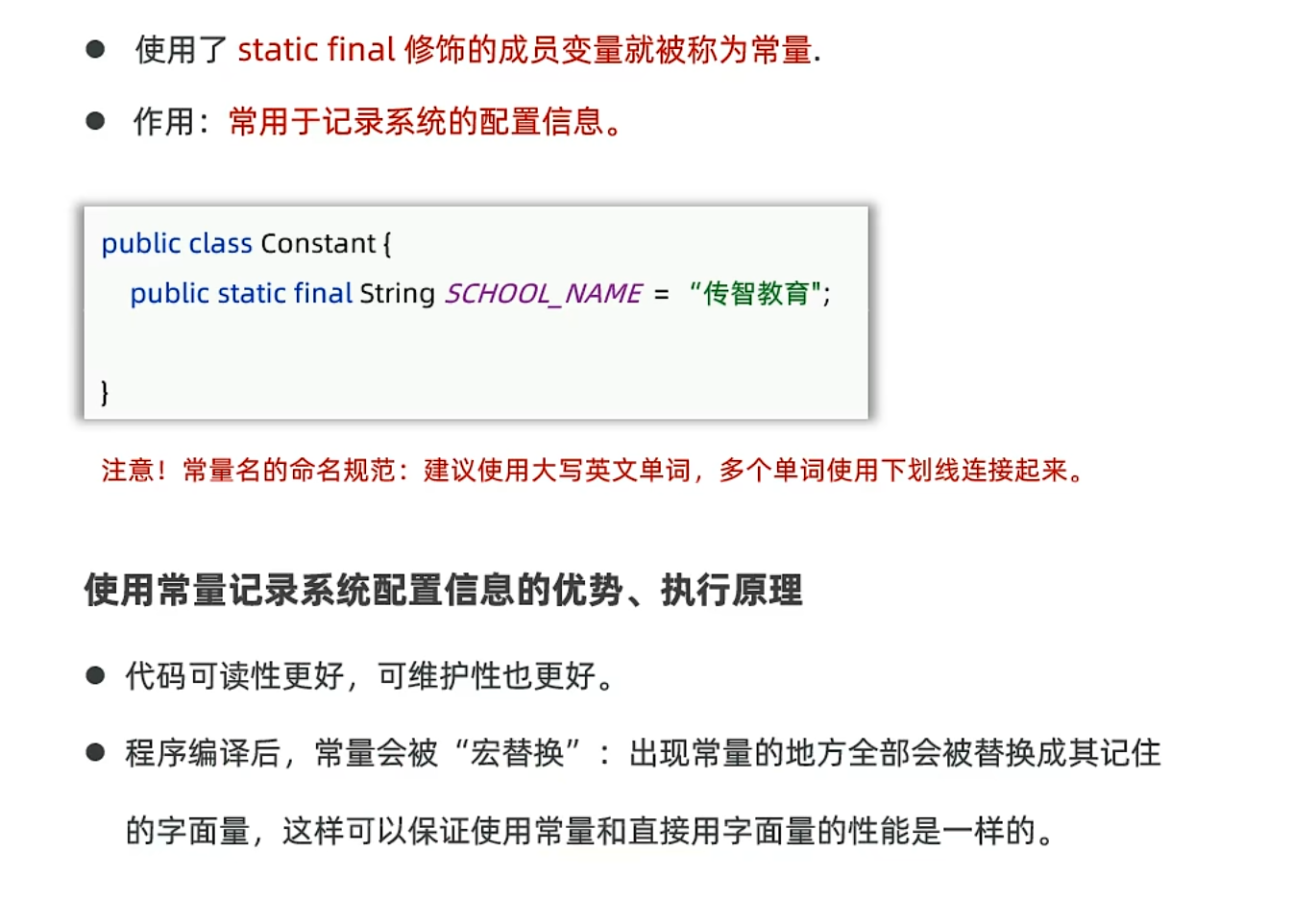
java的常量
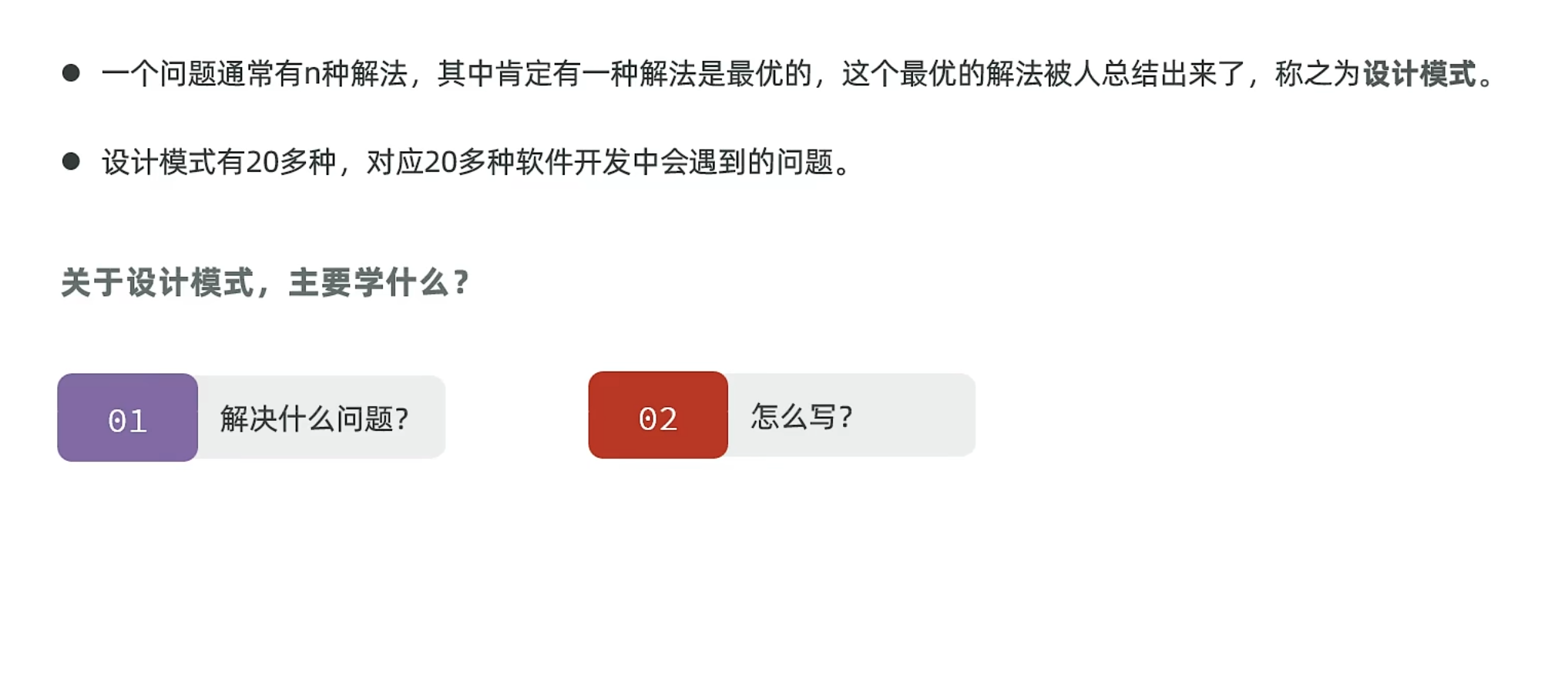
设计模式
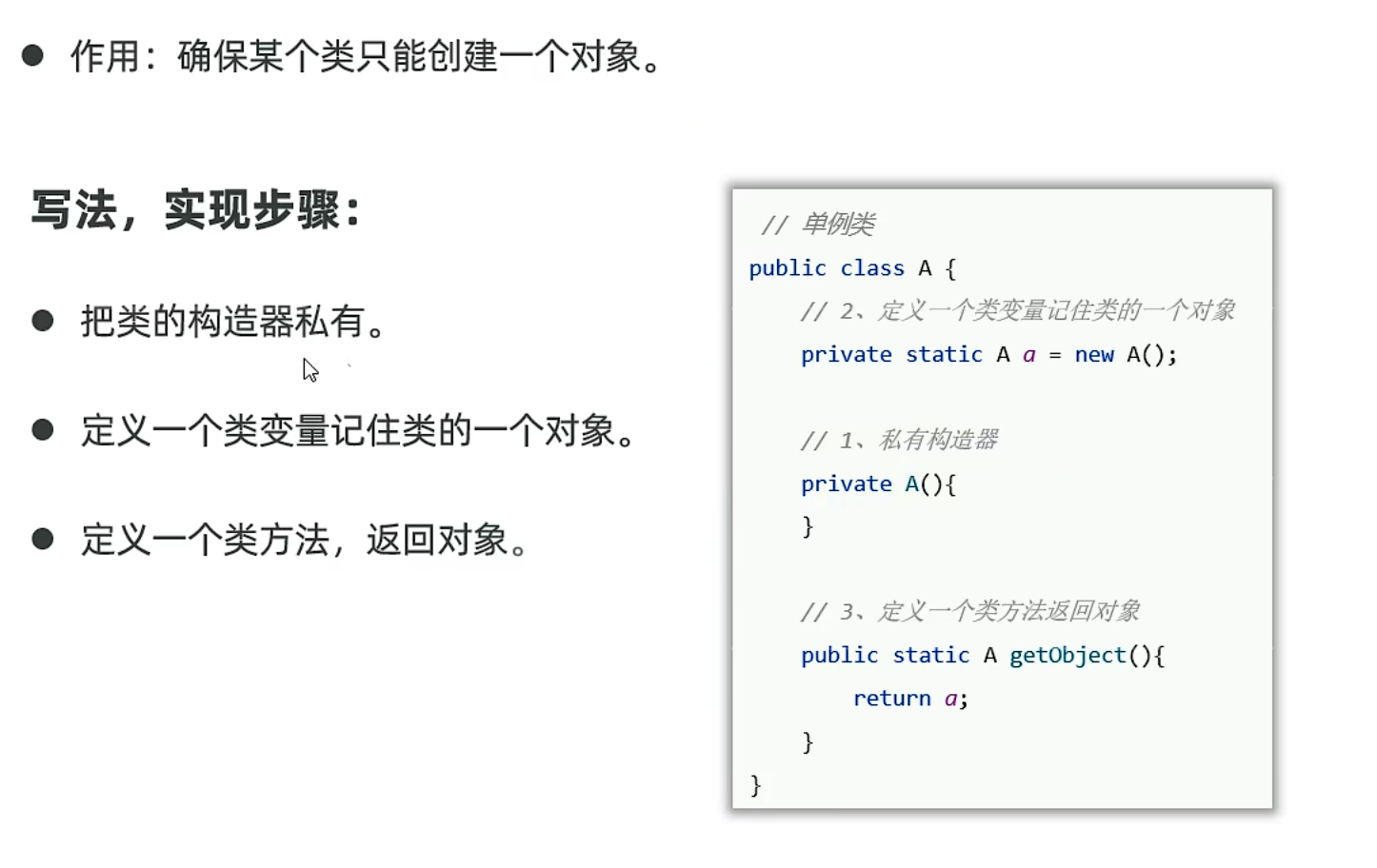
单例设计模式
饿汉式单例:
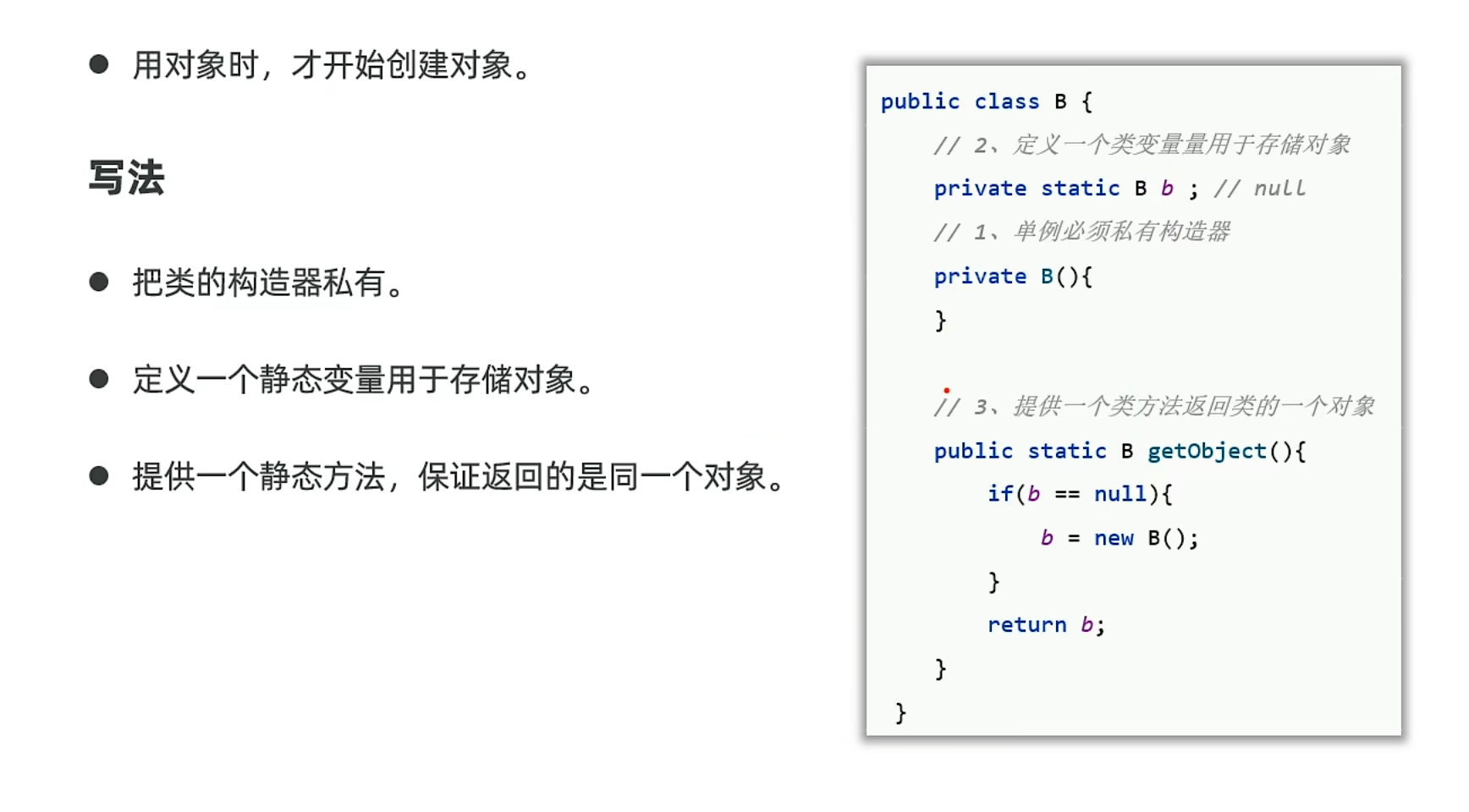
懒汉式单例:
枚举类
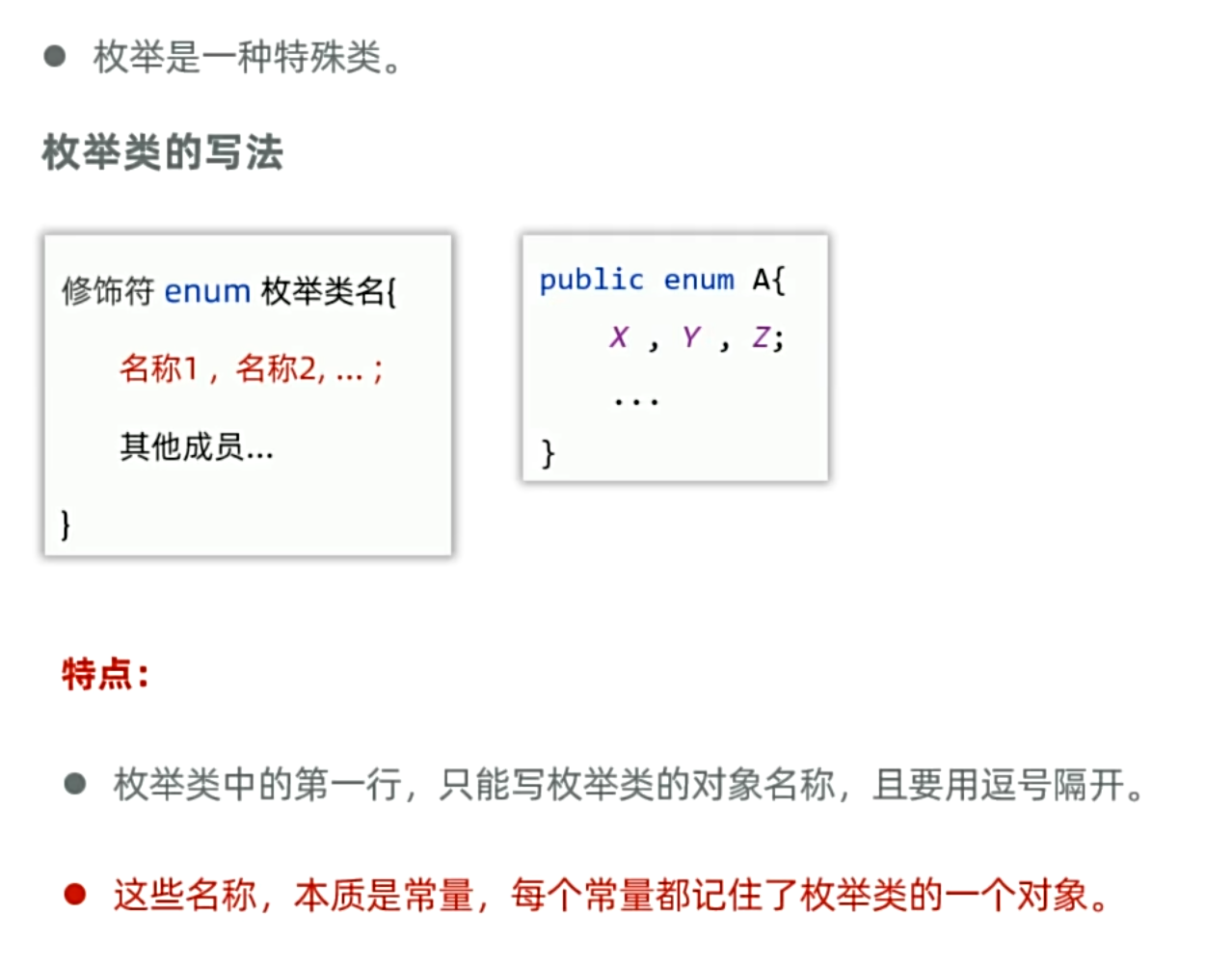
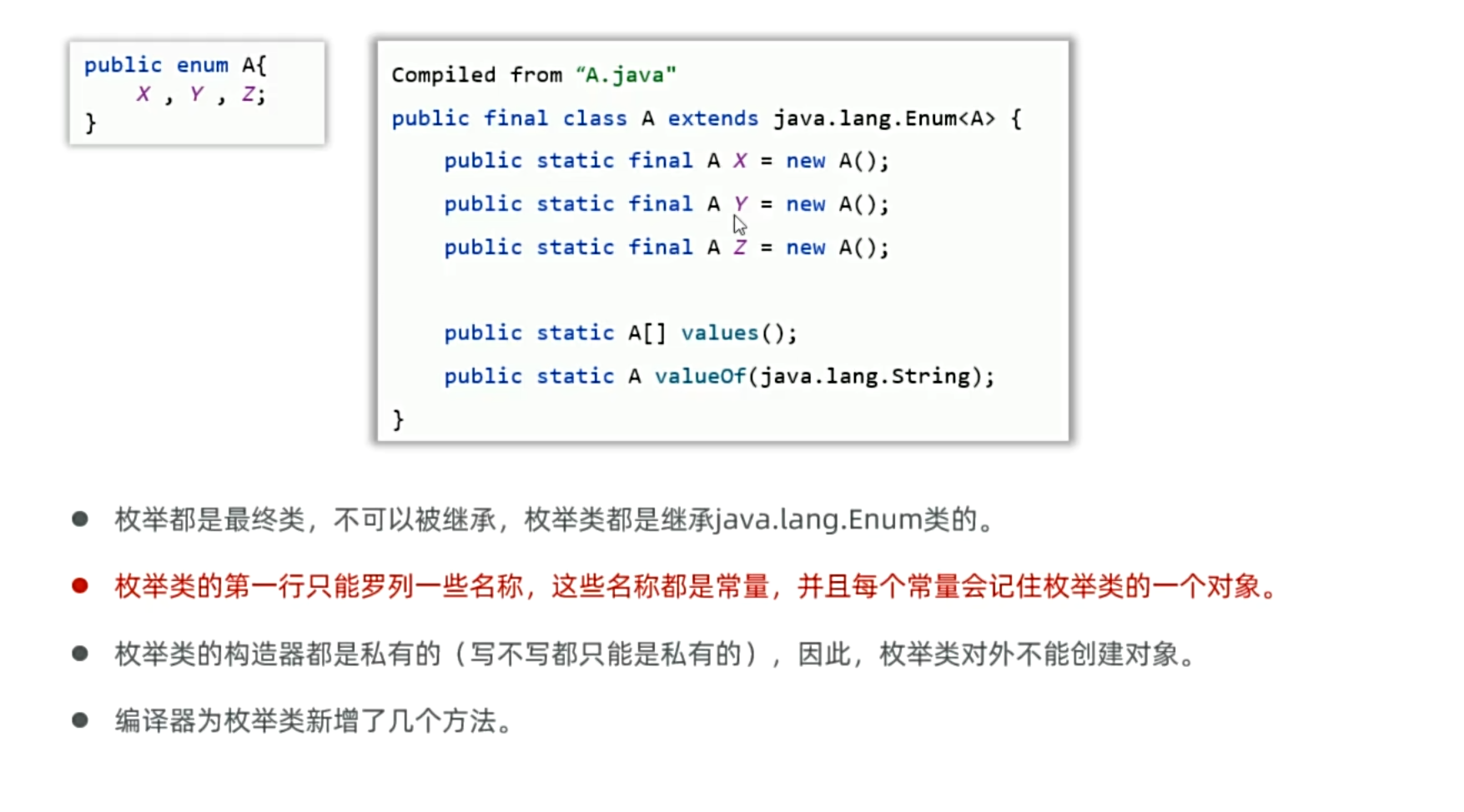
枚举类构造一个枚举对象也是单例类,因为他是常量,只能进行一次赋值操作
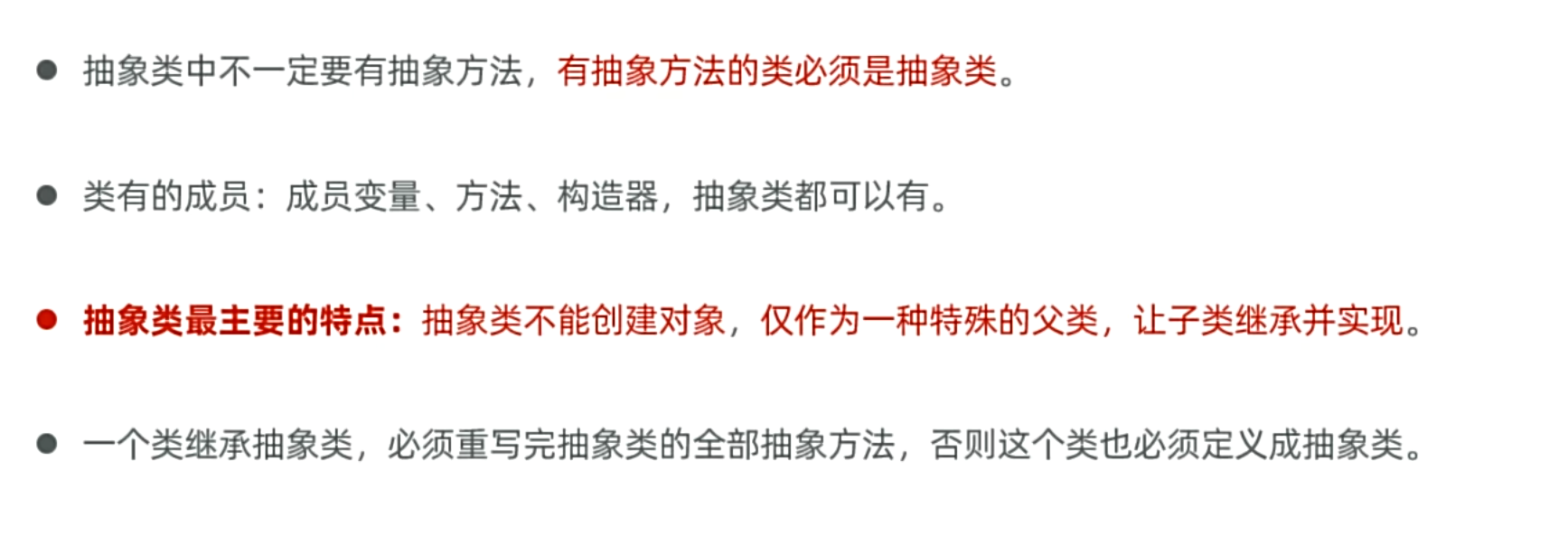
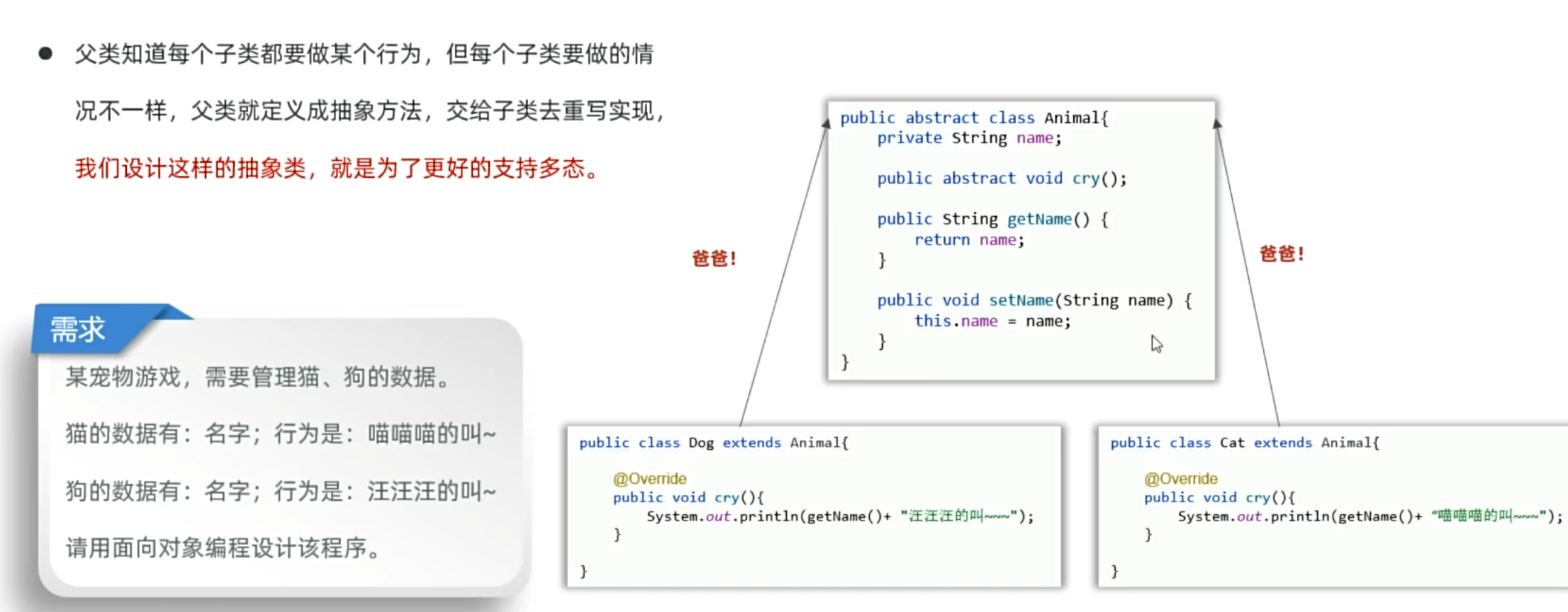
抽象类
抽象方法的特点:
- 只能在抽象类中
- 只有方法声明,没有方法体
- 子类必须重写:如果一个类继承了含有抽象方法的抽象类,子类必须提供该抽象方法的实现,除非子类本身也被声明为抽象类。
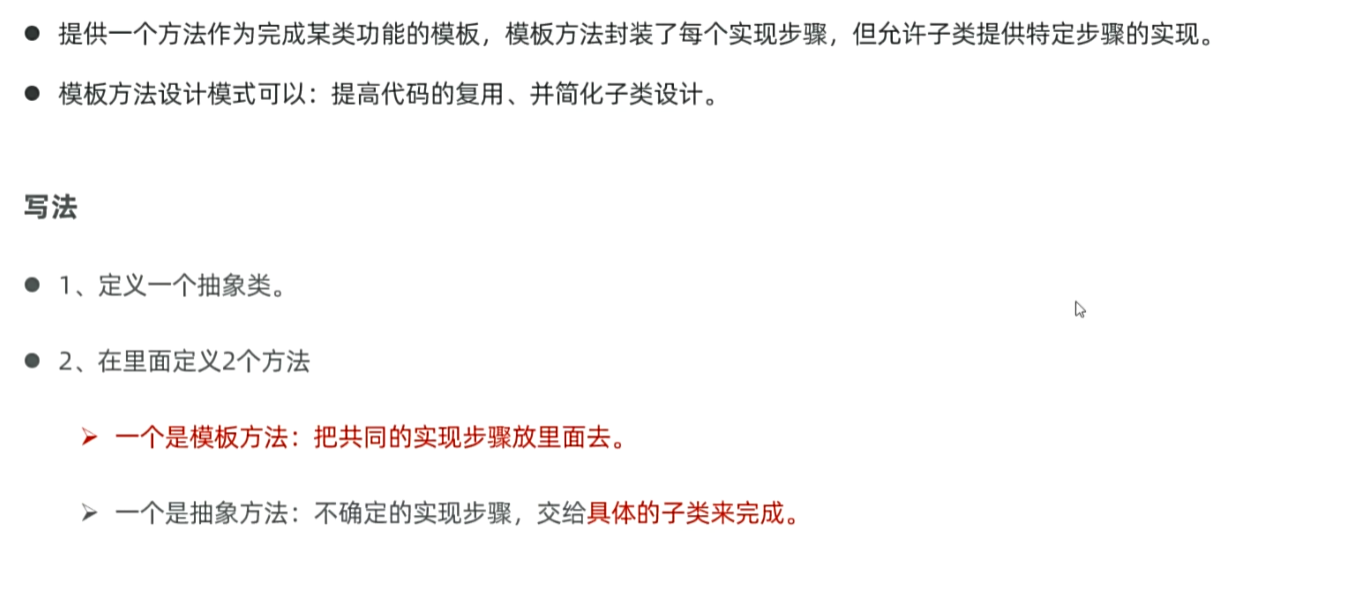
抽象类设计模板
1
2
3
4
5
6
7
8
9
10
11
| package yyssh.LearnAbstractDemo;
public class testAbstractDemo {
public static void main(String[] args) {
People s1 = new Student();
s1.write();
People t1 =new Teacher();
t1.write();
}
}
|
1
2
3
4
5
6
7
8
9
10
11
12
| package yyssh.LearnAbstractDemo;
public abstract class People{
public final void write(){
System.out.println("我是一个人");
writemian();
System.out.println("我生活在地球");
System.out.println("-------------------------------------");
}
public abstract void writemian();
}
|
1
2
3
4
5
6
7
8
| package yyssh.LearnAbstractDemo;
public class Teacher extends People{
@Override
public void writemian() {
System.out.println("我是一个老师");
}
}
|
1
2
3
4
5
6
7
8
| package yyssh.LearnAbstractDemo;
public class Student extends People{
@Override
public void writemian() {
System.out.println("我是一个学生");
}
}
|
接口
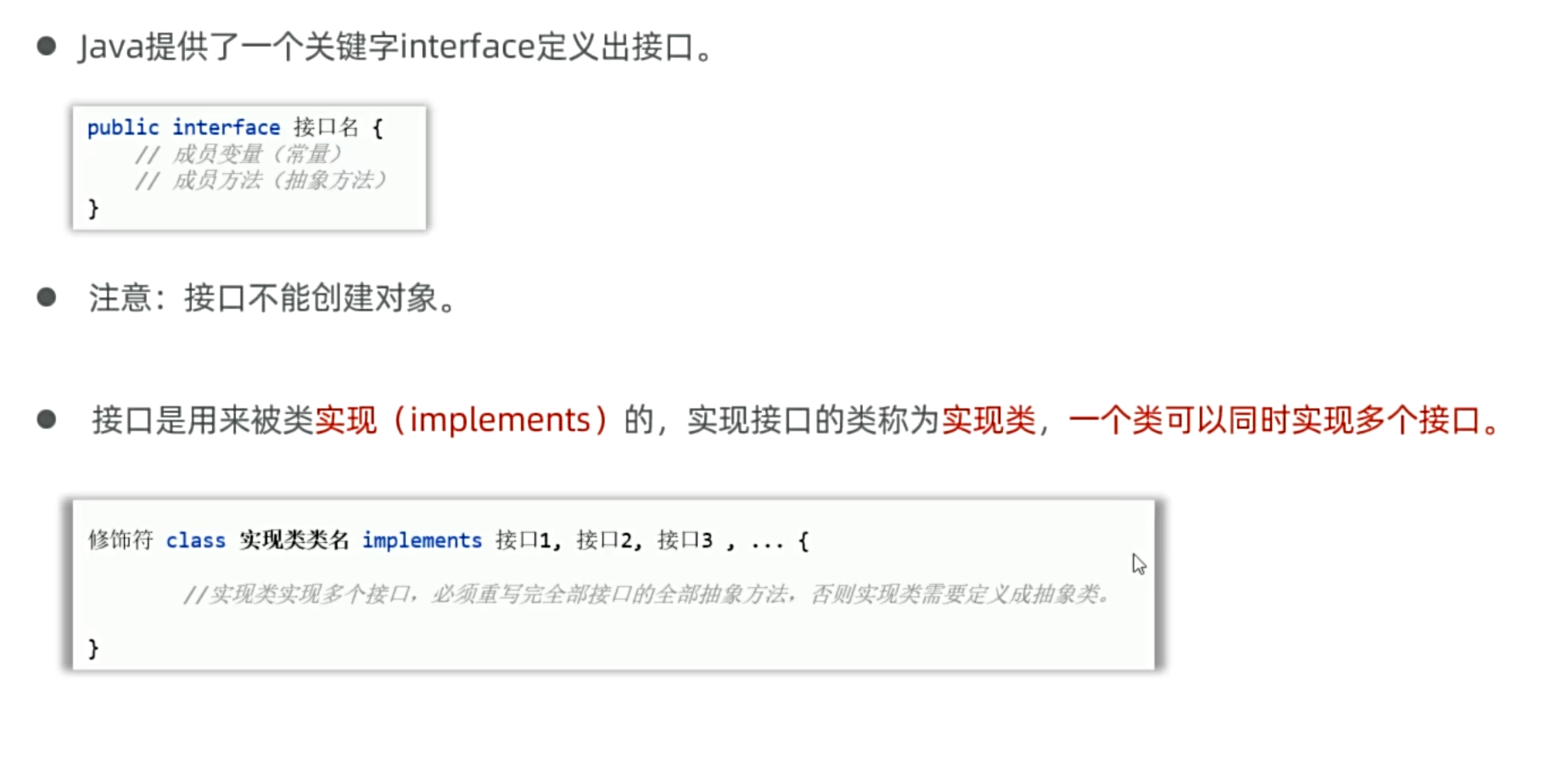
java接口的作用,就类似于C++可以继承多个父类
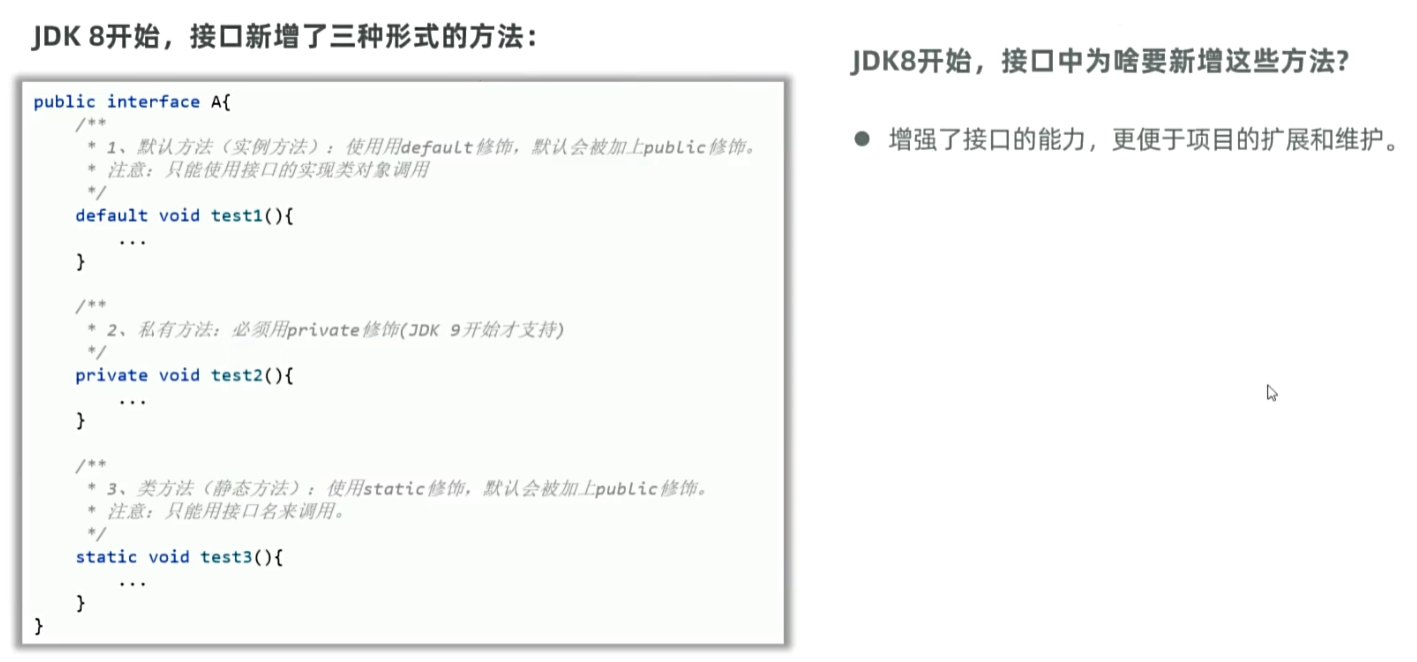
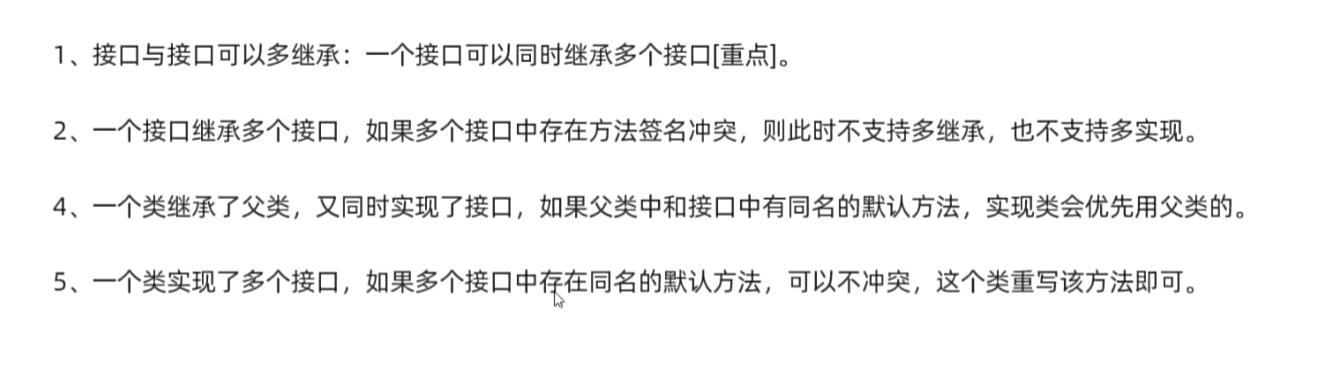
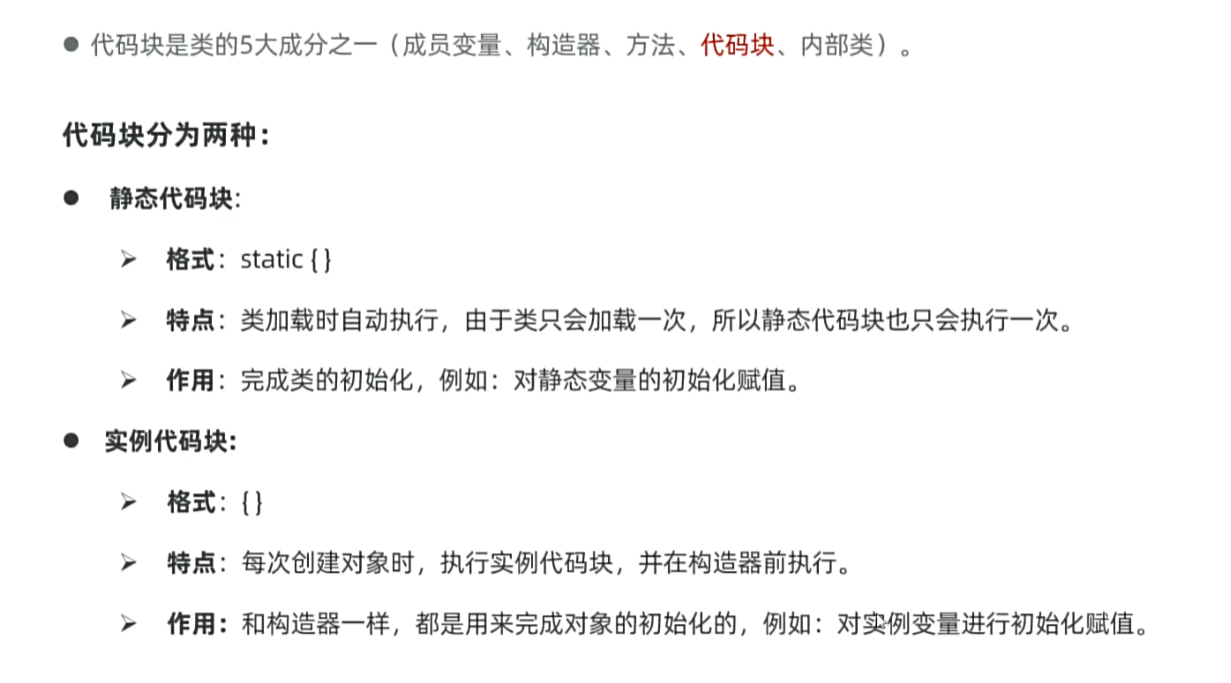
代码块
内部类
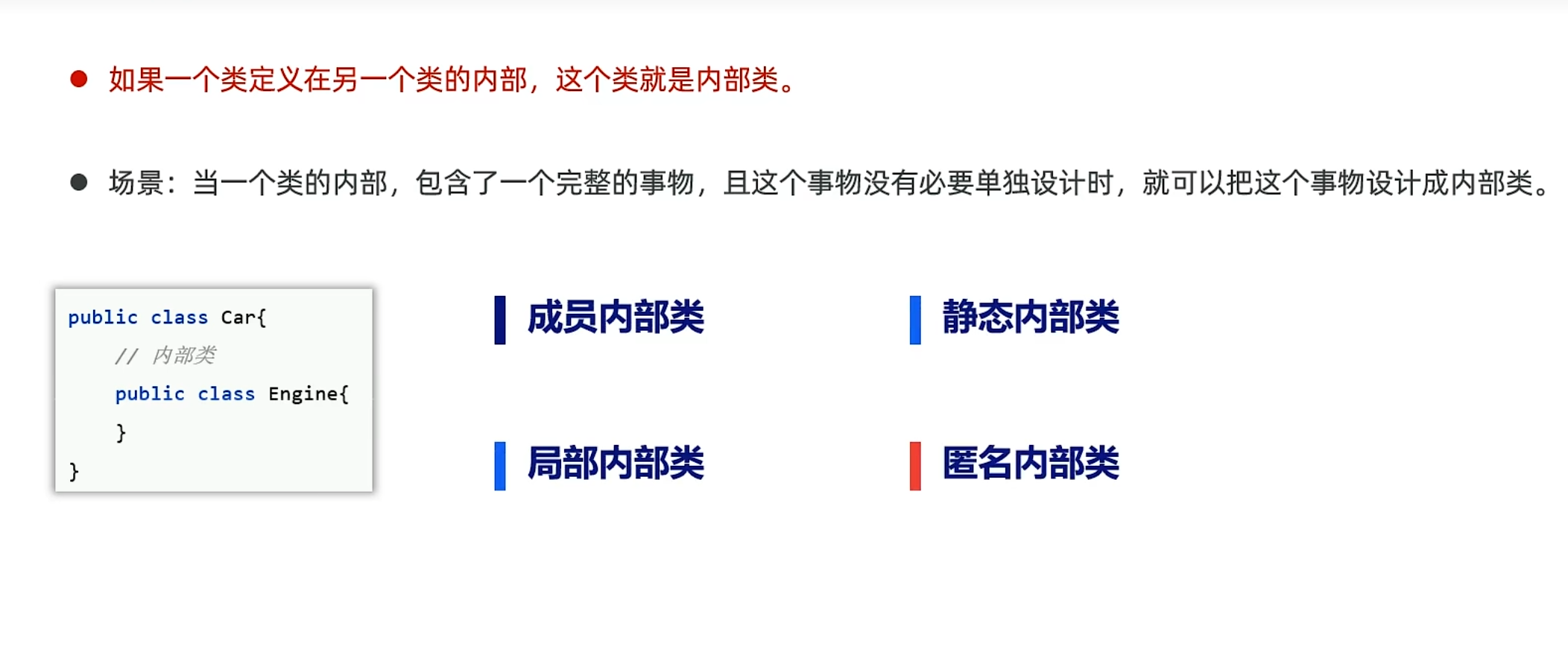
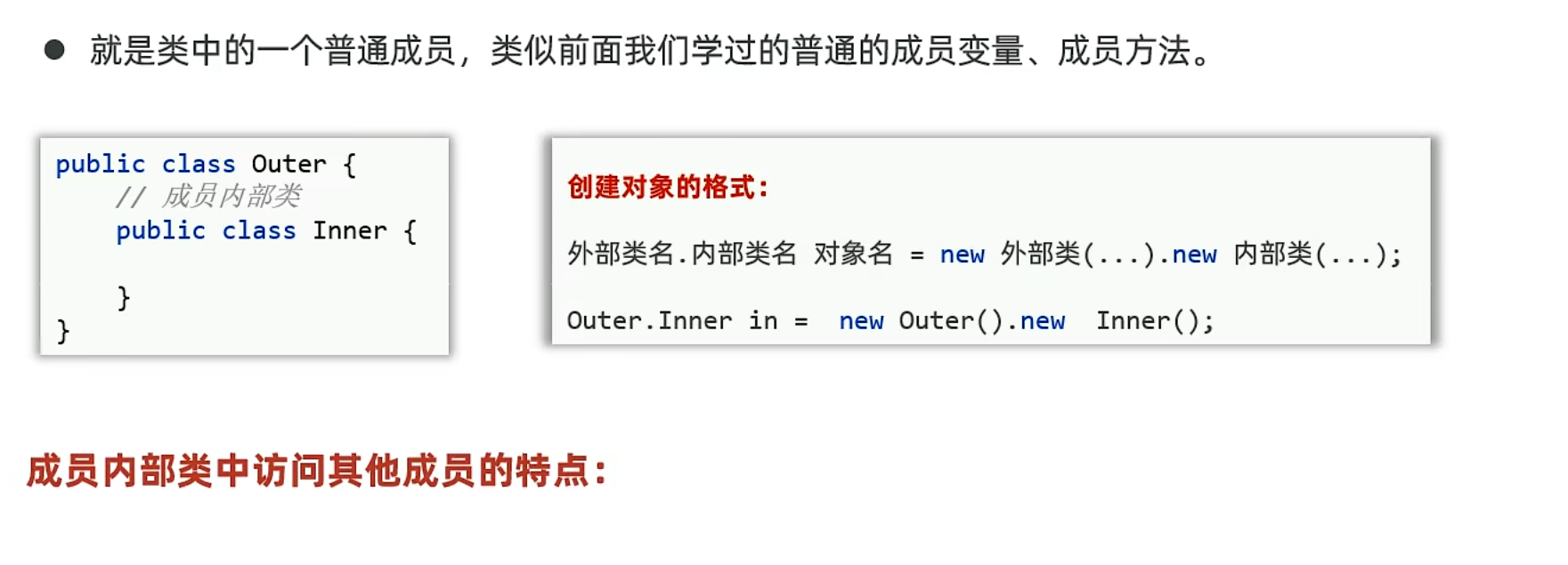
成员内部类
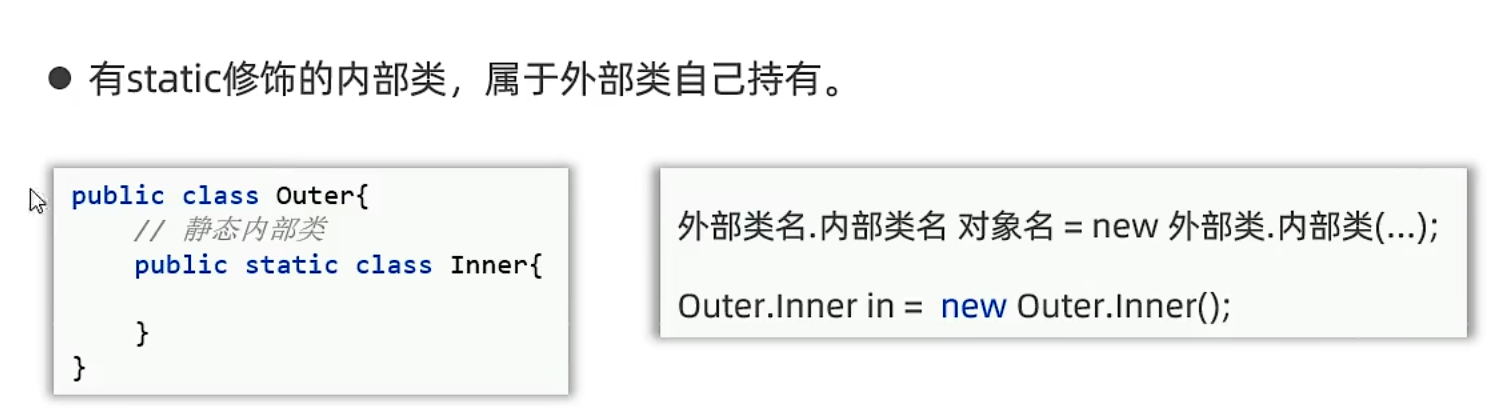
静态内部类
不能访问外部类的成员变量
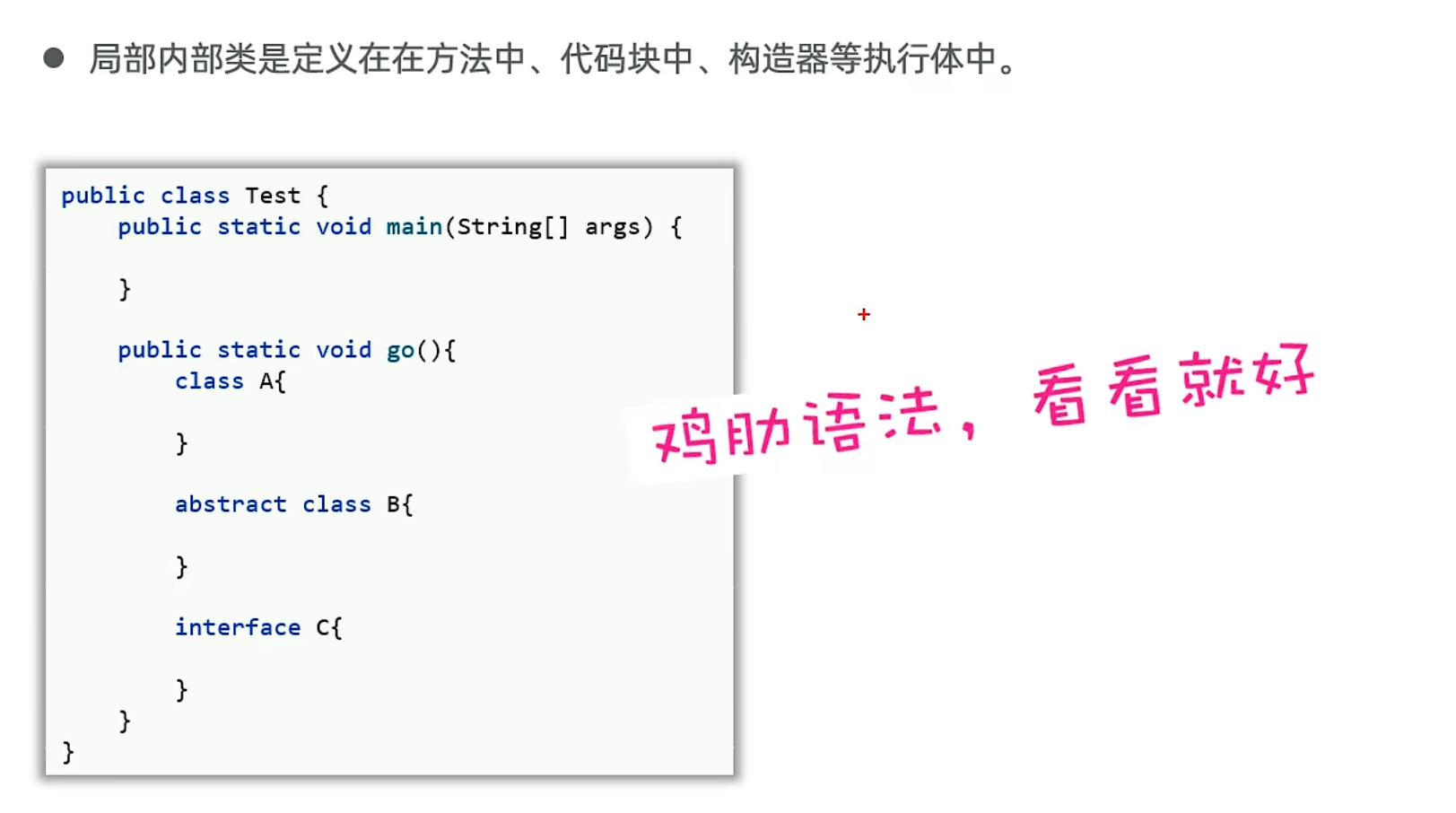
局部内部类
匿名内部类
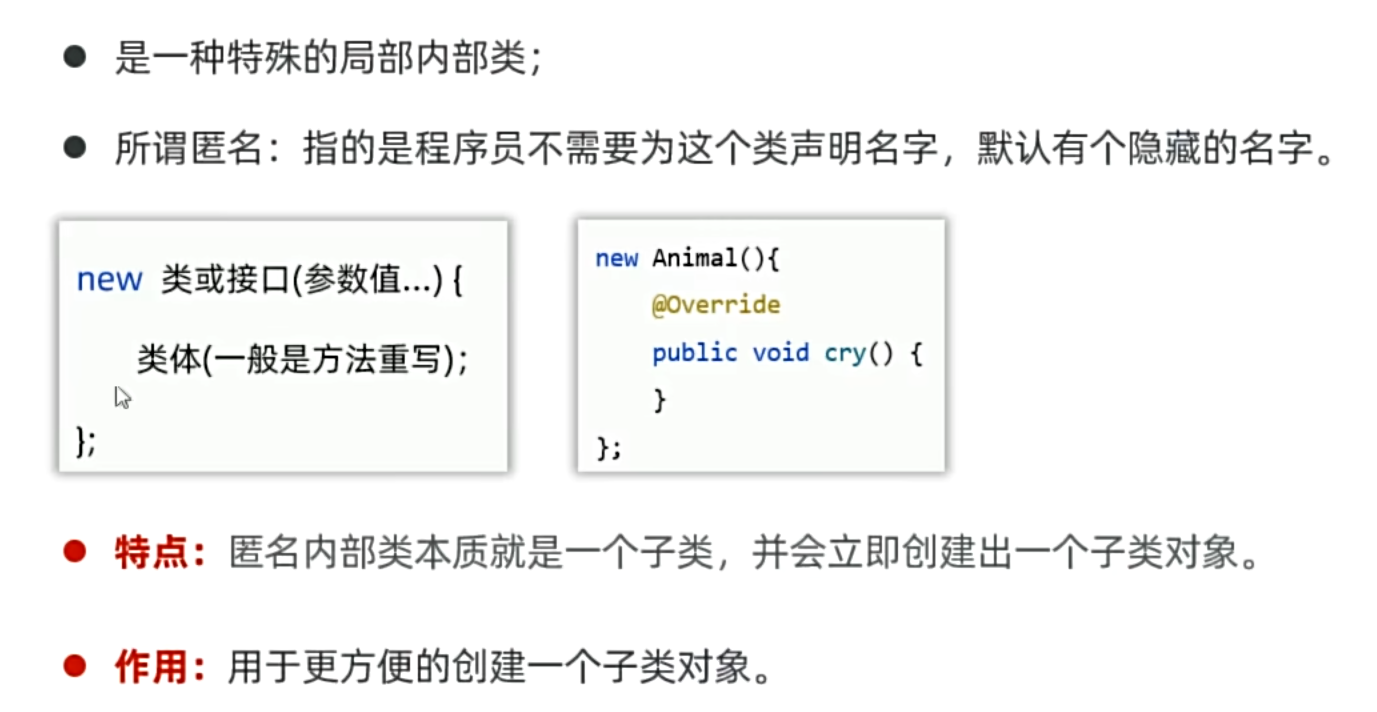
开发方式:
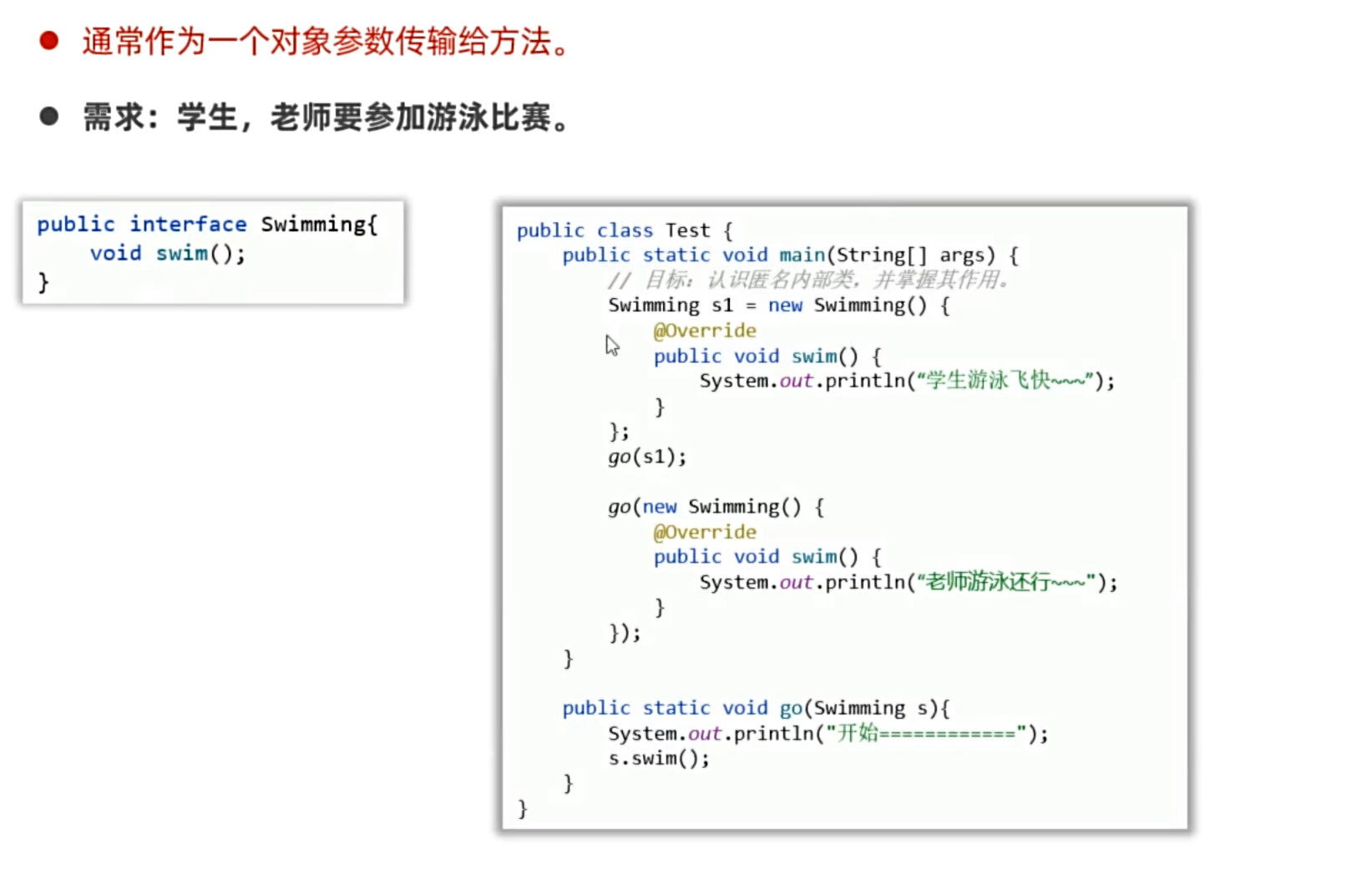
使用场景:
1
2
3
4
5
6
7
8
9
10
11
12
13
14
15
16
17
18
19
20
21
22
23
24
25
26
| package yyssh.innerClass;
import java.util.Comparator;
import java.util.Arrays;
public class testSort {
public static void main(String[] args) {
Student [] students = new Student[5];
students[0] = new Student(18,"yanyuan","男");
students[1] = new Student(19,"chenzhuang","男");
students[2] = new Student(20,"zhanghao","男");
students[3] = new Student(21,"zhangjie","男");
students[4] = new Student(22,"xuziyang","男");
Arrays.sort(students,new Comparator<Student>(){
@Override
public int compare(Student o1, Student o2) {
return o1.getAge() - o2.getAge();
}
});
for (int i=0; i<5; i++) {
Student s = students[i];
System.out.println(s);
}
}
}
|
1
2
3
4
5
6
7
8
9
10
11
12
13
14
15
16
17
| package yyssh.innerClass;
import lombok.AllArgsConstructor;
import lombok.Data;
import lombok.NoArgsConstructor;
@AllArgsConstructor
@NoArgsConstructor
@Data
public class Student {
private int age;
private String name;
private String sex;
}
|
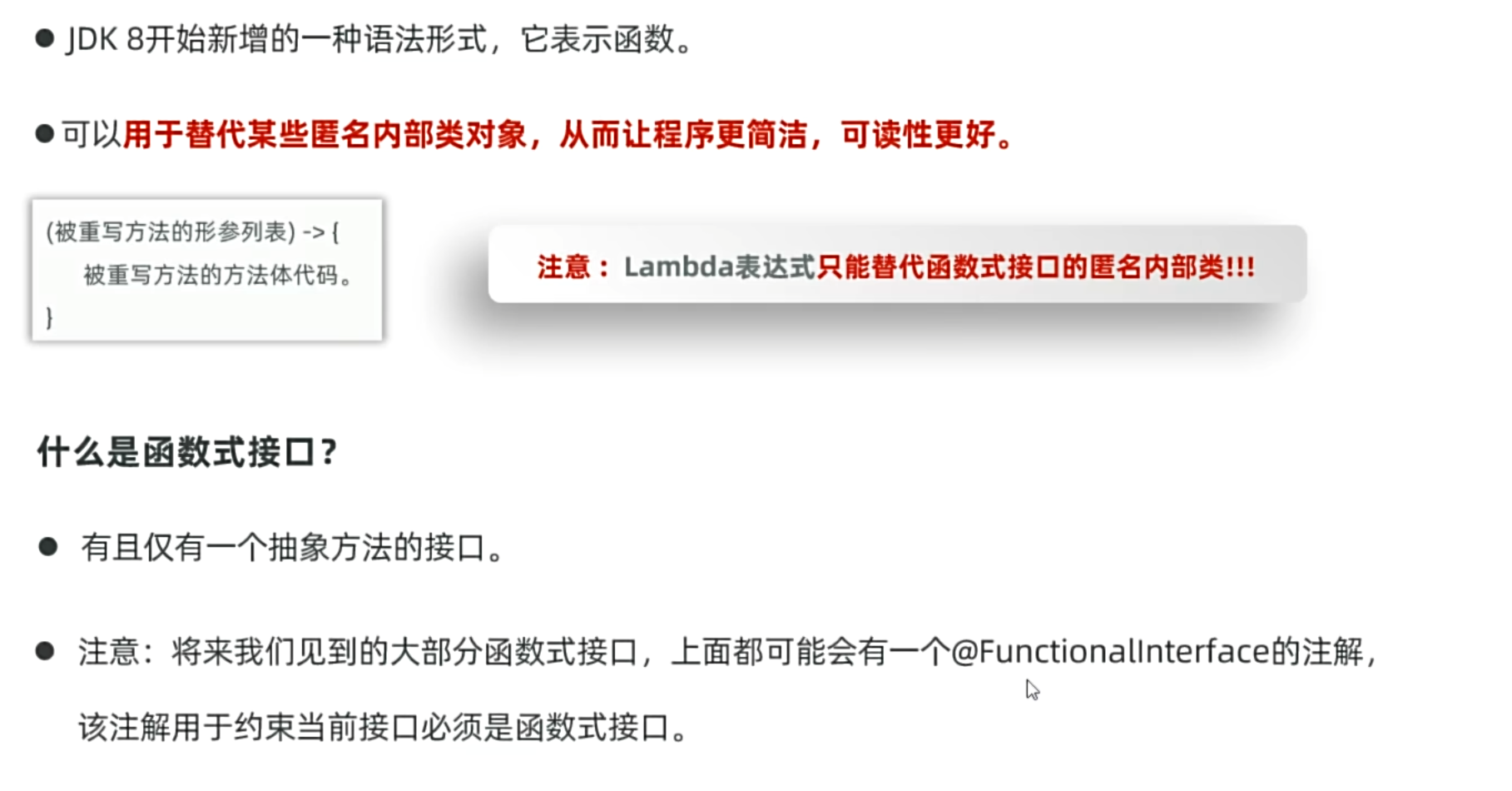
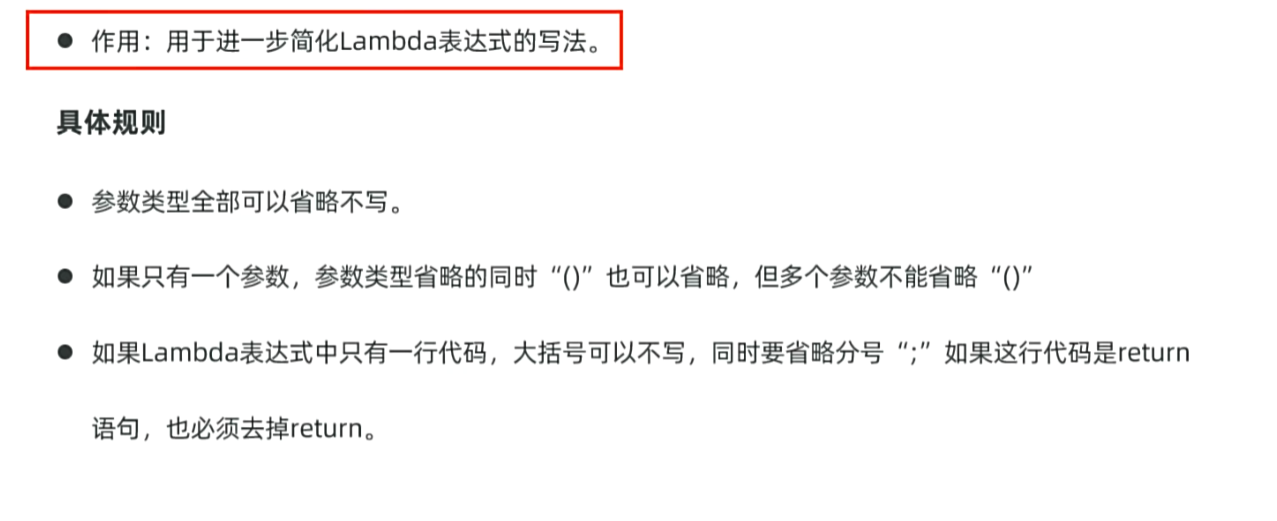
Lambda表达式(函数式编程)
1
2
3
4
5
6
7
8
9
10
11
12
13
14
15
16
17
18
19
20
21
22
23
24
25
26
27
28
29
| package yyssh.learnLambda;
public class lambdaDemo {
public static void main(String[] args) {
Leap l = new Leap(){
@Override
public void leaping() {
System.out.println("leaping");
}
};
l.leaping();
Swim s = ()->{
System.out.println("swimming");
};
s.swimming();
}
}
@FunctionalInterface
interface Swim {
void swimming();
}
abstract class Leap {
public abstract void leaping();
}
|
1
2
3
4
5
6
7
8
9
10
11
12
13
14
15
16
17
18
19
20
21
22
23
24
25
26
27
28
29
30
31
32
33
34
35
36
37
38
39
40
41
42
43
44
45
46
47
48
49
50
51
52
53
54
| package yyssh.learnLambda;
import lombok.AllArgsConstructor;
import lombok.Data;
import lombok.NoArgsConstructor;
import java.util.Arrays;
import java.util.Comparator;
public class lambdaOmit {
public static void main(String[] args) {
sort();
}
public static void sort(){
Student [] students = new Student[5];
students[0] = new Student(18,"yanyuan","男");
students[1] = new Student(19,"chenzhuang","男");
students[2] = new Student(20,"zhanghao","男");
students[3] = new Student(21,"zhangjie","男");
students[4] = new Student(22,"xuziyang","男");
Arrays.sort(students,(Student o1, Student o2)-> {
return o1.getAge() - o2.getAge();
});
Arrays.sort(students,( o1, o2)-> {
return o1.getAge() - o2.getAge();
});
Arrays.sort(students,( o1, o2)-> o1.getAge() - o2.getAge());
for (int i=0; i<5; i++) {
Student s = students[i];
System.out.println(s);
}
}
}
@AllArgsConstructor
@Data
@NoArgsConstructor
class Student {
private int age;
private String name;
private String sex;
}
|
静态方法引用
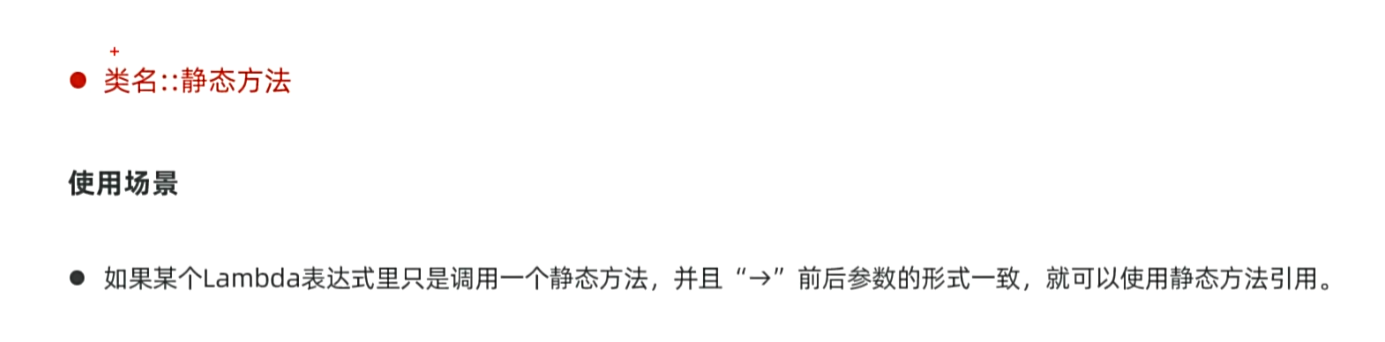
这是正常方法
1
2
3
| Arrays.sort(students,( o1, o2)-> {
return o1.getAge() - o2.getAge();
});
|
使用静态方法
1
2
3
4
5
6
7
8
9
10
11
12
13
14
15
16
17
18
19
20
21
22
23
24
25
26
27
28
29
30
31
32
33
34
35
36
37
38
39
40
41
42
43
44
45
46
47
48
49
50
51
52
53
54
55
56
57
58
59
| package yyssh.learnLambda;
import lombok.AllArgsConstructor;
import lombok.Data;
import lombok.NoArgsConstructor;
import java.util.Arrays;
import java.util.Comparator;
public class lambdaOmit {
public static void main(String[] args) {
sort();
}
public static void sort(){
Student [] students = new Student[5];
students[0] = new Student(18,"yanyuan","男");
students[1] = new Student(19,"chenzhuang","男");
students[2] = new Student(20,"zhanghao","男");
students[3] = new Student(21,"zhangjie","男");
students[4] = new Student(22,"xuziyang","男");
Arrays.sort(students,(Student o1, Student o2)-> {
return o1.getAge() - o2.getAge();
});
Arrays.sort(students,( o1, o2)-> {
return o1.getAge() - o2.getAge();
});
Arrays.sort(students,( o1, o2)-> o1.getAge() - o2.getAge());
Arrays.sort(students,Student::compare);
for (int i=0; i<5; i++) {
Student s = students[i];
System.out.println(s);
}
}
}
@AllArgsConstructor
@Data
@NoArgsConstructor
class Student {
private int age;
private String name;
private String sex;
public static int compare(Student o1, Student o2) {
return o1.getAge() - o2.getAge();
}
}
|
实例方法引用
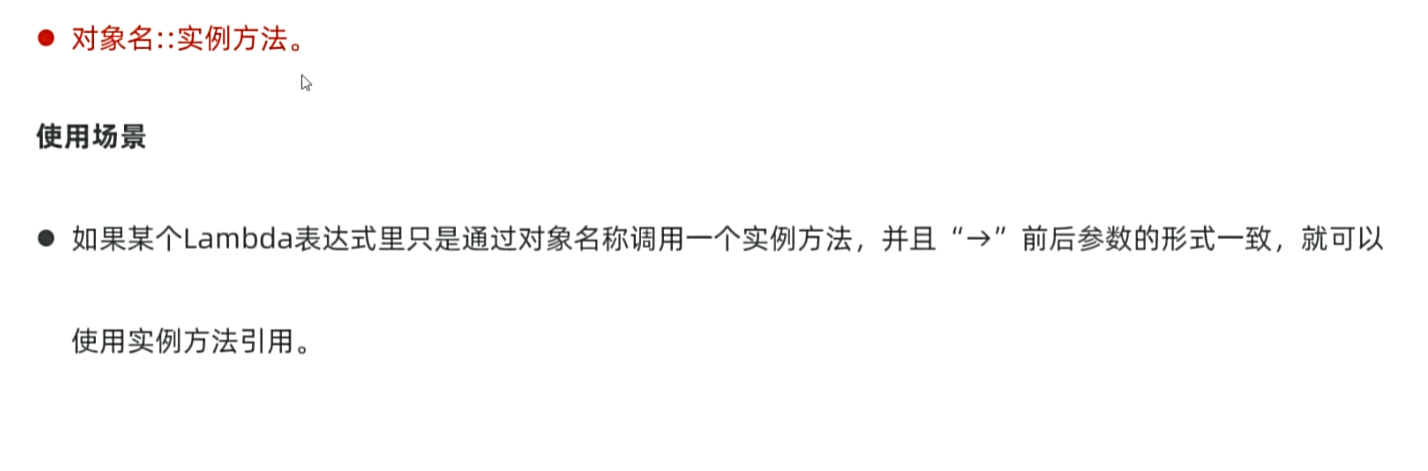
1
2
3
4
|
Student t = new Student();
Arrays.sort(students,( o1, o2)->t.compareHeight(o1,o2));
Arrays.sort(students,t::compareHeight);
|
特定类型引用
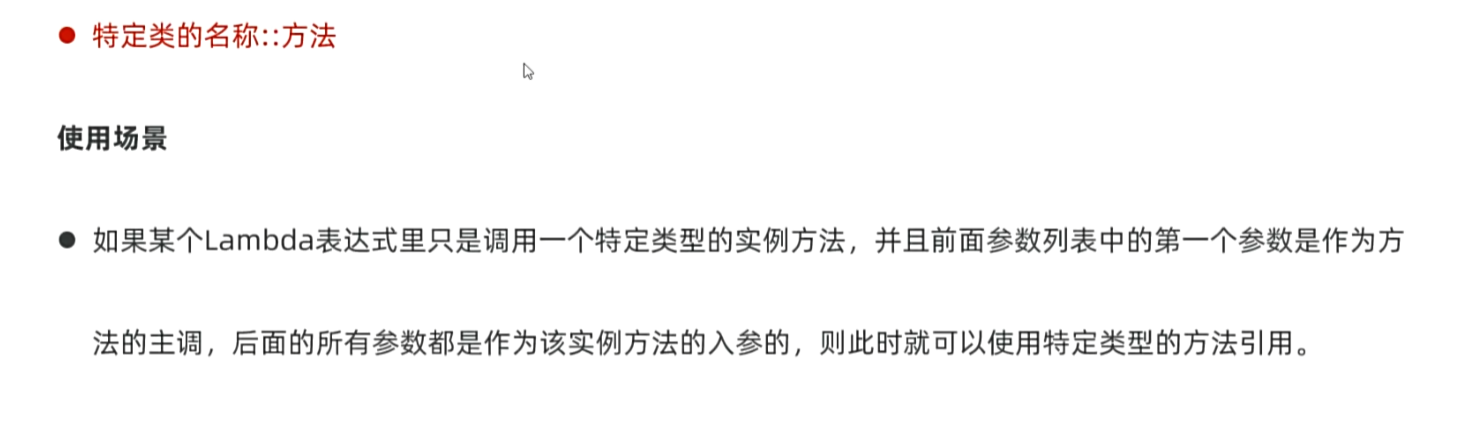
这里的特定类型是指lambda 表达式所实现的函数式接口的具体类型。
1
2
3
4
5
6
7
8
9
10
11
12
13
14
15
16
17
18
| package yyssh.lambdaOmitDemo;
import java.util.Arrays;
import java.util.Comparator;
public class Demo {
public static void main(String[] args) {
String [] names = {"Alies","ailiy","Bob","曹操","张飞","CaoCao"};
Arrays.sort(names, String::compareToIgnoreCase);
System.out.println(Arrays.toString(names));
}
}
|
构造器引用
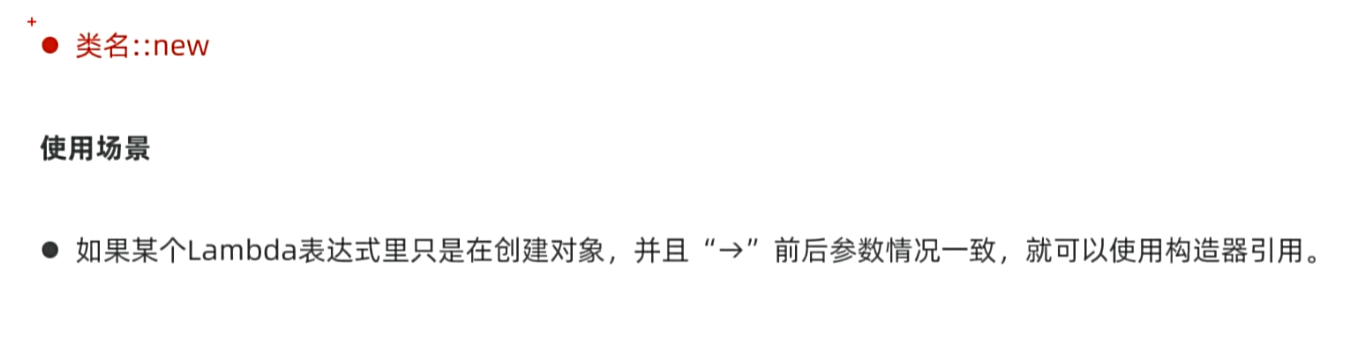
1
2
3
4
5
6
7
8
9
10
11
12
13
14
15
16
17
18
19
20
21
22
23
24
25
26
27
28
29
30
31
32
33
| package yyssh.lambdaOmitDemo;
import lombok.AllArgsConstructor;
import lombok.Data;
import lombok.NoArgsConstructor;
public class Demo2 {
public static void main(String[] args) {
CarFactory cf = Car::new;
Car c1 = cf.getCar("Benz");
System.out.println(c1.getBrand());
}
}
@FunctionalInterface
interface CarFactory {
Car getCar(String brand);
}
@AllArgsConstructor
@Data
@NoArgsConstructor
class Car {
private String brand;
}
|
常用的模块与框架
Lombok
检查模块依赖
- 打开 IntelliJ IDEA,进入 File > Project Structure > Modules,确认每个模块的 Dependencies 选项卡中包含 Lombok。
- 如果缺少,可以手动添加或确保 Maven/Gradle 已同步。
启用注解处理
- 进入 Settings > Build, Execution, Deployment > Compiler > Annotation Processors,勾选 “Enable annotation processing” 和 “Obtain processors from project classpath”。
- 这确保 Lombok 的注解处理器能被正确识别。
@AllArgsConstructor
- 作用:生成一个包含所有字段的构造函数(即所有成员变量的初始化构造函数)。
- 引用:
import lombok.AllArgsConstructor
@Data
@NoArgsConstructor
- 作用:生成一个无参构造函数。
- 引用:
import lombok.NoArgsConstructor
框架解释
总的来说一个jar包就是一个java框架
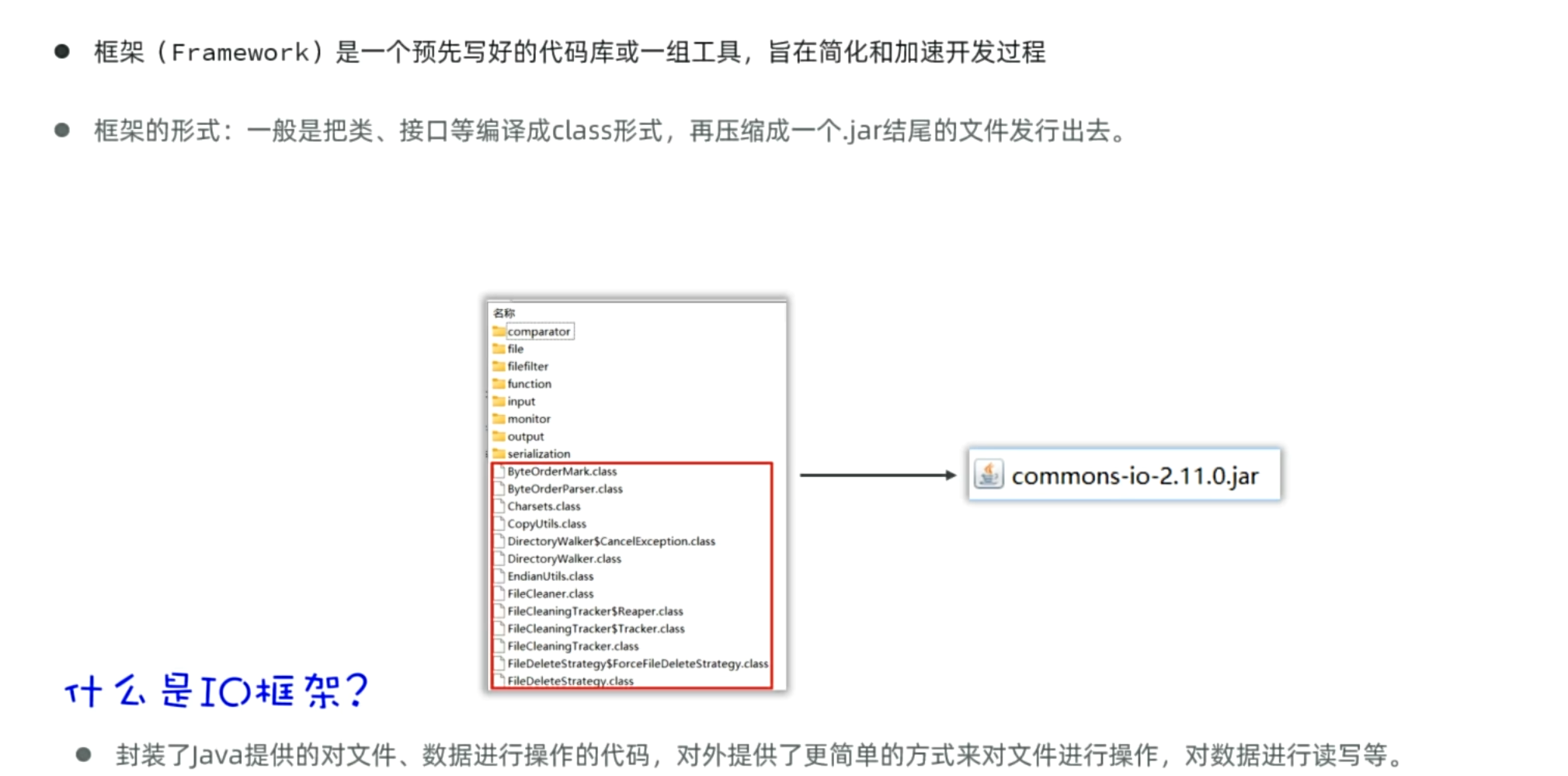
commons-io
导入框架的步骤
- 在项目中创建一个文件夹lib
- 将jar包框架复制到lib文件夹中
- 在jar包右键,选择Add as Library
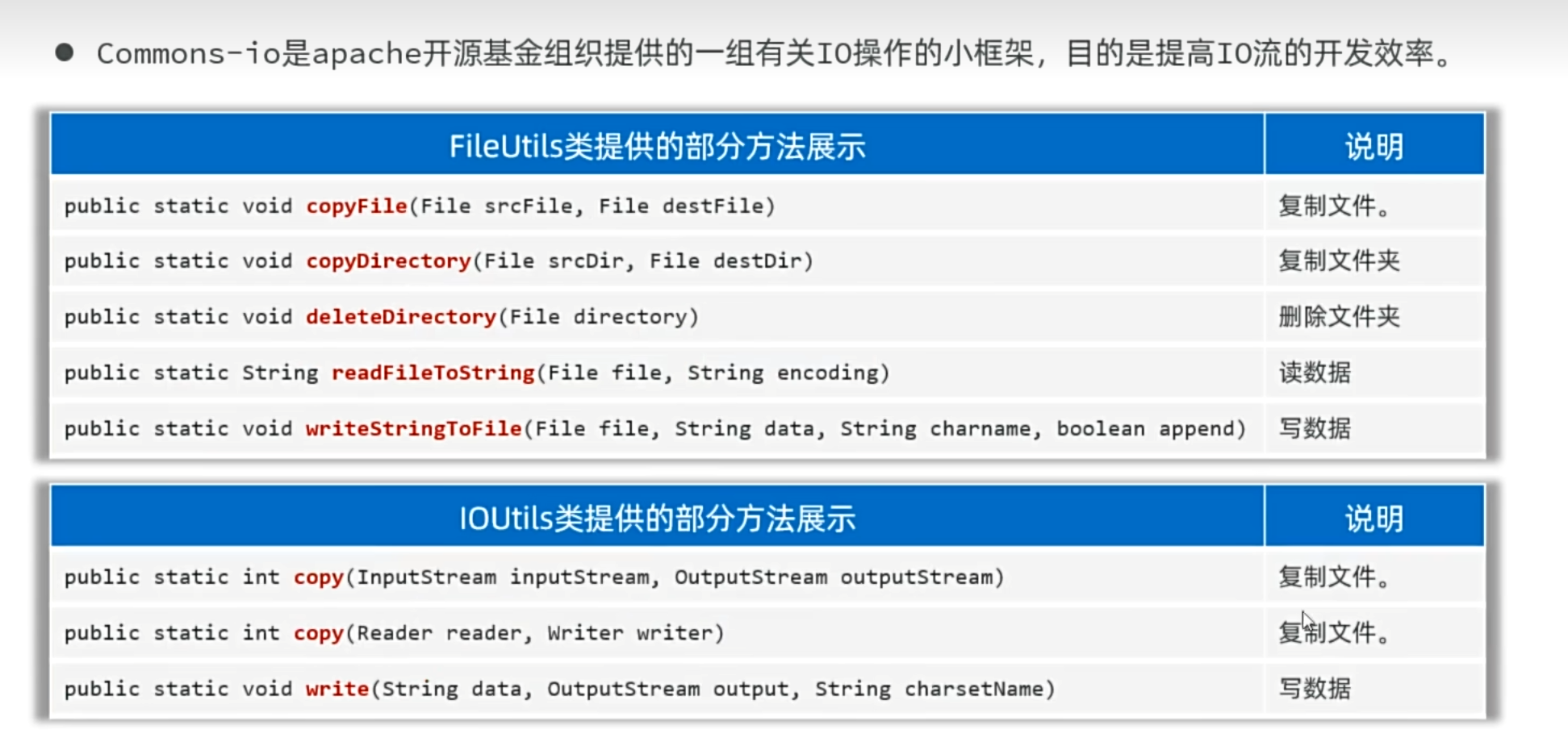
1
2
3
4
5
6
7
8
9
10
11
12
13
14
15
| package yyssh.learnCommonsIO;
import org.apache.commons.io.FileUtils;
import java.io.File;
import java.io.IOException;
public class LearnCommons {
public static void main(String[] args) {
try {
FileUtils.copyFile(new File("FileAndIO/src/yyssh/learnCommonsIO/test.txt"),new File("C:/Users/肥猪/Desktop/test.txt"));
} catch (Exception e) {
throw new RuntimeException(e);
}
}
}
|
java类和对象与C++的区别
| 特性 |
Java |
C++ |
| 类定义 |
所有代码必须在类中 |
允许全局函数和类外代码 |
| 对象存储 |
堆内存(GC 管理) |
栈或堆(手动管理) |
| 继承 |
单继承 + 接口多继承 |
支持多重继承 |
| 多态 |
所有方法默认是虚函数(除非 final) |
需显式声明 virtual |
| 内存管理 |
自动垃圾回收 |
手动 new/delete |
| 访问控制 |
支持包级私有 |
无包级私有 |
| 静态成员 |
类内直接初始化 |
需类外初始化 |
Java的API学习.
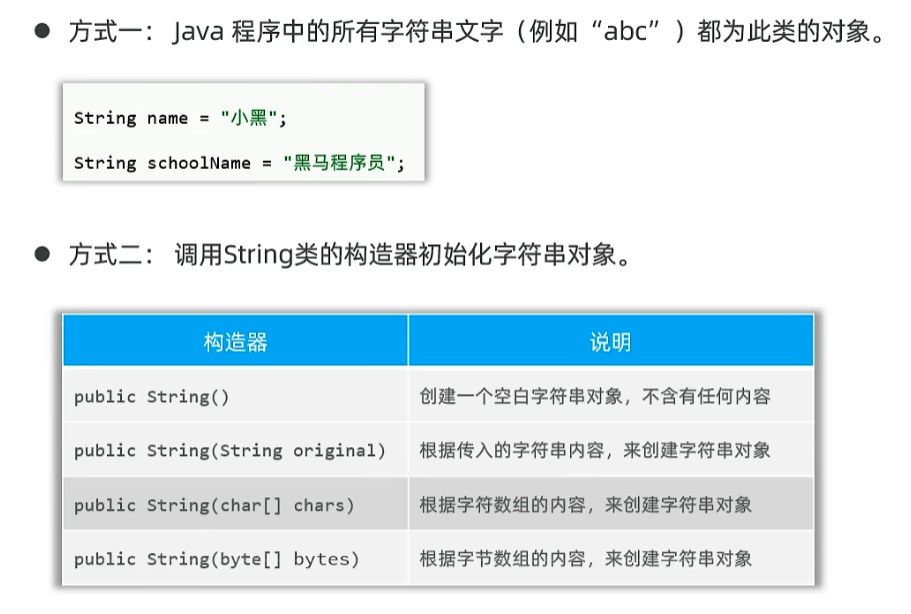
String
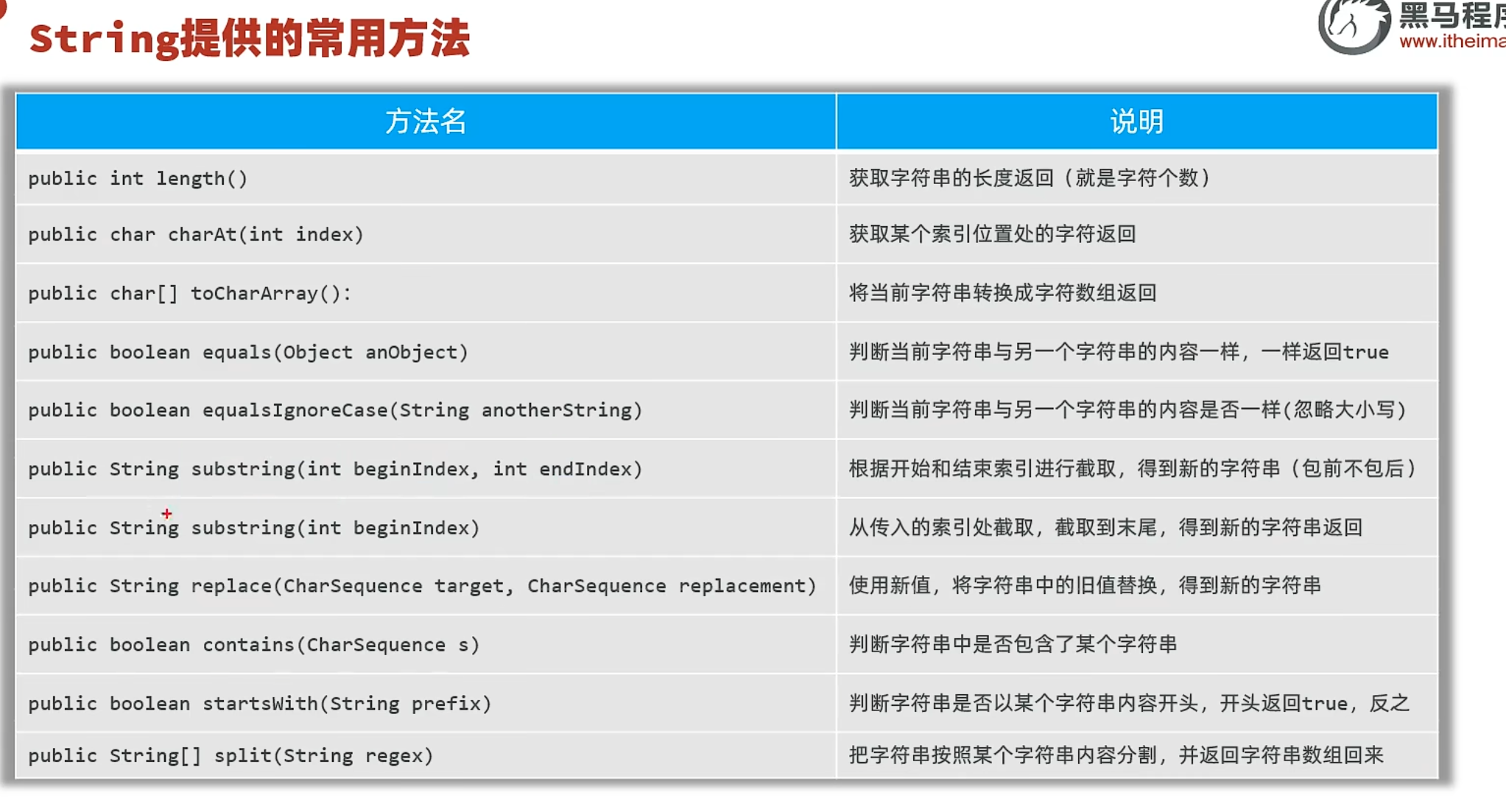
String提供的常用方法
ArrayList
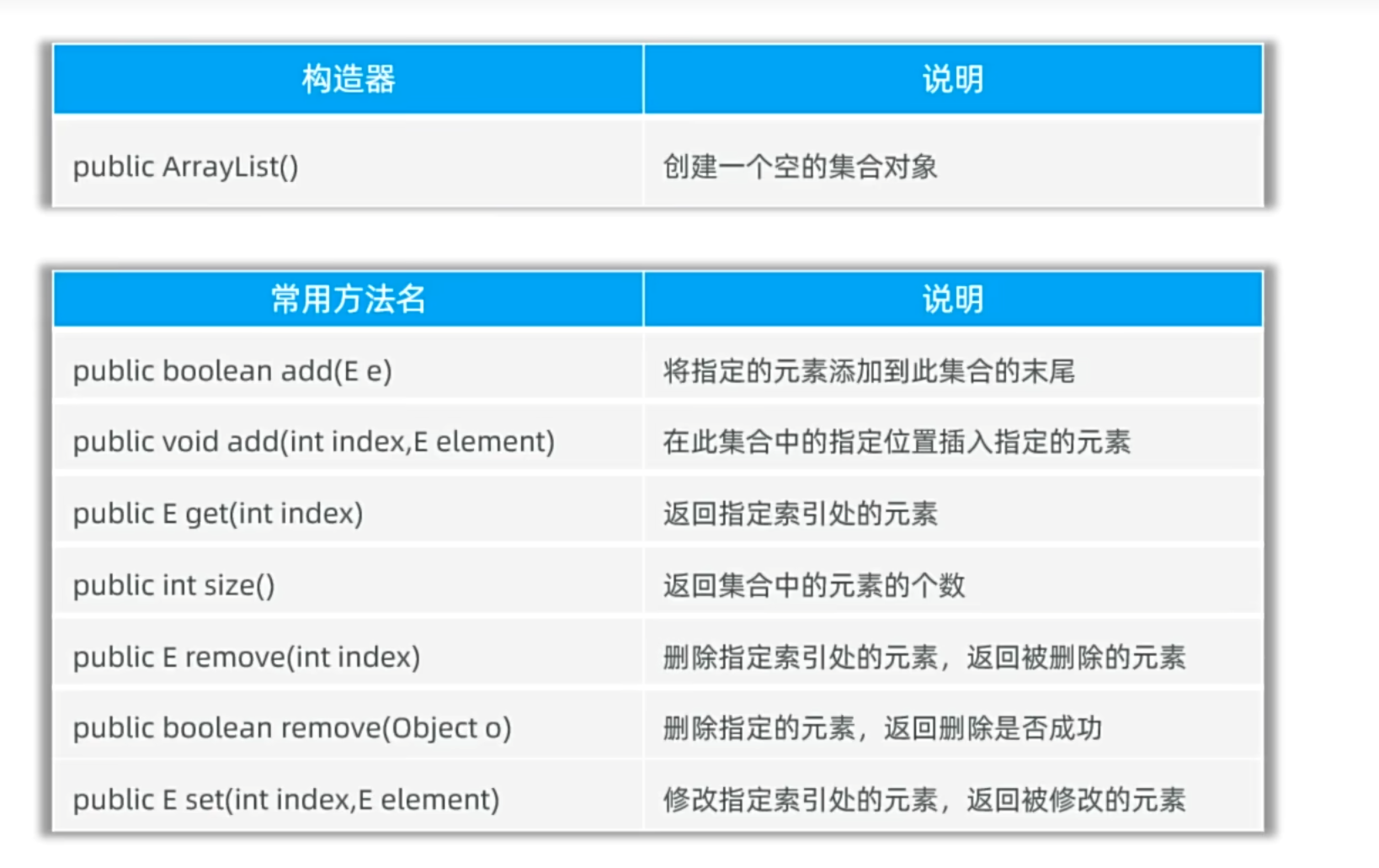
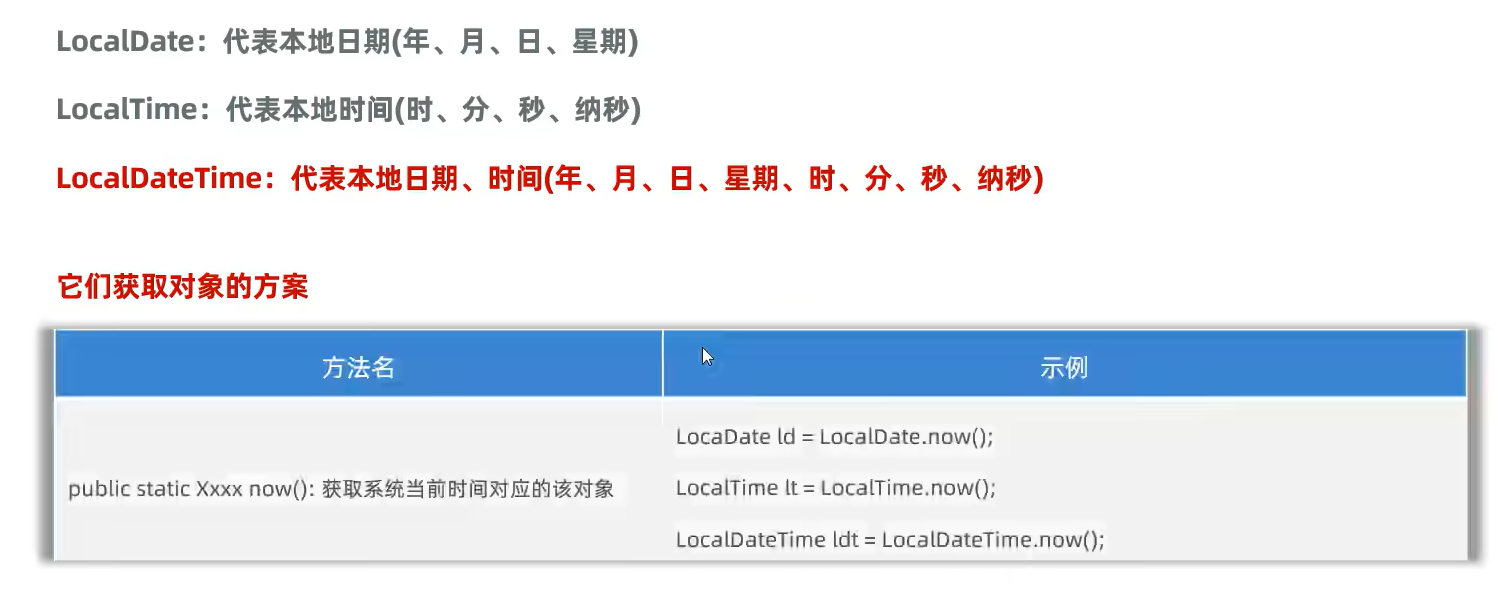
LocalDateTime
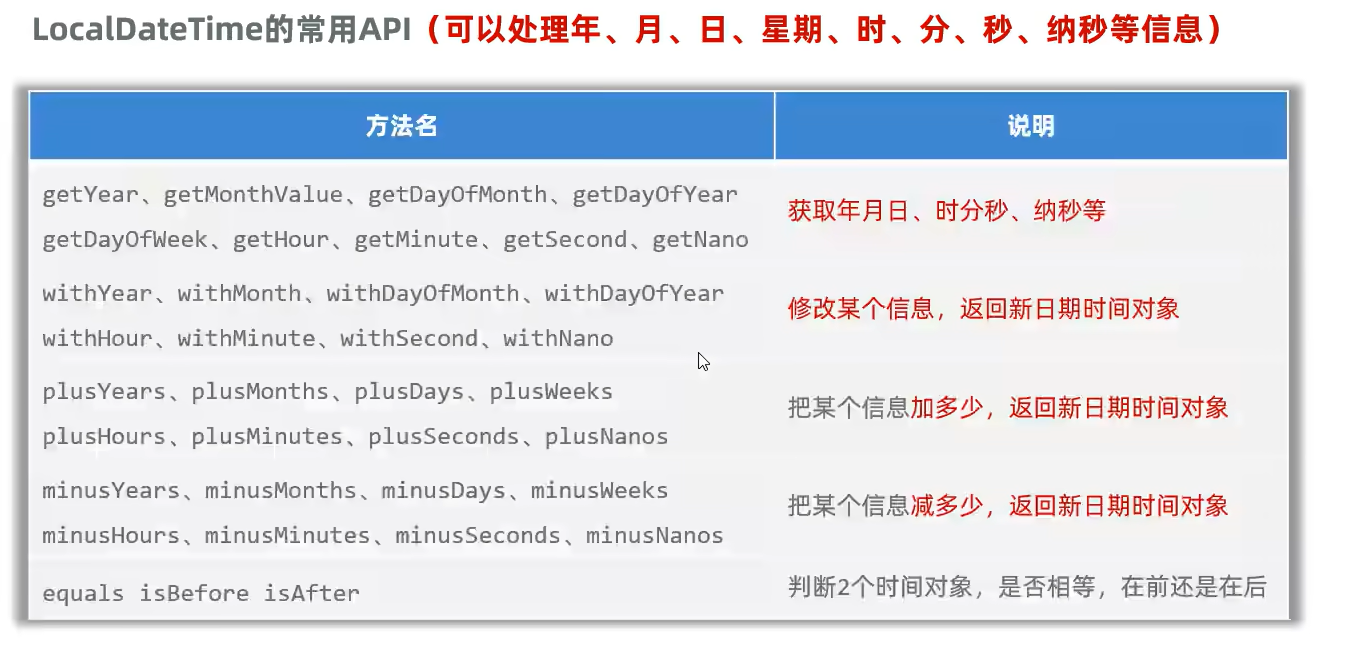
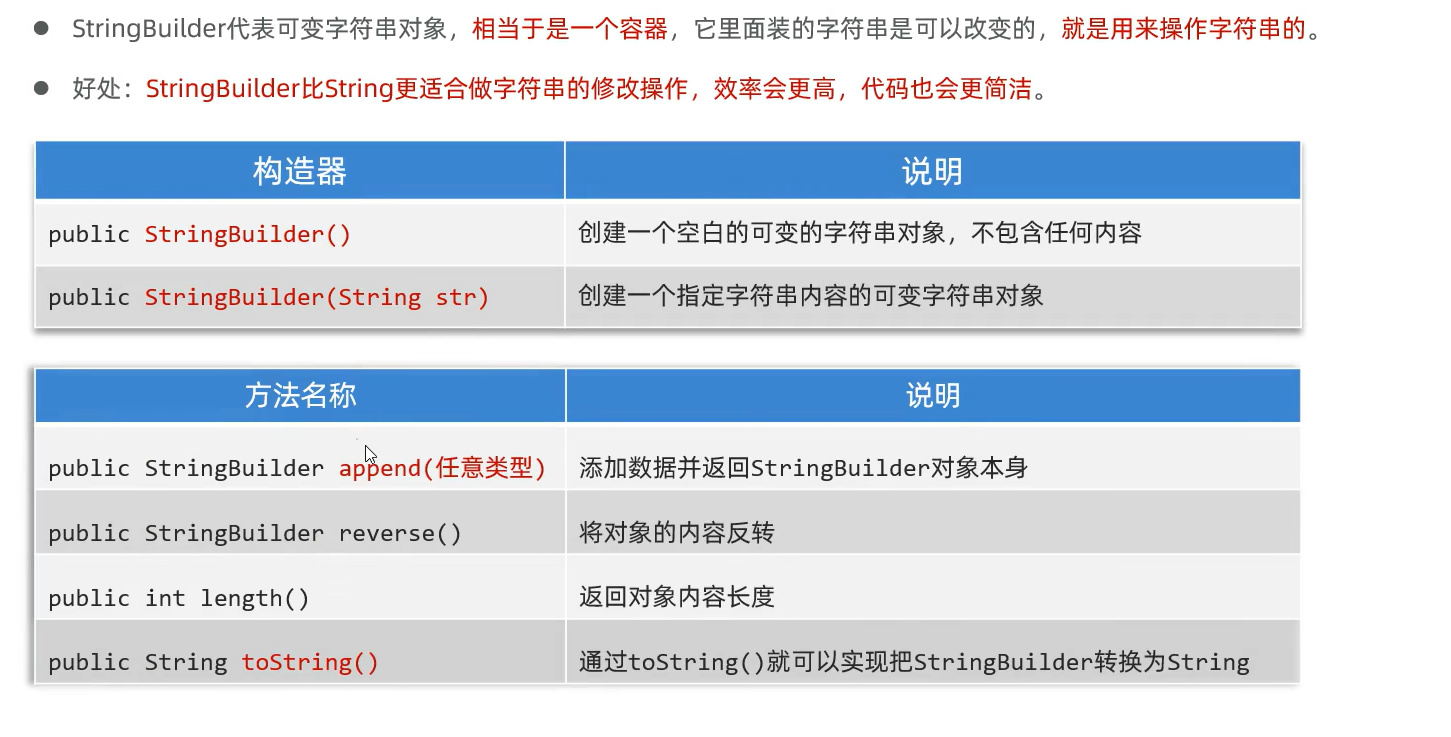
StirngBuilder
使用StringBuilder拼接字符串之后,还要把StringBuilder对象转回string
BigDecimal
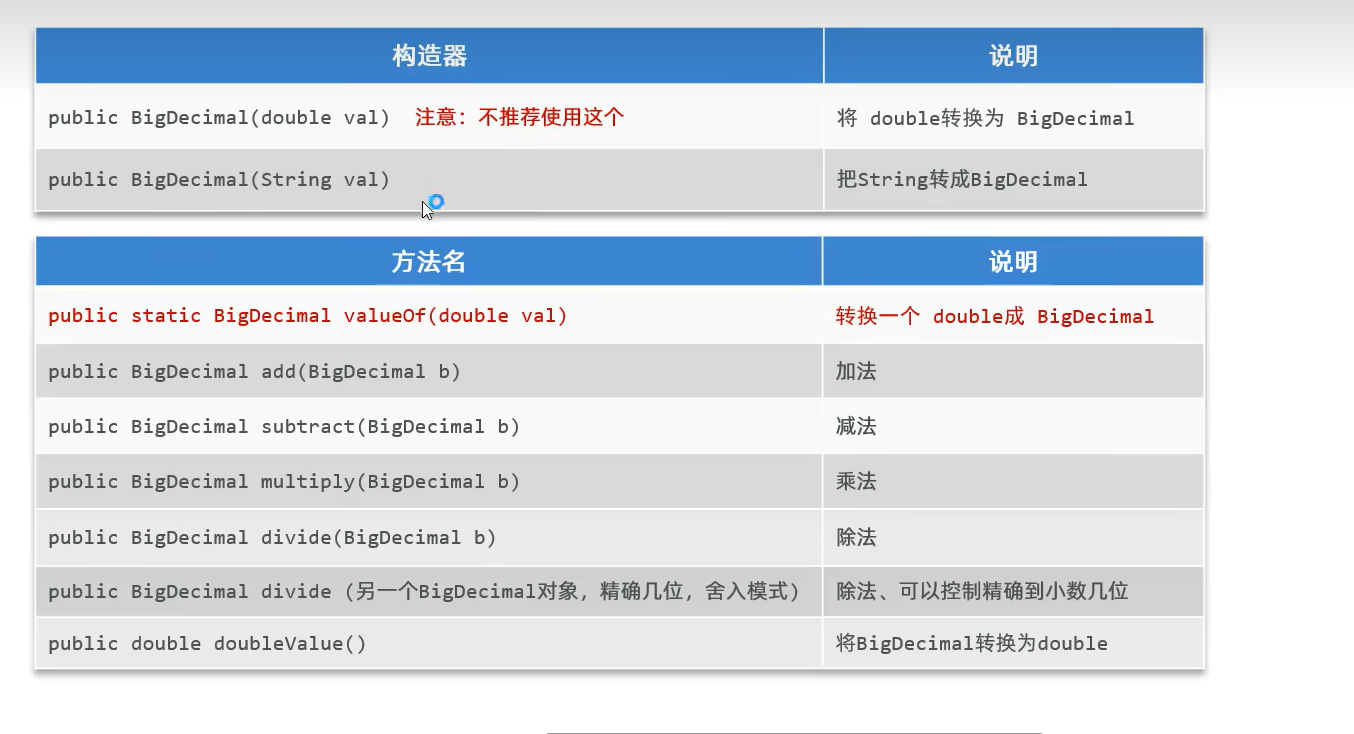
Java中的API和C++、python有什么异同
| 特性 |
Java |
C++ |
Python |
| 内存管理 |
自动垃圾回收 |
手动管理(new/delete) |
自动垃圾回收 |
| 类型系统 |
静态类型,强类型检查 |
静态类型,弱类型检查(可强制转换) |
动态类型,运行时检查 |
| API 调用方式 |
通过类方法、接口 |
通过函数、类方法、运算符重载 |
通过函数、模块、动态类型 |
| 跨平台性 |
字节码(JVM) |
需重新编译为平台特定机器码 |
解释执行(如 CPython) |
| 代码复杂度 |
严格的面向对象结构 |
支持多范式(面向对象、过程式) |
灵活,支持函数式编程 |
典型应用场景
- Java:适合企业级应用(如 Spring 框架的 RESTful API)、Android 开发,依赖成熟的生态系统(如 Maven、JUnit)916。
- C++:适用于高性能计算(如游戏引擎、操作系统底层 API)、资源敏感场景(如嵌入式系统)510。
- Python:快速原型开发(如 Flask/Django 的 Web API)、数据科学(如 NumPy、Pandas),依赖简洁语法和丰富库支持313。
Java的异常
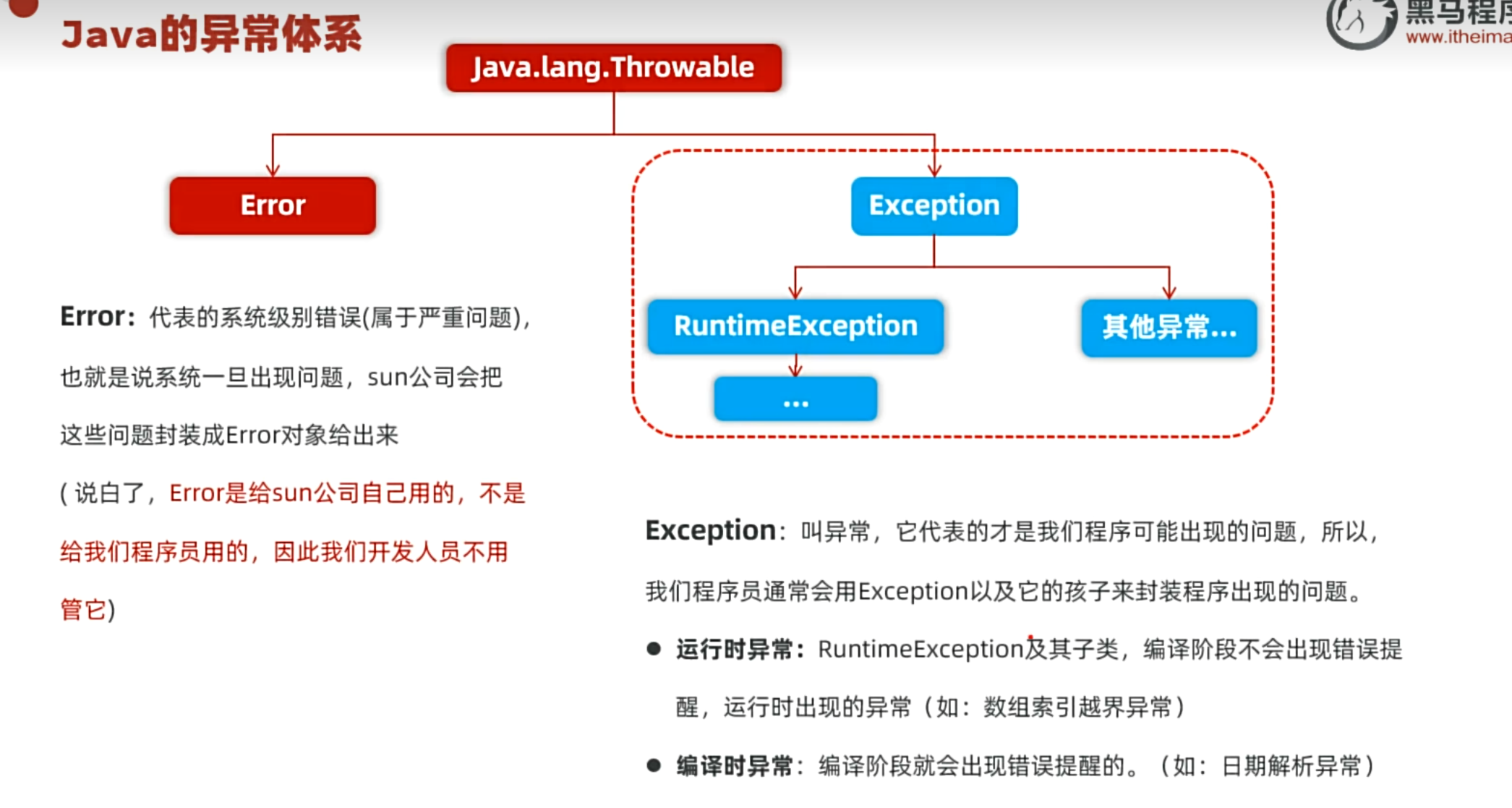
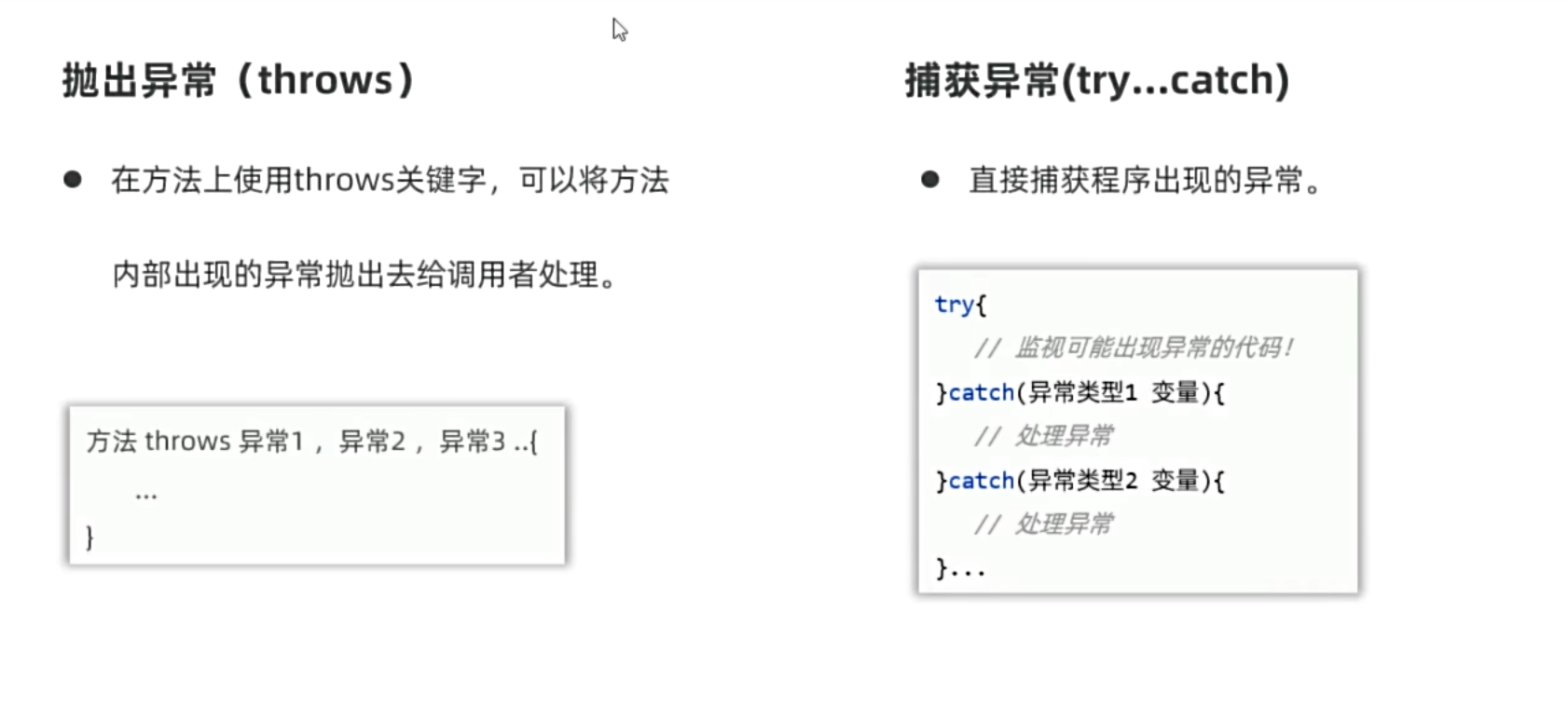
使用快捷键(alt+回车)可以快速将异常抛出,异常统称exception和python是一样的,可以用这个关键字接收所有异常,java异常是层级抛出的,在最初调用的main函数进行异常处理
1
2
3
4
5
6
7
8
9
10
11
12
13
14
15
16
17
18
19
20
21
22
| package yyssh.exceptionDemo;
public class exceptionDemo1 {
public static void main(String[] args) {
try {
System.out.println(test(15,0));
} catch (Exception e) {
System.out.println(e.getMessage());
System.out.println("程序异常");
e.printStackTrace();
}
System.out.println("程序结束");
System.exit(0);
}
public static int test(int a,int b) throws Exception {
int result =a/b;
if (b==0){
throw new Exception("除数不能为0");
}
return result;
}
}
|
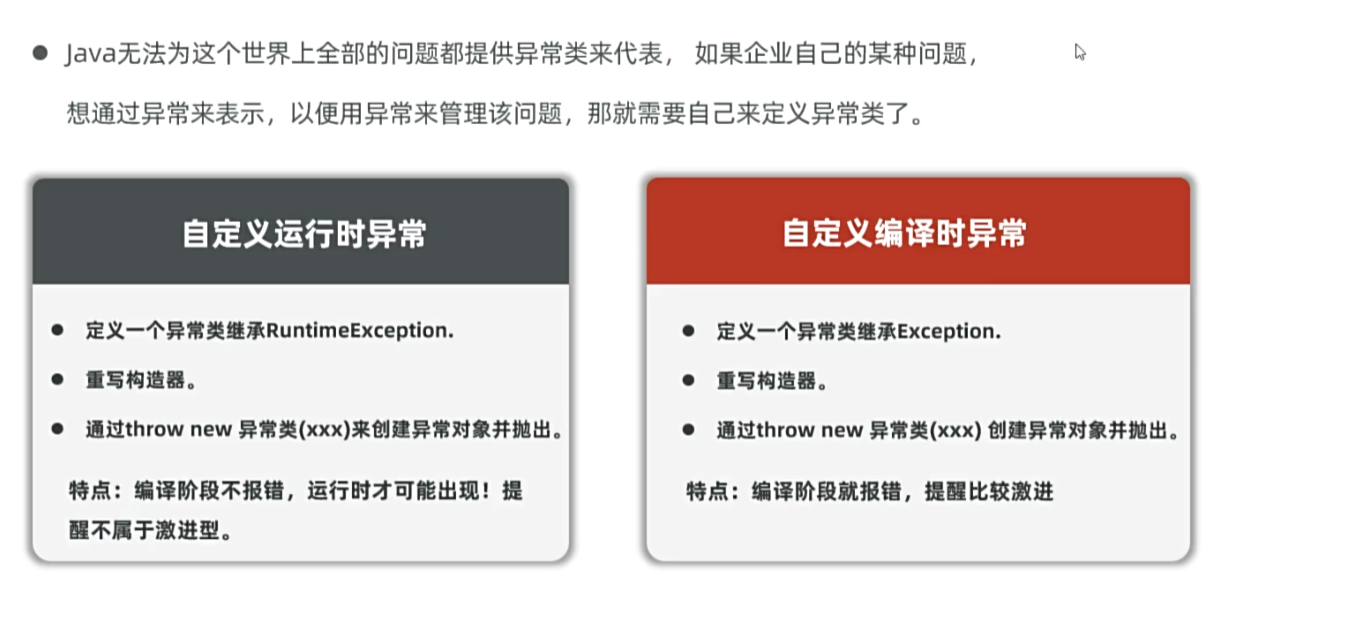
尽量定义运行时异常,编译时异常正在被全面放弃,因为编译时异常需要层级上抛需要每层进行处理或者上抛,资源消耗大
异常的解决方案
1
2
3
4
5
6
7
8
9
10
11
12
13
14
15
16
17
18
19
20
21
22
23
24
25
26
27
| package yyssh.exceptionDemo2;
import java.util.Scanner;
public class exceptionDemo2 {
public static void main(String[] args) {
System.out.println("程序开始");
while (true) {
try {
UserInputPrice();
System.out.println("用户输入成功!!!");
break;
} catch (Exception e) {
System.out.println("你的输入有问题,请输入正常的价格");
}
}
System.out.println("程序结束");
}
public static double UserInputPrice() {
Scanner sc = new Scanner(System.in);
System.out.println("请输入商品的价格:");
double price = sc.nextDouble();
return price;
}
}
|
java的异常和C++、python有什么异同
| 特性 |
Java |
C++ |
Python |
| 异常传播 |
检查型异常必须处理或声明 |
异常可跨函数传播,无需声明 |
异常自动传播,无需声明 |
| 性能开销 |
较高(因堆栈跟踪生成) |
低(无运行时类型检查) |
较高(动态类型和堆栈跟踪) |
| 错误恢复 |
支持完整的异常链(cause 属性) |
仅支持基本异常信息 |
支持异常链(raise ... from ...) |
java的泛型
泛型只在编译阶段,运行阶段就把泛型擦除了
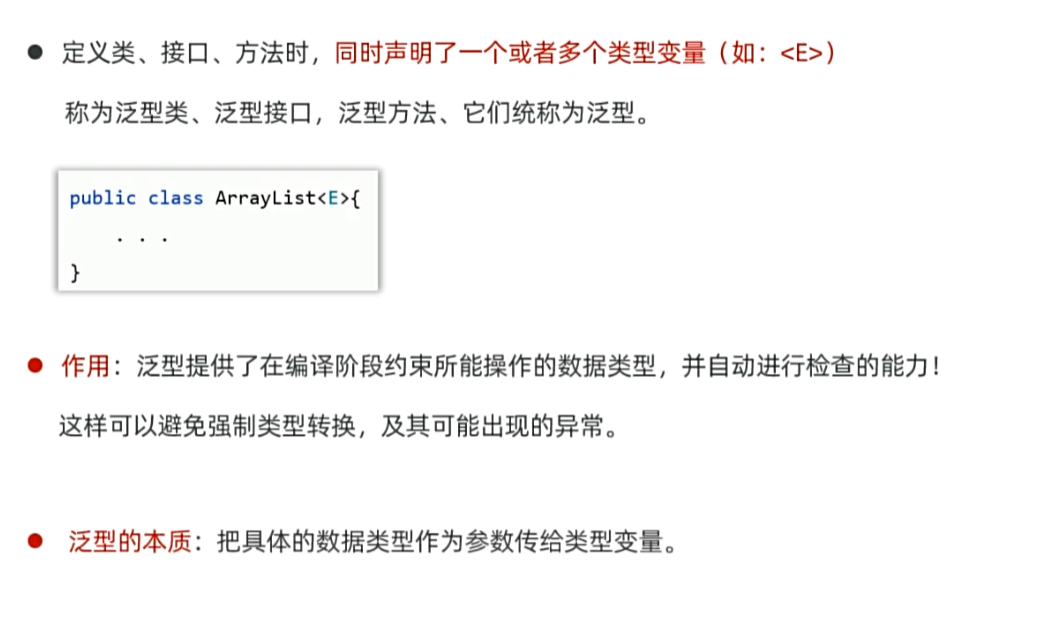
自我理解:泛型就是规定了一个集合只能输入或输出一种类型(因为java是强类型)
1
2
3
4
5
6
7
8
9
10
11
12
13
14
15
16
17
18
19
20
21
22
23
| package yyssh.knowGenerics;
import java.util.ArrayList;
public class knowGenerics {
public static void main(String[] args) {
ArrayList list = new ArrayList();
list.add(1);
list.add("yyssh");
list.add(true);
list.add(new Object());
for (Object o : list) {
System.out.println(o);
}
ArrayList<String> StringList = new ArrayList<>();
StringList.add("yyssh");
for (String s : StringList) {
System.out.println(s);
}
}
}
|
shift+f6一键式改名
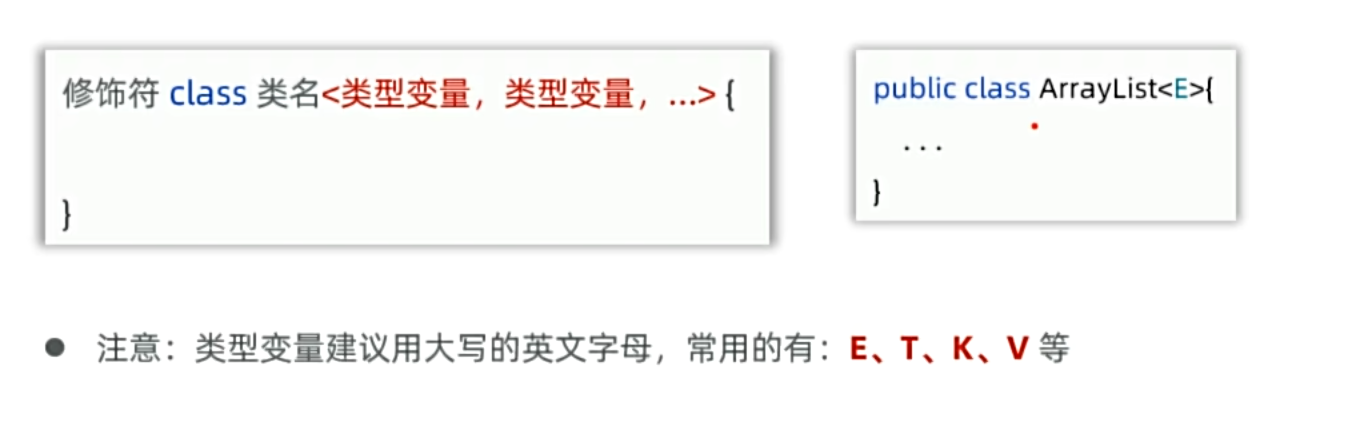
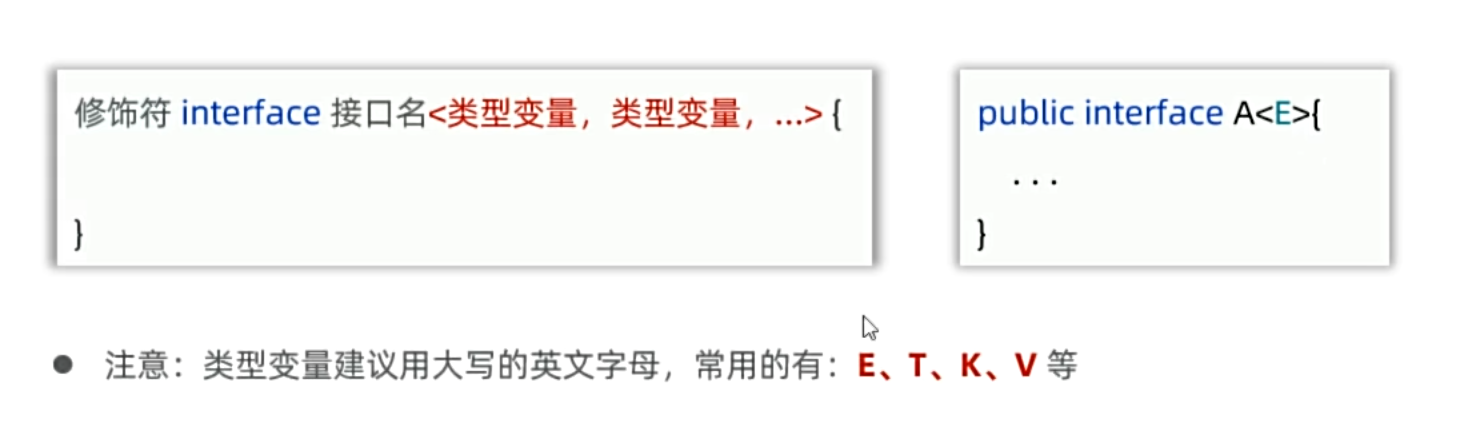
泛型类和接口
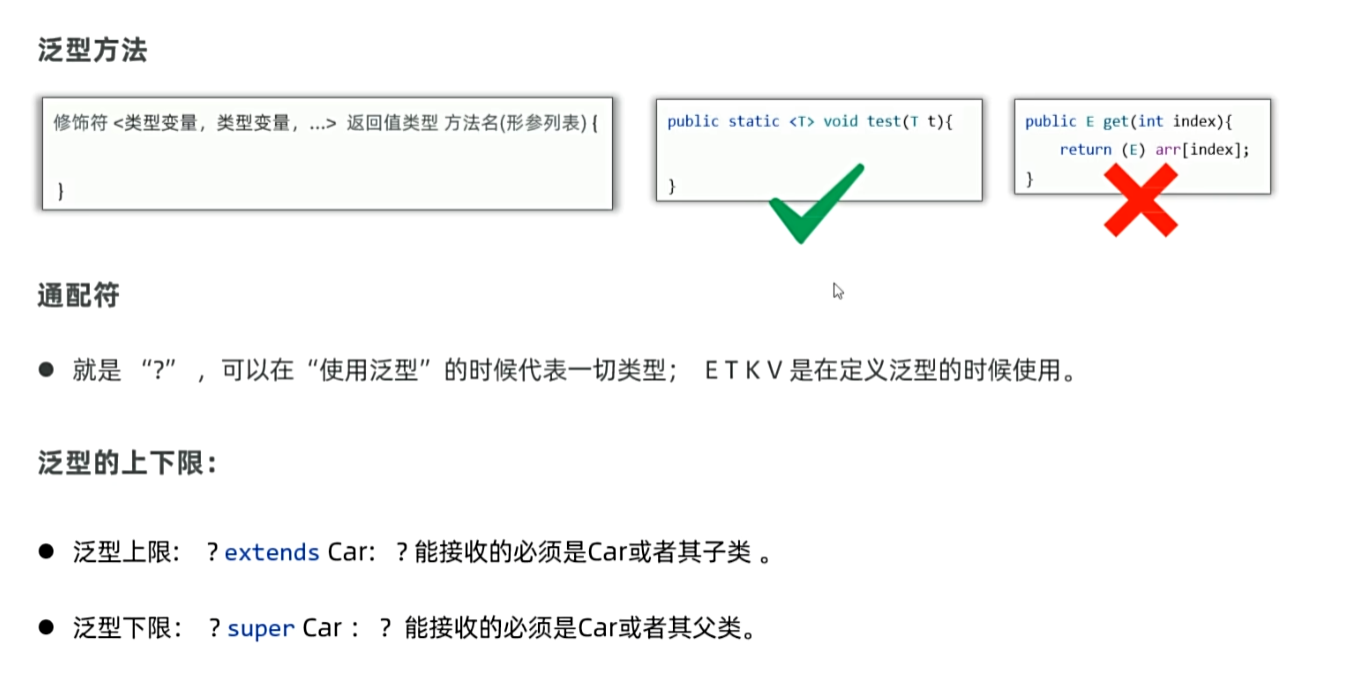
泛型的方法、通配符和上下限
泛型的包装类
Java为了灌输它的万物皆对象的理念,只允许泛型传入的数据是对象,而不能传入基本数据类型,所以包装类也就应运而生,包装类就是将基本数据类型转换为对象
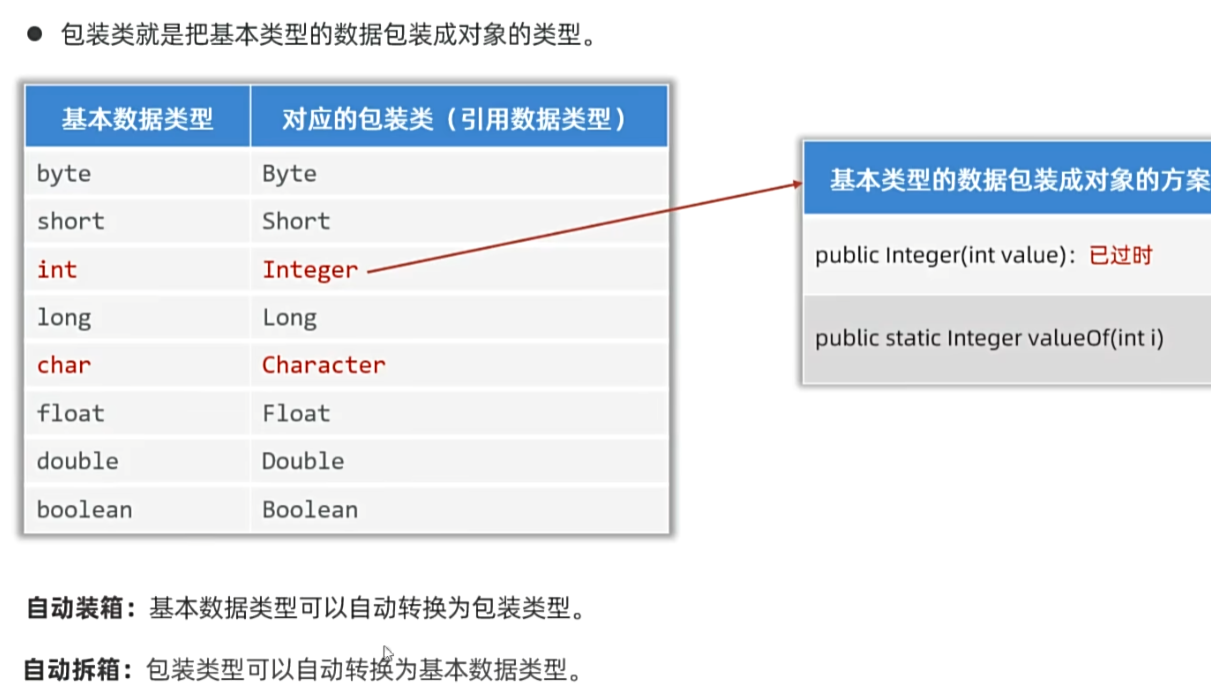
其实第二种方法也不是经常使用可以直接将两者进行转换看,因为java内置了一个自动装箱(自动把int转换为Integer)和自动拆箱(自动把Integer转换为int)的功能
但是这种方法没有被程序员认可,所以sun公司提供了包装类的两个好用的API
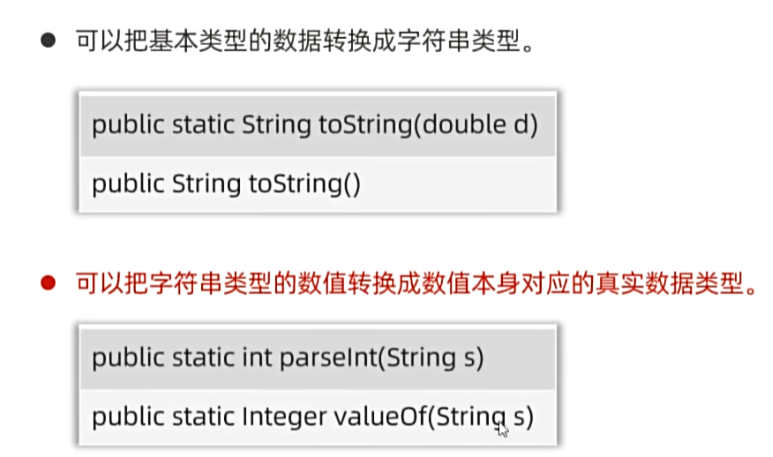
1
2
3
4
5
6
7
8
9
10
11
12
13
14
15
16
17
18
19
20
21
22
23
24
25
26
27
28
29
30
31
32
33
34
| package yyssh.genericsPack;
import java.util.ArrayList;
public class PackClass {
public static void main(String[] args) {
ArrayList <Integer> list = new ArrayList<>();
list.add(123);
list.add(456);
for (Integer integer : list) {
System.out.println(integer);
}
Integer i =123;
System.out.println(i);
int j=i;
System.out.println(j);
System.out.println(i==j);
String name = i.toString();
System.out.println(name);
String is = i+"";
System.out.println(is);
System.out.println(is.getClass());
String a = "123";
String c = "456";
Integer b = Integer.parseInt(a);
Integer d = Integer.valueOf(c);
System.out.println(b);
System.out.println(b.getClass());
System.out.println(d);
System.out.println(d.getClass());
}
}
|
java的泛型和C++、python有什么异同
| 特性 |
Java 泛型 |
C++ 模板 |
Python 类型系统 |
| 类型检查时机 |
编译时 |
编译时 |
运行时(类型提示为静态检查工具服务) |
| 实现机制 |
类型擦除 |
代码实例化 |
动态类型 + 类型提示 |
| 支持基本类型 |
需装箱(如 Integer) |
直接支持(如 int) |
无泛型,直接支持所有类型 |
| 类型约束 |
显式边界(extends) |
隐式约束(操作符/方法存在性) |
鸭子类型 |
| 代码复用灵活性 |
高(类型安全) |
极高(支持元编程) |
极高(动态特性) |
java的集合
collection集合的特点
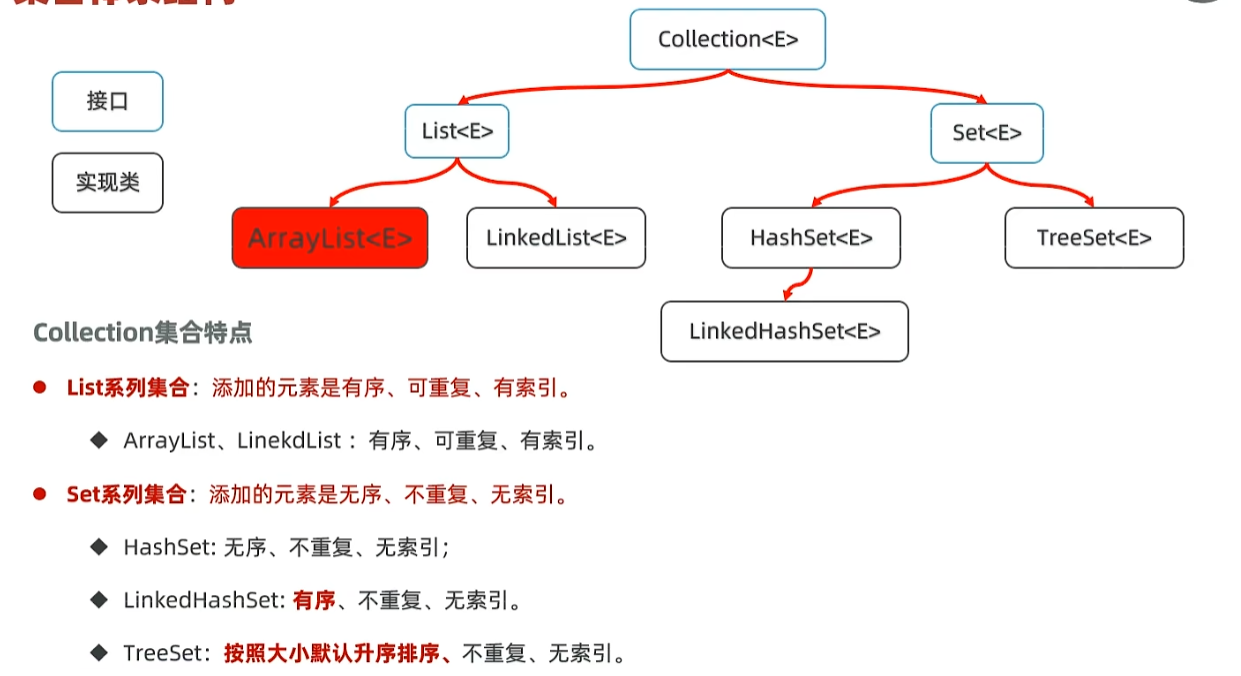
collection的工具类
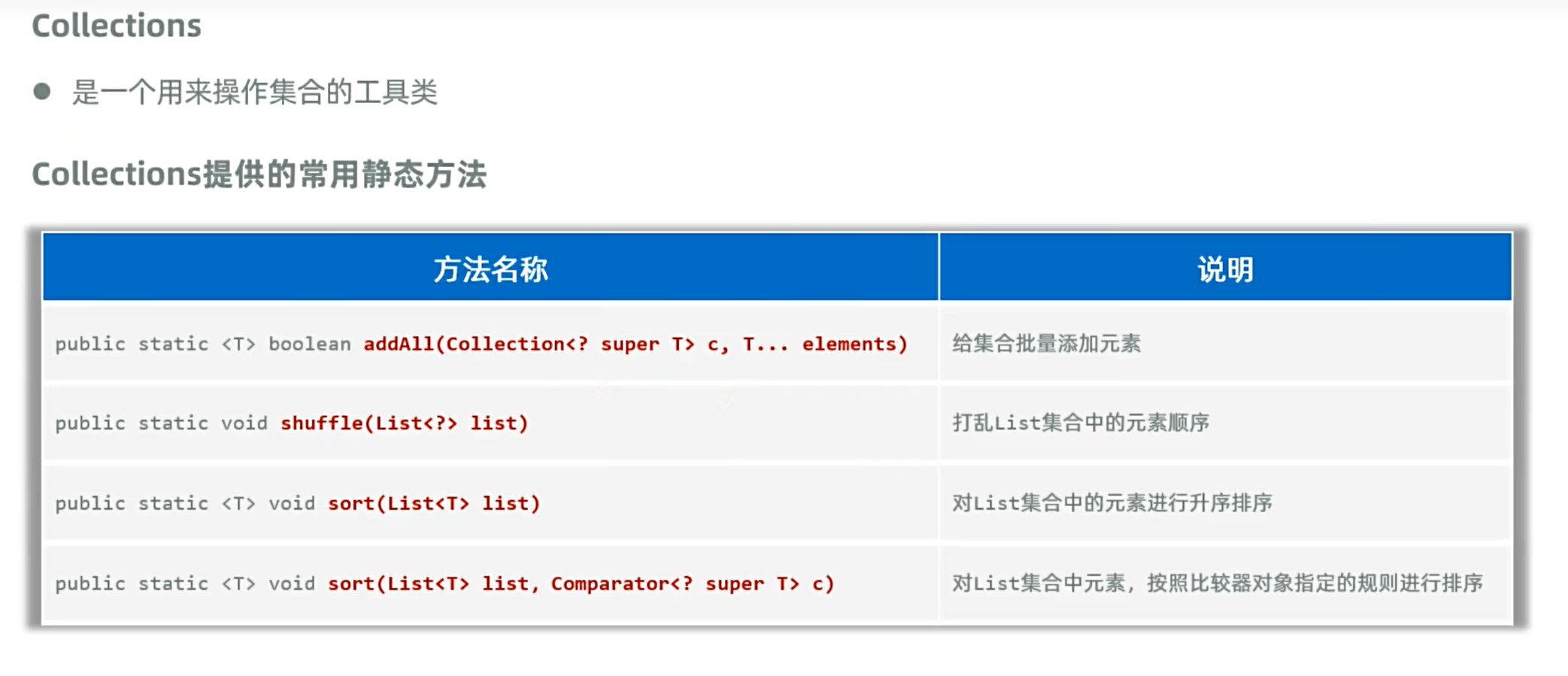
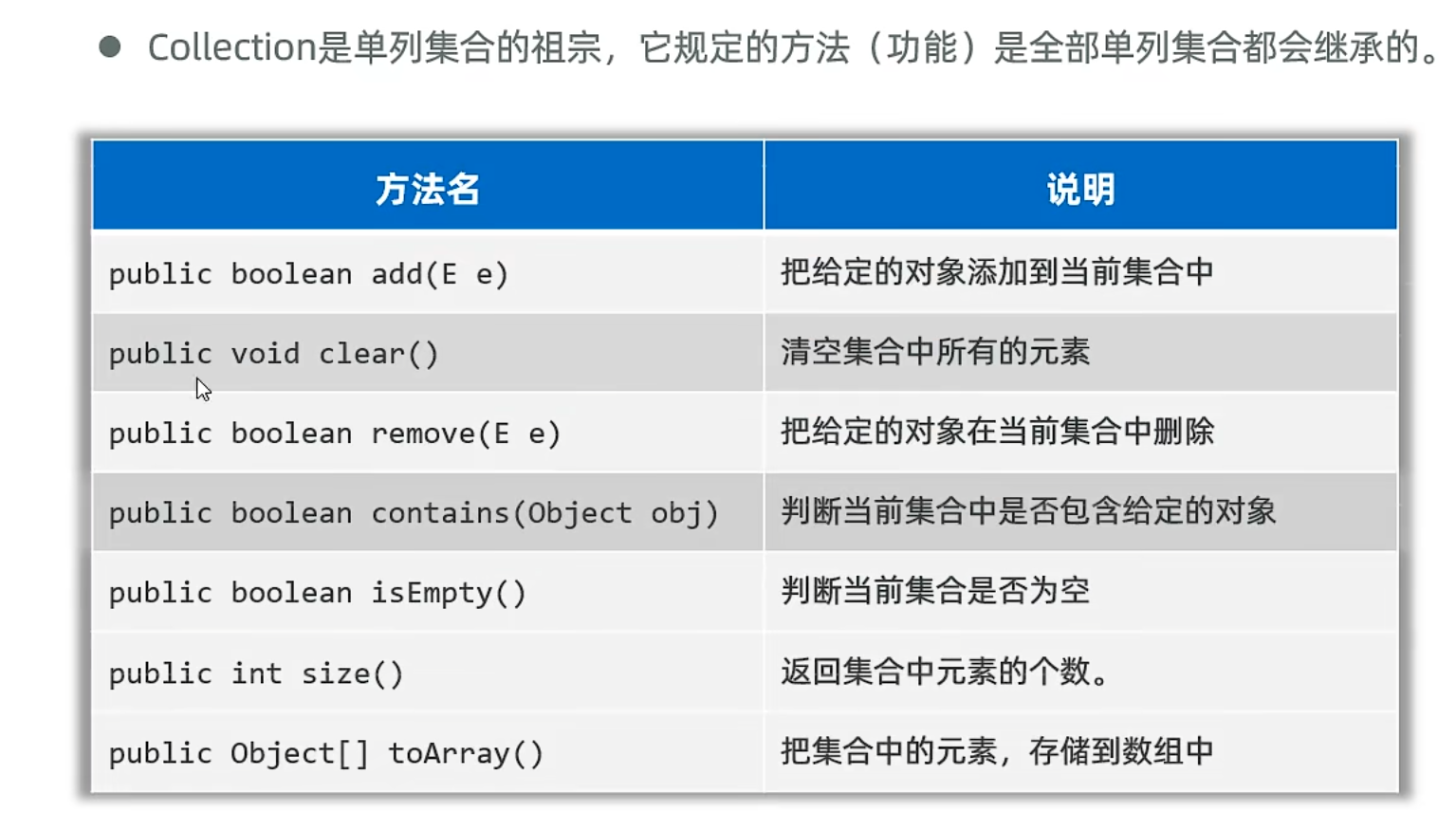
collection常用方法
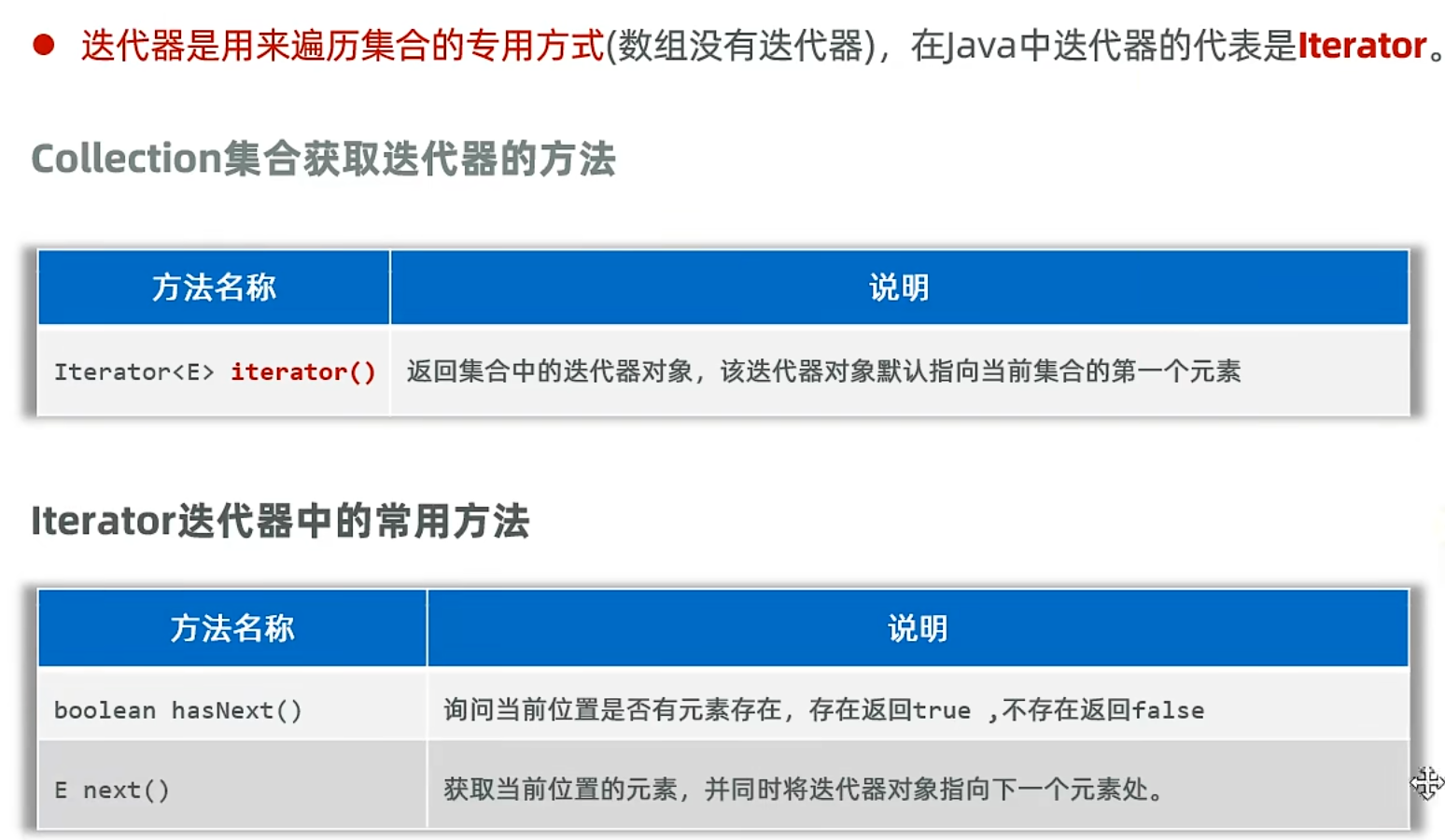
collection的遍历方法:迭代器遍历
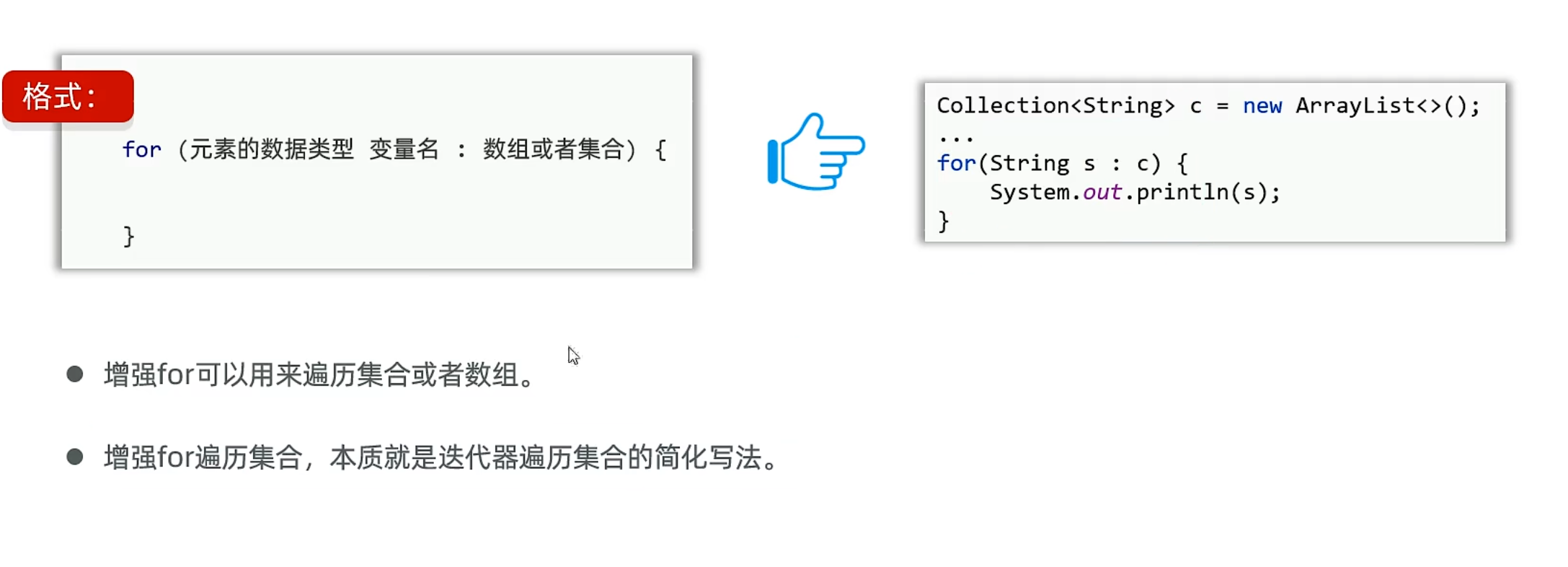
collection的遍历方法:for循环遍历
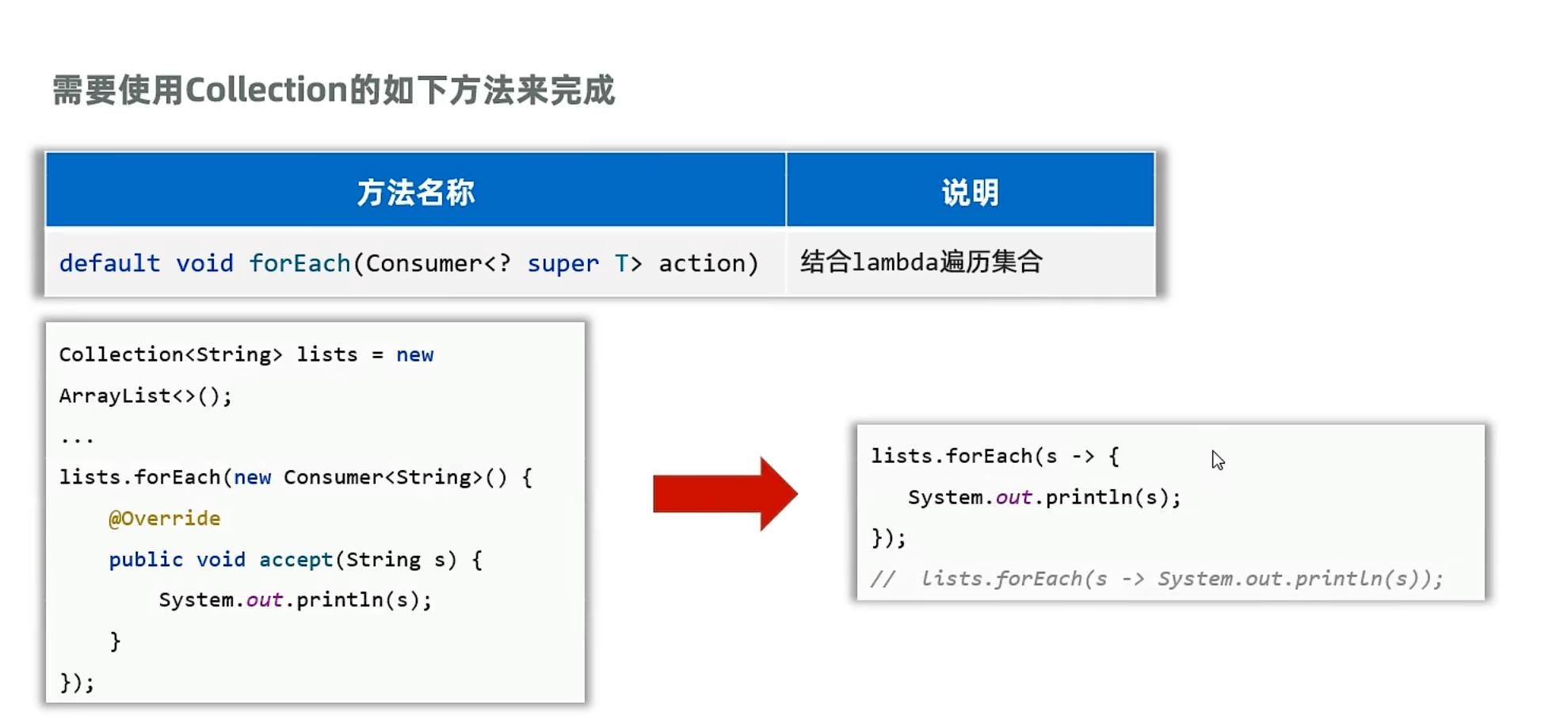
collection的遍历方法:lambda遍历
1
2
3
4
5
6
7
8
9
10
11
12
13
14
15
16
17
18
19
20
21
22
23
24
25
26
27
28
29
30
31
32
33
34
35
36
37
38
39
40
41
42
43
44
45
46
| package yyssh.knowCollection;
import java.util.ArrayList;
import java.util.List;
import java.util.Iterator;
import java.util.function.Consumer;
public class CollectionDemo1 {
public static void main(String[] args) {
List<String> list =new ArrayList<>();
list.add("123");
list.add("yyssh");
list.add("yanyuan");
list.add("chenzhuang");
list.add("张浩");
Iterator<String> iterator = list.iterator();
while(iterator.hasNext()){
String s = iterator.next();
System.out.println(s);
}
System.out.println("-------------------------------------------------------");
for (String s : list) {
System.out.println(s);
}
System.out.println("-------------------------------------------------------");
list.forEach(s-> System.out.println(s));
System.out.println("--------------------------------------------------------");
list.forEach(System.out::println);
System.out.println(System.out.getClass());
}
}
|
java集合的三种遍历循环,有什么区别,同时又会造成什么问题?
在说这三种循环的区别时,先谈一下这三种循环会造成什么问题?
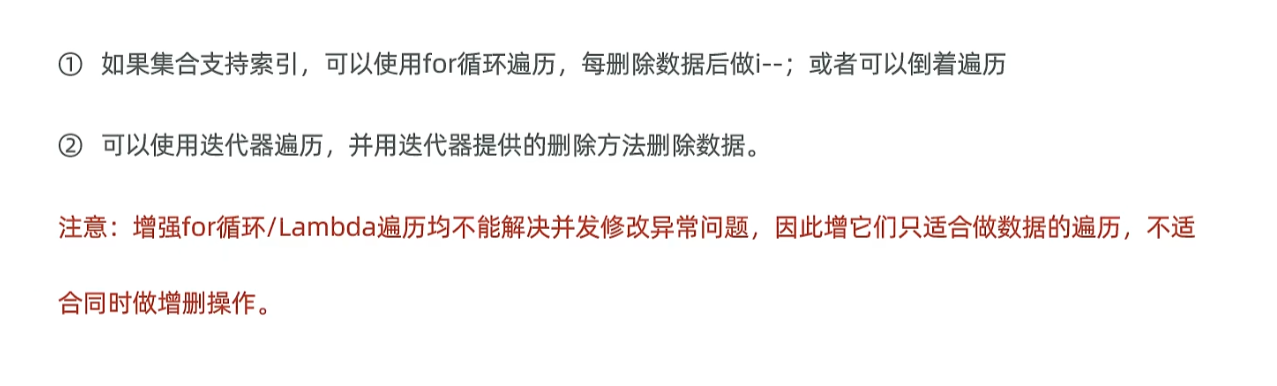
- 遍历集合的同时又存在增删集合元素的行为时可能出现业务异常,这种现象被称为并发异常问题
异常产生的原因,因为在进行正序遍历时,删除一位,指针往前一位,集合补齐一位(说白了就是集合的长度是一直变化的),就会导致集合补齐的这一位逃过检查,从而造成删除不完全
1
2
3
4
5
6
7
8
9
10
11
12
13
14
15
16
17
18
19
20
21
22
23
24
| import java.util.ArrayList;
import java.util.List;
public class circleDemo1 {
public static void main(String[] args) {
List<String> list = new ArrayList<>();
list.add("金龙");
list.add("木龙");
list.add("水龙");
list.add("火龙");
list.add("土龙");
list.add("龙虾");
list.add("龙王");
list.add("男人");
list.add("女人");
for (int i=0;i< list.size();i++) {
String name = list.get(i);
if (name.contains("龙")){
list.remove(i);
}
}
System.out.println(list);
}
}
|
可以看到含有龙的字样并没有被删除完全,这里我们可以采取两种解决方案
方案一:
方案二:
使用倒序循环,将不存在漏掉情况
1
2
3
4
5
6
| for (int i= list.size()-1;i>=0;i--) {
String name = list.get(i);
if (name.contains("龙")){
list.remove(i);
}
}
|
这前面两个例子是为了说明在有索引的情况下是可以采用上面方案解决并发异常问题的,但是如果没有索引的话,例如Set集合,就无法采用上面的方案进行删除,只能采用迭代器自带的删除功能进行删除
1
2
3
| for (String name : list){
System.out.println(name);
}
|
1
2
|
list.forEach(System.out::println);
|
都无法进行索引,也无法进行并发操作,只有迭代器可以
1
2
3
4
5
6
7
8
| Iterator<String> iterator = list.iterator();
while (iterator.hasNext()){
String name = iterator.next();
if (name.contains("龙")){
iterator.remove();
}
}
System.out.println(list);
|
ArrayList底层原理
ArrayList的扩容原理是基于数组存储数据的,查询数据效率高,但是增减效率慢,第一次扩容10个长度,以后每一次扩容1.5倍
LinkedList底层原理
LinkedLIst底层是基于双链表存储数据的,查询效率慢,无论查询哪个数据都要从头或者尾(双向链表)开始找,增删速率高
java为LinkedList增加了许多对于首尾操作的方法
LinkedList的应用场景队列和栈
1
2
3
4
5
6
7
8
9
10
11
12
13
14
15
16
17
18
19
20
21
22
23
24
25
26
27
28
29
30
31
32
33
34
35
36
37
38
| package yyssh.applyLinkedListDemo1;
import java.util.List;
import java.util.LinkedList;
public class LinkedListDemo1 {
public static void main(String[] args) {
LinkedList<String> queue = new LinkedList<>();
queue.addLast("张三");
queue.addLast("李四");
queue.addLast("王五");
queue.addLast("赵六");
for (int i=0;i<queue.size();i++){
System.out.println(queue.removeFirst());
i--;
}
System.out.println("------------------------------------------------------------------");
LinkedList<String> stack = new LinkedList<>();
stack.push("张三");
stack.push("李四");
stack.push("王五");
stack.push("赵六");
for (int i=0;i<stack.size();i++){
System.out.println(stack.pop());
i--;
}
}
}
|
Set集合
java的哈希表
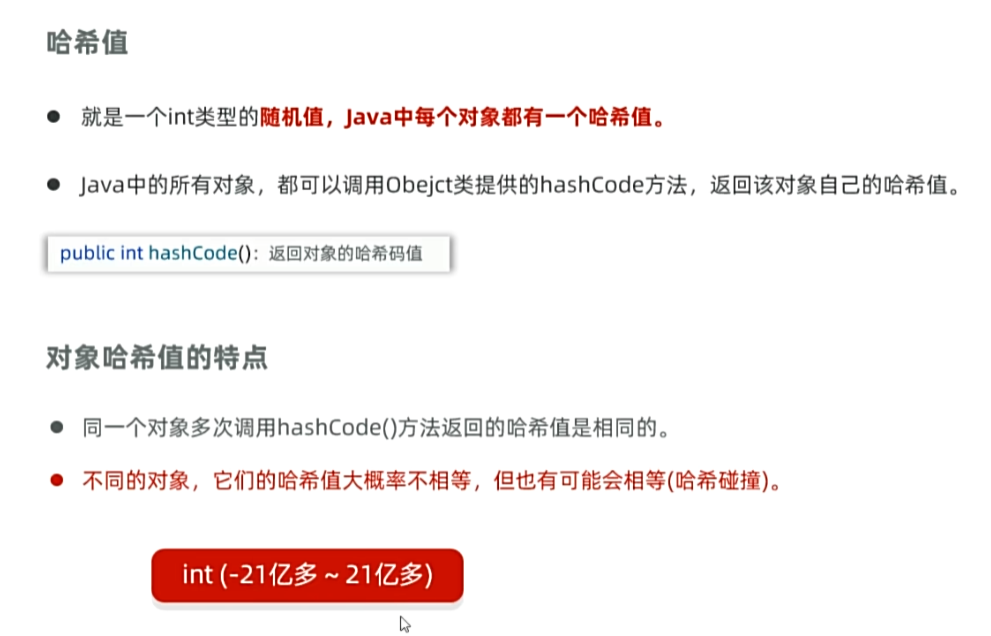
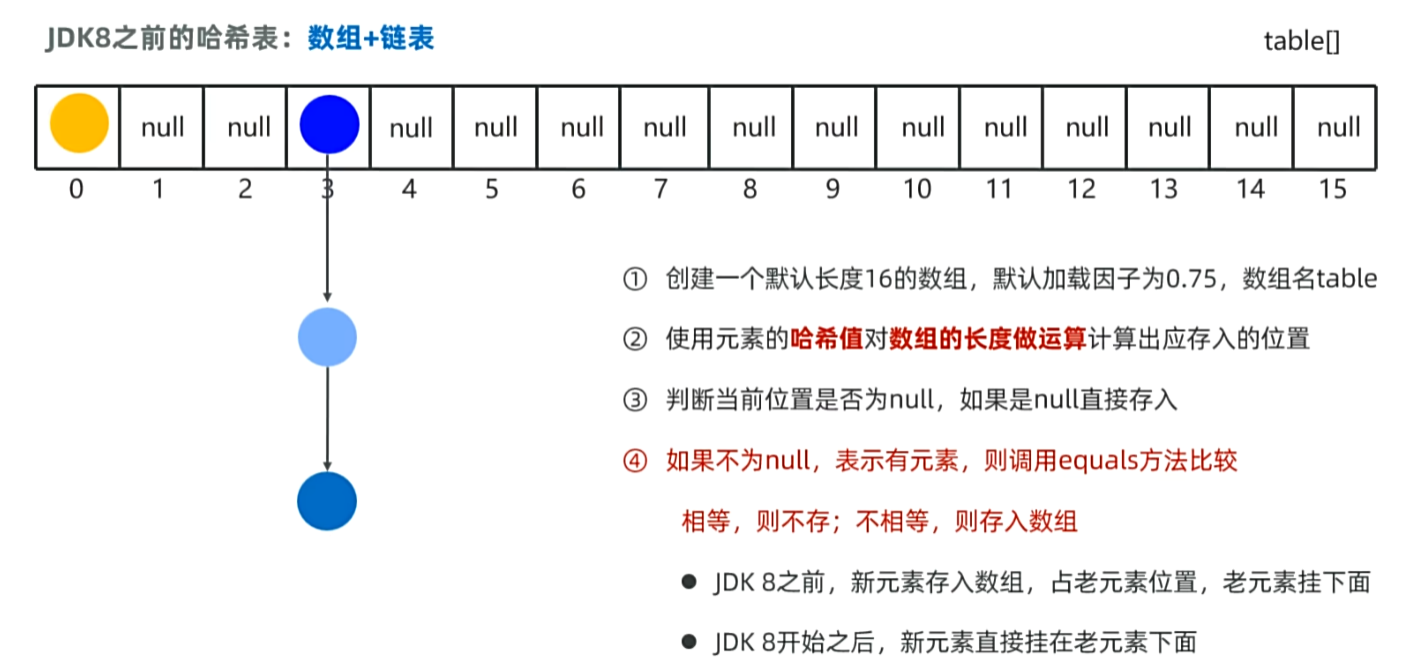
JDK8之前,哈希表=数组+链表
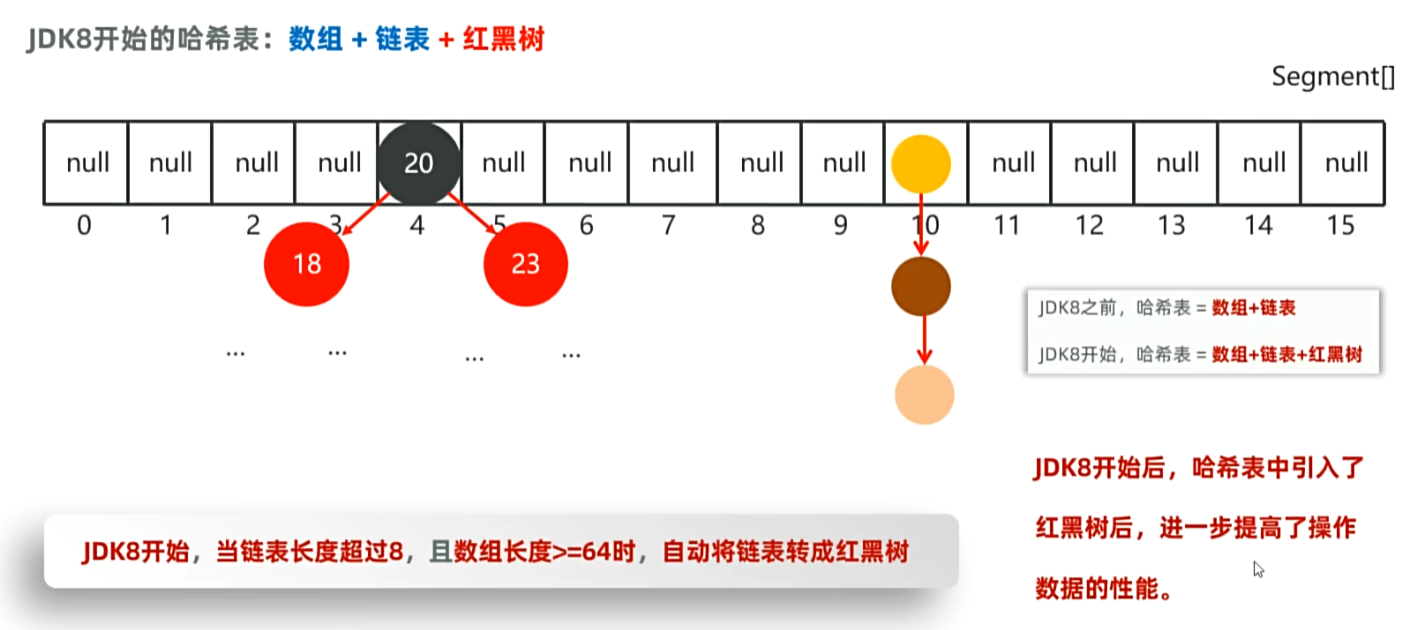
JDK8之后,哈希表=数组+链表+红黑树
哈希表是一种增删改查数据效率都比较高的数据结构
HashSet集合对象去重操作
HashSet虽然是不重复的,但是对象之间如果数据完全相等,但对象之间的hash值不一定相等
1
2
3
4
5
6
7
8
9
10
11
12
13
14
15
16
17
18
19
20
21
22
| package yyssh.hashset;
import java.util.Set;
import java.util.HashSet;
public class HashSetSingle {
public static void main(String[] args) {
Set<Student> Students = new HashSet<>();
Students.add(new Student("yanyuan", 21, 100, 1, "男", "北京", "123456789"));
Students.add(new Student("chenzhuang", 18, 91, 2, "男", "北京", "123456789"));
Students.add(new Student("zhanghao", 20, 95, 3, "男", "北京", "123456789"));
Students.add(new Student("zhangjie", 39, 88, 4, "男", "北京", "123456789"));
Students.add(new Student("chenzhuang", 18, 91, 2, "男", "北京", "123456789"));
Students.add(new Student("zhanghao", 20, 95, 3, "男", "北京", "123456789"));
for (Student s : Students) {
System.out.println(s);
}
}
}
|
学生类:
1
2
3
4
5
6
7
8
9
10
11
12
13
14
15
16
17
18
19
20
21
22
23
24
25
26
27
28
29
30
31
32
33
34
35
36
37
38
39
40
41
42
43
44
45
46
47
48
49
50
51
52
53
54
55
56
57
58
59
60
61
62
63
64
65
66
67
68
69
70
71
72
73
74
75
76
77
78
79
80
81
82
83
84
85
86
87
88
89
90
91
92
93
94
95
96
97
98
99
100
101
102
103
104
105
| package yyssh.hashset;
import java.util.Objects;
public class Student {
private String name;
private int age;
private int score;
private int id;
private String sex;
private String address;
private String phone;
public Student(String name, int age, int score, int id, String sex, String address, String phone) {
this.name = name;
this.age = age;
this.score = score;
this.id = id;
this.sex = sex;
this.address = address;
this.phone = phone;
}
@Override
public boolean equals(Object o) {
if (this == o) return true;
if (o == null || getClass() != o.getClass()) return false;
Student student = (Student) o;
return age == student.age && score == student.score && id == student.id && Objects.equals(name, student.name) && Objects.equals(sex, student.sex) && Objects.equals(address, student.address) && Objects.equals(phone, student.phone);
}
@Override
public int hashCode() {
return Objects.hash(name, age, score, id, sex, address, phone);
}
@Override
public String toString() {
return "Student{" +
"name='" + name + '\'' +
", age=" + age +
", score=" + score +
", id=" + id +
", sex='" + sex + '\'' +
", address='" + address + '\'' +
", phone='" + phone + '\'' +
'}'+'\n';
}
public String getName() {
return name;
}
public void setName(String name) {
this.name = name;
}
public int getAge() {
return age;
}
public void setAge(int age) {
this.age = age;
}
public int getScore() {
return score;
}
public void setScore(int score) {
this.score = score;
}
public int getId() {
return id;
}
public void setId(int id) {
this.id = id;
}
public String getSex() {
return sex;
}
public void setSex(String sex) {
this.sex = sex;
}
public String getAddress() {
return address;
}
public void setAddress(String address) {
this.address = address;
}
public String getPhone() {
return phone;
}
public void setPhone(String phone) {
this.phone = phone;
}
}
|
主要在于equals和hashCode两个方法,但是sun公司都帮你写好了,直接调用就可以了,原理就是hashset集合存储数据要经过两个比较,一个是hashcode算hash值,一个是equals比较实际值
TreeSet集合自定义类型对象排序
1
2
3
4
5
6
7
8
9
10
11
12
13
14
15
16
17
18
19
20
21
22
23
24
| package yyssh.TreeSet;
import java.util.Comparator;
import java.util.Set;
import java.util.TreeSet;
public class TreeSetDemo1 {
public static void main(String[] args) {
Set<Teacher> teachers =new TreeSet<>(( o1, o2)->Double.compare(o1.getSalary(), o2.getSalary()));
teachers.add(new Teacher("yanyuan", 21, "男", 9009.9));
teachers.add(new Teacher("chenzhuang", 18, "男", 10010.4));
teachers.add(new Teacher("zhanghao", 20, "男", 10009.9));
teachers.add(new Teacher("zhangjie", 39, "男", 99999.9));
teachers.add(new Teacher("huangzhenbao", 18, "男", 199999.9));
System.out.println(teachers);
}
}
|
1
2
3
4
5
6
7
8
9
10
11
12
13
14
15
16
17
18
19
20
21
22
23
24
25
26
| package yyssh.TreeSet;
import lombok.AllArgsConstructor;
import lombok.Data;
import lombok.NoArgsConstructor;
@Data
@NoArgsConstructor
@AllArgsConstructor
public class Teacher {
private String name;
private int age;
private String sex;
private double salary;
@Override
public String toString() {
return "Teacher{" +
"name='" + name + '\'' +
", age=" + age +
", sex='" + sex + '\'' +
", salary=" + salary +
'}'+'\n';
}
}
|
集合的选择
- 如果希望记住元素的添加顺序,需要存储重复的元素,又要频繁的根据索引查询数据?
- 用ArrayList集合(有序、可重复、有索引),底层基于数组的(常用)。
- 如果希望记住元素的添加顺序,且增删首位数据的情况较多?
- 用LinkedList集合(有序、可重复、有索引),底层基于双链表的。
- 如果不在意元素顺序,也没有重复元素需要存储,只希望增删改查都快?
- 用HashSet集合(无序、不重复、无索引),底层基于哈希表实现的。(常用)
- 如果希望记住元素的添加顺序,也没有重复元素需要存储,且希望增删改查都快?
- 用LinkedHashSet集合(有序、不重复、无索引),底层基于哈希表和双链表。
- 如果要对元素进行排序,也没有重复元素需要存储?且希望增删改查都快?
Map集合
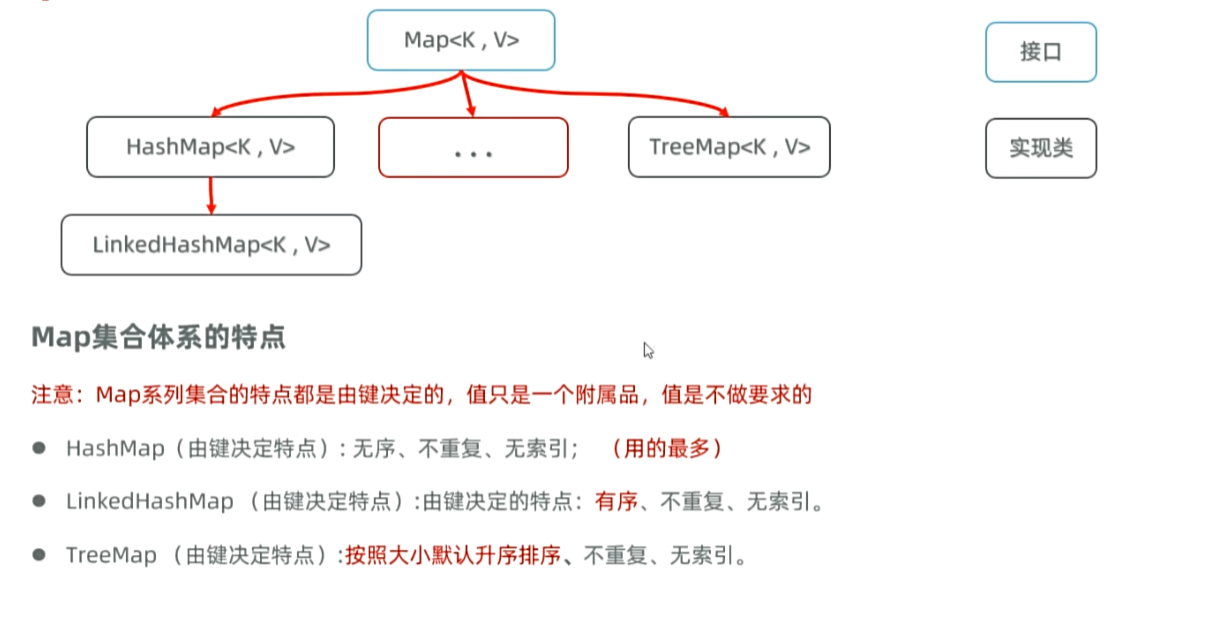
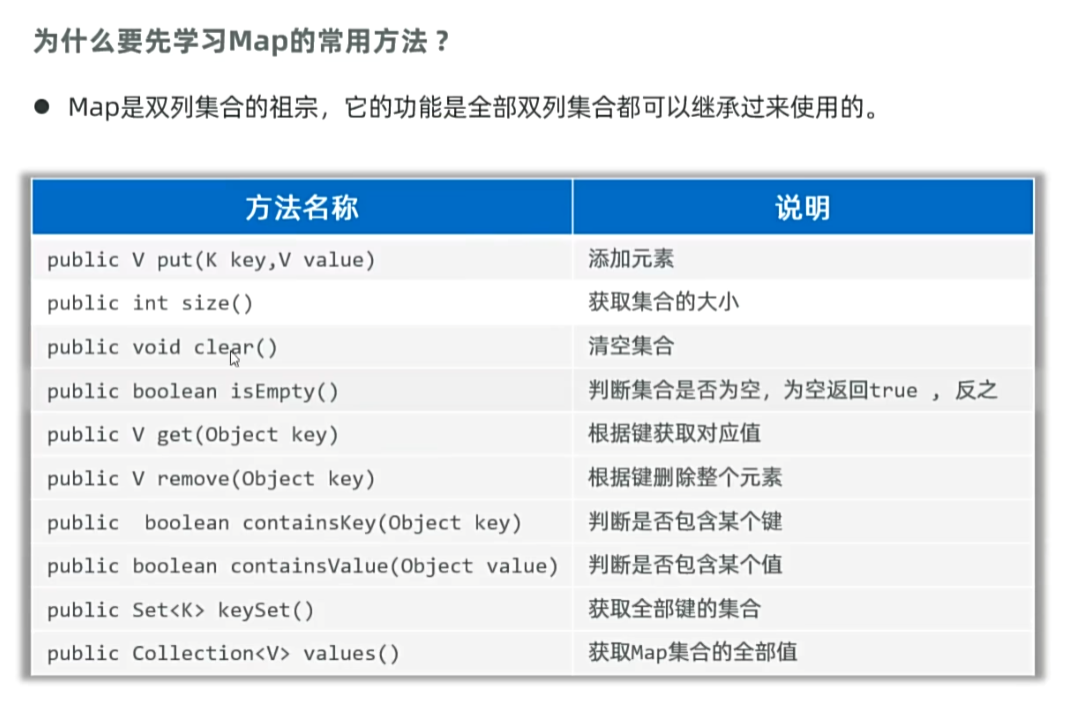
Map集合的常用方法
1
2
3
4
5
6
7
8
9
10
11
12
13
14
15
16
17
18
19
20
21
22
| package yyssh.LearnMapFunction;
import java.util.Collection;
import java.util.HashMap;
import java.util.Map;
import java.util.Set;
public class MapDemo1 {
public static void main(String[] args) {
Map<String, Integer> maps = new HashMap<>();
maps.put("张三", 18);
maps.put("王五", 19);
maps.put("赵六", 20);
System.out.println(maps);
System.out.println(maps.size());
Set<String> keys = maps.keySet();
System.out.println(keys);
Collection<Integer> values = maps.values();
System.out.println(values);
}
}
|
Map集合的遍历方法
根据键找值
先获取Map集合的全部键,再通过遍历键来找值
1
2
3
4
5
6
7
8
9
10
11
12
13
14
15
16
17
18
19
20
21
| package yyssh.MapTraversingDemo1;
import java.util.HashMap;
import java.util.Map;
import java.util.Set;
public class MapTraversingDemo1 {
public static void main(String[] args) {
Map<String, Integer> maps = new HashMap<>();
maps.put("张三", 18);
maps.put("王五", 19);
maps.put("赵六", 20);
Set<String> keys = maps.keySet();
for (String key : keys) {
Integer value = maps.get(key);
System.out.println(key + ":" + value);
}
}
}
|
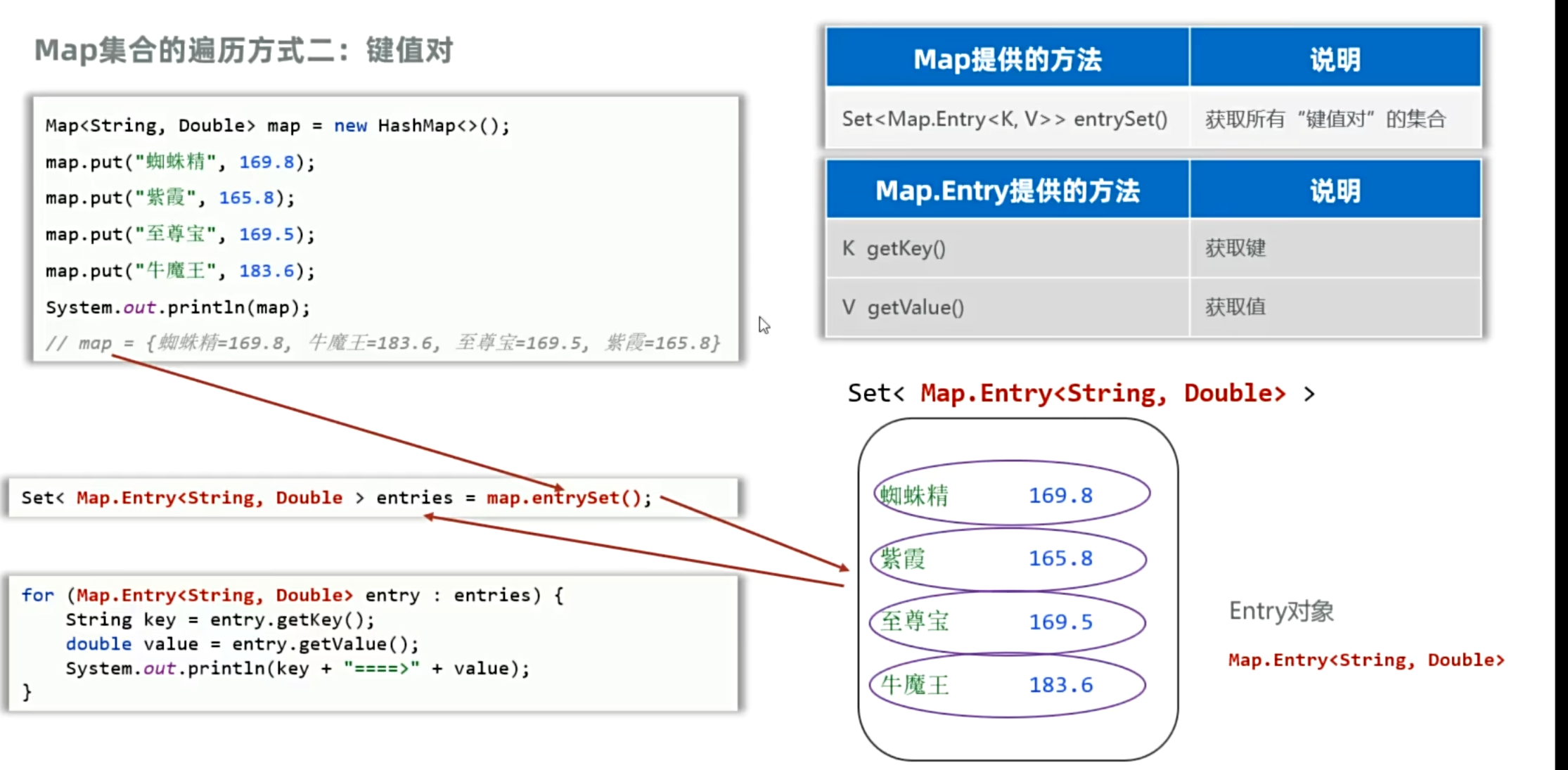
把键值对看成一个整体进行遍历
利用java内置api将键值对看成一个entry对象进行遍历
1
2
3
4
5
6
7
8
9
10
11
12
13
14
15
16
17
18
19
20
21
22
23
| package yyssh.MapTraversingDemo2;
import java.util.HashMap;
import java.util.Map;
import java.util.Set;
public class MapTraversingDemo2 {
public static void main(String[] args) {
Map<String, Double> maps = new HashMap<>();
maps.put("蜘蛛精", 169.8);
maps.put("紫霞",165.8 );
maps.put("至尊宝", 169.5);
maps.put("牛魔王", 183.6);
Set<Map.Entry<String, Double>> entries = maps.entrySet();
for (Map.Entry<String, Double> entry : entries) {
String key = entry.getKey();
Double value = entry.getValue();
System.out.println(key + ":" + value);
}
}
}
|
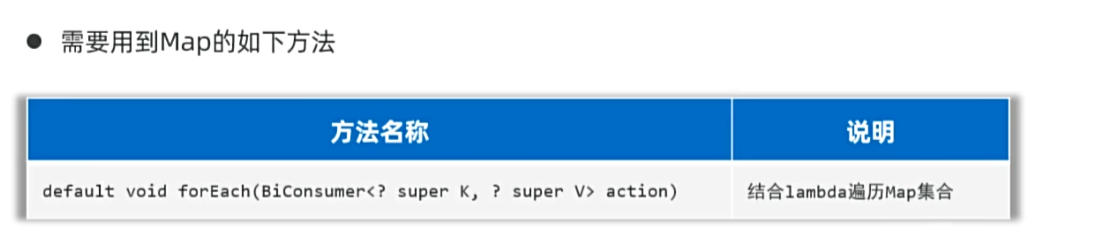
lambda表达式遍历
1
2
3
4
5
6
7
8
9
10
11
12
13
14
15
16
17
18
19
20
21
22
23
24
25
26
27
| package yyssh.MapTraversingDemo3;
import java.util.HashMap;
import java.util.Map;
import java.util.Set;
import java.util.function.BiConsumer;
public class MapTraversingDemo3 {
public static void main(String[] args) {
Map<String, Double> maps = new HashMap<>();
maps.put("蜘蛛精", 169.8);
maps.put("紫霞",165.8 );
maps.put("至尊宝", 169.5);
maps.put("牛魔王", 183.6);
maps.forEach(( key, value)-> System.out.println(key + ":" + value));
}
}
|
Map集合的实现类
描述:Set集合就是基于Map集合的,Set集合就是Map集合不取值,只取键的结果
| 实现类 |
底层原理 |
Set集合基于Map集合 |
| HashMap |
哈希表 |
public HashSet() { map = new HashMap<>(); } |
| LinkedHashMap |
基于双链表的首尾指针进行排序 |
HashSet(int initialCapacity, float loadFactor, boolean dummy) { map = new LinkedHashMap<>(initialCapacity, loadFactor); } |
| TreeMap |
哈希表+红黑树 |
public TreeSet(Comparator<? super E> comparator) { this(new TreeMap<>(comparator)); } |
Stream流

stream流的使用步骤
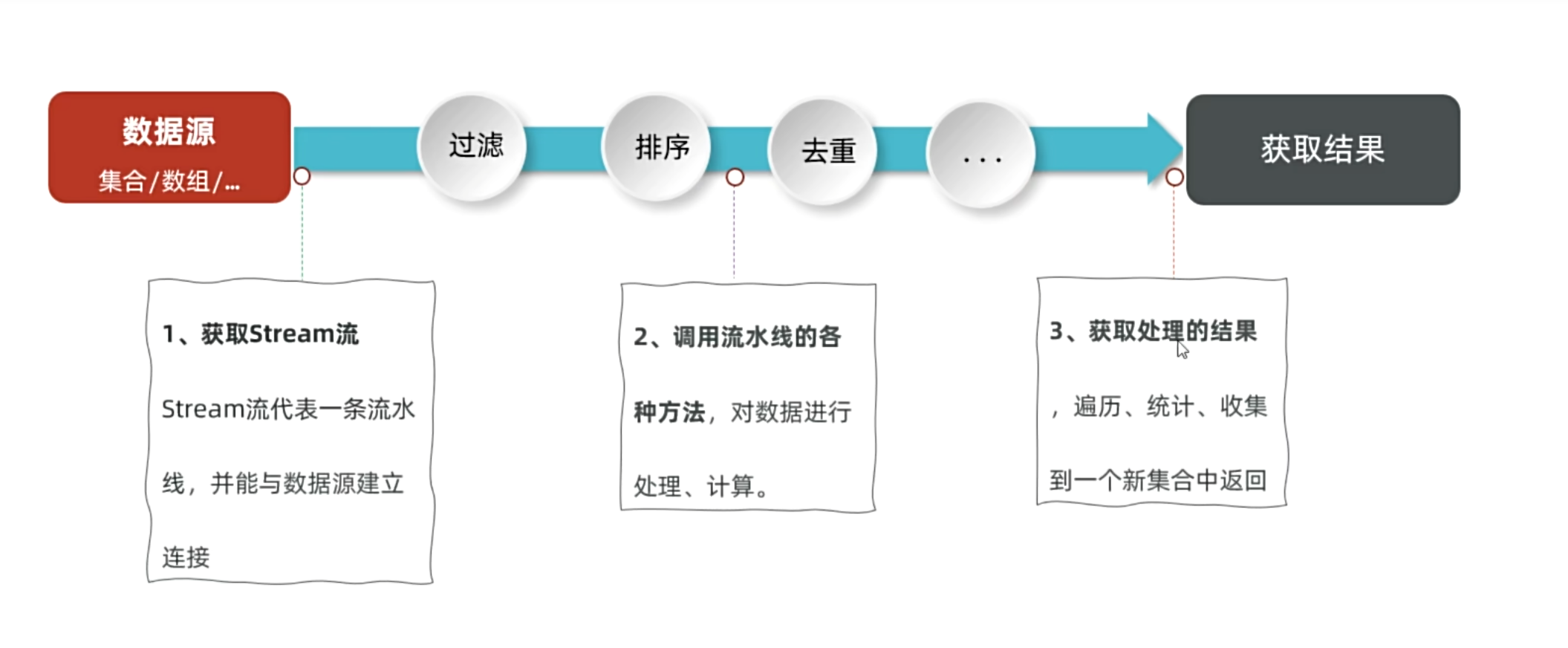
获取stream流
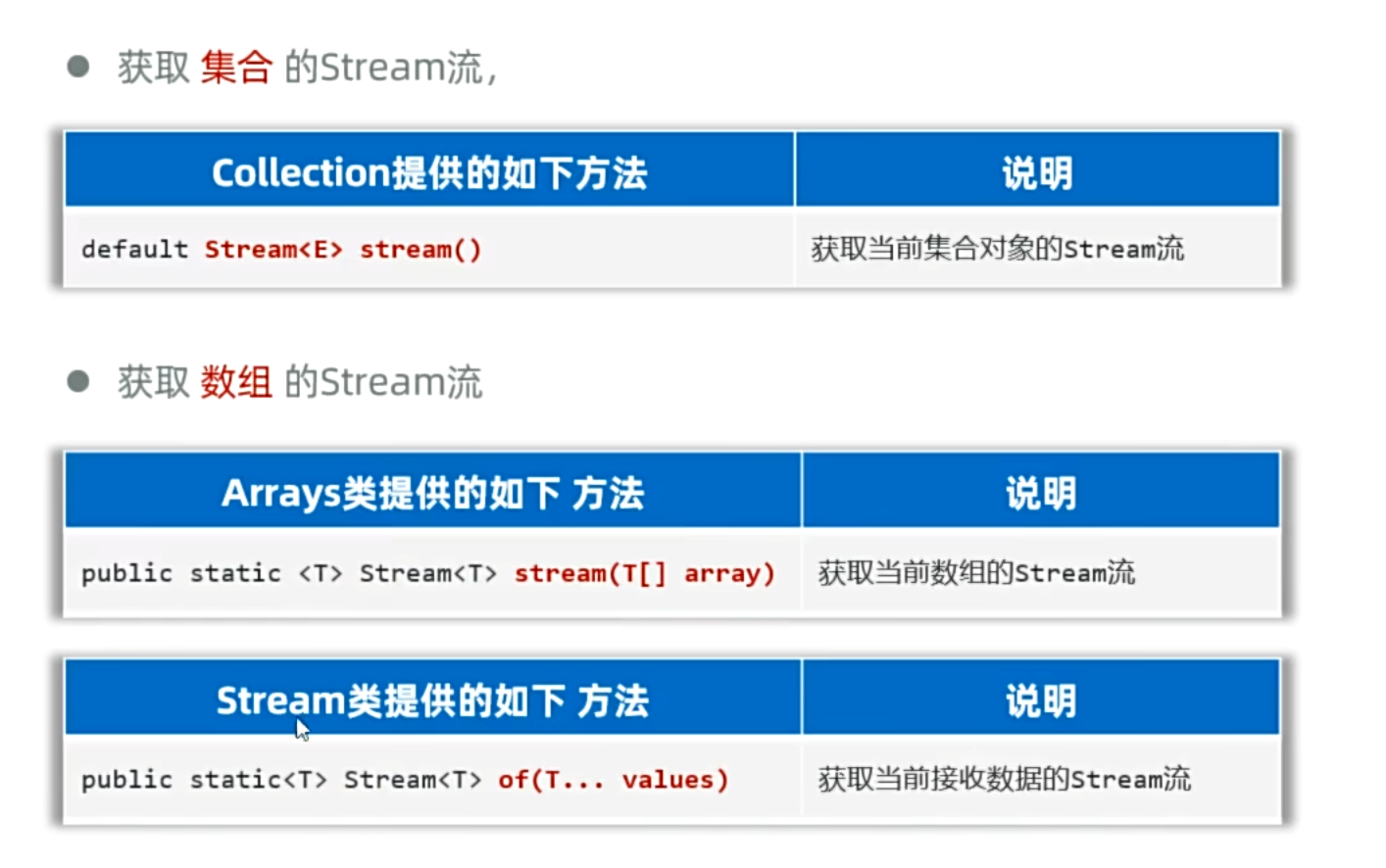
1
2
3
4
5
6
7
8
9
10
11
12
13
14
15
16
17
18
19
20
21
22
23
24
25
26
27
28
| package fun.yyssh.GetStream;
import java.util.*;
import java.util.stream.Stream;
public class GetStream {
public static void main(String[] args) {
List<String> list = new ArrayList<>();
list.add("yanyuan");
list.add("chenzhuang");
Stream<String> sl = list.stream();
Map<String,Integer> map = new HashMap<>();
Stream<String> sm = map.keySet().stream();
Stream<Integer> sv = map.values().stream();
Stream<Map.Entry<String,Integer>> sme = map.entrySet().stream();
String[] arr = {"yanyuan","chenzhuang"};
Stream<String> sa = Arrays.stream(arr);
Stream<String> sa2 = Stream.of(arr);
}
}
|
- 可变参数代表可以接收多种数据,无数据、多个数据、数组等都可以接收
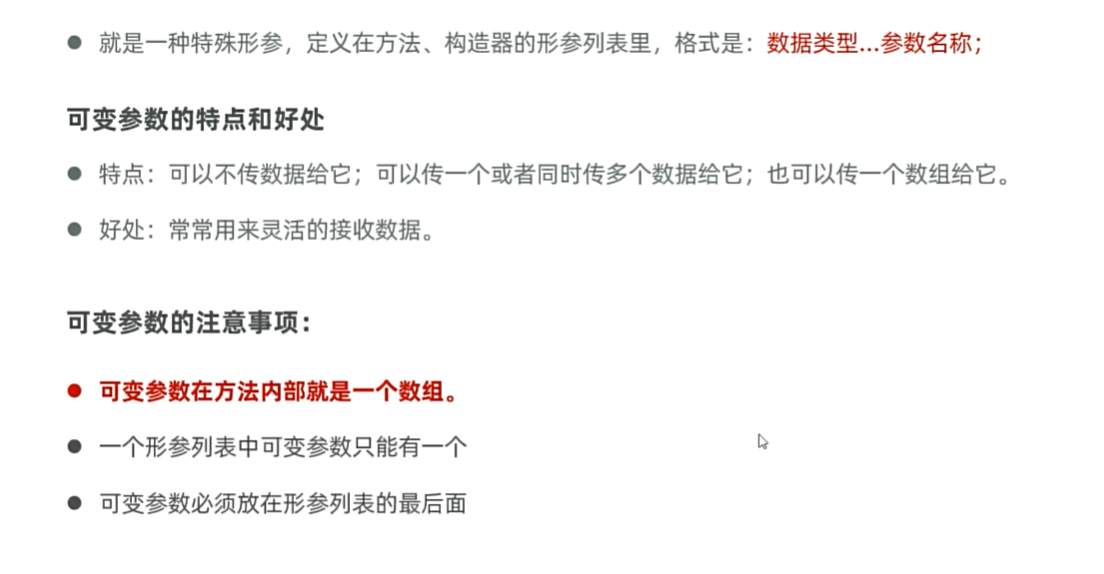
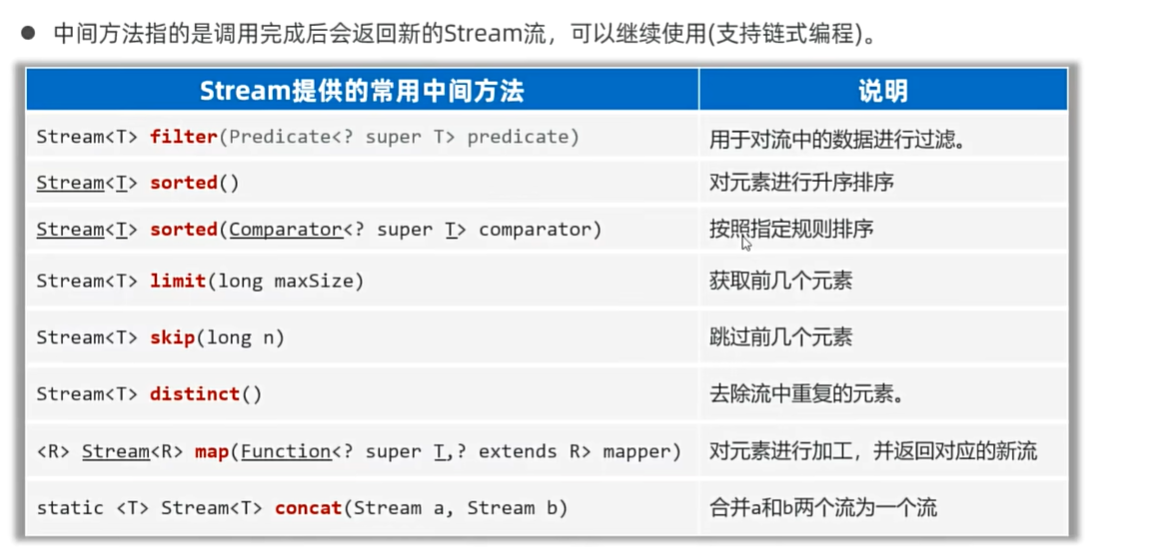
Stream流的中间方法
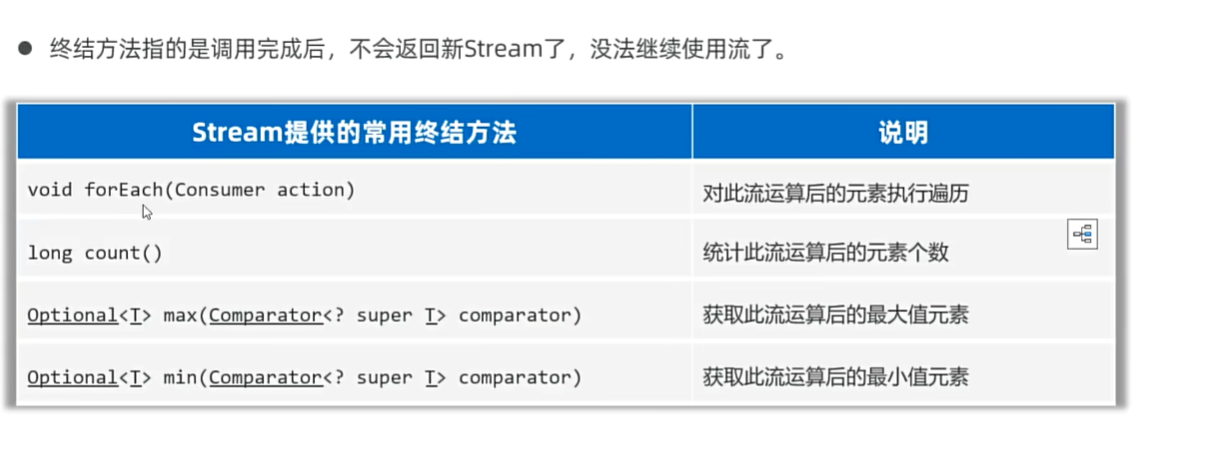
Stram流的终结(收集)方法
java的集合和python的集合有什么异同
1. List(列表)
| 特性 |
Java |
Python |
| 有序性 |
有序(插入顺序),可重复 |
有序(插入顺序),可重复 |
| 实现分类 |
ArrayList(数组)、LinkedList(链表)、Vector(线程安全数组) |
单一列表类型(list),底层为动态数组 |
| 线程安全 |
Vector线程安全,其他默认不安全 |
默认不安全,需手动同步 |
| 操作示例 |
list.add(元素)、list.get(索引) |
list.append(元素)、list[索引] |
| 特点 |
类型固定(泛型),需显式声明 |
动态类型,可混合存储不同类型元素 |
2. Map(字典)
| 特性 |
Java |
Python |
| 键值对存储 |
键唯一,值可重复 |
键唯一且不可变(如字符串、数字、元组),值可任意类型 |
| 实现分类 |
HashMap(哈希表)、TreeMap(红黑树) |
单一字典类型(dict),底层为哈希表 |
| 线程安全 |
ConcurrentHashMap线程安全,其他默认不安全 |
默认不安全 |
| 操作示例 |
map.put(key, value)、map.get(key) |
dict[key] = value、dict.get(key) |
| 特点 |
键可为任意对象(需实现hashCode()和equals()) |
键必须为不可变类型(如列表不可作为键) |
3. Set(集合)
| 特性 |
Java |
Python |
| 元素特性 |
无序,不可重复 |
无序,不可重复(支持集合运算如并集、交集) |
| 实现分类 |
HashSet(哈希表)、TreeSet(红黑树) |
单一集合类型(set),底层为哈希表 |
| 线程安全 |
默认不安全 |
默认不安全 |
| 操作示例 |
set.add(元素)、set.contains(元素) |
set.add(元素)、元素 in set |
| 特点 |
基于Map实现(键存储,值为空对象) |
直接支持数学集合操作(如 union(), intersection() |
Java的File类
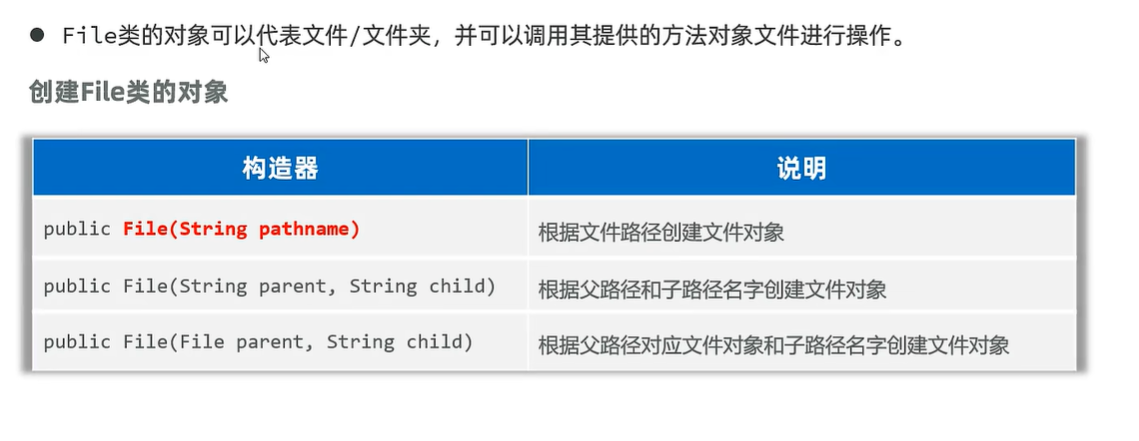
File类对象
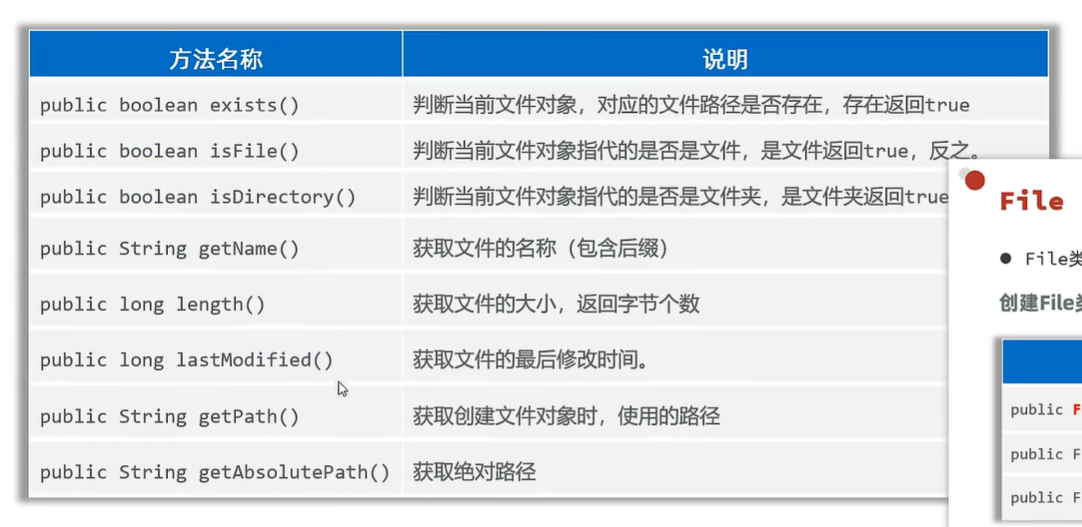
File类的基础方法
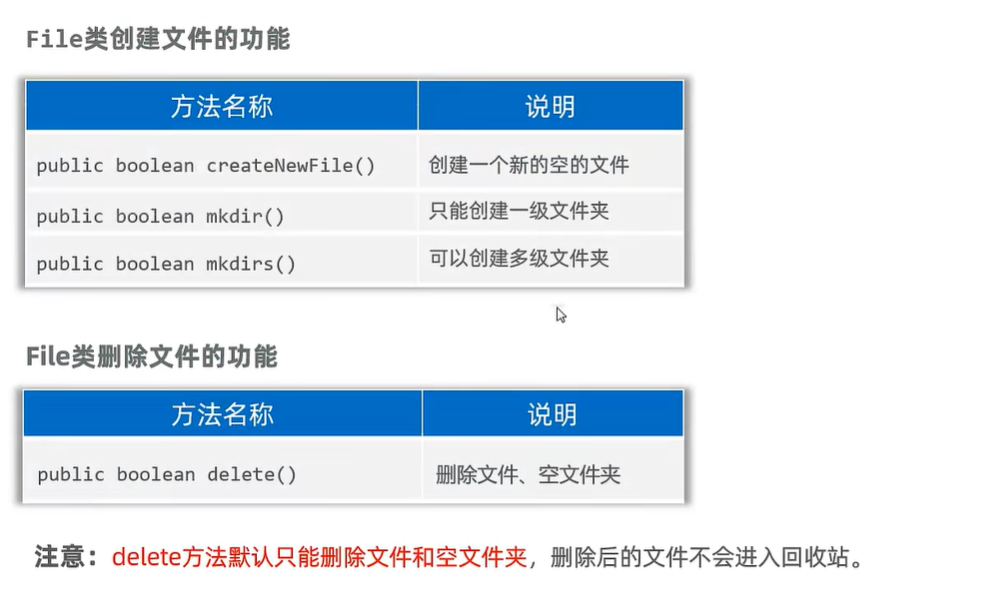
File类创建和删除文件夹
File类的遍历文件夹功能
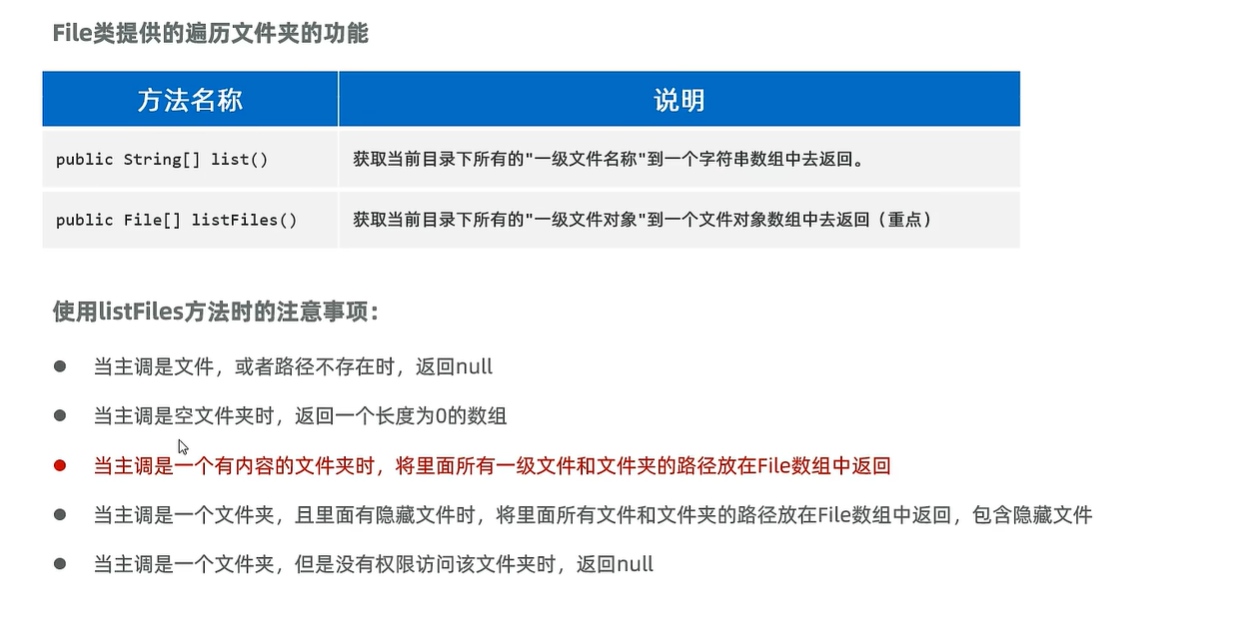
1
2
3
4
5
6
7
8
9
10
11
12
13
14
15
16
17
18
19
20
21
22
23
24
25
26
27
28
29
30
31
32
33
34
35
| package yyssh.learnFile;
import java.io.File;
public class LearnFile {
public static void main(String[] args) {
try {
File file = new File(".\\..\\images\\fileObject.webp");
System.out.println(file.getName());
System.out.println(file.length());
System.out.println(file.getPath());
System.out.println(file.getAbsolutePath());
System.out.println("-----------------------------------------------");
File file2 = new File(".\\..\\images");
File[] files = file2.listFiles();
for (File f : files) {
System.out.println(f.getName());
}
System.out.println("-----------------------------------------------");
String[] fileNames = file2.list();
for (String name : fileNames) {
System.out.println(name);
}
} catch (Exception e) {
throw new RuntimeException(e);
}
}
}
|
公式化递归
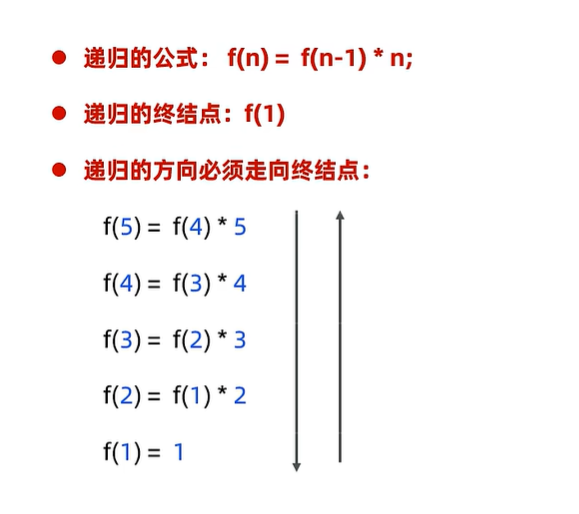
1
2
3
4
5
6
7
8
9
10
11
12
13
14
15
16
17
18
19
20
21
| package yyssh.learnFile;
public class LearnRecursion {
public static void main(String[] args) {
System.out.println("10的阶乘和"+factorial(10));
System.out.println("10的累加和"+accumulate(10));
}
public static int factorial(int n){
if(n==1){
return 1;
}
return factorial(n-1)*n;
}
public static int accumulate(int n){
if(n==1){
return 1;
}
return accumulate(n-1)+n;
}
}
|
文件夹递归搜索
1
2
3
4
5
6
7
8
9
10
11
12
13
14
15
16
17
18
19
20
21
22
23
24
25
26
27
28
29
30
| package yyssh.learnFile;
import java.io.File;
public class FileSearchDemo {
public static void main(String[] args) {
File file = new File("D:/");
searchFile(file, "Everything.exe");
}
public static void searchFile(File dir, String name) {
if (!dir.exists()|| dir.isFile()|| dir == null) {
return;
}
File[] files = dir.listFiles();
if (files != null&& files.length > 0) {
for (File f : files) {
if (f.isFile()) {
if (f.getName().contains(name)) {
System.out.println("找到了:"+f.getAbsolutePath());
}
} else {
searchFile(f, name);
}
}
}
}
}
|
java的编码与解码
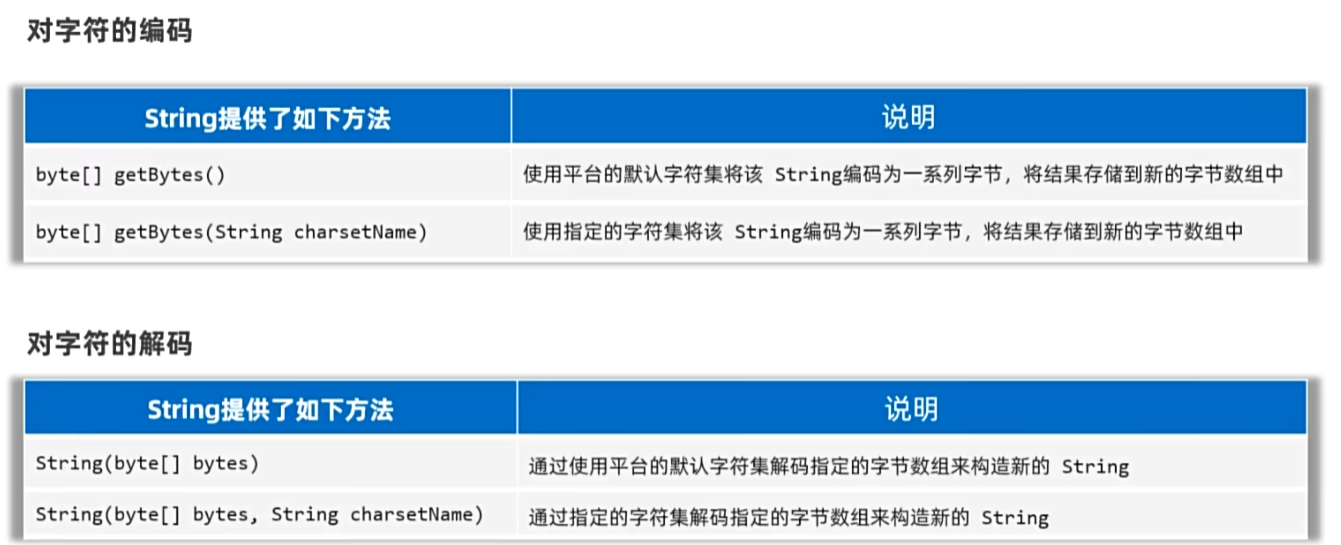
Javad的IO流
IO流的体系
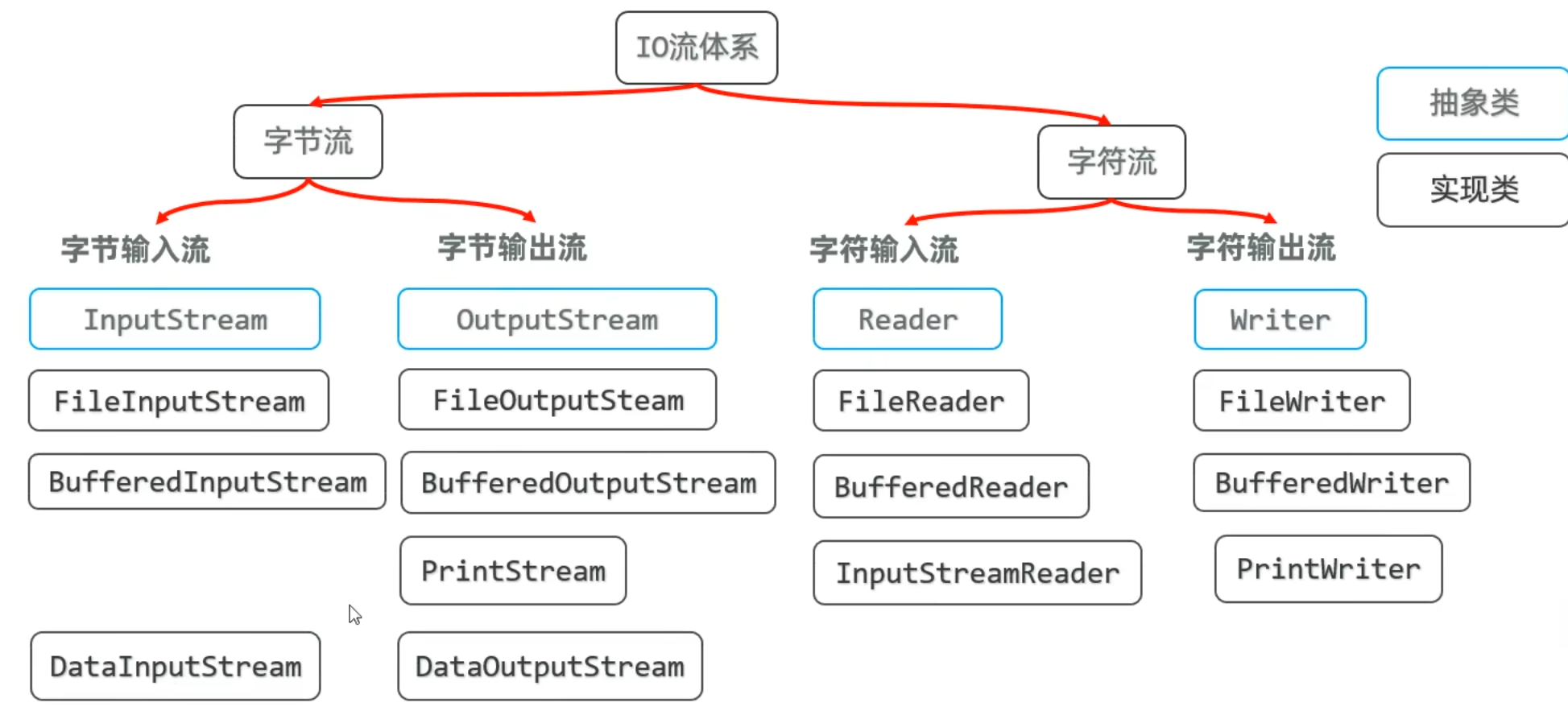
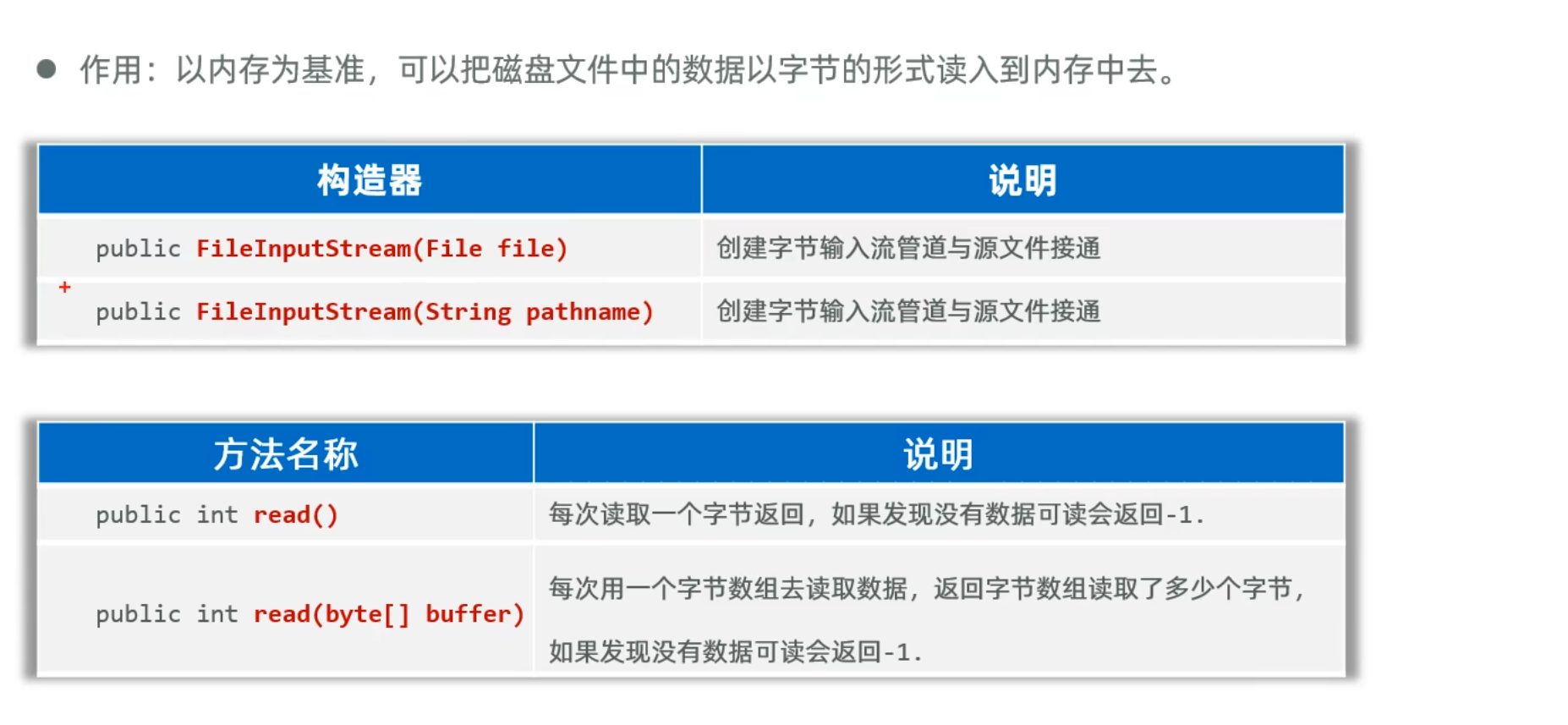
- read方法无法读取汉字,因为汉字在不同编码下所占字节不同,无法1字节读取
read(buffer),如果读取包含汉字的文件,只能选择包含整个文件大小的字符数组去读,java特别给了一个方法readAllBytes可以一次读取整个文件的字符数组,但是这样也有缺陷,如果文件太大,这无法一次读取整个文件,也影响内存效率
1
2
3
4
5
6
7
8
9
10
11
12
13
14
15
16
17
18
19
20
21
22
| package yyssh.learnIO;
import java.io.*;
public class LearnFileInputStream {
public static void main(String[] args) {
try {
InputStream is = new FileInputStream("FileAndIO/src/yyssh/learnIO/1.txt");
byte[] buffer = new byte[3];
int len;
while ((len = is.read(buffer)) != -1) {
System.out.print(new String(buffer,0,len));
}
is.close();
} catch (Exception e) {
throw new RuntimeException(e);
}
}
}
|
1
2
3
4
5
6
7
8
9
10
11
12
13
14
15
16
17
18
19
| package yyssh.learnIO;
import java.io.FileNotFoundException;
import java.io.InputStream;
import java.io.FileInputStream;
public class LearnFileInputStreamDemo2 {
public static void main(String[] args) {
try {
InputStream is = new FileInputStream("FileAndIO/src/yyssh/learnIO/2.txt");
byte[] buffer = is.readAllBytes();
System.out.println(new String(buffer));
is.close();
} catch (Exception e) {
throw new RuntimeException(e);
}
}
}
|
FileOutputStream
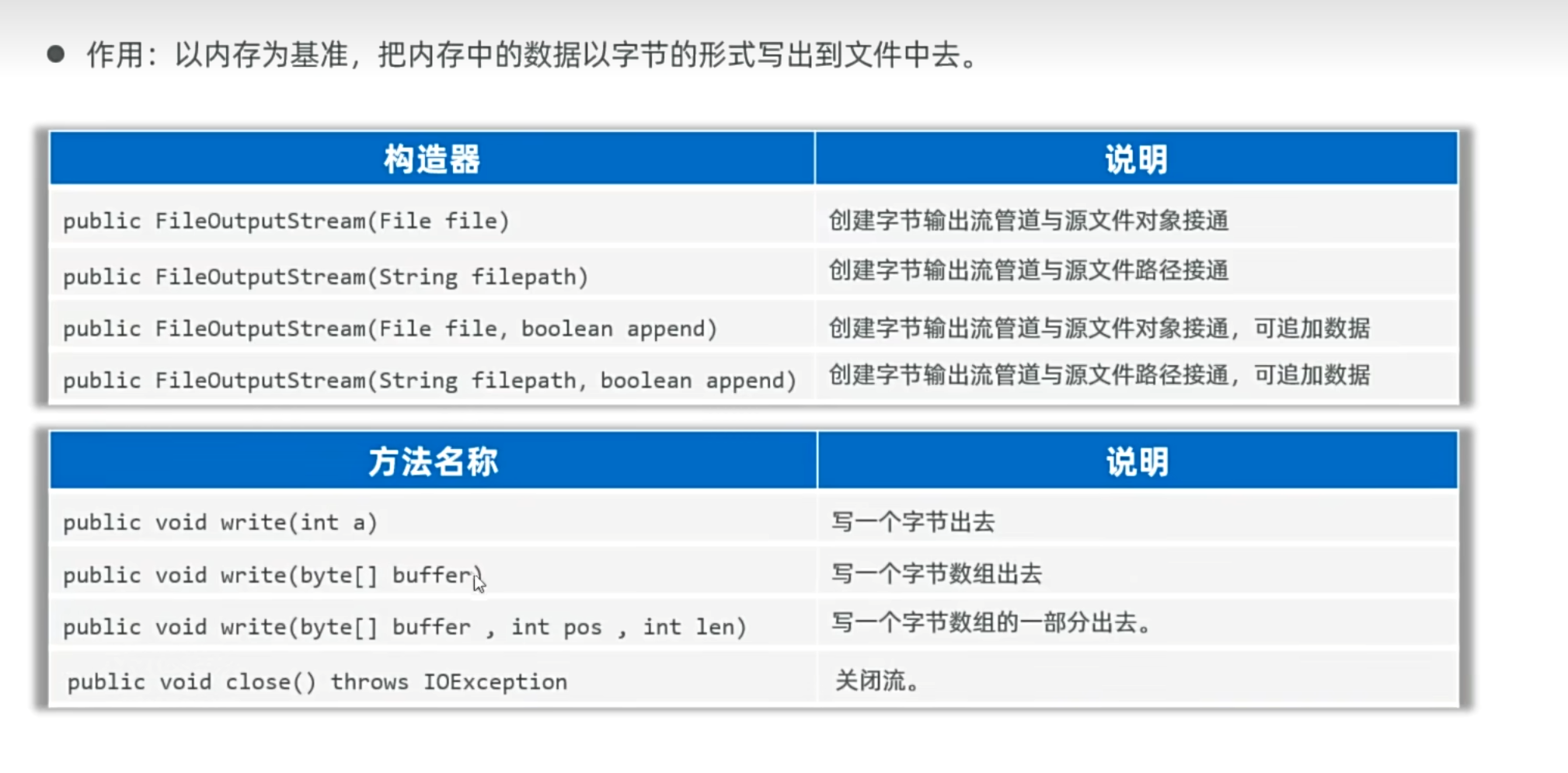
使用字符流进行文件复制操作
1
2
3
4
5
6
7
8
9
10
11
12
13
14
15
16
17
18
19
20
21
22
23
24
25
| package yyssh.learnIO;
import java.io.*;
public class FileCopy {
public static void main(String[] args) {
copyFile("FileAndIO/src/yyssh/learnIO/1.txt", "C:/Users/肥猪/Desktop/1_new.txt");
}
public static void copyFile(String src, String dest) {
try ( InputStream fis = new FileInputStream(src);
OutputStream fos = new FileOutputStream(dest)
){
byte[] buffer = new byte[1024];
int len;
while ((len = fis.read(buffer)) != -1) {
fos.write(buffer, 0, len);
}
System.out.println("复制成功");
} catch (Exception e) {
throw new RuntimeException(e);
}
}
}
|
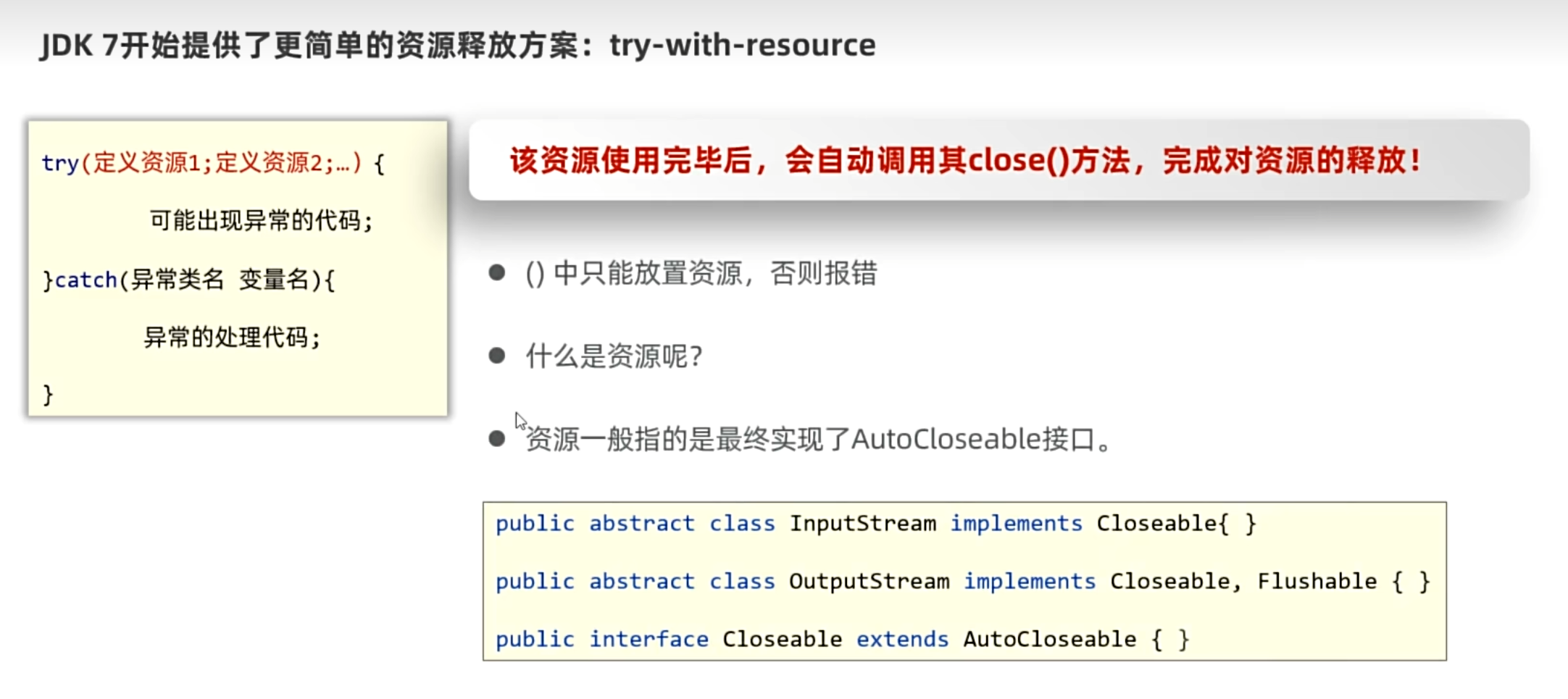
资源释放的方案
java7之前使用try-catch-finally的方法在finally进行资源释放
java7之后使用try-with-resource的方法
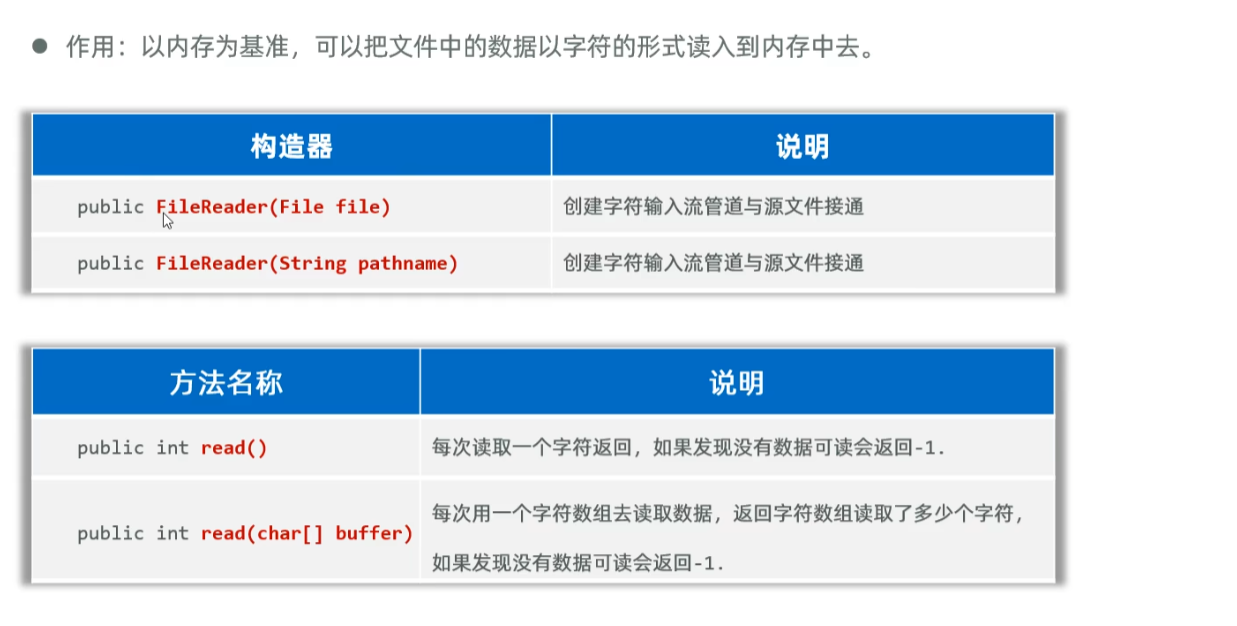
FileReader
FileWriter
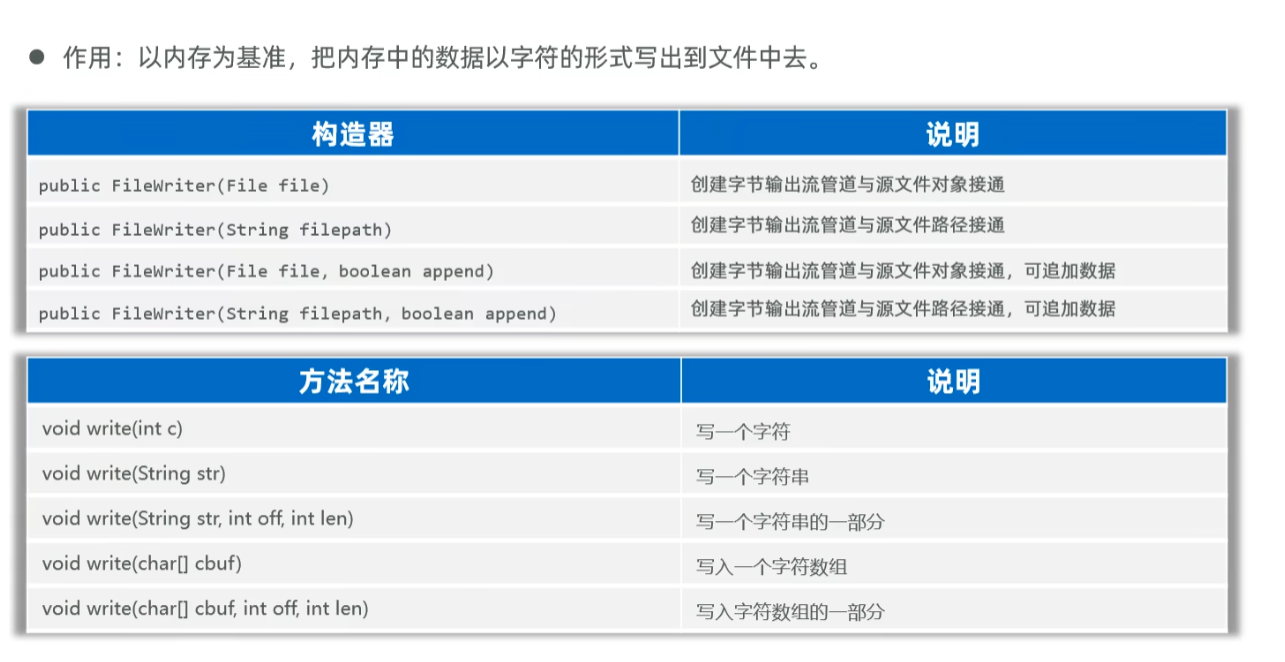
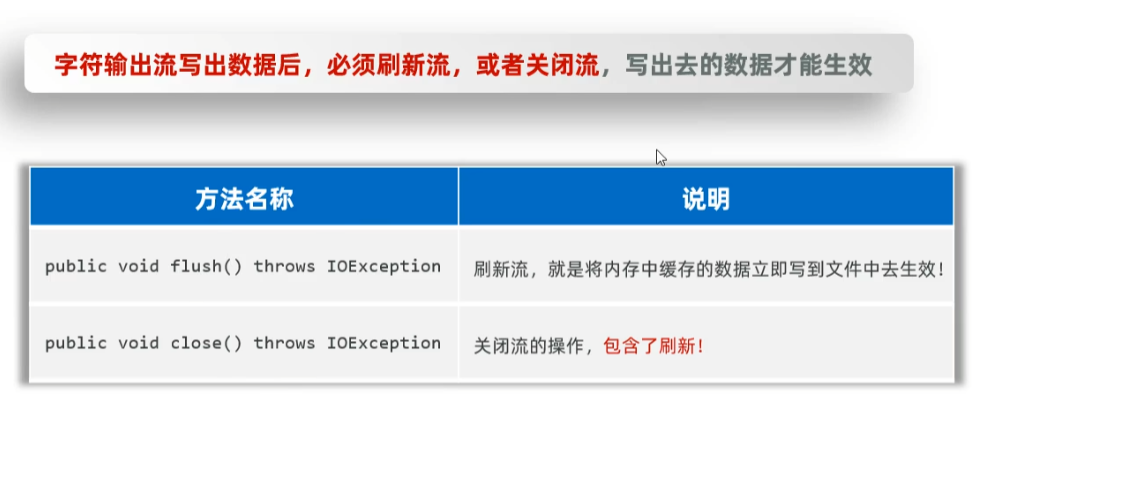
- 通过代码写入的数据不会立马写入磁盘中,会进入内存缓冲区的地方,内存缓冲区可以避免内存与磁盘进行多次IO操作,从而拖累内存运行
- 刷新流之后还可以继续使用流,但是关闭流之后无法继续使用流,关闭流包含了刷新流
缓冲流
缓冲流的功能就是代替原先的字节和字符流,提高效率和性能
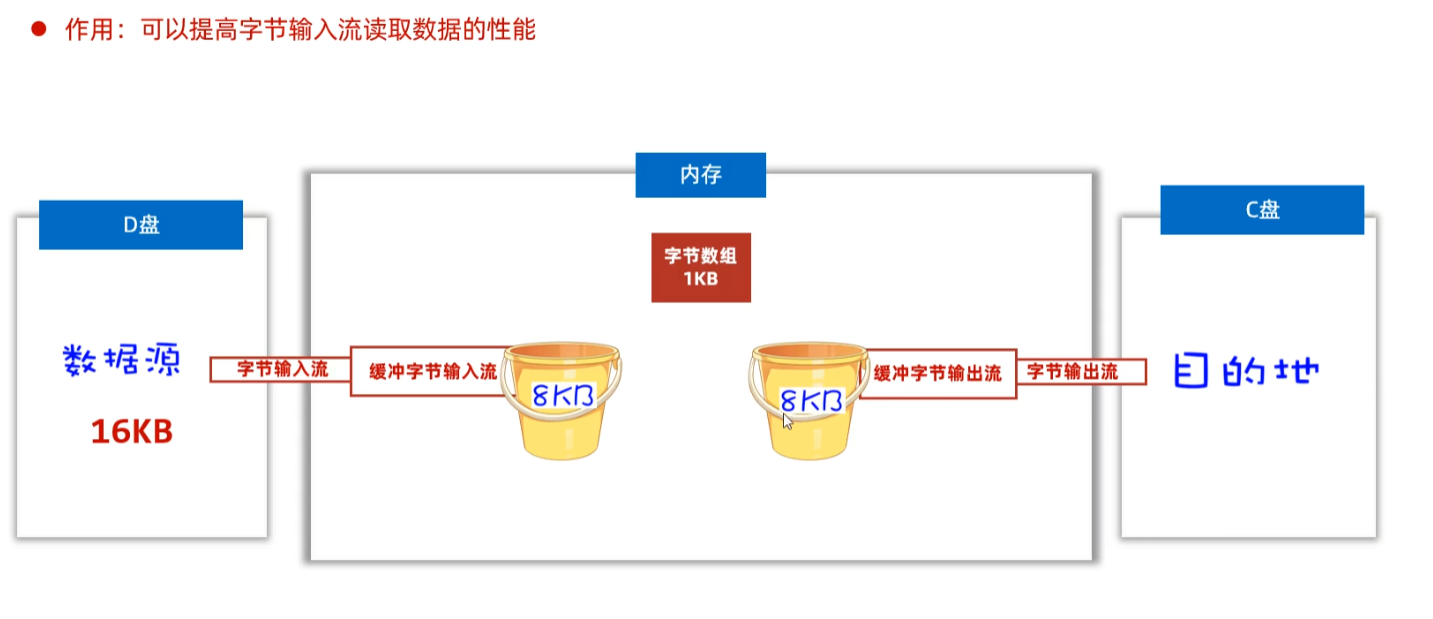
缓冲流就相当于这里8kb的桶,目的是减少了内存和磁盘的IO次数
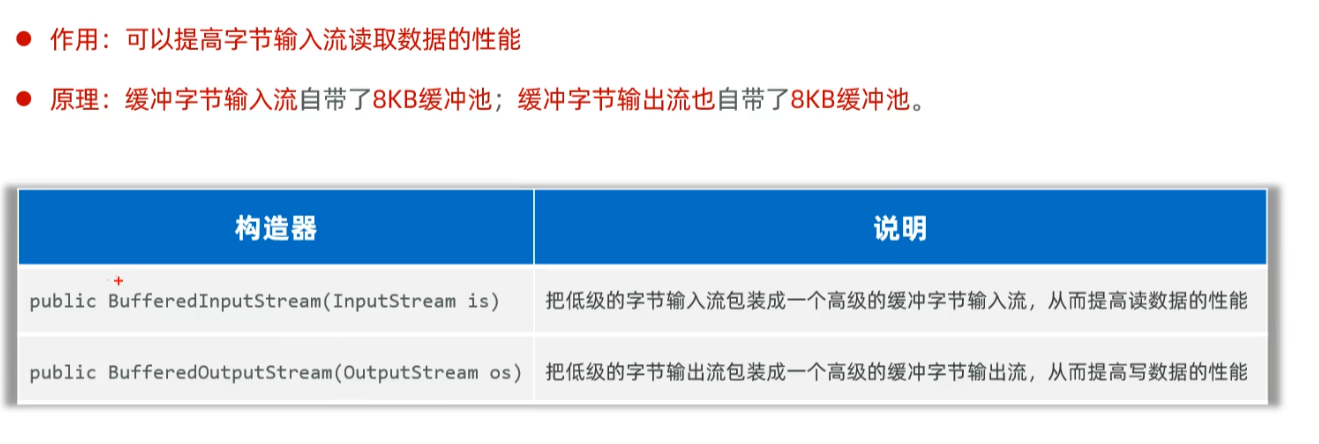
bufferedOutputStream和bufferedInputStream是一样的构造器
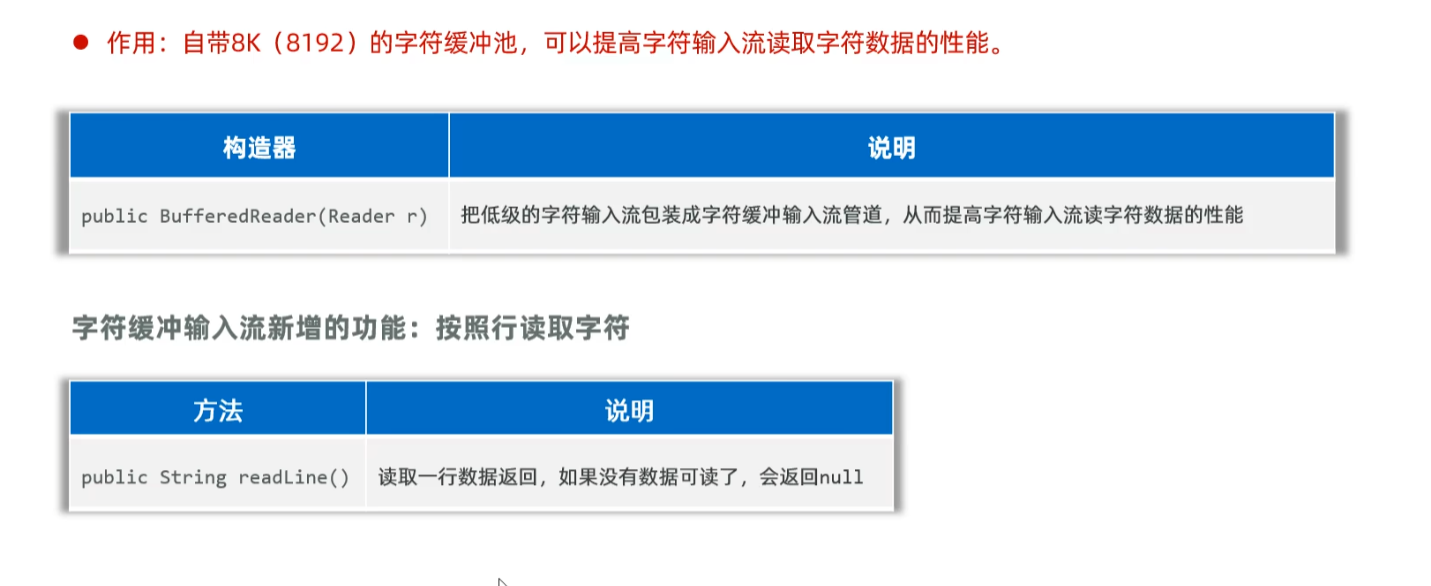
BufferedReader
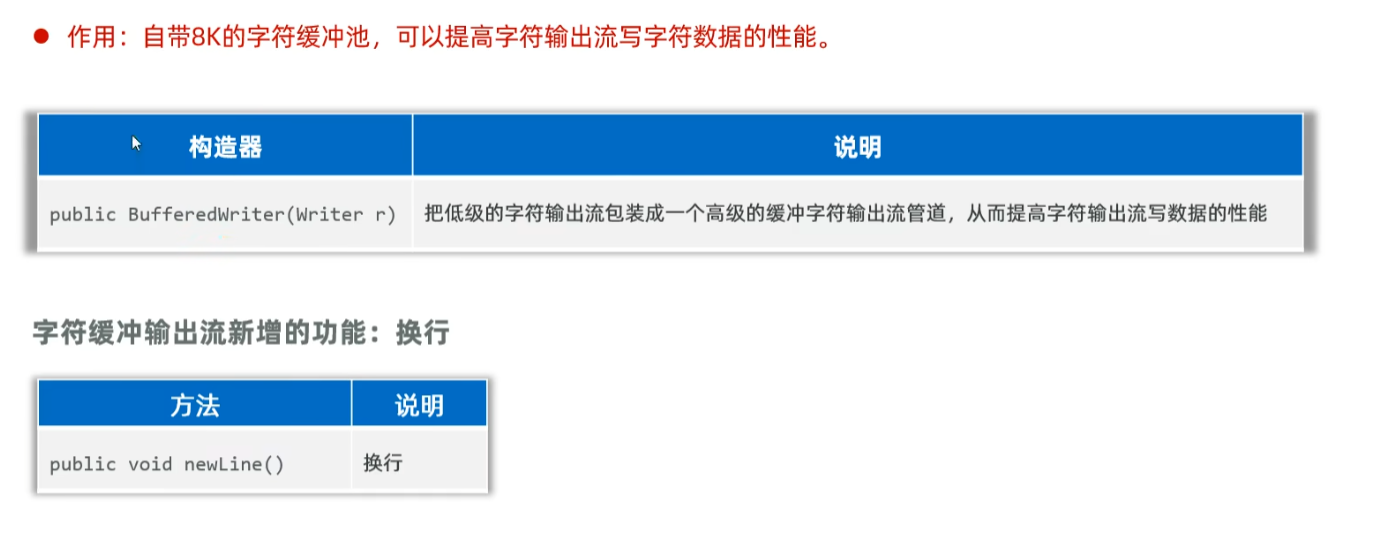
BufferedWriter
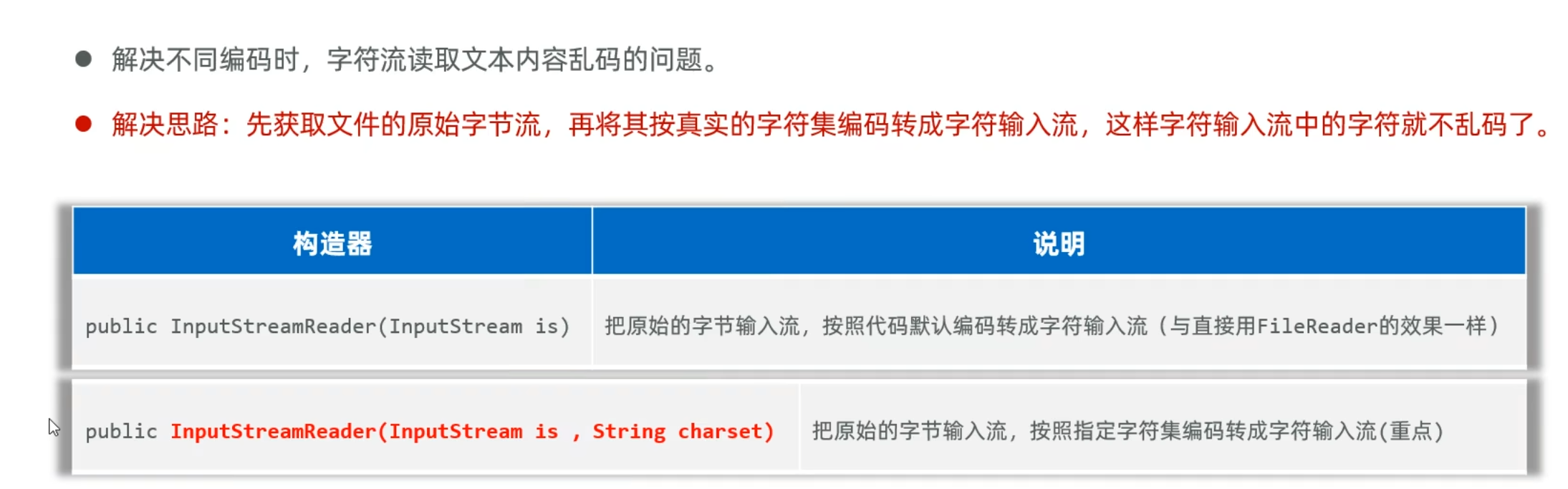
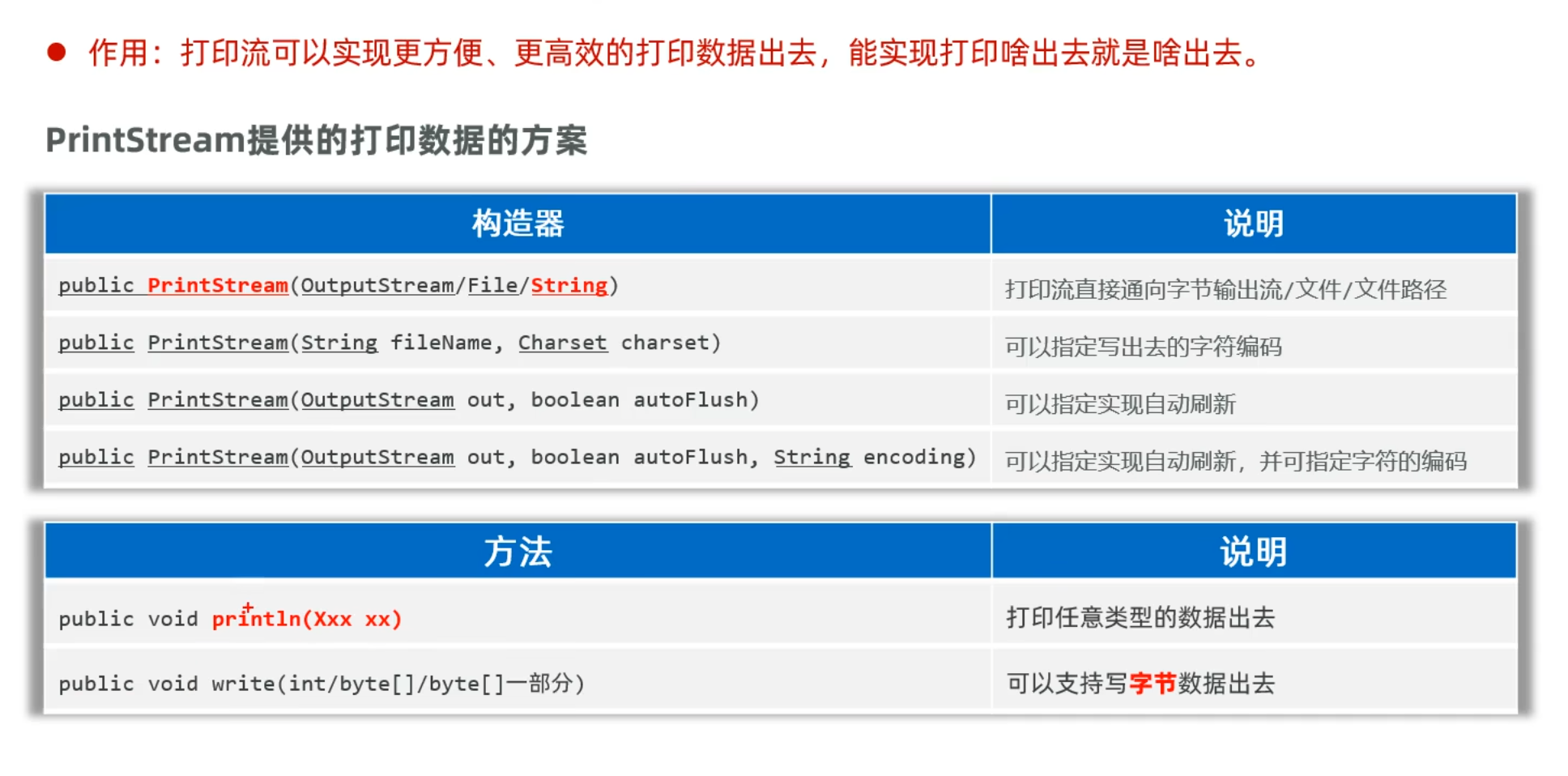
打印流PrintStream
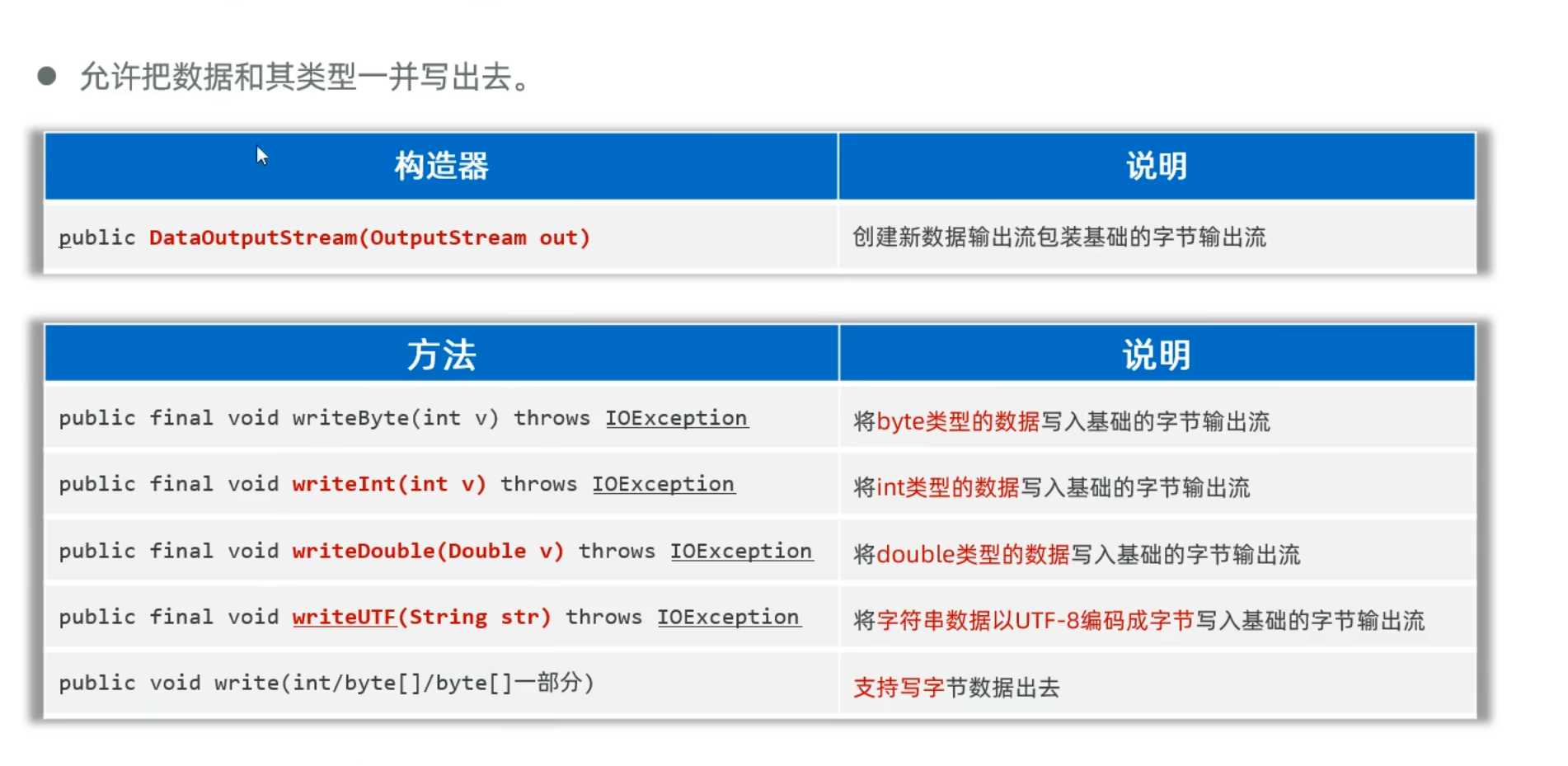
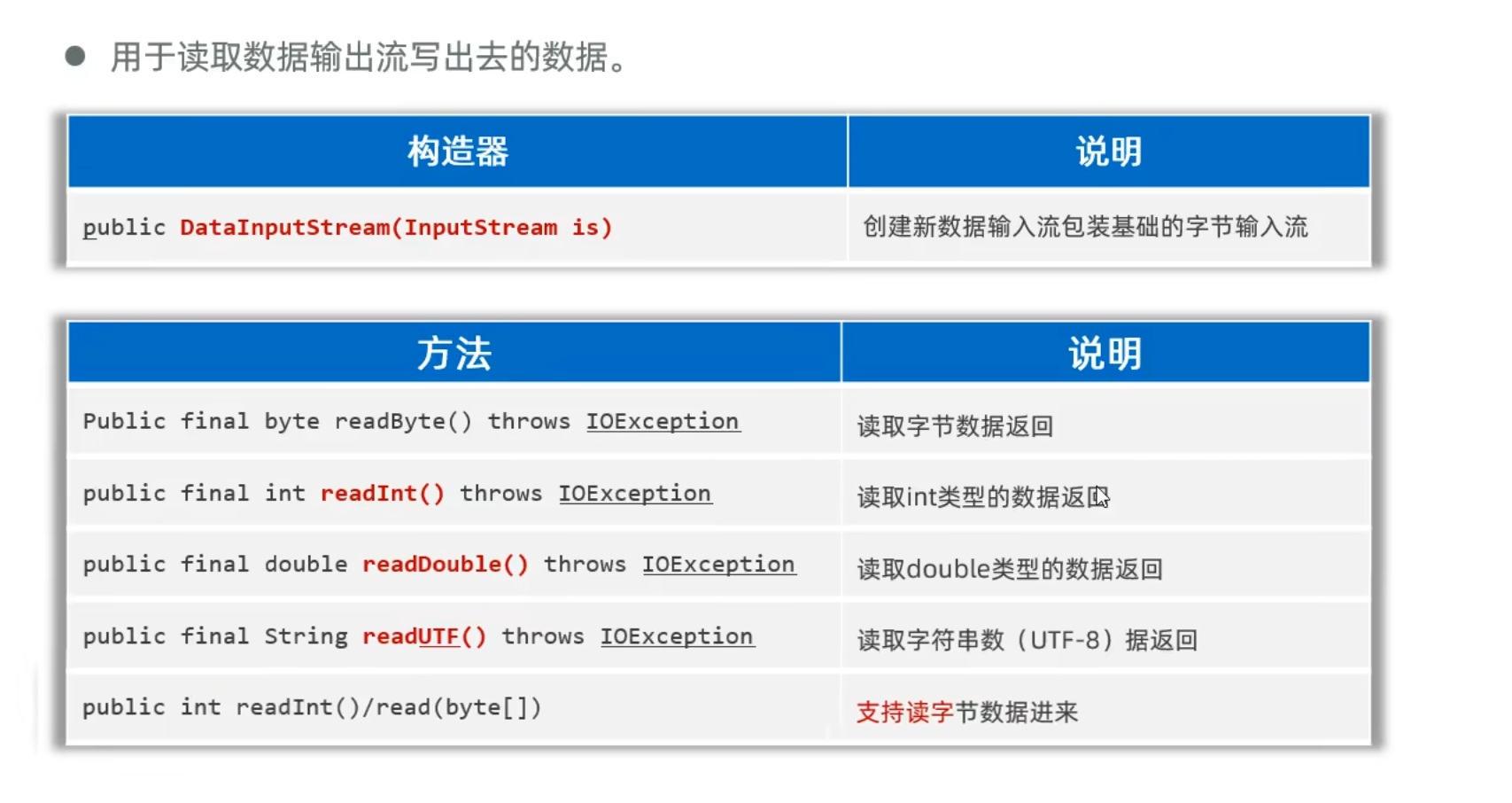
Properties类读取配置信息
作用
Properties类是Java中用于处理配置文件的工具类,它可以方便地读写键值对格式的配置文件(通常是.properties文件)。Properties继承自Hashtable,表示一个持久的属性集,能够将属性保存到流中或从流中加载。
构造器
| 构造器 |
说明 |
public Properties() |
创建一个无默认值的空属性列表 |
public Properties(Properties defaults) |
创建一个带有指定默认值的空属性列表 |
基本操作方法
| 方法 |
说明 |
public String getProperty(String key) |
用指定的键在此属性列表中搜索属性 |
public String getProperty(String key, String defaultValue) |
用指定的键在属性列表中搜索属性,如果未找到则返回默认值 |
public Object setProperty(String key, String value) |
调用Hashtable的方法put,设置键值对 |
public void load(InputStream inStream) |
从输入流中读取属性列表(键和元素对) |
public void load(Reader reader) |
按简单的面向行的格式从输入字符流中读取属性列表 |
public void store(OutputStream out, String comments) |
将属性列表写入输出流 |
public void store(Writer writer, String comments) |
将属性列表写入输出字符流 |
public Enumeration<?> propertyNames() |
返回属性列表中所有键的枚举 |
1
2
3
4
5
6
7
8
9
10
11
| InputStream is = BaseDao.class.getClassLoader().getResourceAsStream("db.properties");
Properties p = new Properties();
try {
p.load(is);
String driver = p.getProperty("driver");
String url = p.getProperty("url");
String user = p.getProperty("user");
String password = p.getProperty("password");
} catch (Exception e) {
throw new RuntimeException(e);
}
|
Java的file和IO流和python与c++有什么异同
| 特性/语言 |
Java |
Python |
C++ |
| 基本 I/O 类/模块 |
java.io、java.nio |
open()、io、os、pathlib |
<fstream>、<iostream> |
| 文件类 |
File, Path, Files(java.nio.file) |
os, pathlib.Path, open() |
std::ifstream, std::ofstream, std::fstream |
| 打开文件方式 |
FileReader, FileInputStream 等 |
open('file.txt', 'r') |
ifstream file("file.txt"); |
| 关闭文件 |
close(),或使用 try-with-resources 自动关闭 |
file.close(),或用 with open() as f: 自动关闭 |
file.close(),或通过 RAII 自动关闭 |
| 字符流/字节流 |
明确区分:字符流 (Reader/Writer),字节流 (InputStream/OutputStream) |
open() 区分文本 ('t') 和二进制 ('b') 模式 |
没有明确区分,操作依据数据类型 |
| 缓冲支持 |
BufferedReader, BufferedWriter |
io.BufferedReader, io.BufferedWriter |
std::ifstream 等本身带缓冲 |
| 随机访问文件 |
RandomAccessFile |
seek(), tell() |
seekg(), seekp(), tellg(), tellp() |
| 内存映射文件 |
FileChannel.map() |
mmap 模块 |
<mmap> (非标准,平台依赖) |
| 异常处理 |
必须处理 IOException 等 |
异常可选处理(try/except) |
可抛出异常或使用状态检查(如 file.fail()) |
| Unicode 支持 |
需要明确设置编码,如 InputStreamReader |
默认支持 Unicode(Python 3) |
C++11 起支持 UTF 编码,但操作复杂 |
| 现代语法支持 |
try-with-resources 自动资源管理(Java 7+) |
with 语句上下文管理 |
C++11 起支持智能指针和 RAII |
| 异步 I/O 支持 |
java.nio.channels, AsynchronousFileChannel |
asyncio 模块,第三方库如 aiofiles |
标准库无直接异步支持,可通过线程或 Boost 实现 |
| 跨平台一致性 |
很好 |
很好 |
一般较好,但与系统接口关系更紧密 |
多线程
多线程常用的方法
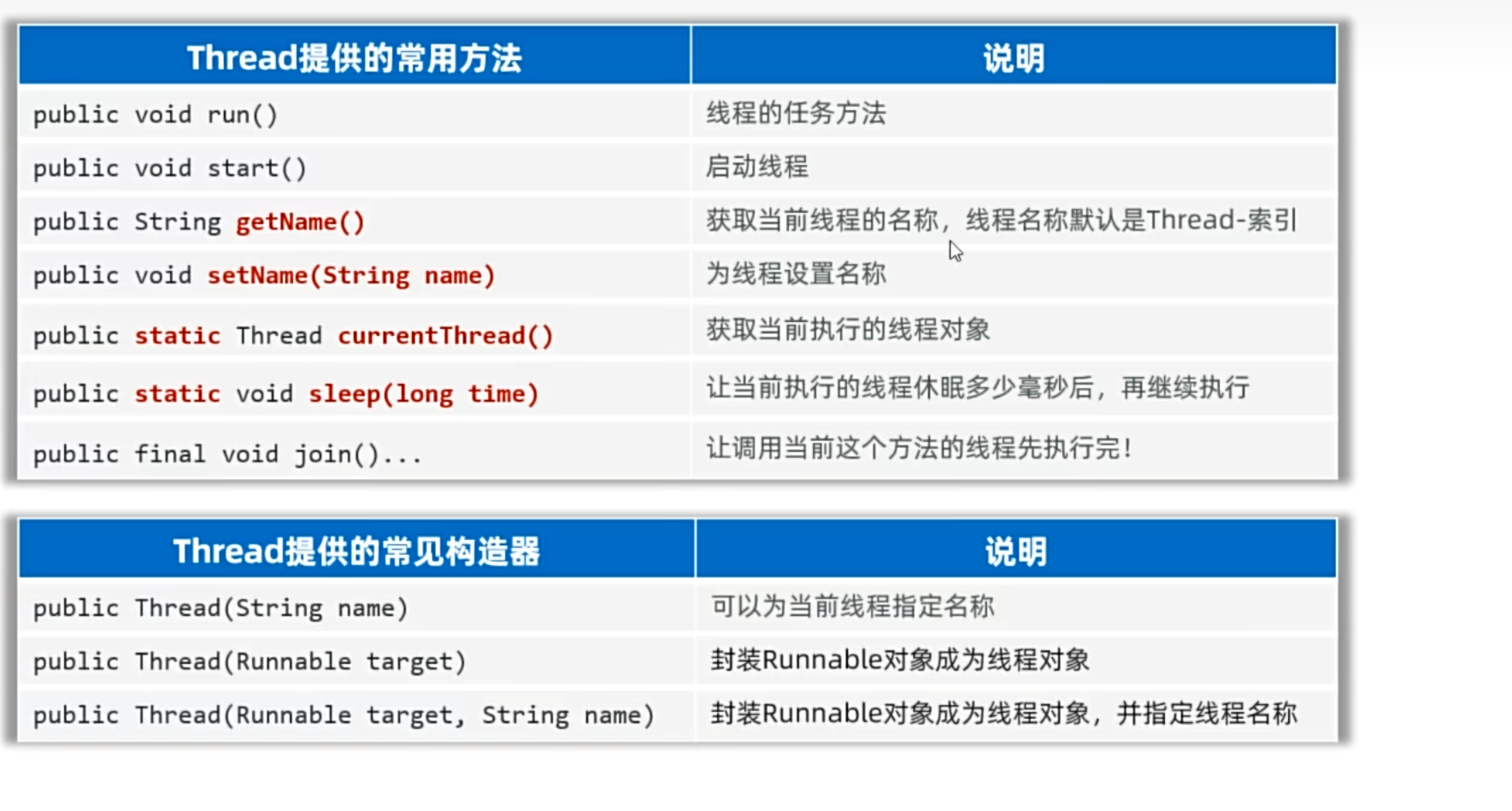
继承Thread类
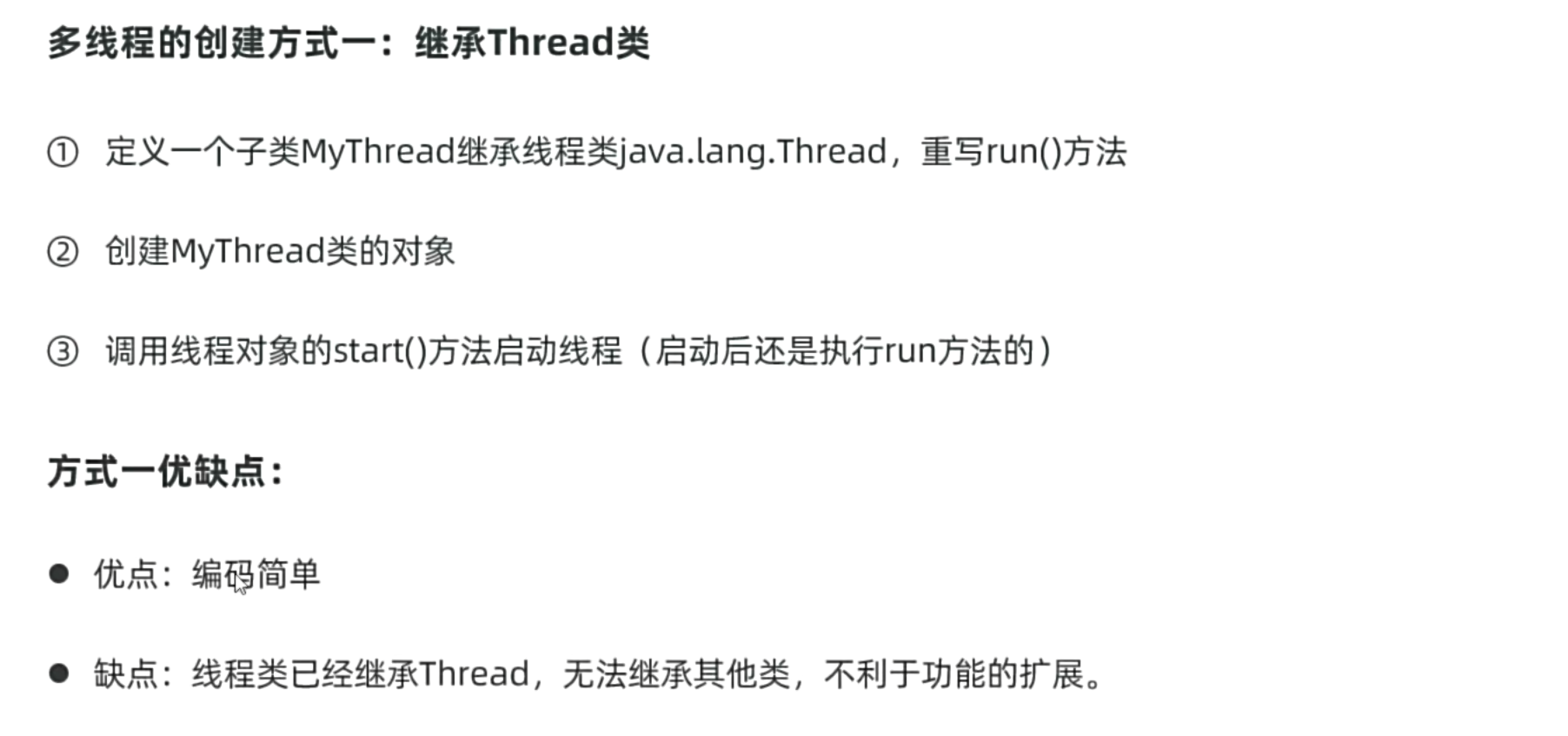
注意事项:
- 启动线程必须是调用start方法,不是调用run方法
- 不要把主线程任务放在子线程之前
1
2
3
4
5
6
7
8
9
10
11
12
13
14
15
16
17
18
19
20
21
22
23
| package yyssh.LearnThread;
public class LearnThread {
public static void main(String[] args) {
Thread t1 = new MyThread();
t1.start();
for (int i = 0; i < 10; i++) {
System.out.println("主线程开始执行");
}
}
}
class MyThread extends Thread{
@Override
public void run() {
for (int i = 0; i < 6; i++){
System.out.println("子线程开始执行");
}
}
}
|
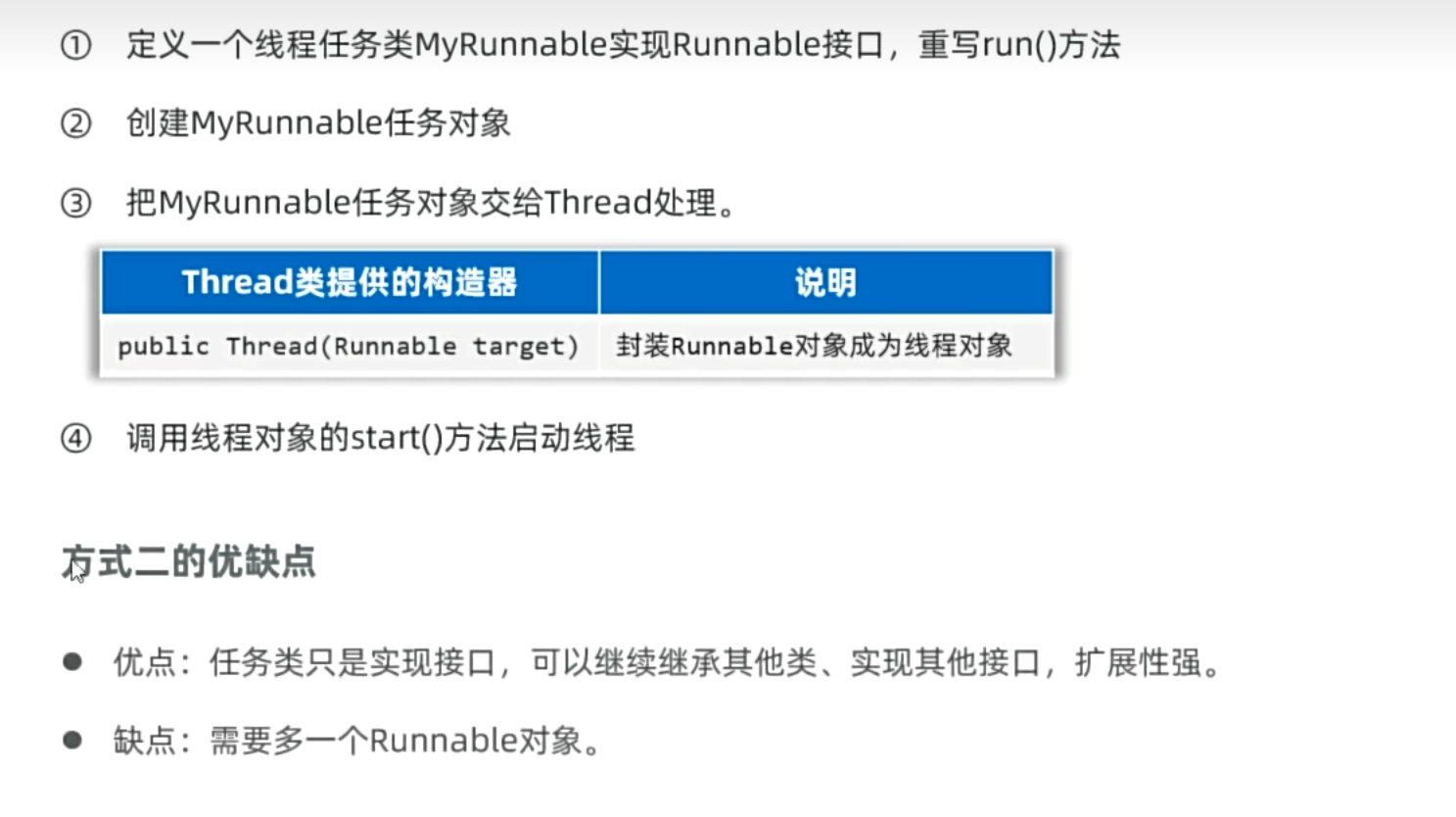
继承Runnable接口
Thread类本身就继承了Runnable接口,所以Thread类也可以当作任务对象来用
1
2
3
4
5
6
7
8
9
10
11
12
13
14
15
16
17
18
19
20
21
22
23
24
25
26
27
28
29
30
31
32
33
34
35
36
37
38
39
40
41
42
43
44
45
46
47
48
49
50
51
52
53
54
55
| package yyssh.LearnThread;
public class LearnThreadDemo2 {
public static void main(String[] args) {
Runnable task = new MyTask();
Thread t1 = new Thread(task);
t1.start();
Runnable t1_5 = new Runnable(){
@Override
public void run() {
for (int i = 0; i < 6; i++){
System.out.println("子线程1.5开始执行");
}
}
};
Thread t1_5_thread = new Thread(t1_5);
t1_5_thread.start();
Thread t2 = new Thread(new Runnable() {
@Override
public void run() {
for (int i = 0; i < 6; i++){
System.out.println("子线程2开始执行");
}
}
});
t2.start();
Thread t3 = new Thread(() -> {
for (int i = 0; i < 6; i++){
System.out.println("子线程3开始执行");
}
});
t3.start();
for (int i = 0; i < 10; i++) {
System.out.println("主线程开始执行");
}
}
}
class MyTask implements Runnable{
@Override
public void run() {
for (int i = 0; i < 6; i++){
System.out.println("子线程1开始执行");
}
}
}
|
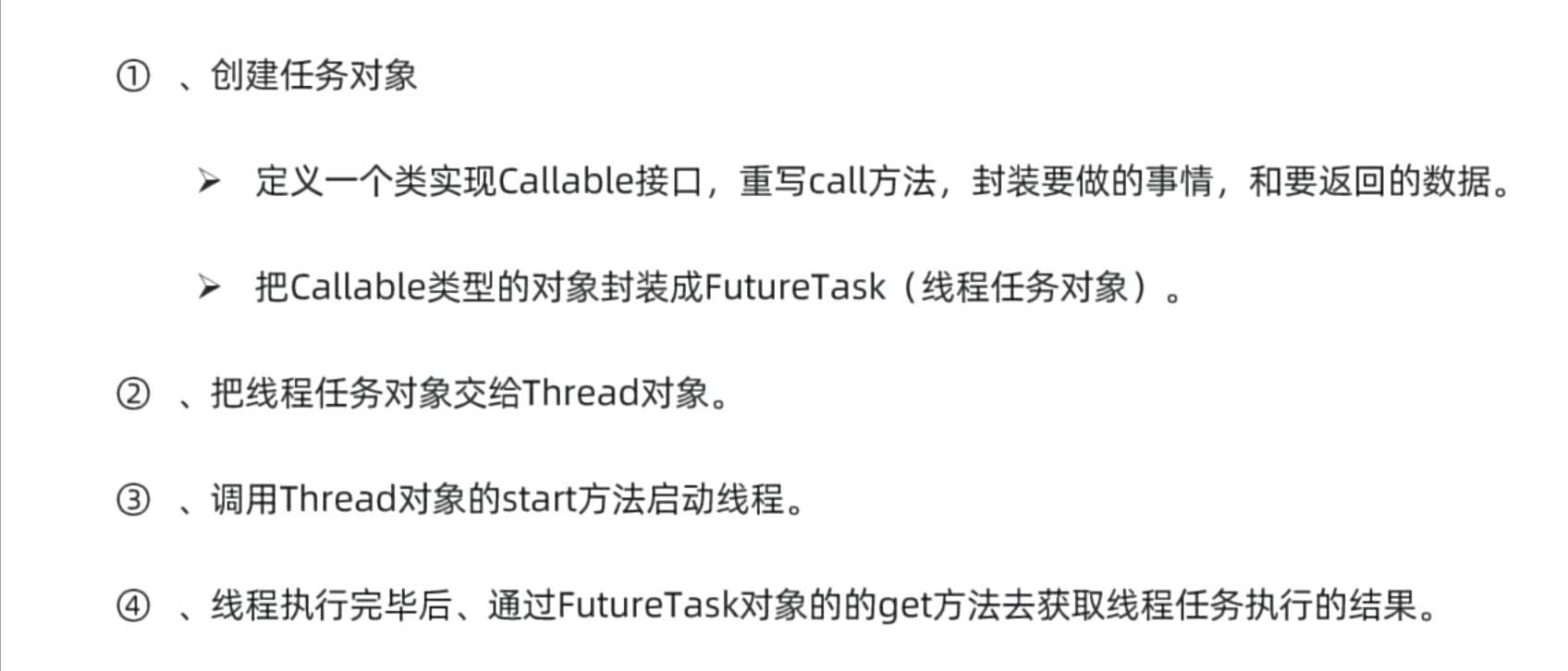
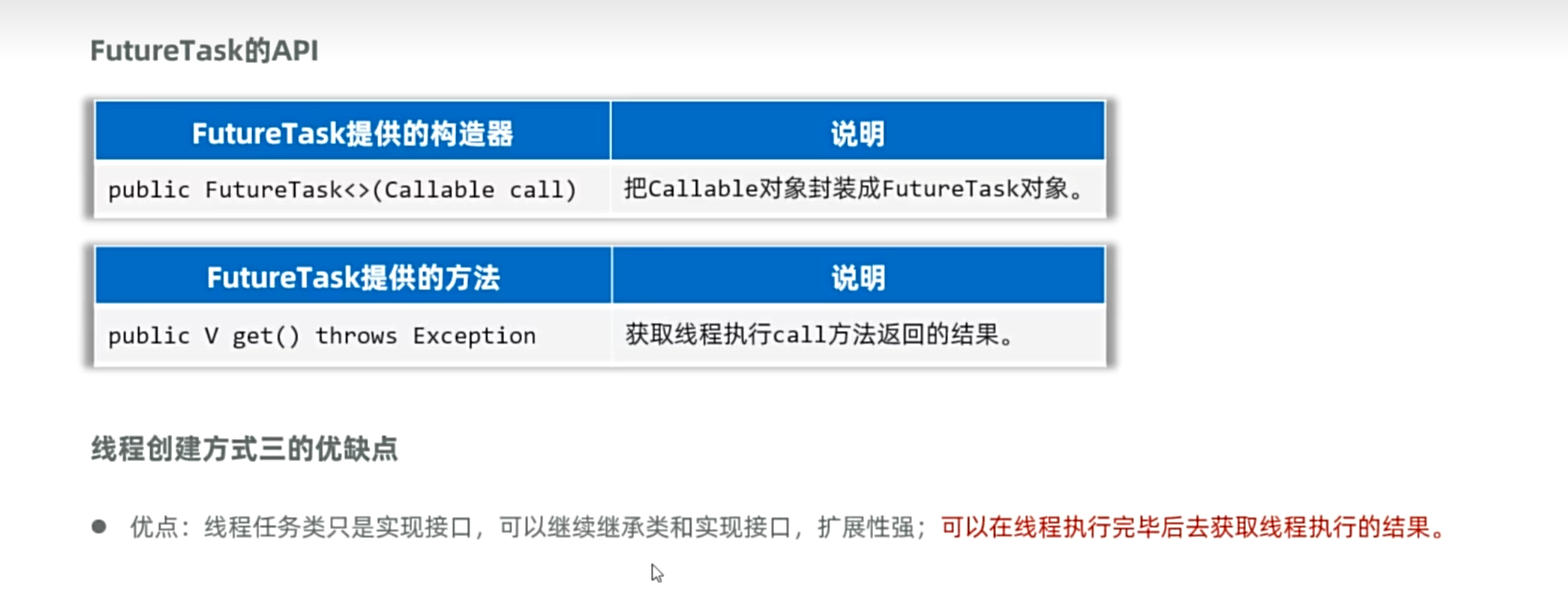
继承Callable接口
1
2
3
4
5
6
7
8
9
10
11
12
13
14
15
16
17
18
19
20
21
22
23
24
25
26
27
28
29
30
31
32
33
34
35
36
37
38
39
40
41
42
43
44
45
46
47
48
49
50
51
52
53
54
55
56
57
58
59
| package yyssh.LearnThread;
import java.util.concurrent.Callable;
import java.util.concurrent.FutureTask;
public class LearnThreadDemo3 {
public static void main(String[] args) {
MyCallable c1 = new MyCallable(100);
Callable c2 = new MyCallable(10);
FutureTask<String> f1 = new FutureTask<>(c1);
FutureTask<String> f2 = new FutureTask<>(c2);
Thread t1 = new Thread(f1);
t1.start();
Thread t2 = new Thread(f2);
t2.start();
try {
String result = f1.get();
System.out.println(result);
} catch (Exception e) {
e.printStackTrace();
}
try {
String result = f2.get();
System.out.println(result);
} catch (Exception e) {
e.printStackTrace();
}
System.out.println("主线程执行");
}
}
class MyCallable implements Callable<String> {
private int n;
public MyCallable(int n) {
this.n = n;
}
@Override
public String call() throws Exception {
int sum = 0;
for (int i = 0; i < n+1 ; i++){
sum += i;
}
return "子线程计算1-"+ n + "的和为:" + sum;
}
}
|
线程安全
当两个线程同时挤占CPU时,可能在一个线程进行重要操作时(取款),另外一个线程也完成了重要操作,从而导致银行出线违规操作

ThreadSecurityDemo.java
1
2
3
4
5
6
7
8
9
10
11
12
13
14
15
| package yyssh.ThreadSecurity;
public class ThreadSecurityDemo {
public static void main(String[] args) {
Account account = new Account("小明", "123456", 100000.0);
Thread t1 = new MyThread("小明",account);
Thread t2 = new MyThread("小红",account);
t1.start();
t2.start();
}
}
|
Account.java
1
2
3
4
5
6
7
8
9
10
11
12
13
14
15
16
17
18
19
20
21
22
23
24
25
26
| package yyssh.ThreadSecurity;
import lombok.AllArgsConstructor;
import lombok.Data;
import lombok.NoArgsConstructor;
@Data
@AllArgsConstructor
@NoArgsConstructor
public class Account {
private String name;
private String password;
private double balance;
public synchronized void drawMoney(double drawAmount) {
if (balance >= drawAmount) {
System.out.println(Thread.currentThread().getName() + "取钱成功,吐出钞票:" + drawAmount);
balance -= drawAmount;
System.out.println("余额为:" + balance);
} else {
System.out.println(Thread.currentThread().getName() + "取钱失败,余额不足");
}
}
}
|
MyThread.java
1
2
3
4
5
6
7
8
9
10
11
12
13
14
15
16
17
| package yyssh.ThreadSecurity;
public class MyThread extends Thread{
private Account account;
public MyThread(String name,Account account){
super(name);
this.account = account;
}
@Override
public void run() {
account.drawMoney(100000);
}
}
|
同步代码块
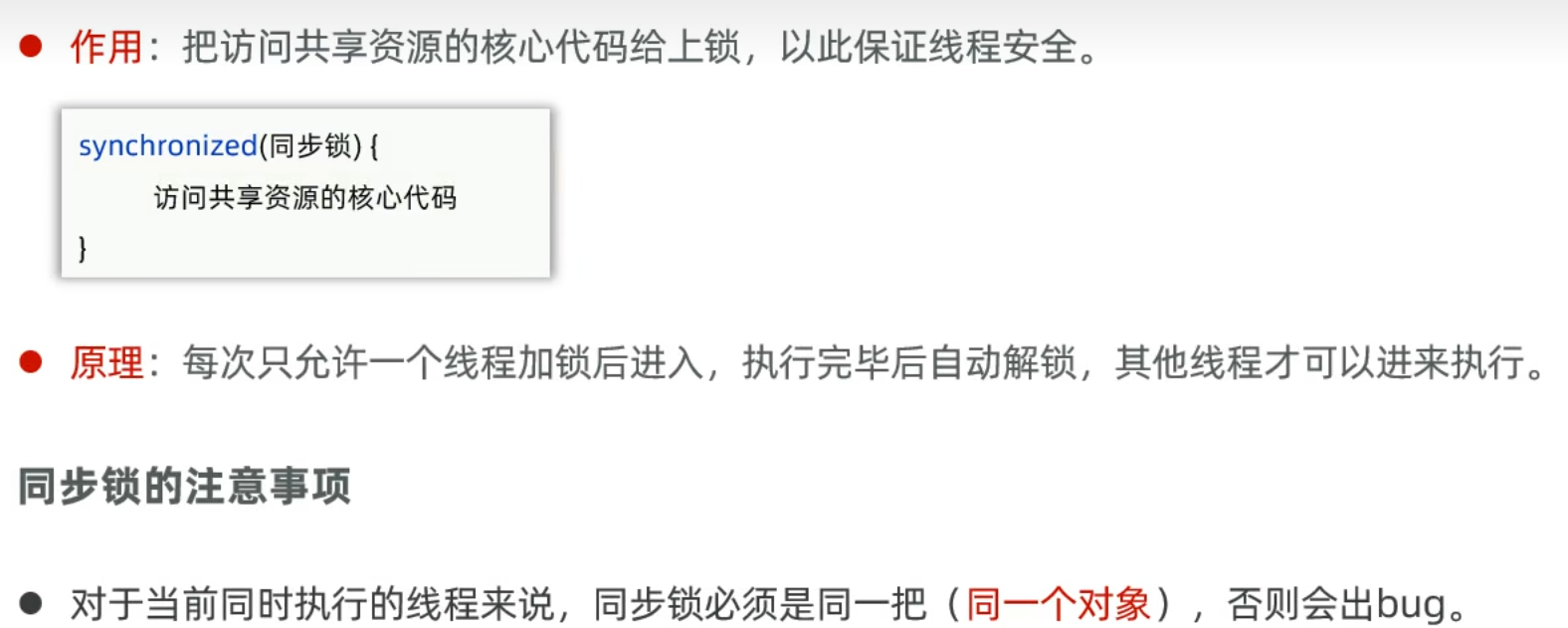
同步锁选择对象:
- 使用共享资源作为锁对象,对于实例方法建议使用this作为锁对象
- 对于静态方法建议使用字节码(类名.class)对象作为锁对象
同步方法
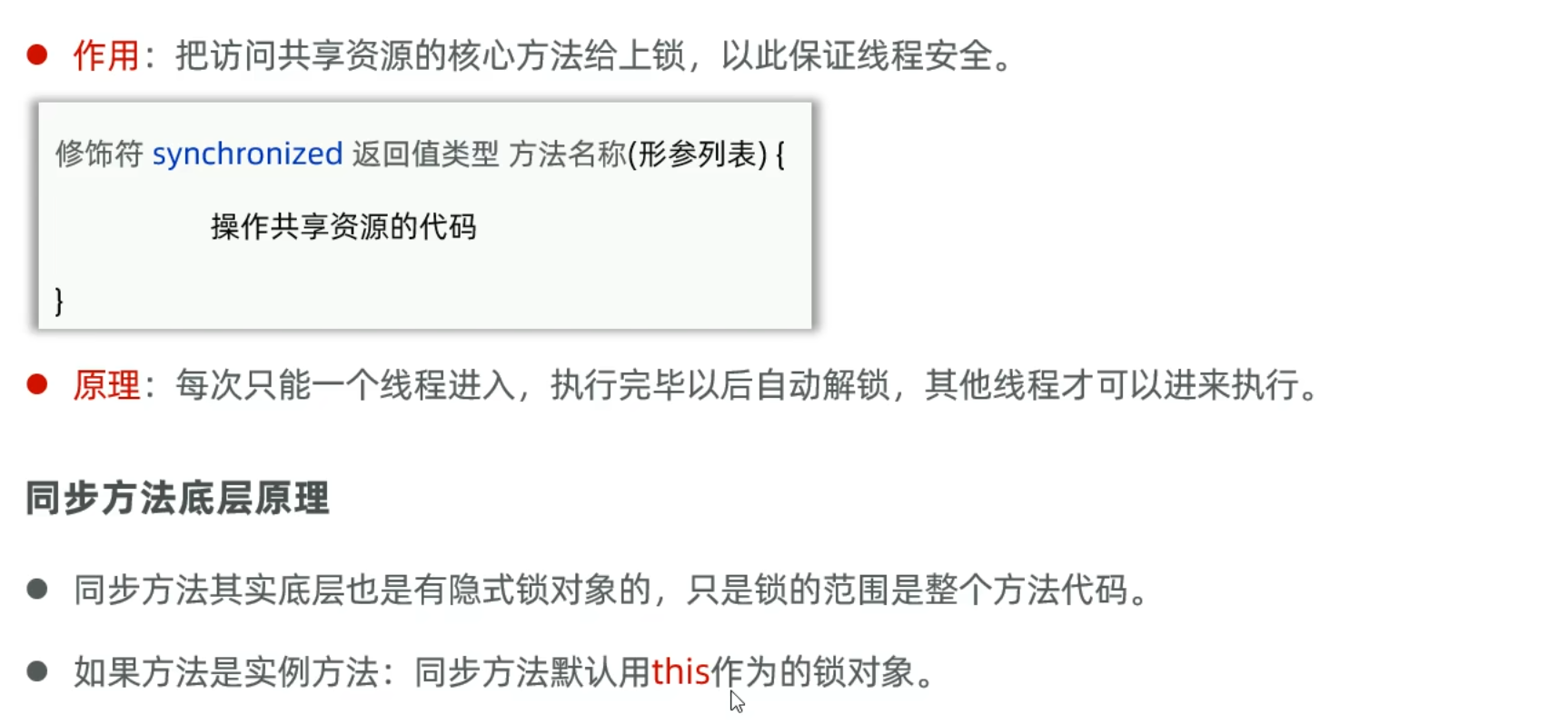
lock锁
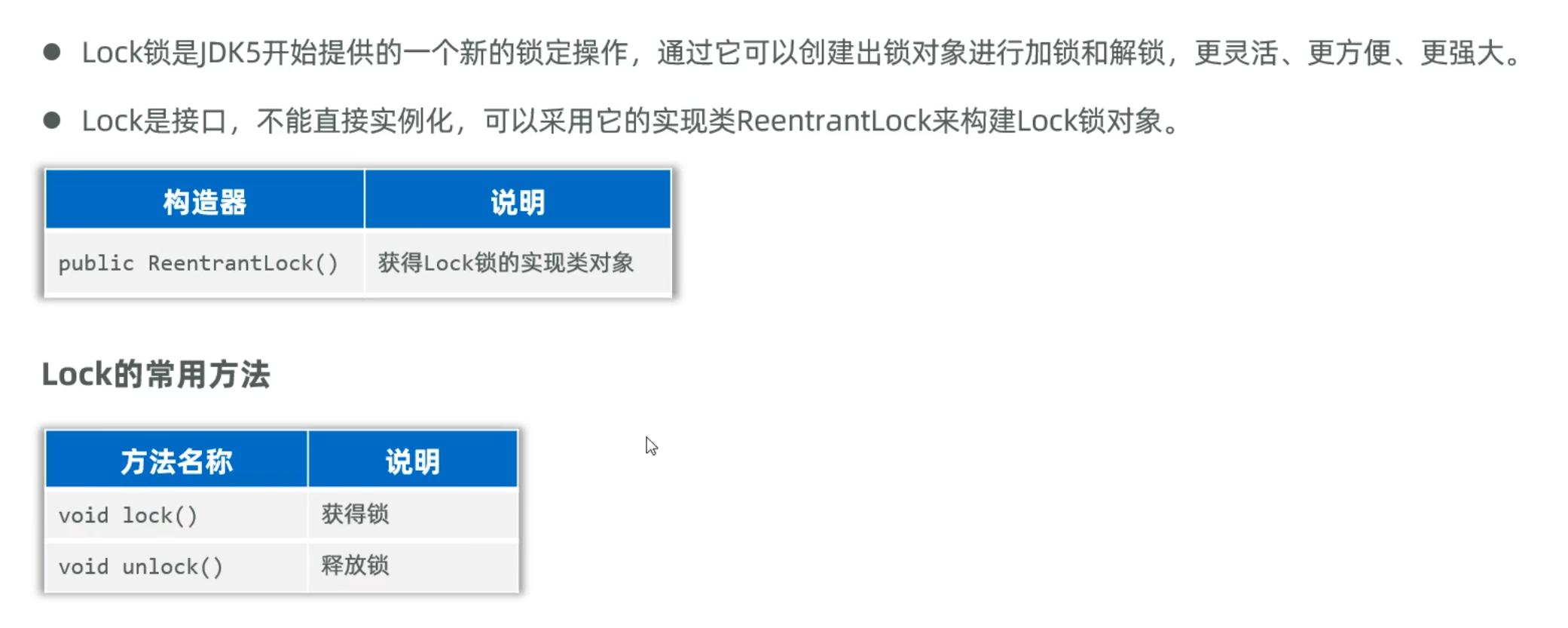
1
2
3
4
5
6
7
8
9
10
11
12
13
14
15
16
17
18
19
20
21
22
23
24
25
26
27
28
29
30
31
32
33
34
| package yyssh.ThreadSecurity;
import lombok.AllArgsConstructor;
import lombok.Data;
import lombok.NoArgsConstructor;
import java.util.concurrent.locks.Lock;
import java.util.concurrent.locks.ReentrantLock;
@Data
@AllArgsConstructor
@NoArgsConstructor
public class Account {
private String name;
private String password;
private double balance;
private final Lock lk = new ReentrantLock();
public void drawMoney(double amount) {
if (balance >= amount) {
lk.lock();
try {
balance -= amount;
System.out.println(Thread.currentThread().getName() + "取款成功,余额为:" + balance);
} finally { lk.unlock();}
}
else {
System.out.println(Thread.currentThread().getName() + "取款失败,余额不足");
}
}
}
|
线程池
线程池的创建原因是因为不可能每一个任务都创建一个线程来管理,所以存在线程复用的情况
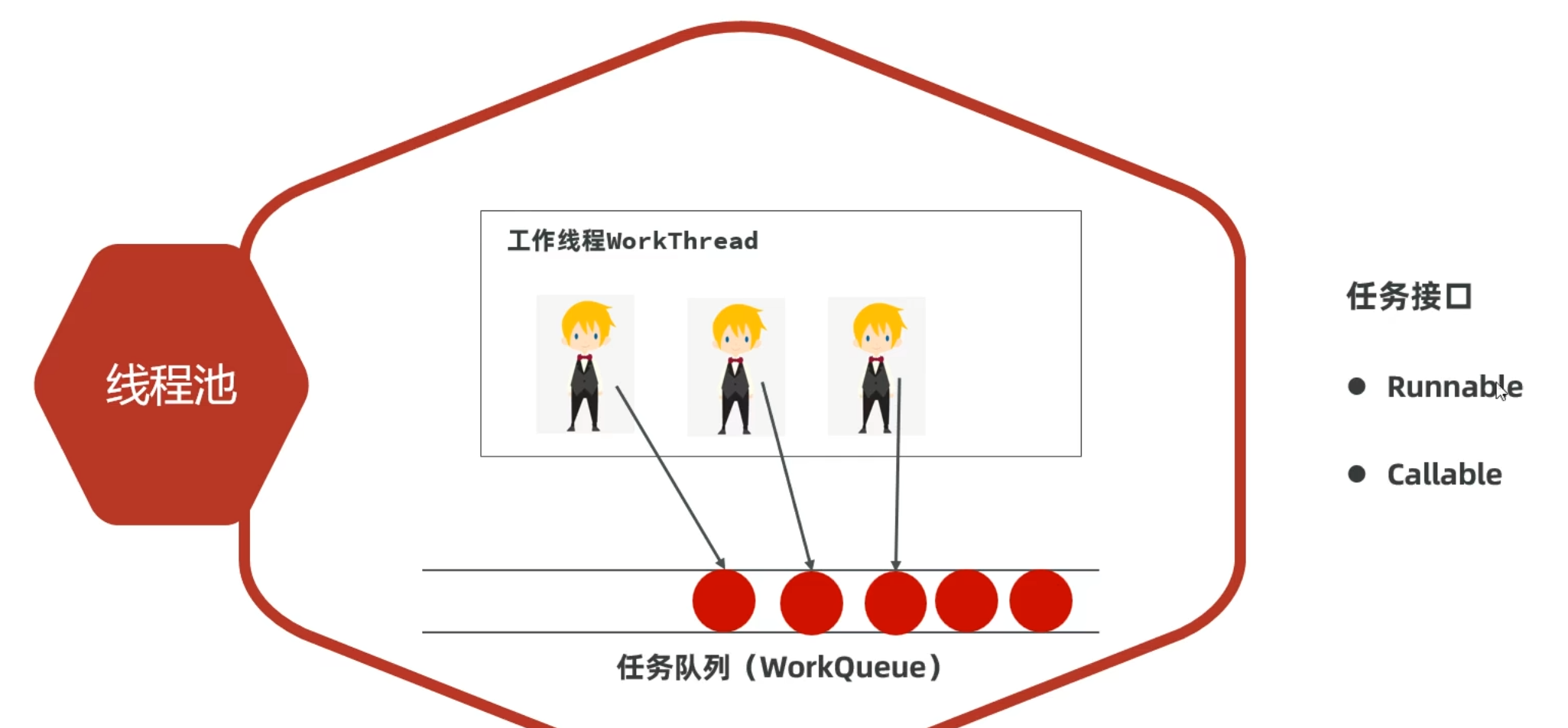
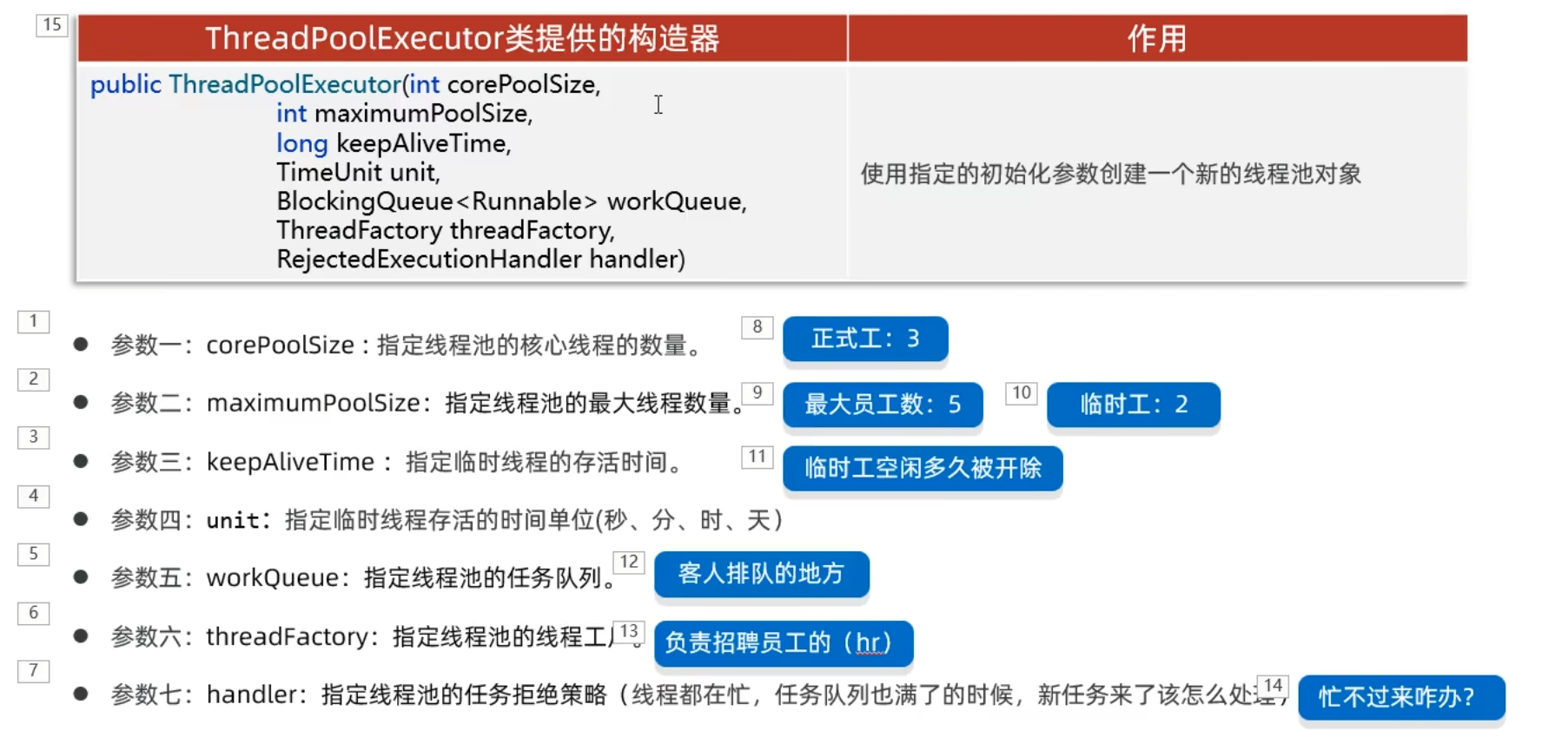
创建线程池
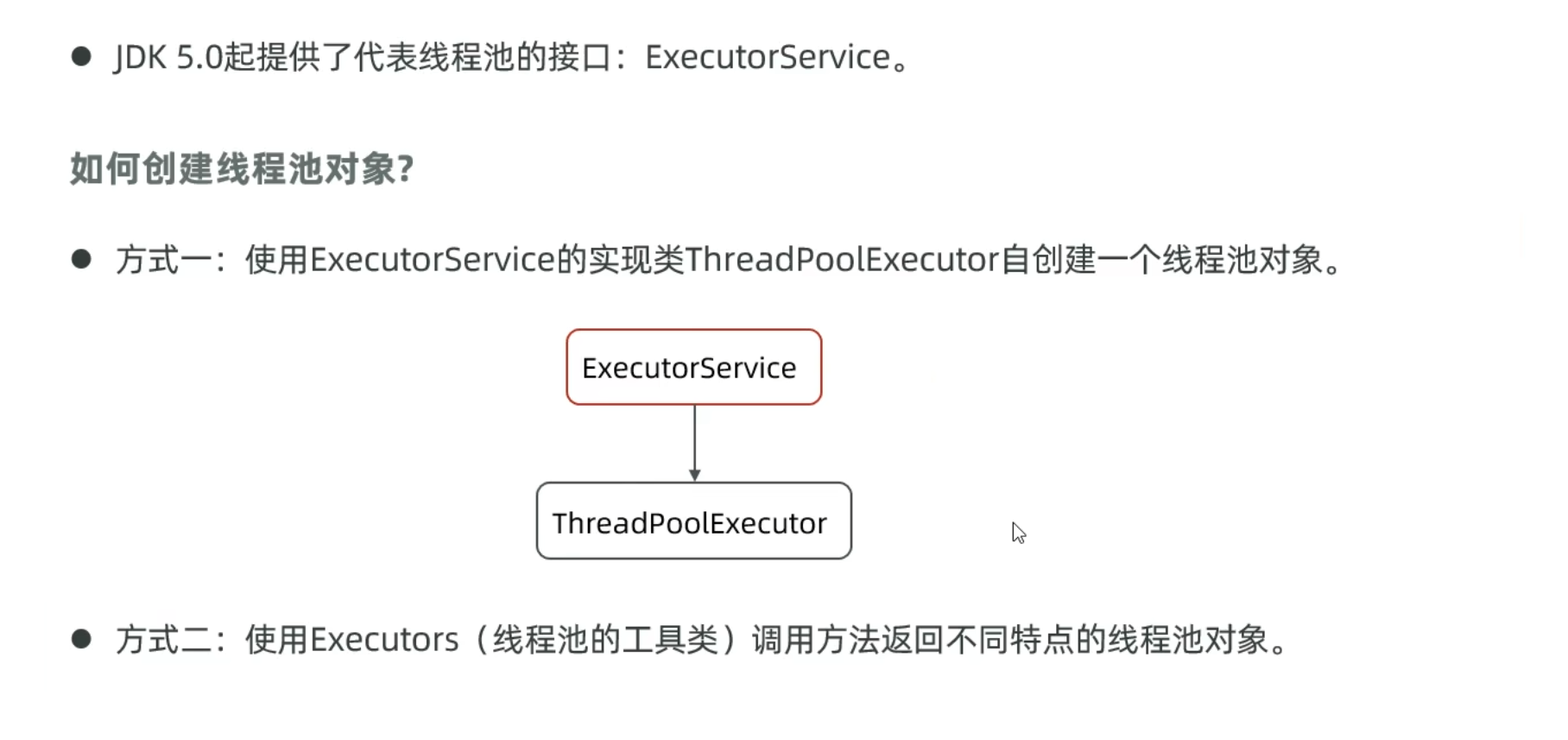
ExecutorService的实现类创建线程池
1
2
3
4
5
6
7
8
9
10
11
12
13
14
15
16
17
18
19
20
| package yyssh.threadPool;
import java.util.concurrent.*;
public class LearnThreadPool {
public static void main(String[] args) {
ExecutorService pool = new ThreadPoolExecutor(3,5,10, TimeUnit.SECONDS,
new ArrayBlockingQueue<>(3), Executors.defaultThreadFactory(), new ThreadPoolExecutor.AbortPolicy());
}
}
|
ExecutorService的常用方法
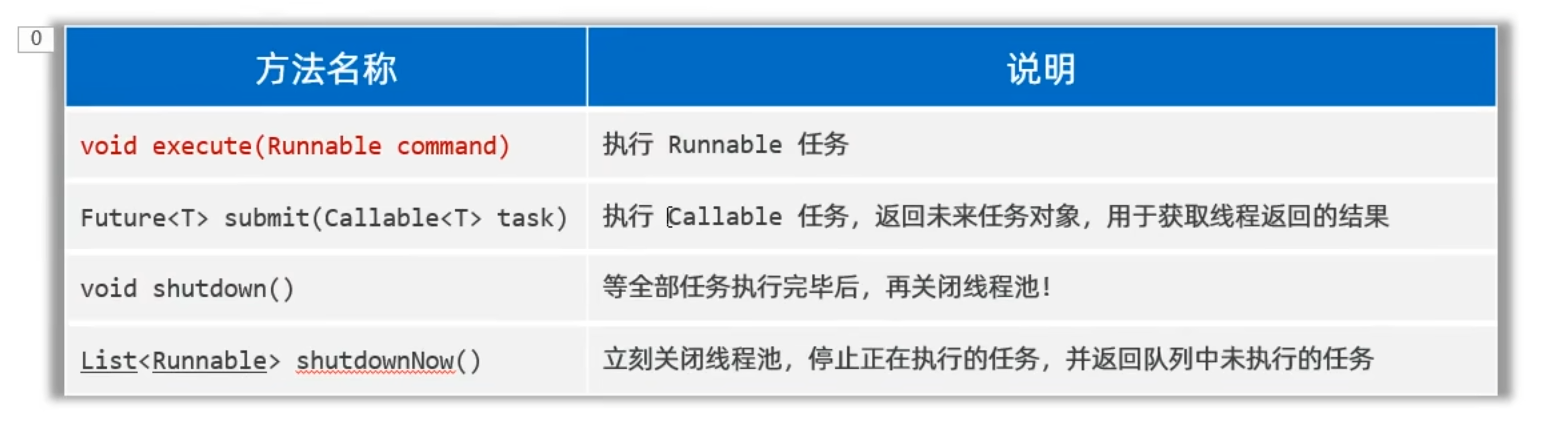
处理Runnable任务
LearnThreadPool.java
1
2
3
4
5
6
7
8
9
10
11
12
13
14
15
16
17
18
19
20
21
22
23
24
25
26
27
28
29
| package yyssh.threadPool;
import java.util.concurrent.*;
public class LearnThreadPool {
public static void main(String[] args) {
ExecutorService pool = new ThreadPoolExecutor(3,5,10, TimeUnit.SECONDS,
new ArrayBlockingQueue<>(3), Executors.defaultThreadFactory(), new ThreadPoolExecutor.AbortPolicy());
Runnable target = new MyRunnable();
for (int i = 0; i < 6; i++){
pool.execute(target);
}
}
}
|
MyRunnable.java
1
2
3
4
5
6
7
8
9
| package yyssh.threadPool;
public class MyRunnable implements Runnable{
@Override
public void run() {
System.out.println(Thread.currentThread().getName()+"开始运行");
}
}
|
临时线程的创建和任务拒绝策略
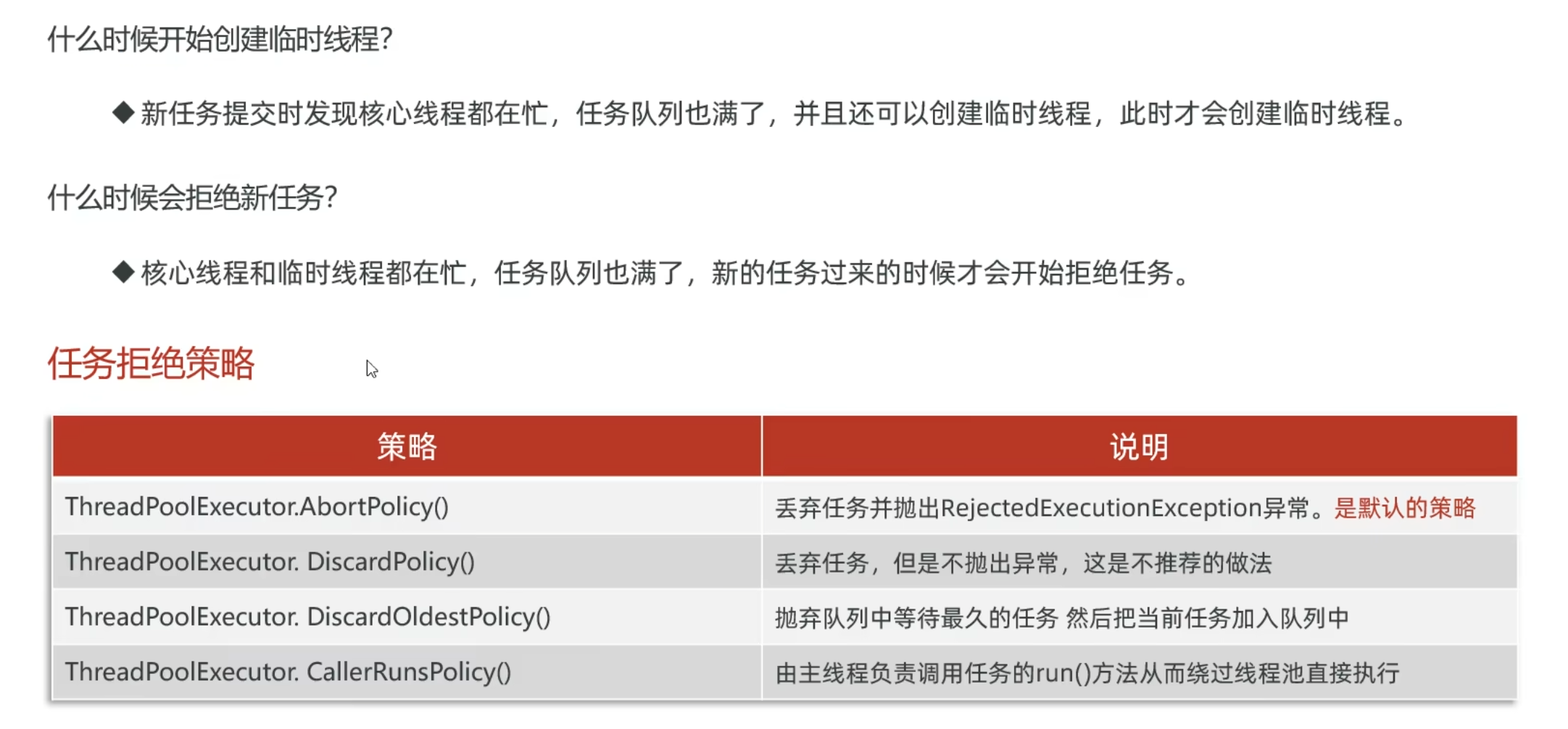
处理Callable任务
LearnThreadPool.java
1
2
3
4
5
6
7
8
9
10
11
12
13
14
15
16
17
18
19
20
21
22
23
24
25
26
27
28
29
30
31
32
33
34
35
36
37
38
39
40
41
42
43
44
45
46
47
48
49
50
51
52
53
54
55
56
| package yyssh.threadPool;
import java.util.concurrent.*;
public class LearnThreadPool {
public static void main(String[] args) {
ExecutorService pool = new ThreadPoolExecutor(3,5,10, TimeUnit.SECONDS,
new ArrayBlockingQueue<>(3), Executors.defaultThreadFactory(), new ThreadPoolExecutor.AbortPolicy());
Runnable target = new MyRunnable();
for (int i = 0; i < 6; i++){
pool.execute(target);
}
Future<String> f1 = pool.submit(new MyCallable(50));
Future<String> f2 = pool.submit(new MyCallable(10));
Future<String> f3 = pool.submit(new MyCallable(100));
Future<String> f4 = pool.submit(new MyCallable(20));
Future<String> f5 = pool.submit(new MyCallable(30));
Future<String> f6 = pool.submit(new MyCallable(40));
try {
String result1 = f1.get();
String result2 = f2.get();
String result3 = f3.get();
String result4 = f4.get();
String result5 = f5.get();
String result6 = f6.get();
System.out.println(result1);
System.out.println(result2);
System.out.println(result3);
System.out.println(result4);
System.out.println(result5);
System.out.println(result6);
}
catch (Exception e) {
e.printStackTrace();
}
}
}
|
MyCallable.java
1
2
3
4
5
6
7
8
9
10
11
12
13
14
15
16
17
18
19
| package yyssh.threadPool;
import java.util.concurrent.Callable;
class MyCallable implements Callable<String> {
private int n;
public MyCallable(int n) {
this.n = n;
}
@Override
public String call() throws Exception {
int sum = 0;
for (int i = 0; i < n+1 ; i++){
sum += i;
}
return Thread.currentThread().getName() + "计算1-"+ n + "的和为:" + sum;
}
}
|
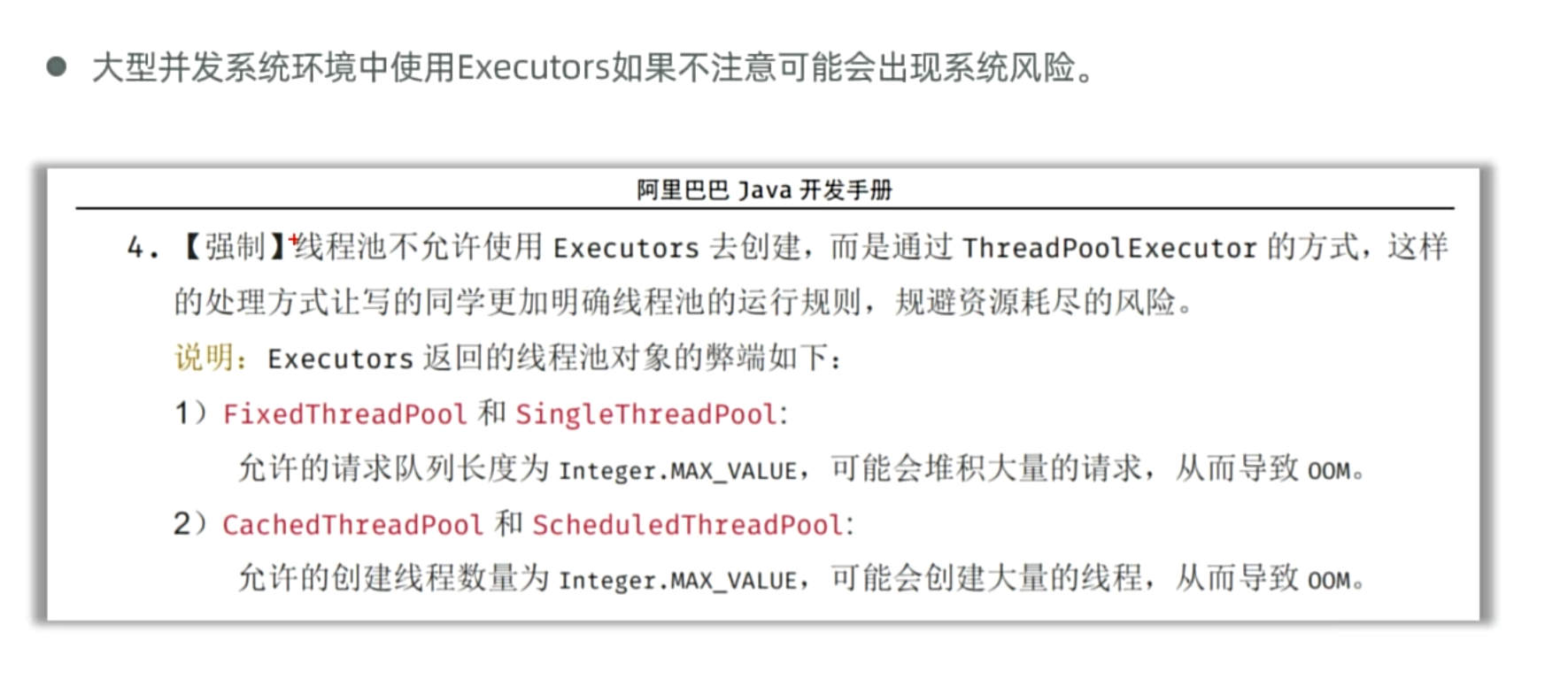
Executors工具类创建线程池
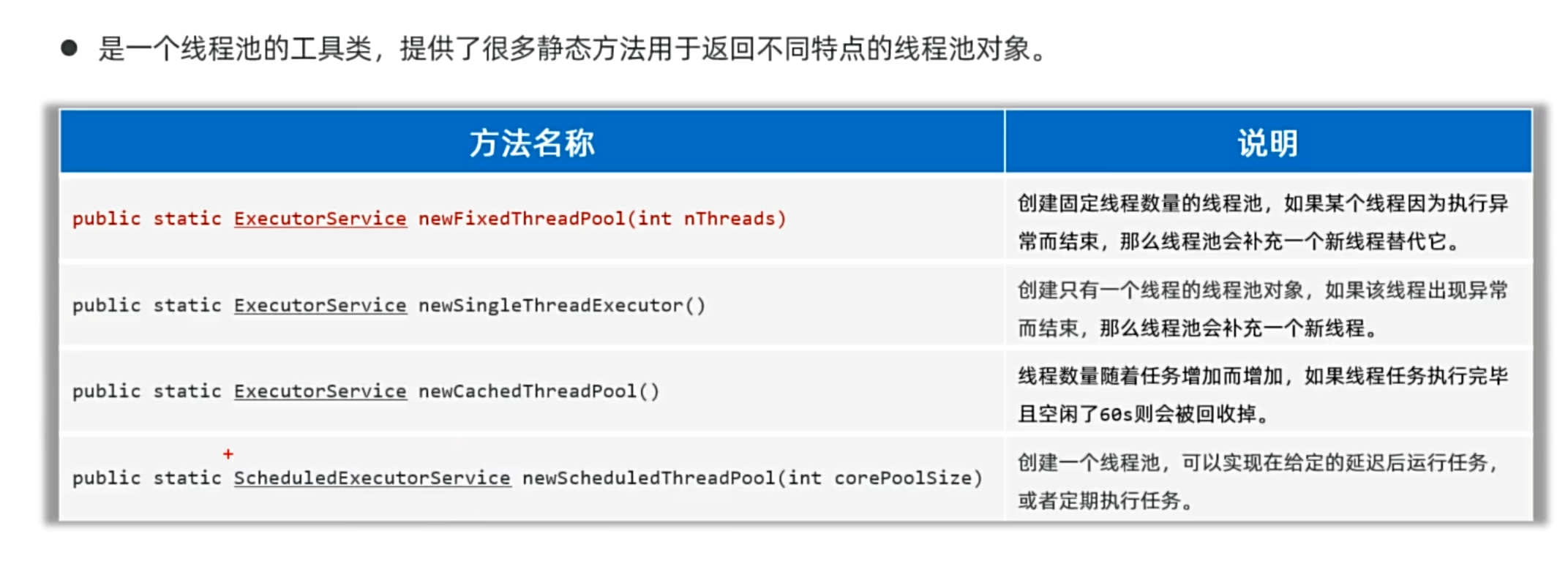
大公司禁止使用 Executor工具类创建线程池
并发和并行
并发:同一时间段执行的程序
并行:同一时间执行的程序
java多线程和python、c++的区别
| 特性 |
Java |
Python |
C++ |
| 线程模型 |
原生支持多线程(基于操作系统线程),通过Thread类和Runnable接口实现。 |
由于GIL(全局解释器锁),CPython的多线程无法真正并行,多线程适合I/O密集型任务。 |
原生支持多线程(C++11起通过<thread>标准库),无GIL限制,可真正并行。 |
| 并行性 |
支持真正的多线程并行(利用多核CPU)。 |
由于GIL限制,多线程无法并行(但多进程可以)。 |
支持真正的多线程并行(依赖操作系统和硬件)。 |
| 线程安全机制 |
内置synchronized关键字、Lock接口、volatile变量等。 |
通过threading.Lock、RLock等实现,但GIL导致线程安全复杂性降低。 |
通过std::mutex、std::atomic等实现,需手动管理,灵活性高但易出错。 |
| 线程通信 |
使用wait()/notify()或BlockingQueue等高级工具。 |
使用queue.Queue或条件变量(threading.Condition)。 |
通过条件变量(std::condition_variable)或低级原子操作实现。 |
| 内存模型 |
定义明确的线程内存模型(JMM),保证可见性和有序性。 |
无严格内存模型,依赖GIL简化同步。 |
C++11引入内存模型(std::memory_order),需显式控制。 |
| 性能 |
线程创建和切换开销适中,适合高并发场景。 |
线程创建开销低,但GIL导致计算密集型性能差。 |
线程性能接近原生操作系统,高效但需精细优化。 |
| 多进程支持 |
可通过ProcessBuilder启动多进程,但线程更常用。 |
多进程是并行计算的推荐方式(multiprocessing模块)。 |
可通过fork()或std::process(C++20)实现,但多线程更常见。 |
| 典型应用场景 |
高并发服务器、企业级应用。 |
I/O密集型任务(如网络请求),GIL限制计算密集型任务。 |
高性能计算、游戏引擎、系统级编程。 |
| 代码示例(简单线程) |
java<br>new Thread(() -> {<br> System.out.println("Hello");<br>}).start();<br> |
python<br>import threading<br>threading.Thread(target=lambda: print("Hello")).start()<br> |
cpp<br>#include <thread><br>std::thread t([](){ std::cout << "Hello"; });<br>t.join();<br> |
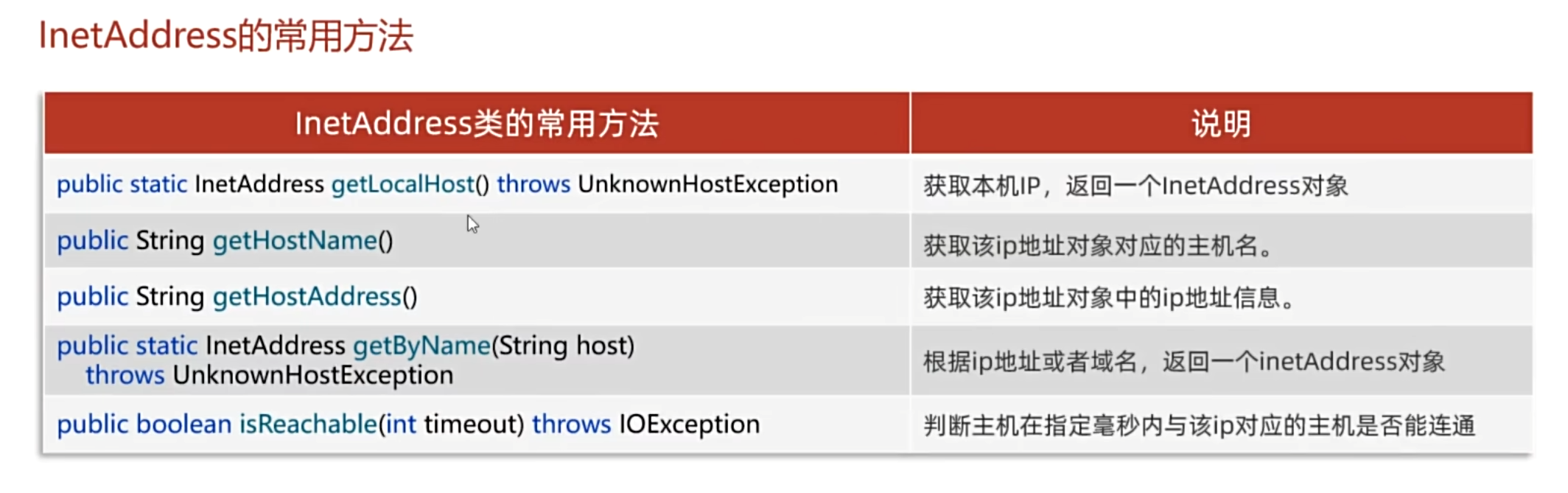
Java的InetAddress
CS架构
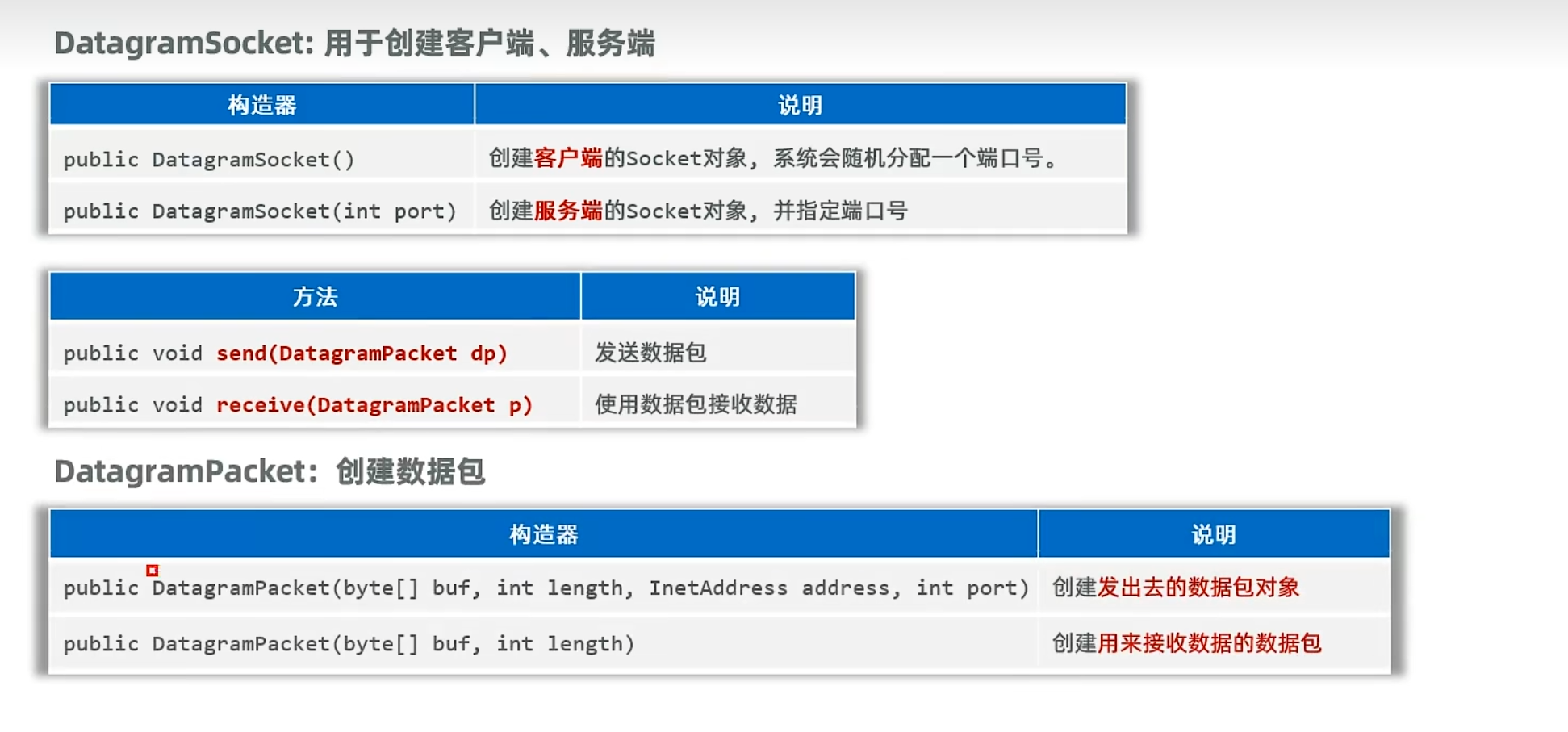
UDP通信的实现
Client:
1
2
3
4
5
6
7
8
9
10
11
12
13
14
15
16
17
18
19
20
21
22
23
24
25
26
27
28
29
30
31
32
33
34
35
36
37
38
39
40
| package yyssh.UDPCommunication;
import java.io.IOException;
import java.net.DatagramPacket;
import java.net.DatagramSocket;
import java.net.InetAddress;
import java.net.UnknownHostException;
import java.util.Scanner;
public class LearnUDPClient {
public static void main(String[] args) throws IOException {
System.out.println("UDP通信Client端");
DatagramSocket client = null;
try {
client = new DatagramSocket();
} catch (Exception e) {
throw new RuntimeException(e);
}
while(true){
Scanner sc = new Scanner(System.in);
System.out.println("请输入你要发送的信息:");
String msg = sc.next();
byte[] bytes = new byte[1024*64];
bytes = msg.getBytes();
client.send(new DatagramPacket(bytes, bytes.length,InetAddress.getLocalHost(),9999));
if("exit".equals(msg)){
break;
}
}
client.close();
}
}
|
Server:
1
2
3
4
5
6
7
8
9
10
11
12
13
14
15
16
17
18
19
20
21
22
23
24
25
26
27
28
29
30
31
32
33
34
35
| package yyssh.UDPCommunication;
import java.io.IOException;
import java.net.DatagramPacket;
import java.net.DatagramSocket;
public class LearnUDPServer {
public static void main(String[] args) throws IOException {
System.out.println("UDP通信Server端");
DatagramSocket server = null;
try {
server = new DatagramSocket(9999);
} catch (Exception e) {
throw new RuntimeException(e);
}
while(true){
byte[] buf = new byte[1024*64];
DatagramPacket packet = new DatagramPacket(buf,0,buf.length);
server.receive(packet);
String msg = new String(packet.getData(),0,packet.getLength());
System.out.println("来自"+ packet.getAddress() +"的数据:"+ msg);
}
}
}
|
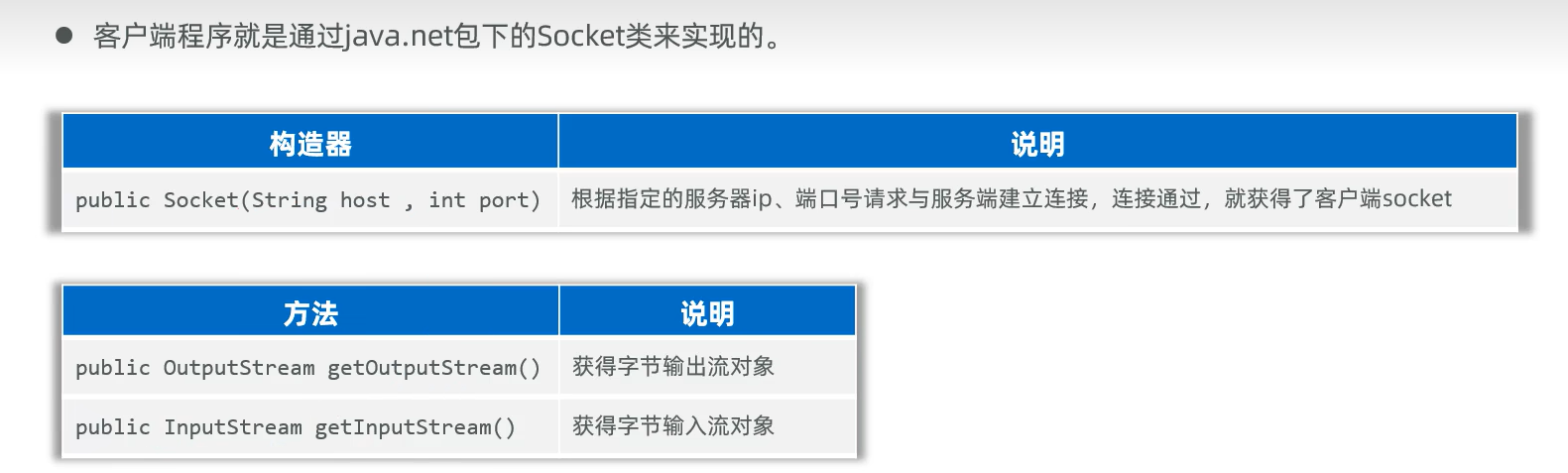
TCP通信的实现
Client:
1
2
3
4
5
6
7
8
9
10
11
12
13
14
15
16
17
18
19
20
21
22
23
24
25
26
27
28
29
30
31
32
33
34
35
| package yyssh.TCPcommunication;
import java.io.DataOutputStream;
import java.net.Socket;
import java.util.Scanner;
public class LearnTCPClient {
public static void main(String[] args) throws Exception {
System.out.println("============TCP通信Client端============");
Socket client = new Socket("127.0.0.1", 9999);
DataOutputStream dis = new DataOutputStream(client.getOutputStream());
Scanner sc = new Scanner(System.in);
while(true){
System.out.println("请输入你要发送的信息:");
String msg = sc.next();
dis.writeUTF(msg);
dis.flush();
if("exit".equals(msg)){
client.close();
}
}
}
}
|
Server:
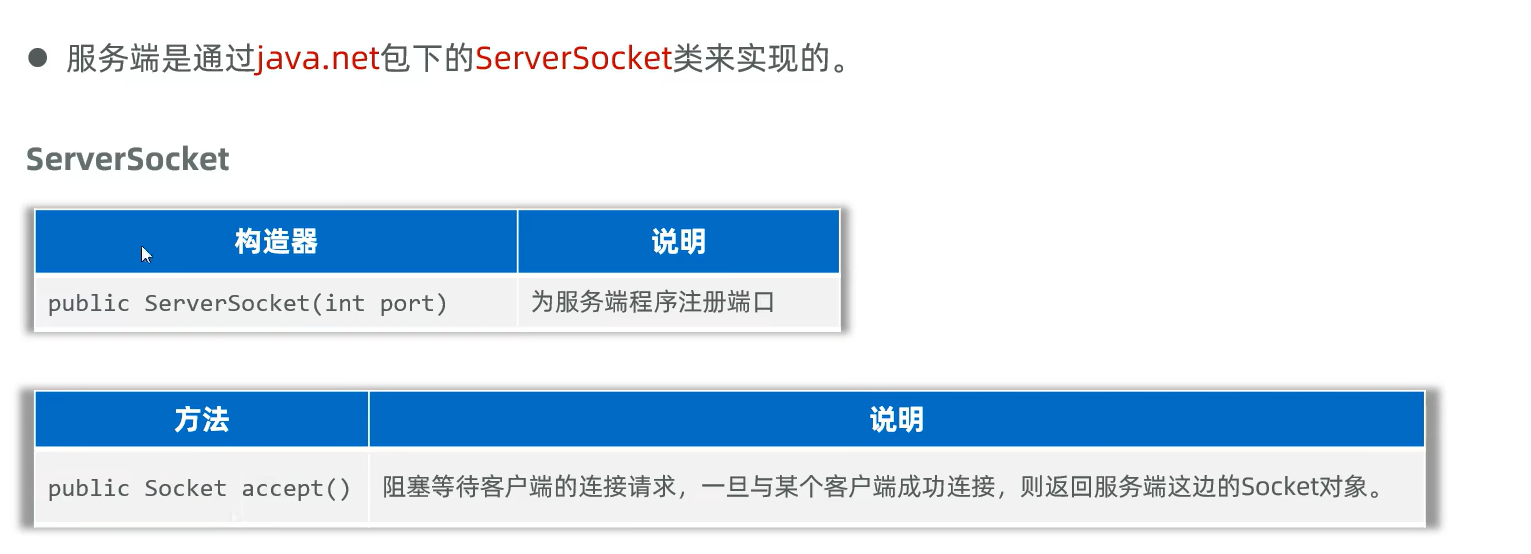
1
2
3
4
5
6
7
8
9
10
11
12
13
14
15
16
17
18
19
20
21
22
23
| package yyssh.TCPcommunication;
import java.net.ServerSocket;
import java.net.Socket;
public class LearnTCPServerDemo2 {
public static void main(String[] args) throws Exception {
System.out.println("==================TCP通信Server端================");
ServerSocket server = new ServerSocket(9999);
while (true){
Socket socket = server.accept();
new MyThread(socket).start();
}
}
}
|
MyThread.java:
1
2
3
4
5
6
7
8
9
10
11
12
13
14
15
16
17
18
19
20
21
22
23
24
25
26
27
28
29
30
31
32
| package yyssh.TCPcommunication;
import java.io.DataInputStream;
import java.net.Socket;
public class MyThread extends Thread{
private Socket socket;
public MyThread(Socket socket){
this.socket = socket;
}
@Override
public void run() {
try {
DataInputStream dis = new DataInputStream(socket.getInputStream());
while(true){
String msg = dis.readUTF();
System.out.println("ip:"+socket.getInetAddress().getHostAddress()
+ ":"+socket.getPort()+"发送消息"+msg);
}
} catch (Exception e) {
System.out.println("ip:"+socket.getInetAddress().getHostAddress()
+ ":"+socket.getPort()+"下线了");
throw new RuntimeException(e);
}
}
}
|
BS架构
Server:
1
2
3
4
5
6
7
8
9
10
11
12
13
14
15
16
17
18
19
20
21
22
23
24
25
| package yyssh.BSCommunication;
import java.net.ServerSocket;
import java.net.Socket;
import java.util.concurrent.ExecutorService;
import java.util.concurrent.Executors;
public class LearnTCPServerDemo2 {
public static void main(String[] args) throws Exception {
ServerSocket server = new ServerSocket(9999);
ExecutorService pool = Executors.newFixedThreadPool(10);
while (true){
Socket socket = server.accept();
pool.execute( new MyThread(socket));
}
}
}
|
MyThread.java:
1
2
3
4
5
6
7
8
9
10
11
12
13
14
15
16
17
18
19
20
21
22
23
24
25
26
27
28
29
30
31
32
| package yyssh.BSCommunication;
import java.io.DataInputStream;
import java.io.PrintStream;
import java.net.Socket;
public class MyThread extends Thread{
private Socket socket;
public MyThread(Socket socket){
this.socket = socket;
}
@Override
public void run() {
try {
PrintStream ps = new PrintStream(socket.getOutputStream());
ps.println("HTTP/1.1 200 OK");
ps.println("Content-Type:text/html;charset=UTF-8");
ps.println();
ps.println("<html>");
ps.println("<body>");
ps.println("<h1>Hello World</h1>");
ps.println("</body>");
ps.println("</html>");
ps.close();
}
catch (Exception e) {
throw new RuntimeException(e);
}
}
}
|
Junit单元测试
在 JUnit 4 中:
- @Test测试方法必须是 public、非静态(non-static)、无参数、无返回值 的方法。
在 JUnit 5 中(使用 org.junit.jupiter.api.Test):
- @Test测试方法也 必须是非静态的(non-static)。
- 同样不能有参数(除非你用的是参数化测试)。
所以用@Test直接注释main函数会报错
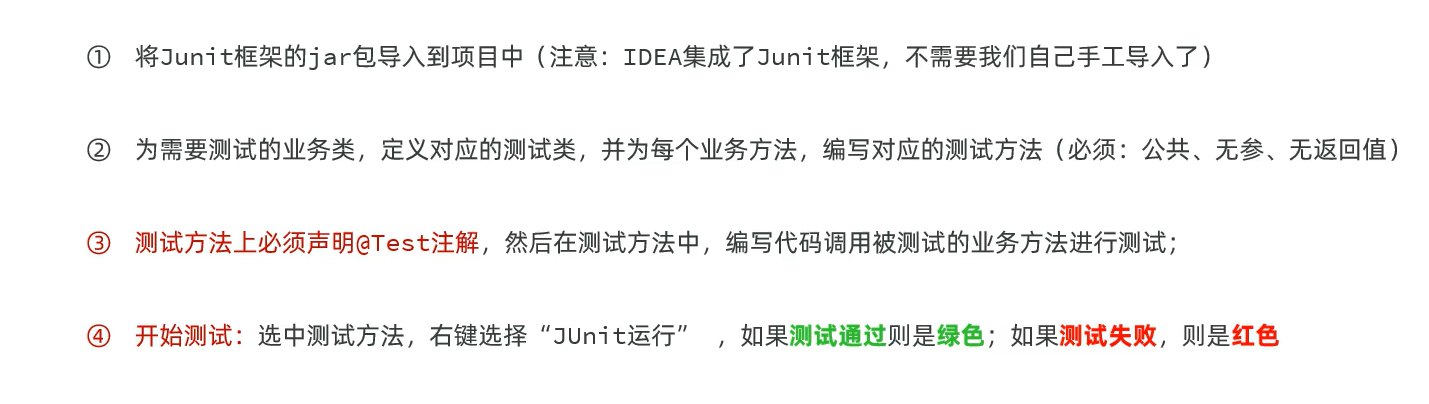
单元测试本质就是你新建一个类调用被测试的类,然后传入测试参数(null、“”等等),观察程序是否报错或者与预期值是否相同
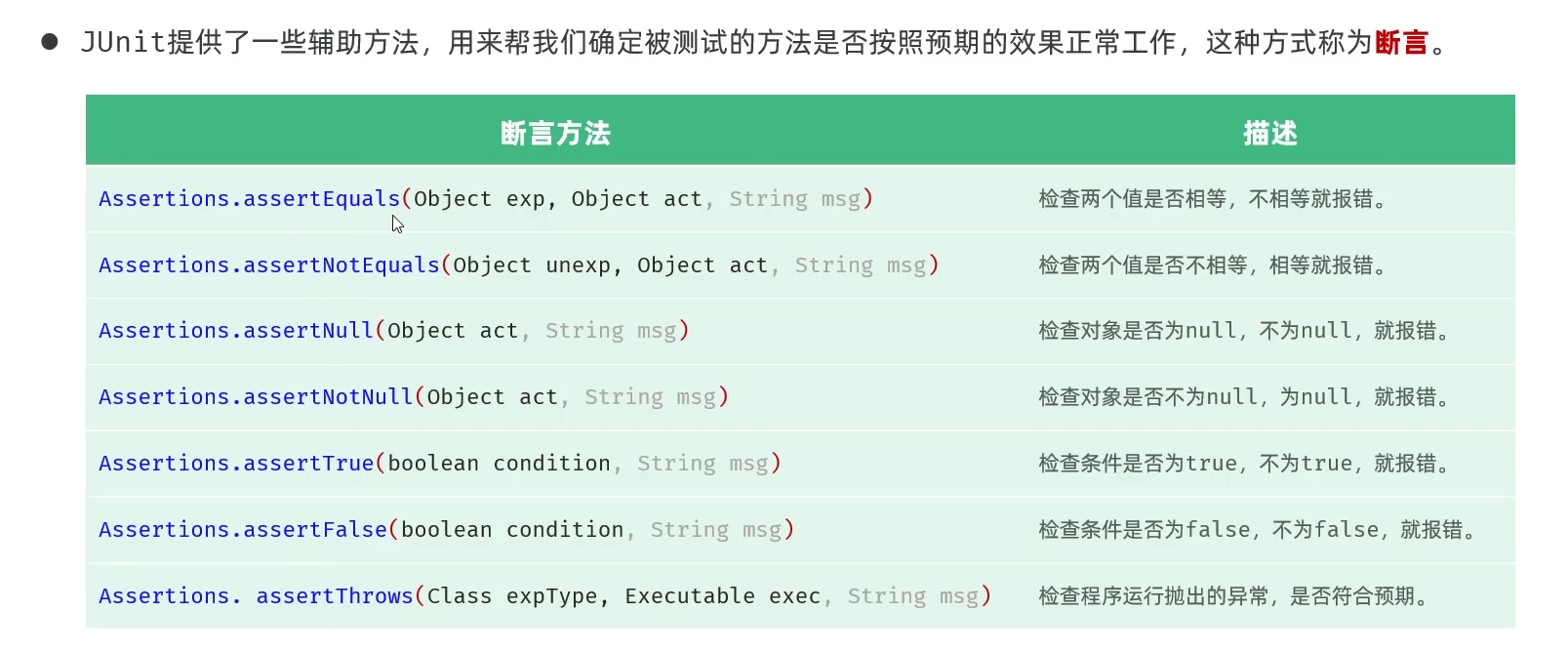
断言测试
- 断言测试:Assert.assertEquals(“测试不相等时你想输出的字符串”,应输出值,实际值)
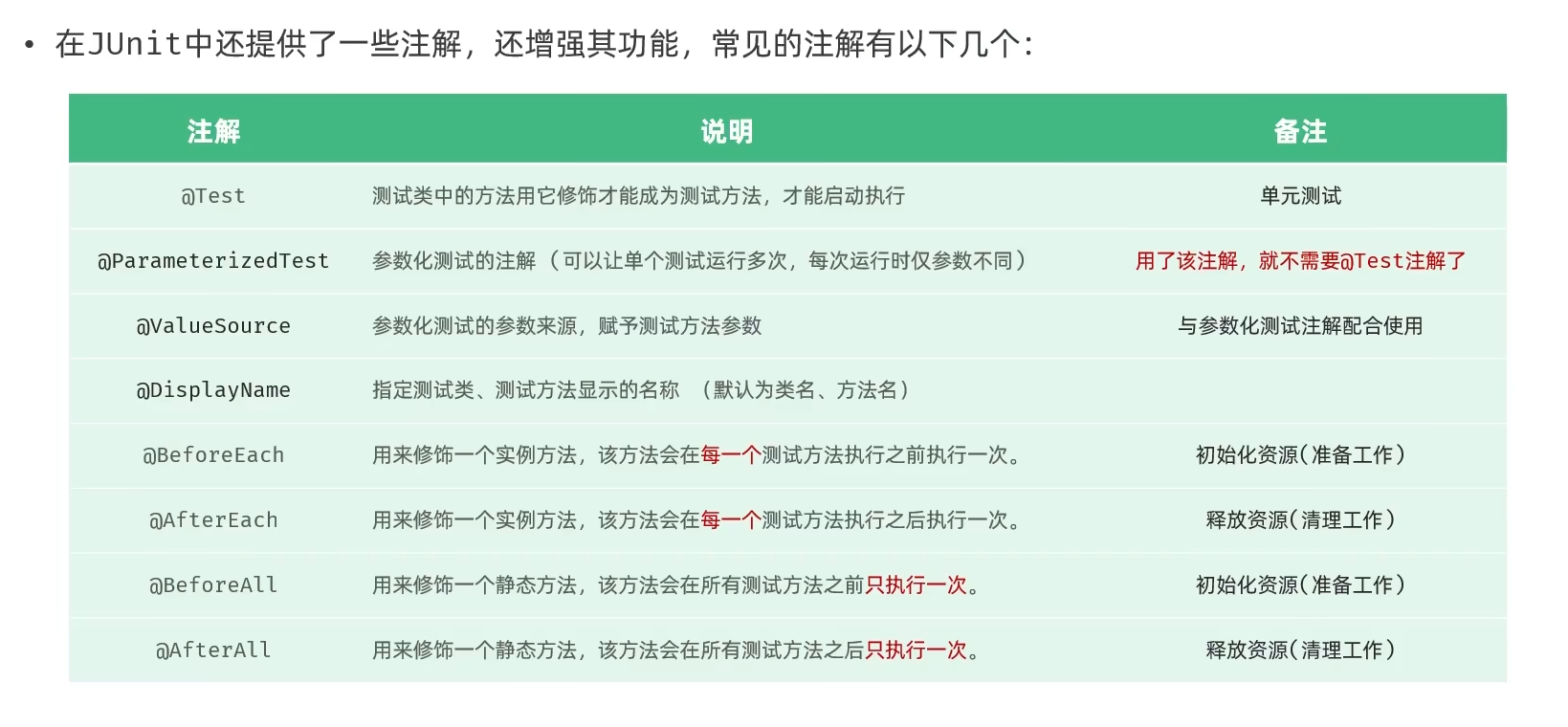
测试的注解
Java的反射
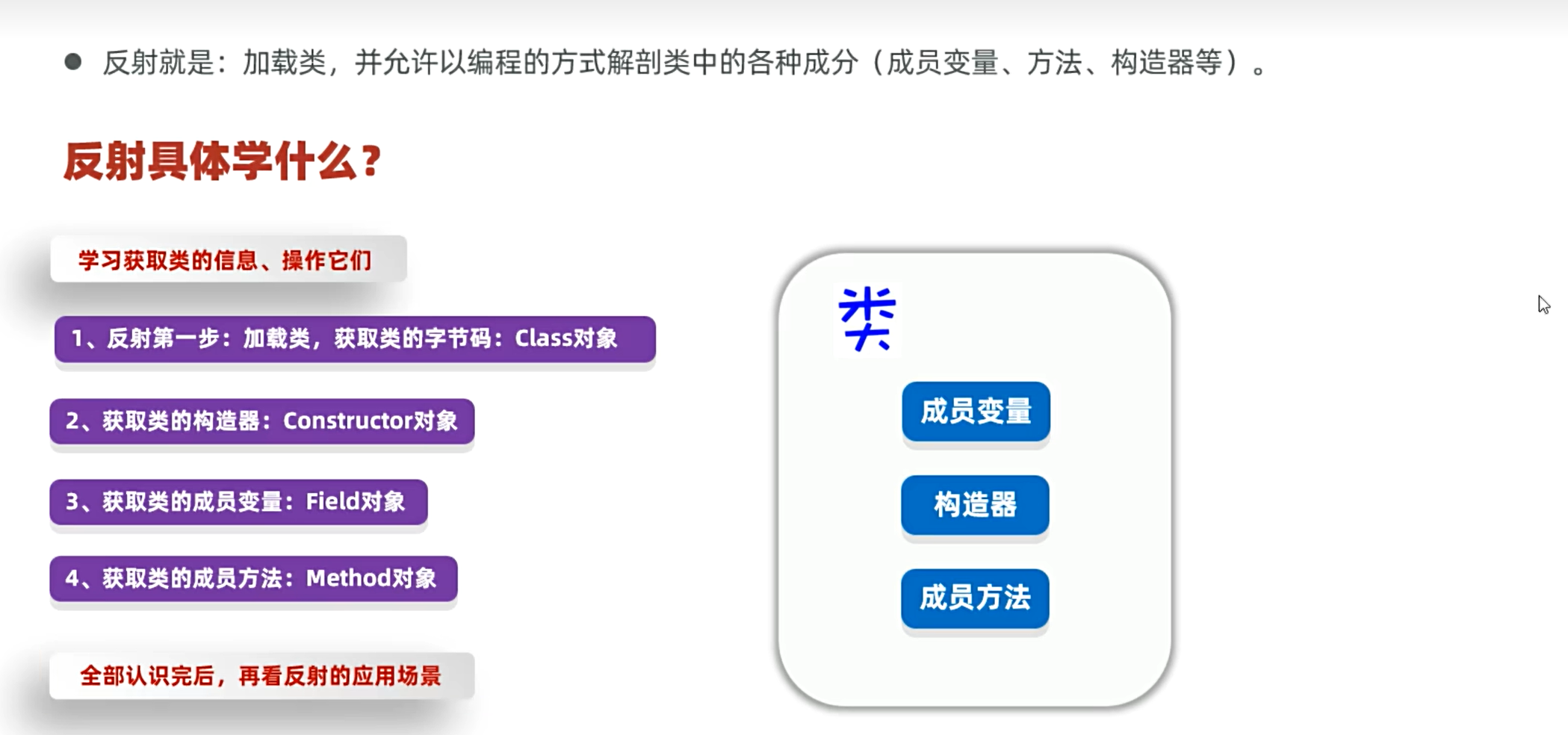
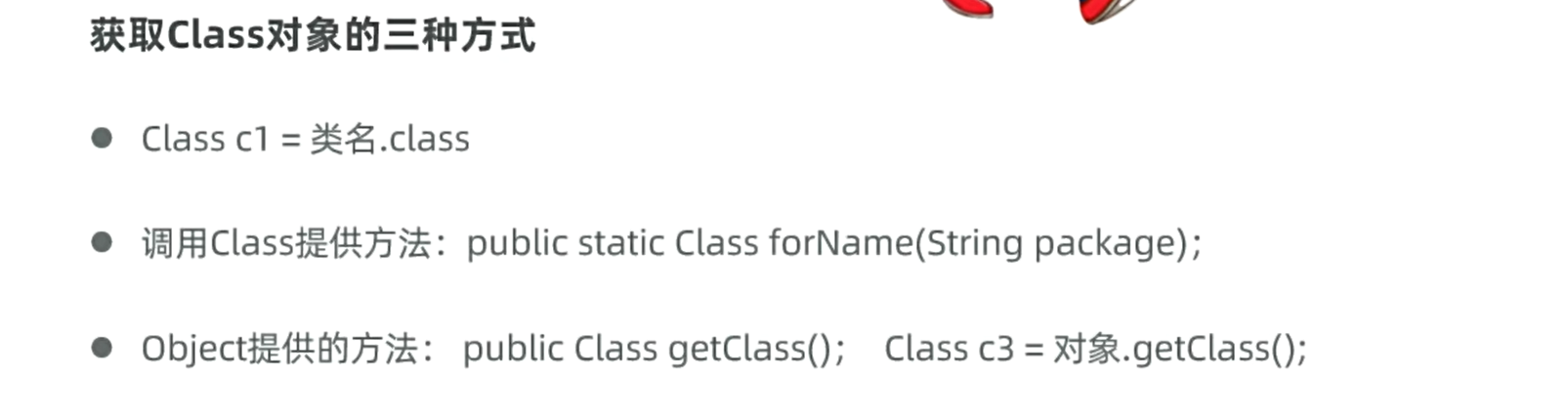
加载类
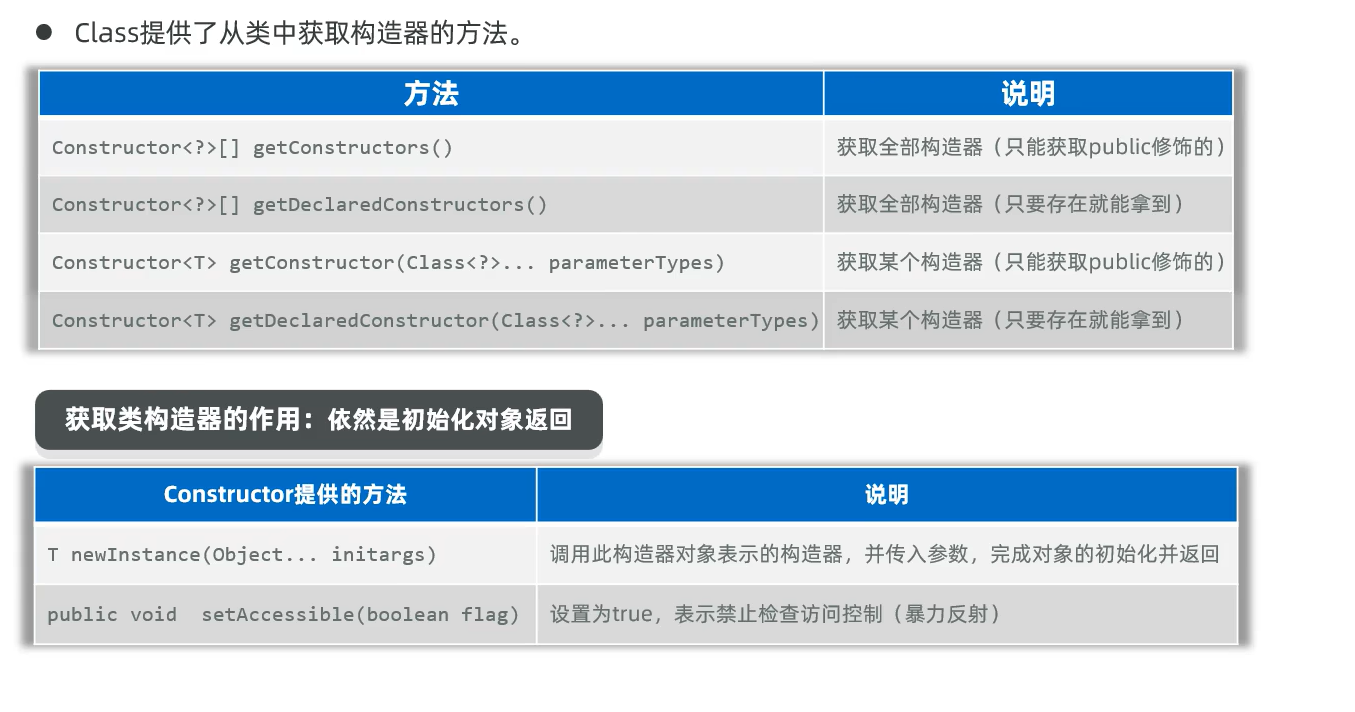
获取构造器
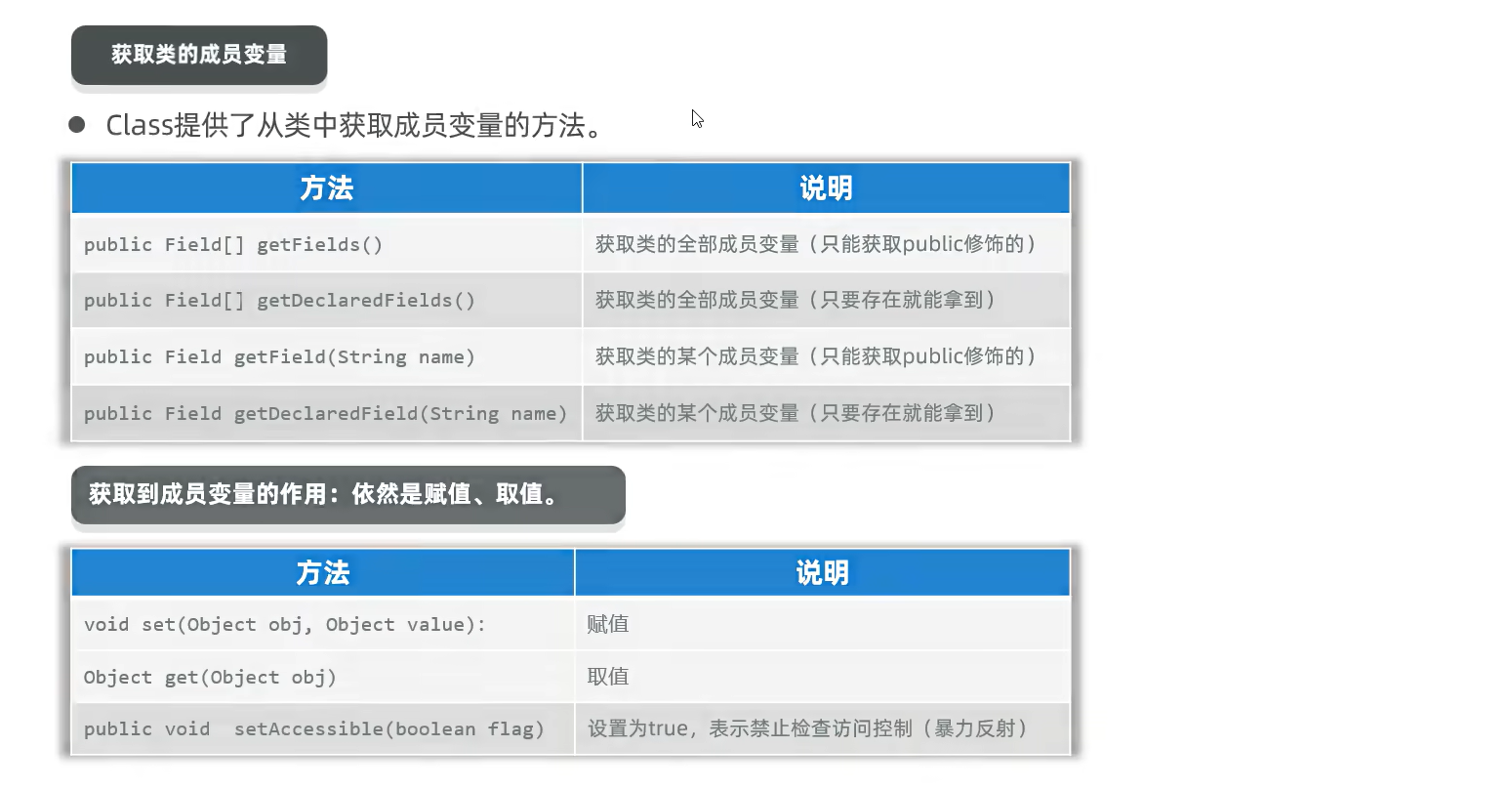
获取成员变量
获取成员方法
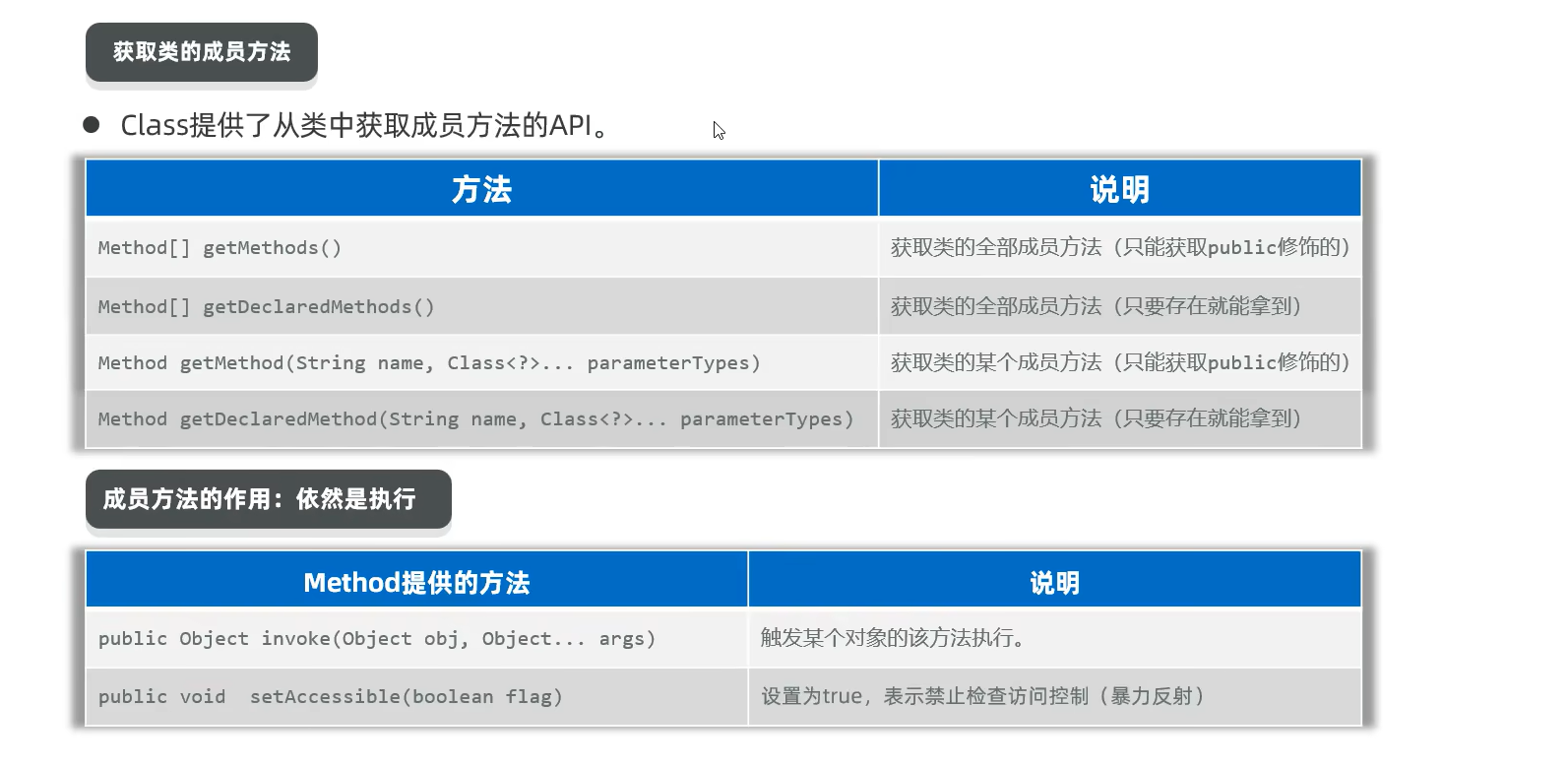
反射类和构造器、成员变量、成员方法例子
LearnReflect:
1
2
3
4
5
6
7
8
9
10
11
12
13
14
15
16
17
18
19
20
21
22
23
24
25
26
27
28
29
30
31
32
33
34
35
36
37
38
39
40
41
42
43
44
45
46
47
48
49
50
51
52
53
54
55
56
57
58
59
60
61
62
63
64
65
66
67
68
69
70
71
72
| package yyssh.reflect;
import java.lang.reflect.Constructor;
import java.lang.reflect.Field;
import java.lang.reflect.Method;
public class LearnReflect {
public static void main(String[] args) throws Exception {
Class dogClass = Dog.class;
System.out.println(dogClass.getName());
System.out.println(dogClass.getSimpleName());
System.out.println("--------------------------------");
Constructor [] constructors = dogClass.getConstructors();
for ( Constructor constructor : constructors) {
System.out.println(constructor.getName()+" "+constructor.getParameterCount());
}
Constructor constructor2 = dogClass.getDeclaredConstructor();
System.out.println( constructor2.getName()+ " "+constructor2.getParameterCount());
Constructor constructor3 = dogClass.getDeclaredConstructor(String.class,int.class,String.class);
System.out.println( constructor3.getName()+ " "+constructor3.getParameterCount());
constructor2.setAccessible(true);
Dog dog = (Dog)constructor2.newInstance();
Dog dog1 = (Dog)constructor3.newInstance("旺财", 3, "狗粮");
System.out.println("--------------------------------");
Field [] fields = dogClass.getDeclaredFields();
for ( Field field : fields) {
System.out.println(field.getName() + " " + field.getType());
}
Field field = dogClass.getDeclaredField("name");
System.out.println(field.getName()+" "+field.getType());
field.setAccessible(true);
field.set(dog, "旺财");
System.out.println(field.get(dog));
System.out.println( "--------------------------------");
Method[] methods = dogClass.getDeclaredMethods();
for ( Method method : methods) {
System.out.println(method.getName() + " " + method.getReturnType());
}
Method method = dogClass.getDeclaredMethod("eat");
System.out.println(method.getName() + " " + method.getReturnType());
Method method1 = dogClass.getDeclaredMethod("eat", String.class);
method1.setAccessible(true);
System.out.println( method1.getName() + " " + method1.getReturnType());
method1.invoke(dog, "狗粮");
}
}
|
Dog.java:
1
2
3
4
5
6
7
8
9
10
11
12
13
14
15
16
17
18
19
20
21
22
23
24
25
26
27
28
29
30
31
32
33
34
35
36
37
38
39
40
41
42
43
44
45
46
47
48
49
50
51
52
53
54
55
56
57
| package yyssh.reflect;
import lombok.AllArgsConstructor;
import lombok.Data;
import lombok.NoArgsConstructor;
@Data
public class Dog {
private String name;
private int age;
public String food;
private Dog() {
System.out.println("无参构造器");
}
public Dog(String name, int age, String food) {
this.name = name;
this.age = age;
this.food = food;
System.out.println("有参构造器");
}
public String getName() {
return name;
}
public void setName(String name) {
this.name = name;
}
public int getAge() {
return age;
}
public void setAge(int age) {
this.age = age;
}
public String getFood() {
return food;
}
public void setFood(String food) {
this.food = food;
}
private void eat () {
System.out.println("吃吃吃");
}
public void eat (String food) {
System.out.println("🐕吃"+food);
}
}
|
反射的作用
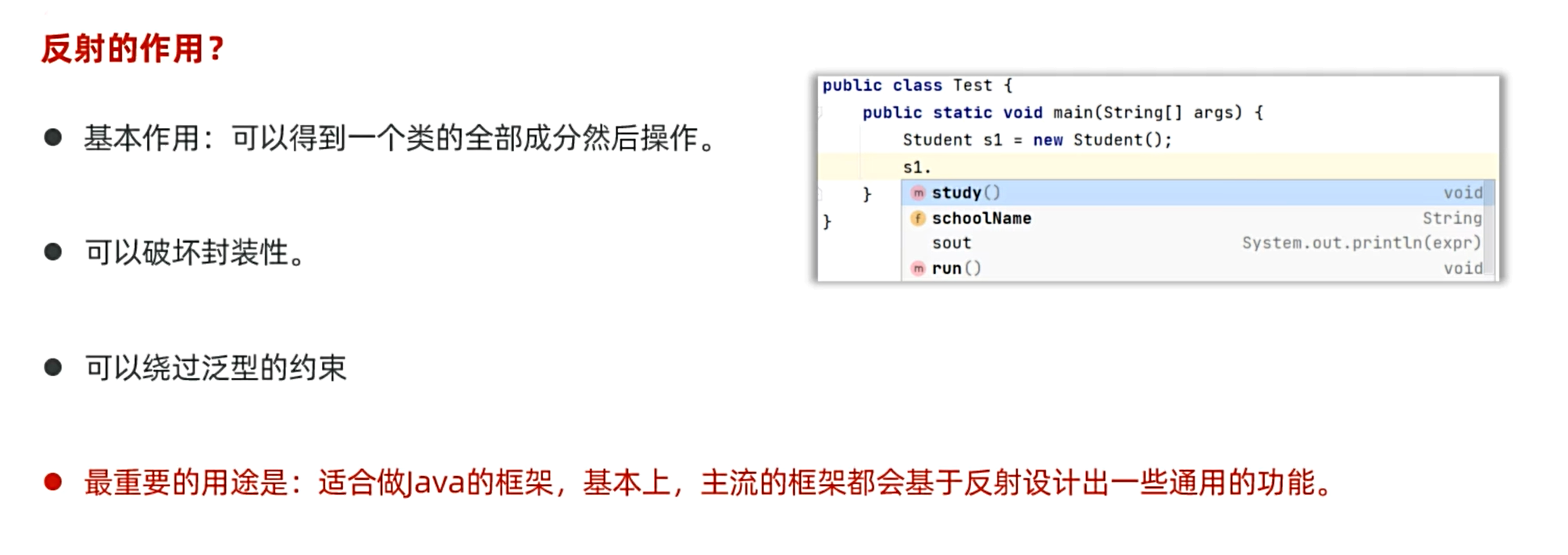
Java的反射与python的反射
| Java 反射功能 |
Java 示例代码 |
Python 类似功能 |
Python 示例代码 |
| 获取类对象 |
Class<?> clazz = Class.forName("com.example.MyClass"); |
通过 type() 或模块的 globals() 获取类 |
MyClass = globals()["MyClass"] 或 clazz = type(obj) |
| 创建实例 |
Object obj = clazz.newInstance(); |
直接调用类或动态获取类后实例化 |
obj = MyClass() 或 obj = globals()["MyClass"]() |
| 调用方法 |
Method method = clazz.getMethod("methodName", paramTypes); method.invoke(obj, args); |
使用 getattr() 获取方法并调用 |
method = getattr(obj, "methodName") method(*args) |
| 访问/修改字段 |
Field field = clazz.getField("fieldName"); field.set(obj, value); |
使用 getattr() 和 setattr() 动态操作属性 |
setattr(obj, "fieldName", value) value = getattr(obj, "fieldName") |
| 获取注解信息 |
Annotation[] anns = clazz.getAnnotations(); |
通过 __annotations__ 或 inspect 模块获取装饰器/注解 |
anns = obj.__annotations__ 或 inspect.getmembers(obj) |
| 动态代理/拦截调用 |
Proxy.newProxyInstance() + InvocationHandler |
重写 __getattr__ 或 __setattr__ 魔术方法 |
python<br>class Proxy:<br> def __getattr__(self, name):<br> return lambda *args: ...<br> |
| 检查方法/字段是否存在 |
clazz.getMethod("method") (抛异常) clazz.getDeclaredFields() |
hasattr(obj, "attr") 或 dir(obj) |
if hasattr(obj, "method"): ... 或 "field" in dir(obj) |
| 调用私有方法/字段 |
field.setAccessible(true); method.setAccessible(true); |
Python 无严格私有成员(通过名称约定 _name 或 __name 变形) |
obj._MyClass__private_field (需知道变形后的名称) |
注解
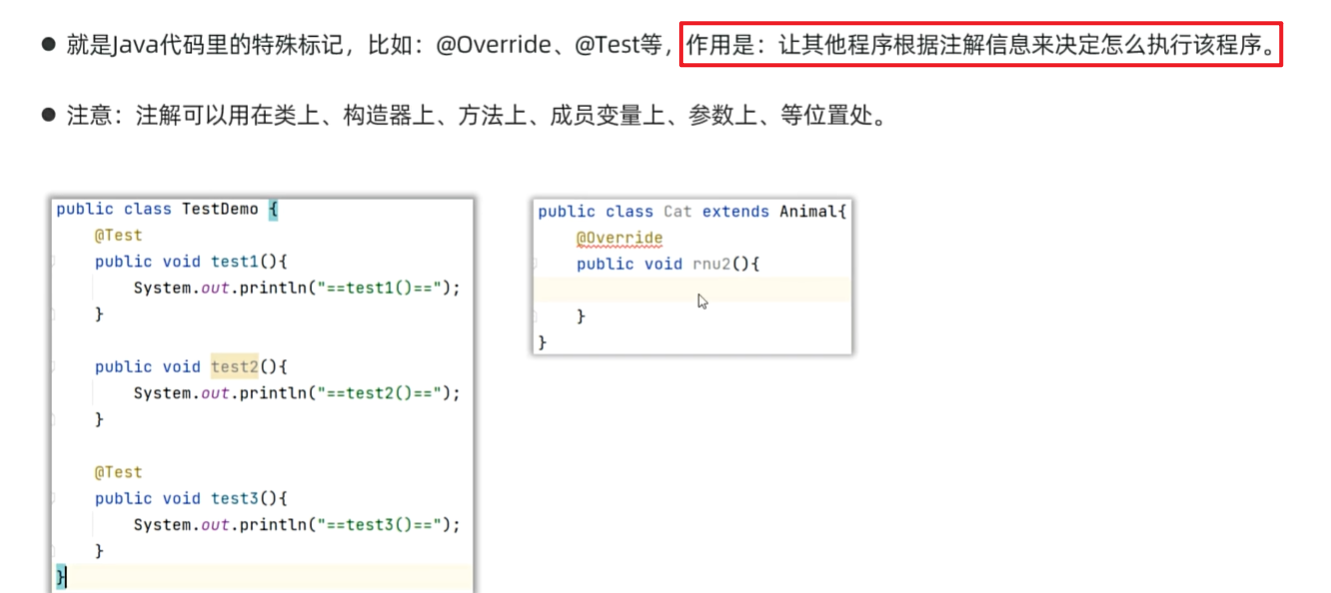
自定义注解
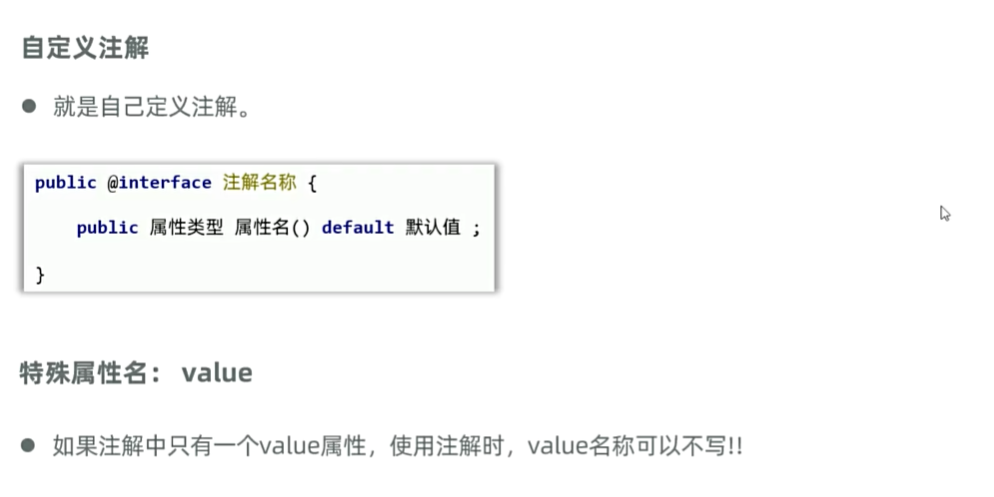
自定义注解的原理
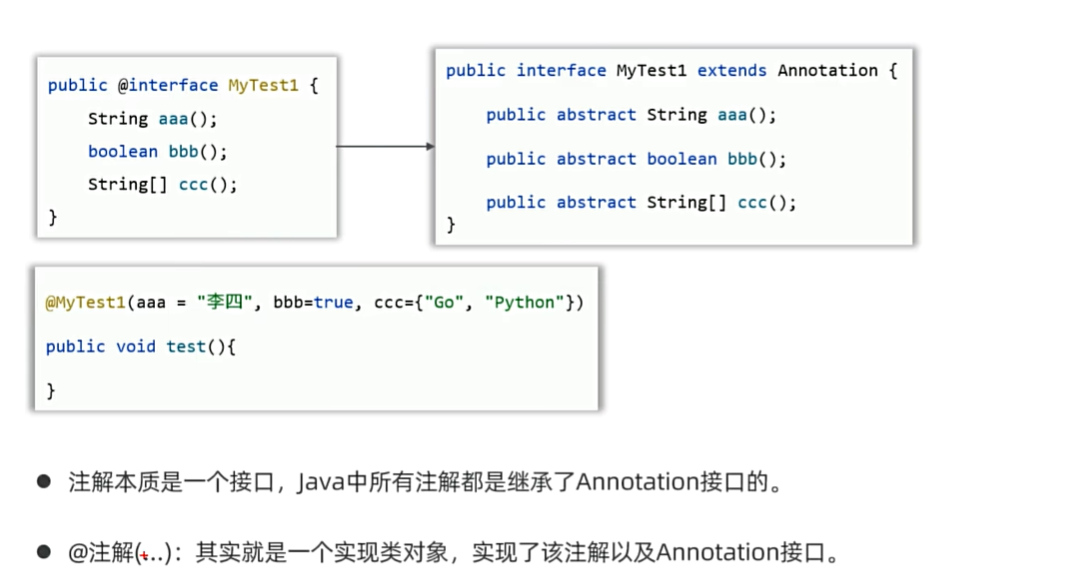
元注解
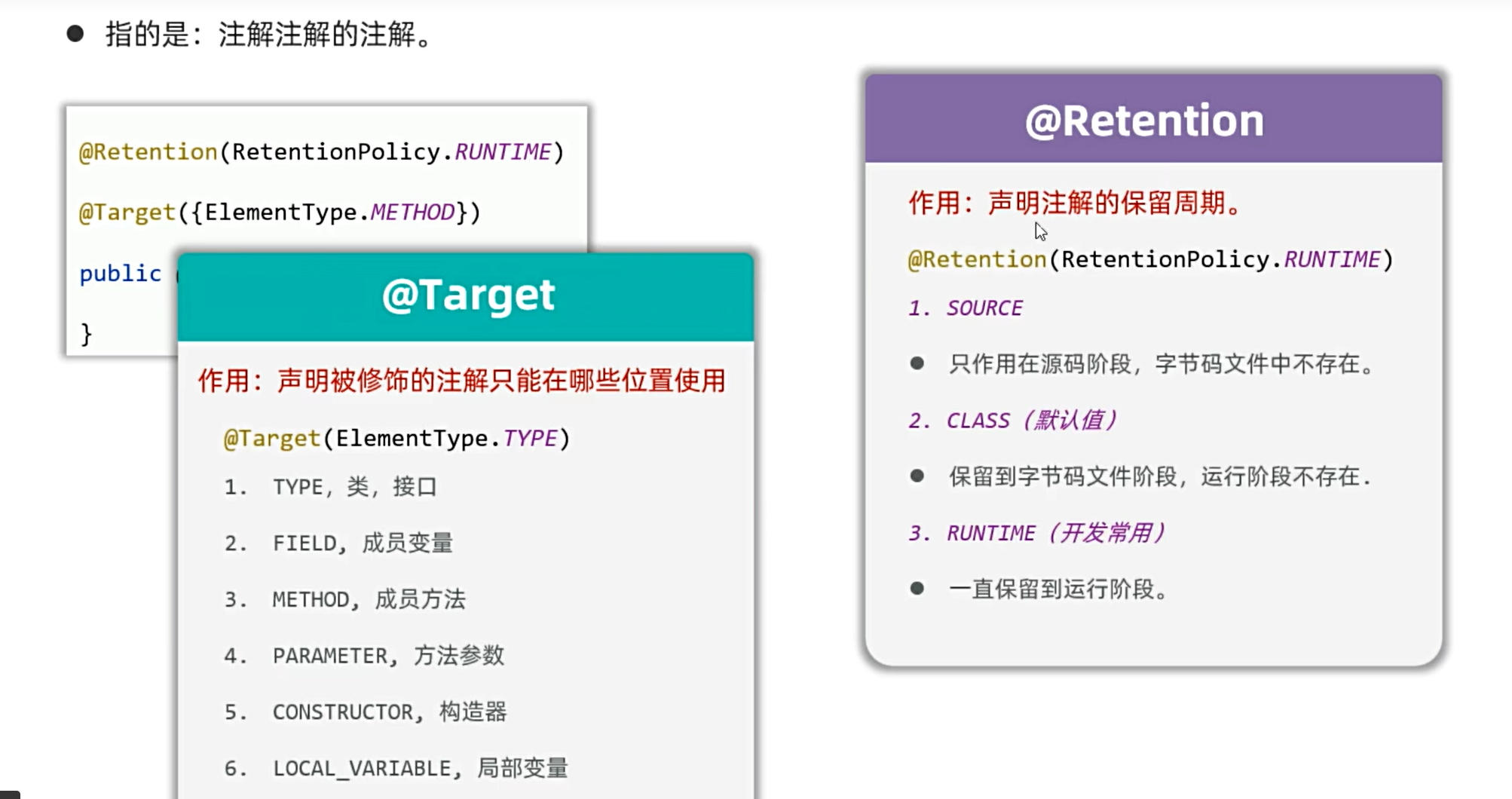
注解解析
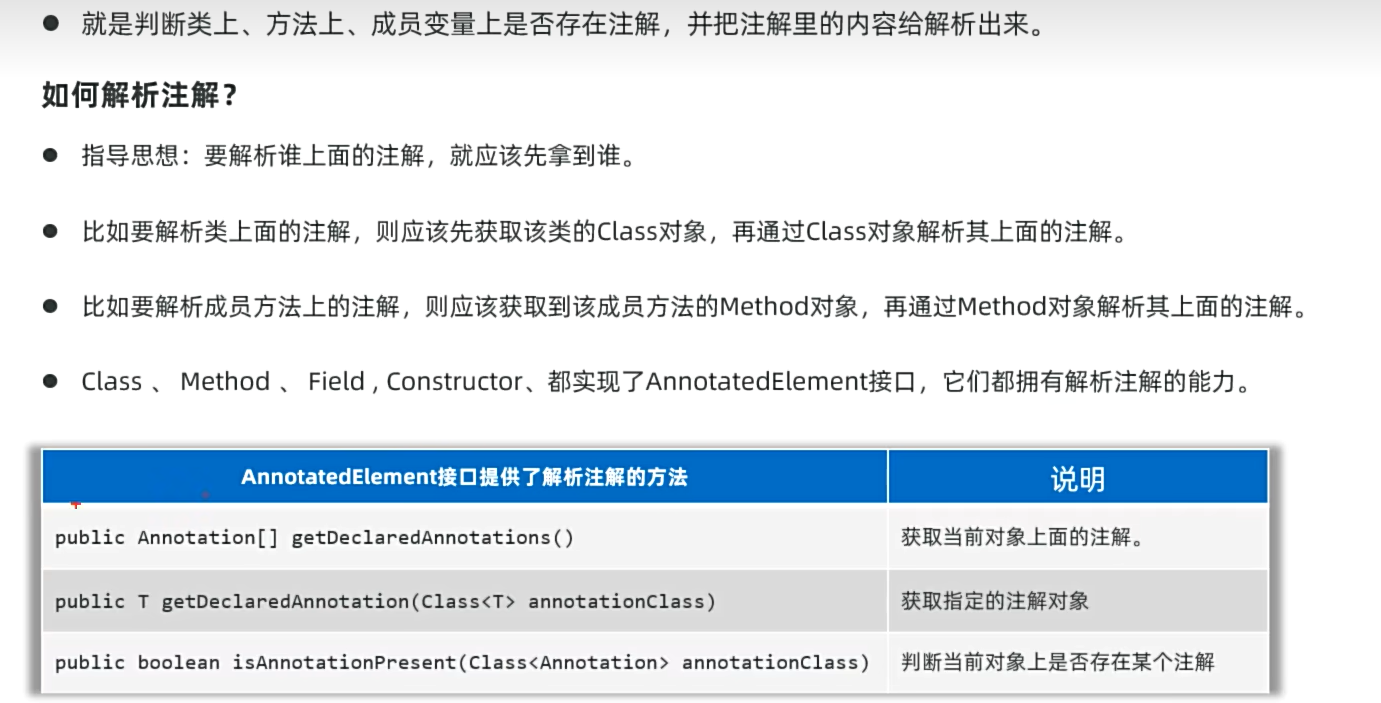
自定义注解、元注解、注解解析例子
LearnAnnotation.java:
1
2
3
4
5
6
7
8
9
10
11
12
13
14
15
16
17
18
19
20
21
22
23
24
25
26
27
28
29
30
31
32
33
34
35
36
37
38
39
40
41
42
43
44
45
46
47
48
49
50
| package yyssh.learnAnnotation;
import org.junit.jupiter.api.Test;
import java.lang.annotation.Annotation;
import java.lang.reflect.Method;
public class LearnAnnotation {
@Test
public void test1() {
Class s1 = Student.class;
Annotation [] annotations = s1.getDeclaredAnnotations();
for (Annotation annotation : annotations) {
System.out.println(annotation);
}
if (s1.isAnnotationPresent(MyAnnotation.Teacher.class)){
MyAnnotation.Teacher MyTeacher = (MyAnnotation.Teacher) s1.getDeclaredAnnotation(MyAnnotation.Teacher.class);
System.out.println(MyTeacher.name() + " " + MyTeacher.age() + " " + MyTeacher.sex());
}
}
@Test
public void test2() throws Exception {
Class s1 = Student.class;
Method method = s1.getDeclaredMethod("run");
Annotation [] annotations = method.getDeclaredAnnotations();
for (Annotation annotation : annotations) {
System.out.println(annotation);
}
if (method.isAnnotationPresent(MyAnnotation.Teacher.class)){
MyAnnotation.Teacher MyTeacher = method.getDeclaredAnnotation(MyAnnotation.Teacher.class);
System.out.println(MyTeacher.name() + " " + MyTeacher.age() + " " + MyTeacher.sex());
}
}
}
|
Student.java:
1
2
3
4
5
6
7
8
9
10
11
12
13
14
15
16
17
18
| package yyssh.learnAnnotation;
import lombok.AllArgsConstructor;
import lombok.Data;
import lombok.NoArgsConstructor;
@Data
@NoArgsConstructor
@AllArgsConstructor
@MyAnnotation.Teacher(name = "小明",age = 18,sex = "男")
public class Student {
private String name;
private int age;
public String sex;
@MyAnnotation.Teacher(name = "小红",age = 19,sex = "女")
public void run(){}
}
|
MyAnnotation.java:
1
2
3
4
5
6
7
8
9
10
11
12
13
14
15
16
| package yyssh.learnAnnotation;
import java.lang.annotation.ElementType;
import java.lang.annotation.Retention;
import java.lang.annotation.RetentionPolicy;
import java.lang.annotation.Target;
public class MyAnnotation {
@Retention(RetentionPolicy.RUNTIME)
@Target({ElementType.TYPE,ElementType.METHOD})
public @interface Teacher {
public String name() ;
public int age() ;
public String sex() ;
}
}
|
Java和python、C++的注解的异同
| 特性 |
Java 注解 (@Annotation) |
Python 装饰器/类型注解 |
C++ 属性 ([[attr]]) |
| 语法示例 |
@Override @Deprecated(since="1.0") |
@decorator def func() -> str: ... |
[[deprecated]] [[nodiscard]] |
| 主要用途 |
元数据标记、编译时检查、运行时反射 |
函数/类行为修改、类型提示、元编程 |
编译器指令、优化提示、废弃警告 |
| 自定义支持 |
是(可定义新的注解类型) |
是(可编写自定义装饰器) |
否(仅支持标准属性,C++23 可能扩展) |
| 运行时访问 |
是(通过反射 getAnnotations()) |
是(通过 __annotations__ 或 inspect 模块) |
否(仅编译期处理) |
| 影响编译行为 |
是(如 @Override 检查重写) |
否(类型提示需额外工具如 mypy) |
是(如 [[nodiscard]] 警告返回值未使用) |
| 类型检查 |
可结合泛型(如 @NotNull) |
通过 typing 模块(运行时无强制) |
通过 concepts(C++20 编译时约束) |
| 多注解叠加 |
支持(@A @B) |
支持(多层装饰器 @A @B) |
支持([[attr1, attr2]]) |
| 标准库中的常见用例 |
@Override, @FunctionalInterface, @SpringBootApplication |
@staticmethod, @dataclass, @typing.overload |
[[deprecated]], [[maybe_unused]], [[noreturn]] |
动态代理
代理含义:中介人,假设一个明星需要唱歌跳舞,他会让中介人去和主办方谈,中介人负责收钱,日期安排等等,明星只需要唱歌跳舞
实现步骤:
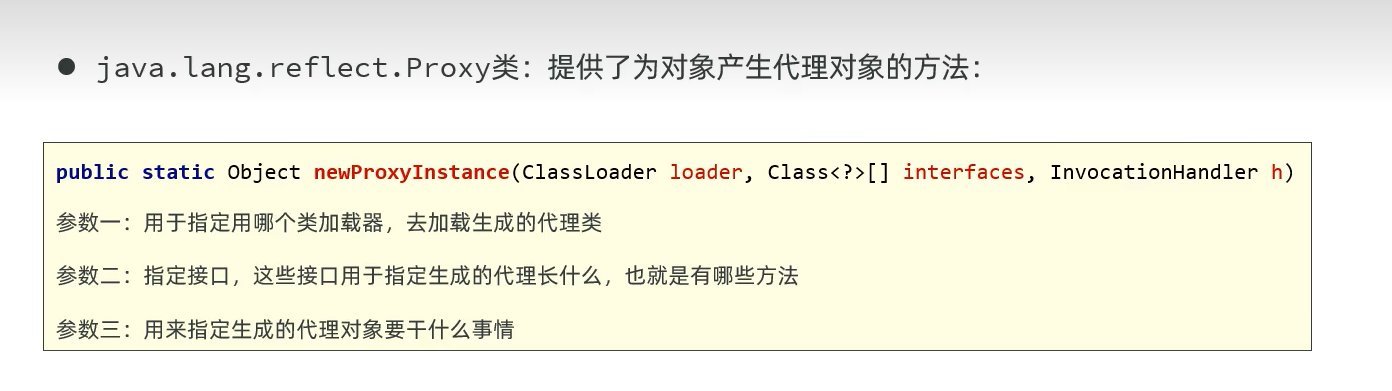
ProxyUtil.java:
1
2
3
4
5
6
7
8
9
10
11
12
13
14
15
16
17
18
19
20
21
22
23
24
25
26
27
28
29
30
31
32
33
34
35
36
37
38
39
40
41
42
43
44
45
| package yyssh.learnProxy;
import java.lang.reflect.InvocationHandler;
import java.lang.reflect.Method;
import java.lang.reflect.Proxy;
public class ProxyUtil {
public static StarService getProxy(Star s) {
StarService proxy = (StarService) Proxy.newProxyInstance(ProxyUtil.class.getClassLoader(), s.getClass().getInterfaces(), new InvocationHandler() {
@Override
public Object invoke(Object proxy, Method method, Object[] args) throws Throwable {
if ( method.getName().equals("sing")){
System.out.println("准备话筒,收钱");
}else if( method.getName().equals("dance")){
System.out.println("准备场地,收钱");
}
Object result = method.invoke(s, args);
return result;
}
});
return proxy;
}
}
|
可以将public static StarService getProxy(Star s)改为泛型
再将对象改为代理对象
1
2
3
4
|
StarService proxy = ProxyUtil.getProxy(star);
proxy.sing("夜曲");
System.out.println(proxy.dance());
|
就可以为任何类都做代理
1
2
3
4
5
6
7
8
9
10
11
12
13
14
15
16
17
18
19
20
21
22
23
24
25
26
27
28
29
30
31
32
33
34
35
36
37
38
39
40
41
42
43
44
45
| package yyssh.learnProxy;
import java.lang.reflect.InvocationHandler;
import java.lang.reflect.Method;
import java.lang.reflect.Proxy;
public class ProxyUtil {
public static <T> T getProxy(Star s) {
T proxy = (T) Proxy.newProxyInstance(ProxyUtil.class.getClassLoader(), s.getClass().getInterfaces(), new InvocationHandler() {
@Override
public Object invoke(Object proxy, Method method, Object[] args) throws Throwable {
if ( method.getName().equals("sing")){
System.out.println("准备话筒,收钱");
}else if( method.getName().equals("dance")){
System.out.println("准备场地,收钱");
}
Object result = method.invoke(s, args);
return result;
}
});
return proxy;
}
}
|
StarService.java:
1
2
3
4
5
6
| package yyssh.learnProxy;
public interface StarService {
public void sing(String name);
public String dance();
}
|
Star.java:
1
2
3
4
5
6
7
8
9
10
11
12
13
14
15
16
17
18
19
20
21
| package yyssh.learnProxy;
import lombok.AllArgsConstructor;
import lombok.Data;
import lombok.NoArgsConstructor;
@Data
@NoArgsConstructor
@AllArgsConstructor
public class Star implements StarService {
private String name;
@Override
public void sing(String name) {
System.out.println("我在唱歌singing");
}
@Override
public String dance() {
System.out.println("我在跳舞I'm dancing");
return "谢谢大家!";
}
}
|
LearnProxy.java:
1
2
3
4
5
6
7
8
9
10
11
12
| package yyssh.learnProxy;
public class LearnProxy {
public static void main(String[] args) {
Star star = new Star("小红");
StarService proxy = ProxyUtil.getProxy(star);
proxy.sing("夜曲");
System.out.println(proxy.dance());
}
}
|
切面编程思想(AOP)
AOP(面向切面编程)是对 OOP(面向对象编程)的一种补充。
目标:将通用功能(如日志、事务、安全等)从主业务逻辑中分离出来,达到增强代码模块化、降低耦合度的目的。
AOP 要解决的问题:把这些通用逻辑抽离成“切面”,以插件的形式织入到业务方法前后。
Spring AOP 默认使用的就是 JDK 动态代理(如果是接口),或 CGLIB 代理(如果是类)。
在 Spring 中用 @Aspect、@Before、@After 就可以配置这些代理逻辑,无需手写 InvocationHandler。